dsh-deepseek-web · DeepSeek Harness 网页版内嵌插件
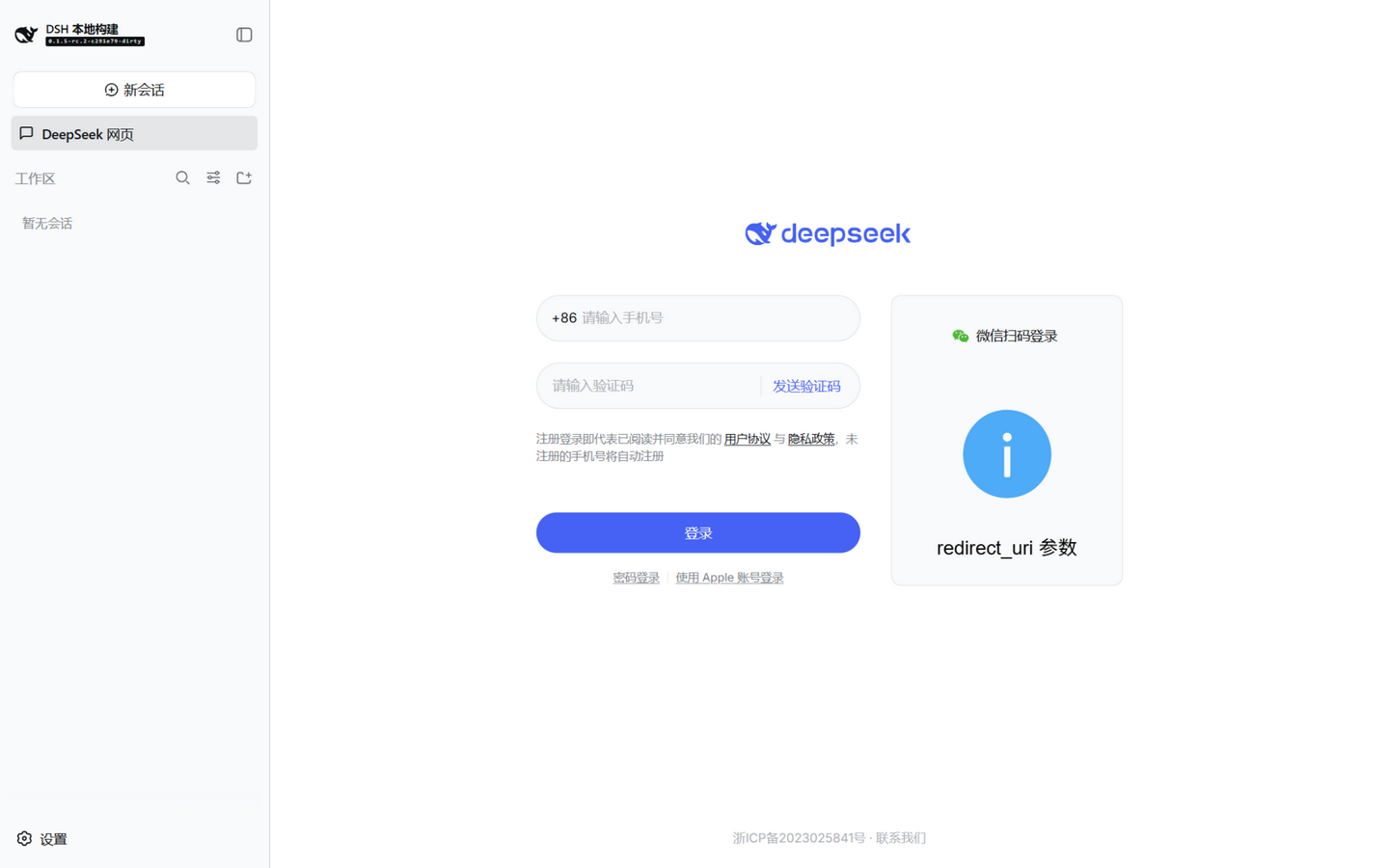
在 DeepSeek Harness(dsh)的侧边栏"工作区"上方插入一个"DeepSeek 网页"入口;点击后,Harness
会话区直接内嵌网页版 DeepSeek(chat.deepseek.com),无需切窗口、无需另开浏览器,也不消耗 Harness 会话
token。适配 dsh web(浏览器)与官方 Electron 桌面端两种形态。
为什么需要它
chat.deepseek.com 下发 Content-Security-Policy: frame-ancestors 'none',任何页面都无法用 iframe 直接
内嵌它;官方桌面壳又刻意禁用了对外导航与外部窗口。本插件在 Harness 宿主进程内(插件 host 半与 host
同进程)启动一个仅绑定 127.0.0.1 的本地反向代理,由它转发并清洗响应:
- 剥掉
frame-ancestors/X-Frame-Options/ COOP/COEP 等框架拒绝头; - 把页面里指向
fe-static.deepseek.com的绝对地址改写为代理相对路径(/fe-static/...),绕过该 CDN 对 非*.deepseek.com来源的 CORS 拒绝;HTML/JS/CSS 文本做改写,其余内容字节流直通; - 改写
Set-Cookie(去掉 Domain/Secure)与同域重定向,登录态保存在代理 origin 的 cookie jar 中。
浏览器把 127.0.0.1 视为"先验可信来源",因此桌面端 dsh-app://(secure scheme)页面 iframe 本地代理
不算混合内容——两种形态统一适用。
插件结构(官方协议)
dsh-deepseek-web/
├── package.json        # dsh.bundle(可安装 bundle)+ dsh.client(浏览器半,platform: web)
├── cordis.patch.yml    # bundle 补丁:- insert: [{ id: deepseek-web, name: dsh-deepseek-web }]
├── lib/index.js        # host 半:apply(ctx, config),本地回环反代服务器(node:http/https/tls)
├── lib/client.js       # 浏览器半:closure-factory 产物(window.__ModuleLoader__.load),注册 UI
└── scripts/            # 桌面端开发模式启动器 + 冒烟测试
浏览器半通过官方 Slots 机制注入 UI:
sidebar.panellist注册面板行({ id: 'deepseek-web', order: 0, label }+ 图标组件)——该导航渲染在 "新会话"与"工作区"之间,即目标位置;main(keyed slot)注册key: 'deepseek-web'的主区面板组件,点击行后由ctx.layout.selectPanel切换主区,面板内容为全幅 iframe。
安装
方式一:dsh web(浏览器形态,持久生效)
# 在 deepseek-harness 仓库内
pnpm dsh plugin --profile web add <本插件仓库的绝对路径>   # 拷贝安装,官方 reconcile 流程
pnpm dsh web                                          # 重启后生效
开发迭代推荐直接用 file URL 补丁行(免拷贝、改完即生效,重启 profile 即可),
写入 %USERPROFILE%\.dsh\profiles\web\cordis.patch.yml:
- insert:
    - id: deepseek-web
      name: 'file:///D:/DSH/<本插件仓库名>/lib/index.js'
file URL 方式要求插件目录已执行
npm install(解析@deepseek-ai/schemastery)。
方式二:官方桌面端(Electron,已打包安装版)
桌面壳独占 $DSH_HOME/profiles/desktop,通过应用菜单 → 插件管理窗口安装(支持本地路径 / tgz /
git),安装后自动写入 dsh.profile.bundles。
方式三:桌面端开发模式(pnpm start:desktop)
开发模式每次启动都会重建一次性项目(apps/desktop/.desktop-build/development/project),装进去的
插件不会存活。本仓库提供启动器,在"项目重建完成 → Host 启动"的窗口期把 file URL 补丁行写进项目的
cordis.patch.yml(Loader 行原生支持绝对路径,client 半通过最近 package.json 发现,无需 junction):
<本插件仓库根目录>\启动DSH桌面端-含插件.cmd
启动器自动适配路径:优先读环境变量 DSH_SKIN_HARNESS_ROOT;未设置时探测与本插件
同级目录的 deepseek-harness;都没有则报错提示。桌面端开发脚本同理。
配置
| 字段 | 默认 | 说明 |
|---|---|---|
port |
3838 |
回环代理端口;被占用时向上扫描 portScan 个 |
portScan |
10 |
额外尝试的端口数(面板按 3838..3848 探测) |
upstream |
https://chat.deepseek.com |
目标站点 |
startPath |
本仓库作者指定的共享会话 | 面板打开的会话路径 /a/chat/s/<id> |
userAgent |
Chrome UA | 仅当浏览器请求未带 UA 时使用 |
debug |
false |
在启动器 stdout 打印每条代理请求 |
在补丁行的 config: 下覆盖(见 cordis.patch.yml 注释)。
使用
- 启动 Harness(
pnpm dsh web或上述启动器),点击侧边栏"DeepSeek 网页"; - 首次打开是 DeepSeek 登录页:手机验证码 / 密码登录均可(登录态存在代理 origin,之后免登录);
- 打开你要参照的会话即可在 Harness 内直接阅读,分析过程不再占用会话 token。
已知限制
- 微信扫码登录不可用:微信校验 OAuth
redirect_uri域名,代理 origin 无法通过(页面会显示 "redirect_uri 参数错误")。请用验证码或密码登录。 - "使用环境异常"提醒:DeepSeek 检测到被嵌入时弹出提示,点 × 关闭即可;这是官方風控提示,插件不做 规避。
- 会话区切回对话时面板会卸载,再次点击即时恢复(端口与路径缓存在浏览器半)。
- 代理仅绑定 127.0.0.1,威胁模型与本机其他本地进程一致;请不要把
port暴露到局域网。
验证
npm install
node scripts/smoke-proxy.mjs   # 独立拉起代理:ping + 拉取会话页 + 断言框架头已剥离
集成验证(本仓库开发时的实测):pnpm dsh web 启动后,window.__DSH_BOOT__ 包含
dsh-deepseek-web;侧边栏出现"DeepSeek 网页";点击后主区加载经代理的 DeepSeek 页面。
License
MIT
No comments yet. Be the first to write one.