dsh-ember



四件事,一个插件,不动任何官方组件。 完全权限变红、推理等级变滑块、模型菜单补辨识度、会话列表加状态环。
- 每项功能独立开关,关掉立刻生效
- 纯前端,无服务端逻辑,装完重启即可
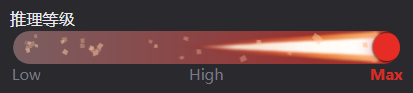
推理等级滑块 · Max 档(暗色主题)
English readers: see English below.
为什么
DSH 的界面有四处可以更好用:
- 完全权限是灰色的。 「完全权限」意味着智能体能直接执行敏感操作 —— 删文件、跑命令、改系统。它和「仅可查看」用同一个颜色,视觉上没有任何区别。
- 推理等级是一串菜单项。 想从 Low 调到 High,要点开菜单、找到那一行、点它。档位越多找得越慢,而且看不出「现在在整条阶梯的哪个位置」。
- 模型菜单里认不出自己在哪。 分组标题没有任何样式,滚动起来不知道当前是哪家 provider;选中的模型只有一个 14px 的对勾,官方 CSS 里明确写着
background:0 0(透明)—— 扫一眼落不下点。 - 会话列表看不出谁在跑。 运行中只有一个转圈的加载点,等你回答是黄点,完成是绿点。点很小,扫一眼列表分不出哪个需要你处理。
这个插件把这四处逐个补上,且每处都能单独关掉。
功能
1. 完全权限变红
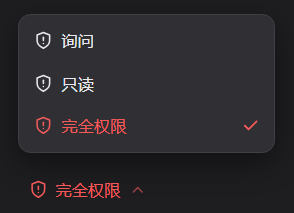
- 「完全权限」的文字和盾牌图标都变成主题红
- 明暗主题都红,各用 DSH 自带的危险色:亮色
#ec1313,暗色#f25a5a - 只在该预设被选中时红;切回「仅可查看」自动恢复原色
- 确认弹窗里的「启用完全权限」按钮不会被误染
2. 推理等级滑块
打开模型菜单,「推理等级」那一行下面直接就是滑块 —— 不用点进去:
┌──────────────────────────────┐
│ 模型        Deepseek-V4.1…  ›│
│ 推理等级                High ›│
│ [======|===============]     │  ← 滑块,停在当前档
│ Low        **High**       Max│  ← 档名当刻度,当前档加粗
└──────────────────────────────┘
- 档位完全由上游下发决定:读模型适配器报的
efforts,不写死 - 连续拖动,不是分段按钮:滑块位置是浮点数,跟手走;拖动时只重画,松手才吸附到最近档并提交
- 1 / 2 / 3 / 4 / 6 档都验证过;只有 1 档时钉在右端并标
aria-readonly - 拖动时刻度即时高亮
- 键盘方向键 / Home / End 同样可用
- 每档在旋钮背后画各自的余烬尾焰:档位越高,尾焰越长越热
3. 模型菜单可读性
模型菜单按官方尺寸(手机上也要用),所以这里不动宽度,改的是两处辨识:
┌──────────────────────────────┐
│ 搜索模型…                    │
├──────────────────────────────┤  ← 分组标题:14px 加粗 + 细分隔线
│ PROVIDER 名                  │    滚动时吸顶,自带不透明底
│                              │
│ ▢ Model-A · x0.8             │
│ ▣ Model-B · x0.12          ● │  ← 选中行:10% 洗色 + 2px 边 + 同色圆点
└──────────────────────────────┘
- 分组标题加粗加大(12px → 14px / 700),下方一条细分隔线;sticky 时用主题自带的
--dsw-alias-menu-group-header-fill铺底,否则下一组的行会从标题底下穿过去 - 当前模型是一行扁平的选中态:电光蓝(
#0a84ff)10% 透明度的洗色、2px 同色半透明边(55%)、模型名 600 - 没有渐变、没有高光、没有内阴影、没有光晕。 现代系统 UI 靠单一强调色 + 一层洗色 + 一条干净的边来区分选中,不靠伪造的光影
- 原来的小对勾换成同色实心圆点(8px),和边框同色相 —— 「行被选中」与「点在这儿」是一个信号
- 宽度不变、行高不变、节点不增删,移动端布局不受影响
4. 会话状态环
左侧会话列表里,每个会话的状态从行首那个小点变成整行一圈边框:
| 状态 | 环的形态 |
|---|---|
| 运行中 | 电光蓝短弧顺时针绕圈,4.2 秒一圈 |
| 等你回答 | 霓虹黄整圈呼吸,1.9 秒一个周期 |
| 完成未读 | 同一条霓虹黄呼吸 |
| 空闲 | 没有环 |
- 环贴在行自己的边界上(
inset:0),和选中态背景共用同一条边 - 线宽 2px,满饱和不混透明 —— 浅色主题下混透明会被行背景冲淡成米色,所以直接用不透明电光色
- 行首原来的小点保留在 DOM 里(无障碍 label 还在),只是完全透明,不影响布局也不影响读屏
- 拖拽排序时环自动让位给官方的落点指示线
- 尊重系统「减少动画」偏好:关掉动画后三种状态仍是可辨认的静态环
「等你回答」和「完成未读」用同一个脉冲:两种都是「有事等你」,靠同一个节奏一眼扫到,而不是让它们竞争注意力。
「完成」是什么意思:跟随宿主的 completionUnread —— 有结果你还没看,点开那个会话就消失。它不是「已跑完」的永久徽章。
功能开关
插件详情页(插件 → 已安装 → dsh-ember)有四个开关,默认全部开启:
| 开关 | 对应功能 |
|---|---|
| 完全权限变红 | 第 1 项 |
| 推理等级滑块 | 第 2 项 |
| 模型菜单可读性 | 第 3 项 |
| 会话状态环 | 第 4 项 |
- 关掉立刻生效,不需要重启
- 设置保存在本机浏览器的
localStorage(键dsh-ember:features),换浏览器或清缓存会回到默认全开 - 存储不可用或数据损坏时回落为全部开启,不会导致插件失效
安装
dsh plugin add dsh-ember
也可以从 GitHub 直接装(会走源码构建):
dsh plugin add https://github.com/REALOIYO/dsh-ember
或者先克隆到本地,再指向那个目录:
git clone https://github.com/REALOIYO/dsh-ember
dsh plugin add F:/path/to/dsh-ember
装完重启 DSH。这是纯前端插件,没有服务端逻辑。
兼容性
| 项 | 要求 |
|---|---|
| DSH | 0.2.1-rc.3(在 rc.3 上开发与验证) |
| 菜单 | [role="menu"][aria-label="模型与推理等级"] |
| 依赖服务 | slots sessions modelDirectories remote remote.session |
| 平台 | Web(桌面端与局域网访问一致) |
| 浏览器内核 | Chromium 111+(用到 :has() 与 color-mix()) |
实现要点
红色:属性标记 + 一条 CSS
官方触发器的盾牌图标不写 color,用 currentColor 描边 —— 所以给按钮上色,盾牌跟着变。
插件用 MutationObserver 监听,当触发器同时满足「aria-label 含访问模式」和「含完全权限文案」时打上 data-dsh-full-access,再配一条规则:
[data-dsh-full-access]{ color: var(--dsw-alias-state-error-primary) !important }
[data-dsh-full-access] svg{ color: inherit !important }
--dsw-alias-state-error-primary 在主题里本来就分开放(亮色 → red-600,暗色 → red-400),所以不用自己挑色就自动跟随明暗。
判据故意从严:两个条件都满足才动手 —— 官方哪天改了文案,结果是「不变红」而不是「染错按钮」。
滑块:读服务、写服务
用菜单的无障碍名定位,不用哈希类名(每次构建都变):
document.querySelectorAll('[role="menu"]')
  → aria-label 匹配 模型与推理等级
档位不是猜的,是读模型适配器报的阶梯:
directory.store.getSnapshot()
→ snapshot.groups[i].models[j].reasoning.efforts
→ [{ id: 'low', name: 'Low' }, { id: 'high', name: 'High' }, …]
提交走 directory.select(),传完整三元组而不是裸档位 id:
await directory.select({
  provider: current.provider,
  model: current.model,
  reasoningEffort: levelId,
});
三个设计决定:
- 为什么等存储确认:
select()是异步的,快照在写入后仍会短暂回报旧档位。立刻采纳会让旋钮先吸附再弹回,所以本地记住目标档,等上游追上来再认账 - 为什么松手才提交:拖动时只重画刻度与
aria-valuetext,不写数据。在pointermove里提交会打出十几次切换 - 为什么只注入不接管:官方那两行原样保留,只是下方多了一个本插件写的块。官方菜单怎么渲染、定位、处理键盘,完全没动
状态环:纯 CSS 读状态
会话行本身已经带状态:宿主把 StateDot 渲染成行的第一个子元素,并把状态写在它的 data-state 上(ongoing / warning / done / idle)。
所以整行可以读自己的状态:
[data-row-key^="session:"]:has([data-state="ongoing"]) { … }
[data-row-key^="session:"]:has([data-state="warning"]) { … }
[data-row-key^="session:"]:has([data-state="done"])    { … }
- 不用 MutationObserver、不读 store、不碰官方组件
idle故意不写:宿主根本不给空闲会话渲染状态点,所以没有可匹配的东西,安静的行天然安静- 环是绝对定位的伪元素 + mask 挖空中心,
pointer-events:none,不改布局、不拦事件
开关:一个 style 标签一个功能
CSS 拆成四段,各自一个 <style> 标签。开关就是 tag.disabled = true —— 浏览器保留已解析规则,只停止应用,不重新解析也不增删 DOM。
配置读写全程 fail-open:localStorage 不可用、值损坏、或由旧版本写入(认得的功能更少),一律解析为「全部开启」。
已知边界
- 依赖
aria-label文案判定完全权限。 官方若改文案(如「完整权限」),红色会失效但不会误染。修正位置:lib/client.js的FULL_ACCESS_LABELS - 不处理 subagent 会话(
available === false),与官方选择器一致 - 菜单不可见时环境动画停止。 宿主用
display:none/visibility:hidden/opacity:0或移除节点关闭菜单时,循环都会自停,并在菜单重新可见后自行恢复 - 模型菜单的选中行样式靠属性推断。 插件用三条选择器兜底(
[aria-checked="true"]/[data-selected]/[class*="_selected"])。三条都不命中时静默无效果,不会误染 - 分组标题靠
data-menu-group-heading定位,另有section[data-menu-group] > div:first-child兜底。官方若改属性名,结果是标题不再加粗,而不是样式串到别的元素上 - 选中行没有阴影是设计决定。 列表是
overflow-y:auto,菜单是overflow:hidden,向外画的阴影会被裁掉;用内阴影伪造景深正是前几版「油腻」的来源 - 电光蓝是写死的
#0a84ff,不走主题 token。 主题自带的 business blue 是#4176e6,在 10% 洗色下亮度不足。若要跟随主题,把rgba(10,132,255,…)换回var(--dsw-alias-state-business-primary)并调高 alpha - 状态环配色是写死的电光值,不走主题 token。 运行中
#00a2ff→#beeeff梯度,等你/完成#ffd400。之所以不用color-mix(… , transparent)降饱和:混透明会把颜色朝环背后的行填充混,浅色主题下无论比例多高都只能是米黄。深色主题下霓虹黄可能偏亮,如需分主题微调,改lib/client.js里css_ring的两条background - 状态环在扁矩形上快慢不均。 短边只有 1318 度却要走 32px,长边 162167 度走 200px,像素速度差约 1.4 倍。已通过加长弧 + 放慢单圈摊薄,但几何根源无法消除
开发
lib/index.js       loader 入口(空实现,dsh.client 声明才让宿主加载 client.js)
lib/client.js      全部前端逻辑:CSS 注入、权限染色、滑块组件、状态环、功能开关
cordis.patch.yml   profile patch 层,插入一个 loader entry
docs/              探测报告与验证记录
离线验证台在 _tmp/(不在包内):用真实 DOM 复现会话行与 composer 行,不连 DSH 即可检查状态环与滑块。
验证台是开发用的临时产物,不随包发布;装好插件后不需要它。
许可
MIT
English
Four things, one plugin, no shipped component replaced. Full access turns red, reasoning effort becomes a slider, the model picker gains bearings, and the session list gets a status ring.
- Every feature has its own switch; turning one off takes effect immediately
- Browser-only, no host-side logic; restart after installing
Effort slider at the top rung · dark theme
Why
Four spots in DSH could read better:
- Full access is grey. It permits destructive operations — deleting files, running commands, touching the system — yet it looks exactly like read-only.
- Effort is a list of menu rows. Going from Low to High means opening a menu and hunting for the row. More rungs, more hunting, and no sense of where you sit on the ladder.
- The model picker gives you no bearings. Group headings have no styling of their own, so once the list scrolls you lose track of which provider you are in; the selected row carries only a 14px check mark, and the shipped CSS is explicitly
background:0 0. - The session list does not say who is running. A spinning dot while running, a yellow dot when it waits on you, a green dot when done. They are tiny; scanning the list tells you nothing about which row needs attention.
This plugin fixes all four, and each one can be switched off on its own.
Features
1. Full access in red
- The label and the shield glyph both take the theme's danger colour
- Red in both themes, using DSH's own tokens:
#ec1313light,#f25a5adark - Red only while that preset is current; switching back restores the neutral tone
- The confirmation dialog's “Enable full access” button is deliberately left alone
2. Reasoning effort slider
Open the model menu and the slider is right there under the effort row — no drilling in:
┌──────────────────────────────┐
│ Model       Deepseek-V4.1…  ›│
│ Effort                  High ›│
│ [======|===============]     │  ← the slider, parked on the current rung
│ Low        **High**       Max│  ← rung names as the scale, current in bold
└──────────────────────────────┘
- Ladder length comes from the model adapter's own
efforts, never hard-coded - Continuously draggable, not a row of segmented buttons: the position is a float that follows the pointer; dragging only repaints, and the knob snaps to the nearest rung and commits on release
- 1 / 2 / 3 / 4 / 6 rungs verified; with a single rung the knob parks at the right end and the rail is marked
aria-readonly - The scale highlights live while dragging
- Arrow keys, Home and End work as well
- Each rung paints its own ember plume behind the knob: higher rungs burn longer and hotter
3. Model picker legibility
The picker is width-capped on purpose (it also has to work on a phone), so this changes no geometry — it adds contrast in two places:
┌──────────────────────────────┐
│ Search models…               │
├──────────────────────────────┤  ← group heading: 14px bold + hairline rule
│ PROVIDER NAME                │    sticks while scrolling, opaque bed
│                              │
│ ▢ Model-A · x0.8             │
│ ▣ Model-B · x0.12          ● │  ← selected: 10% wash + 2px edge + same-colour dot
└──────────────────────────────┘
- Group headings go bold and up a size (12px → 14px / 700) with a rule beneath, and get the theme's own
--dsw-alias-menu-group-header-fillbed so rows do not scroll through the sticky title - The selected row is a flat state built from exactly three things: a 10% wash of electric blue (
#0a84ff), a 2px half-transparent edge of the same colour (55%), and a semibold name - No gradients, no highlights, no inner shadows, no glow. Modern system UI separates a selected state with one accent, one wash and one clean edge — not with faked light
- The shipped check mark becomes a same-colour solid dot (8px). Sharing the accent with the row edge makes “this row is selected” and “the mark is here” one signal
- No width change, no row-height change, no nodes added or removed, so the mobile layout is untouched
4. Session status ring
In the left session list, each session's state moves from a dot at the row's leading edge to a ring around the whole row:
| State | What the ring does |
|---|---|
| Running | A short electric-blue arc travels clockwise, one lap every 4.2s |
| Waiting on you | The whole ring breathes in neon yellow, 1.9s a cycle |
| Done (unread) | The same neon-yellow breath |
| Idle | No ring |
- The ring sits flush on the row's own paint box (
inset:0), sharing the edge the selection highlight uses - 2px wide, painted at full saturation with no transparency mix — mixing toward transparent blends against whatever sits behind the ring, which on a light theme is a near-white row, so any ratio above zero washed out to beige
- The leading dot stays in the DOM with its accessibility label, painted fully transparent — no layout shift, no loss for screen readers
- During drag-reorder the ring yields to the host's own drop indicator
- Respects
prefers-reduced-motion: with motion off, all three states remain legible as static rings
Waiting and done share one pulse: both mean "there is something here for you", so they use one rhythm you can spot in a single sweep instead of competing for attention.
What “done” means: it follows the host's completionUnread — there is a result you have not looked at, and it clears the moment you open that session. It is not a permanent “finished” badge.
Switches
The plugin detail page (Plugins → Installed → dsh-ember) carries four switches, all on by default:
| Switch | Feature |
|---|---|
| Full access in red | Feature 1 |
| Reasoning effort slider | Feature 2 |
| Model picker legibility | Feature 3 |
| Session status ring | Feature 4 |
- Turning one off takes effect immediately; no restart
- The setting lives in the browser's
localStorage(keydsh-ember:features); another browser or a cleared cache falls back to all-on - If storage is unavailable or the value is corrupt, every feature falls back to on — the plugin never disables itself
Install
dsh plugin add dsh-ember
Or straight from GitHub (builds from source):
dsh plugin add https://github.com/REALOIYO/dsh-ember
Or clone it first and point at the directory:
git clone https://github.com/REALOIYO/dsh-ember
dsh plugin add F:/path/to/dsh-ember
Then restart DSH. It is browser-only; there is no host-side logic.
Compatibility
| Item | Requirement |
|---|---|
| DSH | 0.2.1-rc.3 (developed and verified on rc.3) |
| Menu | [role="menu"][aria-label="Model and reasoning effort"] |
| Services | slots sessions modelDirectories remote remote.session |
| Platform | Web (desktop and LAN access behave the same) |
| Engine | Chromium 111+ (uses :has() and color-mix()) |
How it works
Red: one attribute plus one CSS rule
The shipped trigger's shield glyph carries no color of its own and strokes with currentColor — so colour the button and the shield follows.
A MutationObserver tags the trigger with data-dsh-full-access when it matches both “aria-label looks like the access trigger” and “contains the full-access copy”, then one rule applies:
[data-dsh-full-access]{ color: var(--dsw-alias-state-error-primary) !important }
[data-dsh-full-access] svg{ color: inherit !important }
--dsw-alias-state-error-primary is already split per theme (light → red-600, dark → red-400), so the colour follows the theme without being picked here.
The predicate is deliberately strict: both conditions must hold — if the host renames the copy, the result is “no red” rather than “the wrong button painted”.
Slider: read the service, write the service
The menu is located by its accessible name, never a hashed class (those change every build):
document.querySelectorAll('[role="menu"]')
  → aria-label matches “Model and reasoning effort”
The rungs are not guessed; they are read from the ladder the model adapter reports:
directory.store.getSnapshot()
→ snapshot.groups[i].models[j].reasoning.efforts
→ [{ id: 'low', name: 'Low' }, { id: 'high', name: 'High' }, …]
Commits go through directory.select(), passing the full triple rather than a bare rung id:
await directory.select({
  provider: current.provider,
  model: current.model,
  reasoningEffort: levelId,
});
Three deliberate decisions:
- Why wait for the store to agree:
select()is async and the snapshot briefly keeps reporting the old rung. Adopting it immediately makes the knob snap to the new rung and bounce back, so the target rung is remembered locally and acknowledged once the upstream catches up - Why commit on release only: during a drag the plugin repaints the scale and
aria-valuetextbut writes no data. Committing insidepointermovewould fire a dozen switches per drag - Why inject rather than take over: the two shipped rows stay exactly as they are; one block authored by this plugin is appended below the effort row. How the host menu renders, positions and handles the keyboard is untouched
Status ring: pure CSS reading its own state
The row already carries its state: the host renders a StateDot as the row's first child and puts the state on its data-state (ongoing / warning / done / idle).
So the row can read its own state:
[data-row-key^="session:"]:has([data-state="ongoing"]) { … }
[data-row-key^="session:"]:has([data-state="warning"]) { … }
[data-row-key^="session:"]:has([data-state="done"])    { … }
- No MutationObserver, no store read, no host component touched
idleis absent on purpose: the host renders no status dot for an idle session at all, so there is nothing to match and quiet rows stay quiet for free- The ring is an absolutely positioned pseudo-element with a masked-out centre and
pointer-events:none— it changes no layout and intercepts no events
Switches: one style tag per feature
The CSS is split into four sections, each installed as its own <style> tag. Switching a feature off is tag.disabled = true — the browser keeps the parsed rules and simply stops applying them, so nothing is re-parsed and nothing is added to or removed from the DOM.
Reading and writing the setting fails open at every step: no localStorage, a corrupt value, or a value written by an older version that knew fewer features all resolve to “everything on”.
Known limits
- Full access detection depends on the
aria-labelcopy. If the host renames it (e.g. to a different word for full access), the red silently stops applying rather than painting the wrong control. Fix location:FULL_ACCESS_LABELSinlib/client.js - Subagent sessions are not handled (
available === false), matching the shipped picker - Ambient animation stops while the menu is hidden. When the host closes the menu with
display:none/visibility:hidden/opacity:0or by removing the node, the loop parks itself and resumes once the menu is visible again - The selected-row style infers its target from attributes. Three selectors are tried (
[aria-checked="true"]/[data-selected]/[class*="_selected"]). When none matches, the result is silence, never a mispainted row - Group headings are located via
data-menu-group-heading, withsection[data-menu-group] > div:first-childas a fallback. If the host renames the attribute the headings simply stop bolding — the styles never leak onto another element - The selected row has no shadow, by design. The list is
overflow-y:autoand the menu isoverflow:hidden, so an outer shadow would be clipped; faking depth with an inner shadow is exactly what read as greasy in earlier versions - Electric blue is a hard-coded
#0a84ff, not a theme token. The theme's own business blue is#4176e6, which is too dim under a 10% wash. To follow the theme instead, swaprgba(10,132,255,…)back tovar(--dsw-alias-state-business-primary)and raise the alpha - The ring's colours are hard-coded electric values, not theme tokens. Running uses a
#00a2ff→#beeeffgradient; waiting/done use#ffd400.color-mix(… , transparent)was deliberately avoided: mixing toward transparent blends against whatever sits behind the ring, which on a light theme is a near-white row, so no ratio above zero could avoid washing out to beige. On a dark theme the neon yellow may read as too bright — to tune per theme, edit the twobackgrounddeclarations incss_ringinlib/client.js - The ring runs unevenly on a flat box. The two short edges span only 13–18deg while the long ones span 162–167deg, so pixel speed differs by about 1.4x. Lengthening the arc and slowing the lap spreads the difference out, but the geometric cause cannot be removed
Development
lib/index.js       loader entry (empty; the dsh.client declaration is what makes the host load client.js)
lib/client.js      all browser logic: CSS injection, permission repaint, slider, status ring, feature switches
cordis.patch.yml   profile patch layer, inserts one loader entry
docs/              probe reports and verification records
An offline harness lives in _tmp/ (not shipped): it reproduces the session row and the composer row with real DOM, so the ring and the slider can be checked without connecting to DSH.
The harness is a development artefact and is not published; it is not needed once the plugin is installed.
License
MIT
No comments yet. Be the first to write one.