READMESource: main@b9e5a125
天气轻语 · dsh-weather-whisper
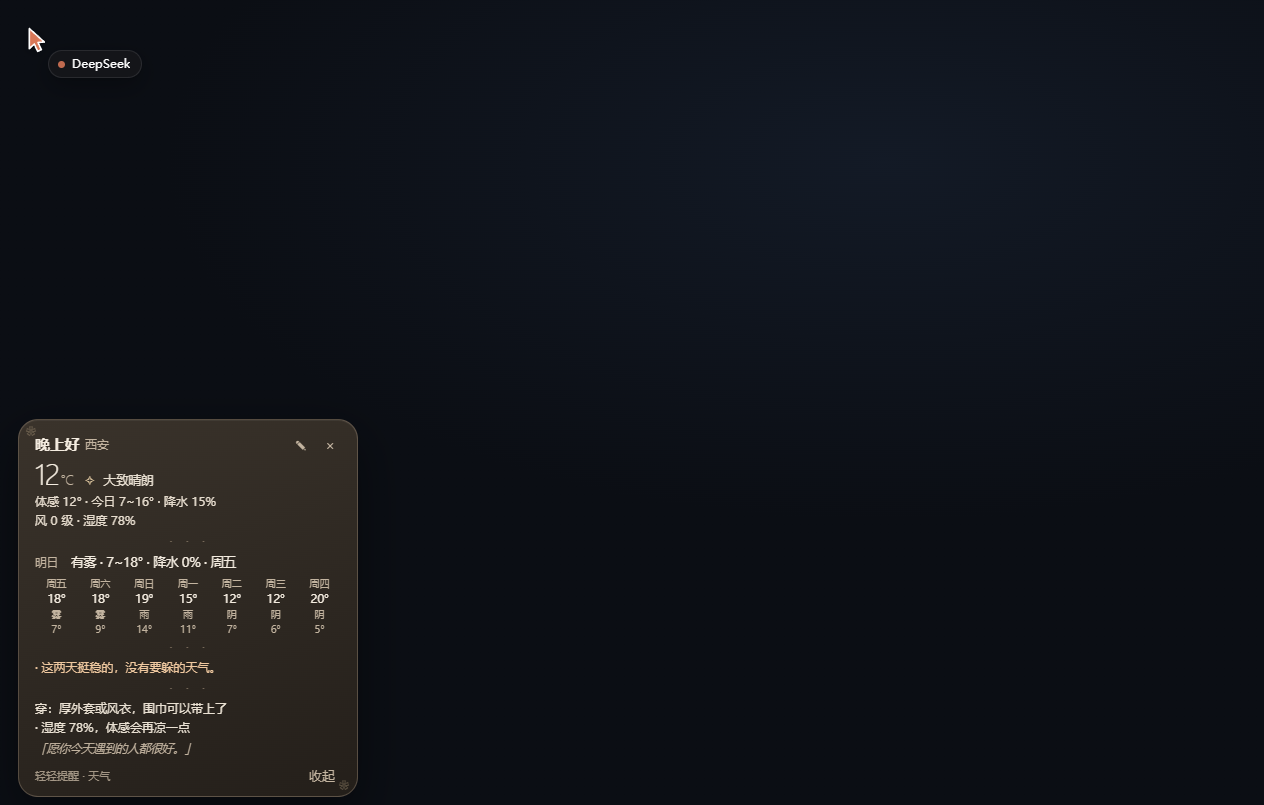
打开 DeepSeek Harness 的那一刻,角落里有一张小卡片,轻轻说今天几度、要不要带伞、明天和这一周怎么样、有没有要躲的天气,以及穿什么。
它不是语音助手,就是一张会自己收起来的卡片。
安装
# 从 npm(如果已发布)
dsh plugin --profile web add dsh-weather-whisper

# 从本仓库
dsh plugin --profile web add github:owner/dsh-weather-whisper
装好后重启一次 DeepSeek Harness,卡片会在启动时出现一次。
它怎么工作
- 定位:先看
ipinfo.io给的经纬度,再用 BigDataCloud 反查中文城市名。 - 天气:Open-Meteo 的免费接口,当前温度、体感、湿度、风、逐时降水与阵风、未来 8 天的高低温与降水概率。
- 极端天气:没有官方预警 API,所以是本地推算——未来 36 小时的逐时降水、阵风、雪码,加上今明两天的极端温度。它只会说“可能”,不会假装自己是气象台。
- 缓存:数据存
localStorage30 分钟,断网时给一句温柔的话,不给报错码。 - 播报频率:每个会话启动只出现一次;平时缩成右下角的一个 🌤️ 圆点,点一下再看。
外观自定义
三种方式,从简单到“我要改代码”。
1. 卡片上的小编辑器
点卡片右上角的 ✎,可以直接选预设、改颜色、换分隔线小图案、换角落花纹、改一周的字形(汉字 / 图标)、给温度加个 ✧。
五个预设:石墨 · 墨白 · 暖沙 · 樱粉 · 深海。
2. 控制台一行
// 只改一处
DSHWeatherWhisper.set({ palette: { accent: "#f5c2d0" } });

// 一次改一组
DSHWeatherWhisper.set({
  palette: { bg: "#14161a", bg2: "#0b0c0e", fg: "#f2f1ec", dim: "#a8a69e",
             accent: "#f2f1ec", line: "#6f7380", alert: "#e8dcc4" },
  decor: { sep: "───", corner: "❋", glyphs: "hanzi", sparkle: false },
  radius: 14,
});

DSHWeatherWhisper.reset();          // 回到默认
DSHWeatherWhisper.presets;          // 预设名列表
3. 直接写存储
设置存成 cookie ww_dsh-weather-whisper:theme(同时镜像到 localStorage["dsh-weather-whisper:theme"]),结构就是上面那个对象,缺的字段自动补默认值:
为什么用 cookie:DSH 每次启动都换端口,
localStorage按 origin(含端口)隔离,重启就忘;cookie 按 host 存,换端口也还在。
{
  "palette": { "bg": "#2b303c", "bg2": "#171a21", "fg": "#e7ecf7",
               "dim": "#9fb0cc", "accent": "#d8deea", "line": "#8fa1c0",
               "alert": "#e6c9a8" },
  "decor": { "sep": "┄┄┄", "corner": "", "glyphs": "hanzi", "sparkle": false },
  "radius": 18
}
sep 可选 ┄┄┄ ─── · · · ・ ・ ・ 〜〜〜 ✿ ✿ ✿ ✧ ✧ ✧ 或空字符串(不显示分隔线)。
corner 可选 ✿ ❀ ❁ ✧ ❋ ⁂ 或不填。
glyphs 是 hanzi(一周格子用汉字)或 emoji。
其他小开关
| 键 | 作用 |
|---|---|
cookie ww_dsh-weather-whisper:city |
手动指定城市,比如 "杭州";留空则自动定位 |
cookie ww_dsh-weather-whisper:pos |
卡片位置(拖动时自动写入) |
隐私
卡片只把经纬度发给 Open-Meteo,把 IP 交给 ipinfo.io 定位;没有账号、没有遥测、没有第三方统计。城市名会发给 BigDataCloud 反查,不想发就自己设 :city。
许可
MIT。
No comments yet. Be the first to write one.