Notix






Desktop notifications for DeepSeek Harness — native macOS and Windows notifications when the agent needs your input, runs too long, fails, or finishes. One package, no separate UI package, no approval logic, no agent blocking.
Notix is a pure observer: it never registers an approval/answerer, never appends session events, and never blocks the agent loop. It watches the shared event surfaces and delivers notifications through a pluggable channel registry with built-in macOS and Windows system channels.
Status:
v0.3.0— first public release. macOS and Windows are supported.Registry availability: the package is
notix-dshon npm. Ifnpm view notix-dsh versionstill returns 404, the release has not reached the registry yet; use the repo-clone install in the meantime.
Contents
- Why Notix
- Platform support
- Install
- Quick start
- What it watches
- What notifications look like
- How delivery works
- Configuration
- Service API
- Security and privacy
- Troubleshooting
- Requirements
- Development
- Contributing
- License
Why Notix
- One package, both halves. The Host plugin and the Plugins settings UI ship in one npm package, so there is no second
notix-dsh-uito install and keep in sync. - A pure observer. Notix never answers approvals, never writes session events and never blocks the agent; delivery failures are contained and never reach the agent loop.
- Native on both desktop platforms. macOS Notification Center through a signed helper,
terminal-notifier,alerterorosascript; Windows Action Center through a WinRT toast posted by the bundled PowerShell helper. - Platform-aware by construction. Only the channel matching the running
process.platformis ever registered, so one profile configuration works on macOS and Windows and the other platform's tooling is never spawned. - Five trigger families, live-editable. Approvals, pending questions, long turns and background jobs, errors and tool failures, and completions are each switchable in the settings card, with thresholds, reminders and quiet hours.
- Calm by default. Dedupe keys, a per-session error cooldown, quiet hours with urgent bypass, per-channel retry, and a circuit breaker.
- Extensible. Other plugins can post notifications and register their own delivery channels through
ctx.notix.
Platform support
| Platform | Channel | Delivery backends | Notes |
|---|---|---|---|
| macOS | macos-system |
Signed Notix helper → terminal-notifier → alerter → osascript |
Notification Center; the helper is the only backend that uses Notix's own bundle identity |
| Windows 10/11 | windows-system |
WinRT ToastNotification posted by the bundled PowerShell helper |
Action Center; built-in Windows PowerShell 5.1, no extra runtime dependency; verified on Windows 11 |
| Linux and other platforms | — (none registered) | — | The plugin loads, but no channel is registered, so notifications are recorded in history and delivery is a no-op |
Only the channel for the host platform is registered, so a single configuration file works on both. Both channel blocks are configurable: the card edits the one for the GUI's platform and applies it live, while the other platform's block stays inert and spawns no process.
Install
Notix ships as one npm package, notix-dsh, containing both the Node/Host plugin and the browser/Client UI. Pick one install path.
From the Web GUI
- Open the Web GUI and go to Plugins.
- Use the Plugins page's add-plugin action to install
notix-dsh; the GUI updates the active profile and adds the bundle for you. - Restart the DSH instance. A new Host plugin is only loaded when the process starts; the Settings card appears once the GUI reloads.
From the CLI
dsh plugin --profile <name> add <package> forwards the remaining arguments to pnpm in the profile directory and installs the package. Because notix-dsh declares dsh.bundle, DSH also reconciles the profile's dsh.profile.bundles list and adds notix-dsh to it, so the next start composes its patch layer.
# Desktop app profile: quit the app first; it keeps loaded plugins in memory.
dsh plugin --profile desktop add notix-dsh

# Web GUI profile (dsh web / browser GUI)
dsh plugin --profile web add notix-dsh
Restart that DSH instance afterwards. To verify the install — or to add it yourself when an older dsh, or a manual/link: setup, did not reconcile — the profile manifest should list the bundle:
// ~/.dsh/profiles/<name>/package.json
{
  "dsh": {
    "profile": {
      "bundles": [
        "@deepseek-ai/dsh-base",
        "@deepseek-ai/dsh-web-app",
        "notix-dsh"
      ]
    }
  }
}
The same command works for any profile name (headless, a custom profile, …): the Host half is profile-agnostic and delivers from any profile on macOS or Windows, and only GUI profiles show the settings card.
From a repo clone
Useful before the release reaches the registry, or while developing the plugin:
git clone https://github.com/QiangXian/notix-dsh.git
cd notix-dsh
pnpm install --frozen-lockfile
pnpm build      # generates lib/, which the package entry points reference

# then install the checkout into a profile
dsh plugin --profile web add link:/absolute/path/to/notix-dsh
Add "notix-dsh" to dsh.profile.bundles as shown above and restart. A link: install serves the checkout's generated lib/, so run pnpm build again after pulling changes.
Package contents
The published npm package is runtime-only. It ships the generated lib/ (built from src/ by the prepack hook on publish — lib/ is not tracked in git), the bundled assets/ (notification icon and helper .icns), locale/, cordis.patch.yml, icon.png, both READMEs, LICENSE, and the macOS helper sources (scripts/build-notifier-app.sh, scripts/notifier/). Everything else — src/, test/, docs/, dev/, build configuration and the notify-test scripts — only exists in a repo clone. Commands that need those files are marked repo clone.
Upgrade
- From npm (quit the desktop app first):
dsh plugin --profile <name> add notix-dsh@latest, then restart the instance. - From a clone:
git pull && pnpm install --frozen-lockfile && pnpm build, then restart. - Settings survive: configuration lives in the profile's
cordis.patch.ymlunderid: notixand is re-read on start. - Coming from a split install: if an older, separate
notix-dsh-uipackage is in the profile, remove it from the bundle list.v0.3.0contains the UI itself, and an existingid: notixconfiguration stays compatible.
Uninstall
- From the Web GUI, remove or disable Notix on the Plugins page; or
- From the CLI:
dsh plugin --profile <name> remove notix-dsh, remove"notix-dsh"fromdsh.profile.bundles, and restart.
Uninstalling removes the package from the profile, but it leaves the notification history (~/.dsh/storages/notix when the Host provides a storage domain), an installed macOS helper at ~/Applications/Notix.app, and the per-user Windows AppUserModelId key under HKCU\Software\Classes\AppUserModelId\<appId> behind. Remove those manually for a clean slate.
Quick start
- Install and restart DSH, then open Plugins → Notix (the same card is also on Settings → Plugins → Notix).
- Pick the notification language and verbosity, switch triggers on or off, tune thresholds, reminders and quiet hours, and configure the channel for the platform the GUI runs on. The card edits the profile's patch file and the Host applies changes immediately.
- Verify delivery:
- repo clone, macOS:
pnpm build && pnpm notify-test - repo clone, Windows:
pnpm build && pnpm notify-test:win - npm install: these scripts are not published — trigger a real event instead (for example, let the agent request an approval).
- repo clone, macOS:
- On macOS, the first notification sent through the signed helper asks for permission: click Allow once.
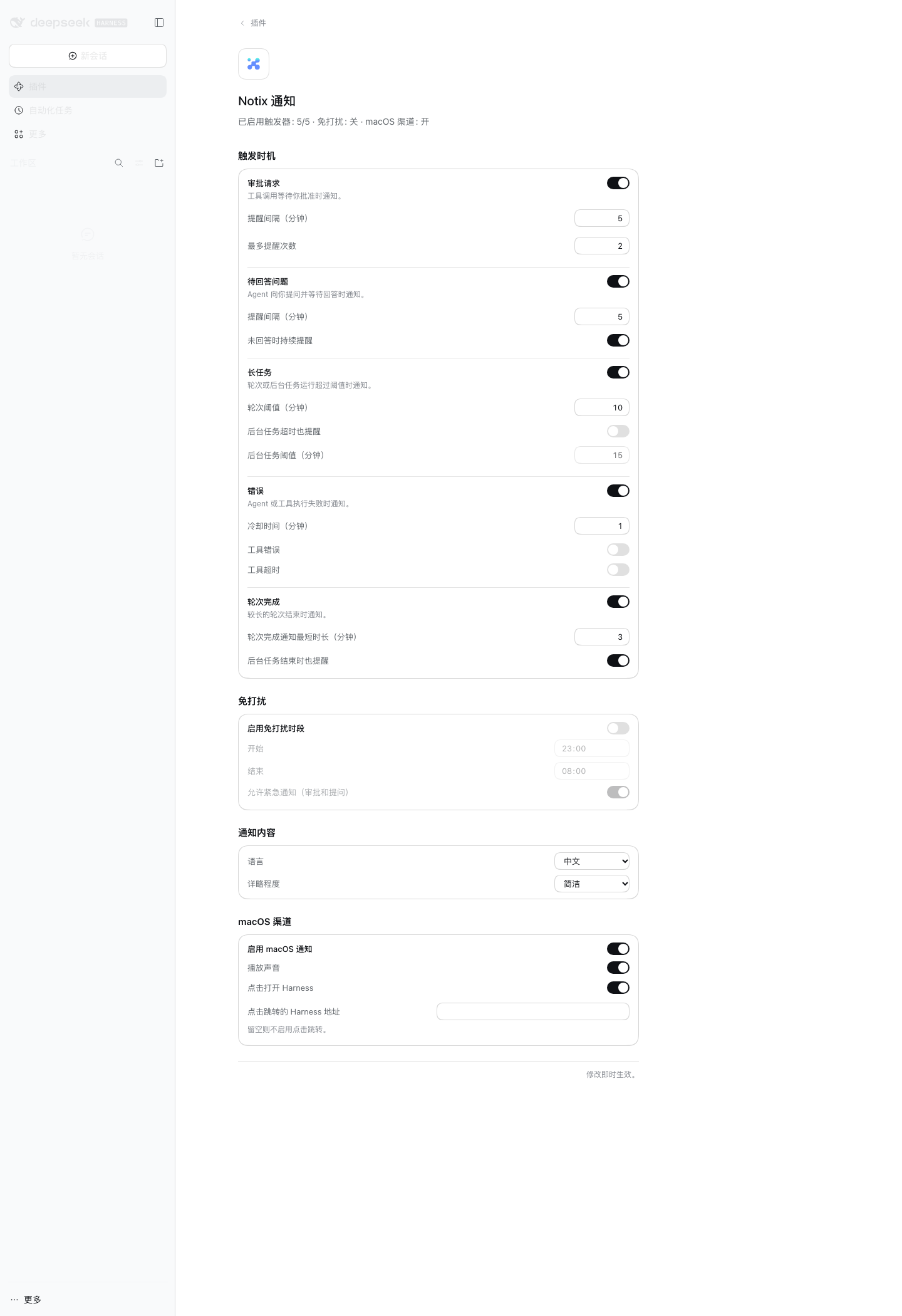
The Notix card in the Web GUI (Plugins → Notix, shown in an isolated macOS test profile with the Chinese UI).
What it watches
| Notification | Watched surface | Default | Settings |
|---|---|---|---|
| Approval requested | approval/asked, with reminders until approval/decided |
On · remind after 5 min, max 2 reminders | triggers.approval |
| Question pending | userQuestions projection (open state), optionally again when continued |
On · remind after 5 min, max 2 reminders | triggers.userQuestion |
| Long turn | turn/start watchdog; deferred while the agent is waiting on you |
On · 10 min threshold | triggers.longTask |
| Long background job | job/registered → job/settled watchdog |
Off · 15 min threshold when enabled | triggers.longTask.jobs / jobThresholdMs |
| Run failed | turn/end with an error reason, plus agent/error (same dedupe key) |
On · 60 s per-session cooldown | triggers.error |
| Tool failure | tool/result with isError; TOOL_TIMEOUT has its own switch |
Off (both switches) | triggers.error.toolErrors / toolTimeout |
| Turn completed | turn/end with reason completed |
On · only turns of at least 3 min | triggers.completion |
| Background job settled | job/settled |
Off | triggers.completion.jobs |
Every notification passes the same pipeline: quiet hours → dedupe → error cooldown → localized rendering → per-channel delivery. Dedupe keys are trigger-scoped and retained for 24 hours, so a repeated event does not re-notify; error notifications within triggers.error.cooldownMs are suppressed per session. Up to 200 notification records are kept in the notix storage domain (in memory when the Host provides no storage domain) and are readable through ctx.notix.history(). Notifications suppressed by quiet hours, dedupe or cooldown are not recorded.
What notifications look like
macOS
With the osascript backend, a notification is a standard banner with a bold title and a multi-line body:
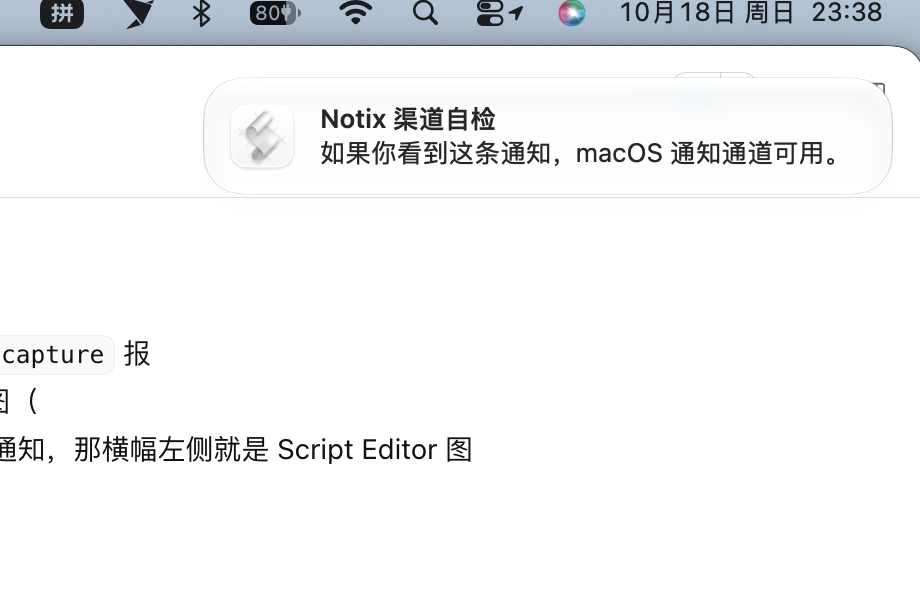
macOS assigns the banner icon to the sending process, so osascript notifications show the system Script Editor icon — that is expected, not a Notix bug:
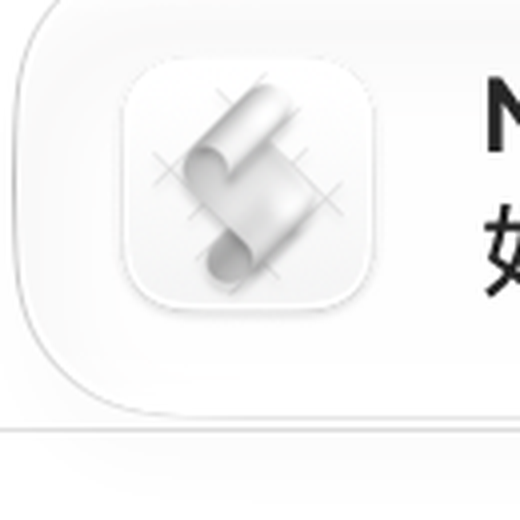
Install terminal-notifier, or build the signed helper described in The whale icon on macOS, to show the Notix whale icon instead.
Windows
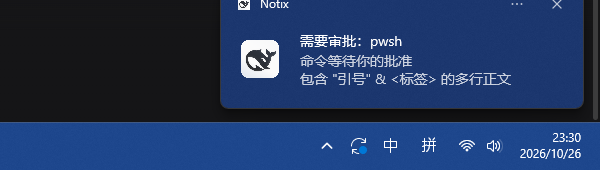
A native Action Center toast attributed to Notix with the whale icon: bold title, up to three body lines, optional sound and click-to-open.
How delivery works
One package, two runtime halves
The manifest combines dsh.bundle.patch and dsh.client, so a single installation provides both halves:
lib/index.jsis the Node/Host entry: triggers, rules, channel registry, history, configuration and thectx.notixservice.lib/client.jsis the browser entry: the Notix card on the Plugins page and under Settings → Plugins.cordis.patch.ymlinserts one Loader entry,id: notix. That entry loads the Host half and lets the Client loader discover this package'sdsh.clientdeclaration.
The two halves keep their own runtime lifecycles; only packaging and installation are merged.
The channel registry
Delivery adapters are registered in a ChannelRegistry and receive every notification the pipeline produces. For each adapter the registry allows a 10 s delivery timeout per attempt, retries up to three times with 1 s / 5 s / 15 s backoff, and opens a five-minute circuit breaker after three failed deliveries. Failures are logged; they never throw into the agent loop.
Platform selection is data-driven: BUILTIN_CHANNELS maps darwin → macos and win32 → windows, and only the entry whose platform matches the running Host (and whose enabled flag is on) is registered. Changing channel settings in the card re-registers the adapter, so sound and click-to-open changes apply immediately. Adding another platform is a new module plus a BUILTIN_CHANNELS entry; the development guide has the checklist.
macOS backends
The channel resolves one backend once and caches the choice (a failed detection is retried on the next notification):
| # | Backend | Selected when | Banner icon | Click-to-open | Sound |
|---|---|---|---|---|---|
| 1 | Notix helper (~/Applications/Notix.app, or channels.macos.notifierApp) |
the helper executable exists | Notix whale icon, attributed to Notix | no | default / silent |
| 2 | terminal-notifier |
it is on PATH |
bundled whale icon via -appIcon |
-open <baseUrl> when clickToOpen and baseUrl are set |
-sound default |
| 3 | alerter |
it is on PATH |
none | no | --sound default |
| 4 | osascript |
always available | Script Editor | no | Glass, or silent |
A backend failure does not fall through to the next backend: fix the reported problem or remove the chosen backend so detection picks the next one.
The whale icon on macOS (code signing)
macOS only grants notification authorization to code-signed apps; an ad-hoc or unsigned bundle is rejected before any permission prompt appears (requestAuthorization returns denied). Build the bundled helper with a real signing identity:
# From a repo clone
NOTIX_SIGN_IDENTITY="Apple Development: Your Name (TEAMID)" \
  ./scripts/build-notifier-app.sh --install

# From an npm install
cd "$(node -p "require.resolve('notix-dsh/package.json')" | sed 's#/package.json##')"
NOTIX_SIGN_IDENTITY="Apple Development: Your Name (TEAMID)" \
  ./scripts/build-notifier-app.sh --install
- Building needs Xcode Command Line Tools (
swiftc). The script resolves its own root, sosh node_modules/notix-dsh/scripts/build-notifier-app.sh --installalso works from any directory. - It writes
build/Notix.appinside the package by default, and--installcopies that bundle to~/Applications/Notix.app— the path the channel looks for unlesschannels.macos.notifierAppoverrides it. To build straight into the lookup path and avoid writing insidenode_modules, setNOTIX_APP_OUTPUT="$HOME/Applications/Notix.app"and drop--install. - The helper is used only while its executable exists; otherwise delivery falls back to
terminal-notifier,alerter, thenosascript. - Click Allow on the first notification; afterwards the banner shows the Notix whale icon.
- Without an identity the script falls back to an ad-hoc signature and warns. macOS rejects ad-hoc helpers for notifications, so while that helper is installed and selected, delivery fails: rebuild with a valid identity, or remove
~/Applications/Notix.appso another backend is used. terminal-notifiershows the bundled whale icon without the helper;osascriptcannot change the icon. The helper sources ship in the npm package, so an npm install can build it too.
Windows toast details
The built-in windows-system channel posts native toasts through Windows PowerShell and the WinRT toast API. It is registered automatically when the Host runs on Windows; the macOS channel is not registered there, and the Windows channel is not registered on macOS, so a shared configuration is safe.
The Host spawns %SystemRoot%\System32\WindowsPowerShell\v1.0\powershell.exe without a shell, running the bundled helper:
powershell.exe -NoProfile -NonInteractive -ExecutionPolicy Bypass -File <package>/lib/channels/toast.ps1
The payload travels through NOTIX_* environment variables (NOTIX_TITLE, NOTIX_BODY, NOTIX_APP_ID, NOTIX_DISPLAY_NAME, NOTIX_ICON, NOTIX_URL, NOTIX_SOUND, NOTIX_TAG, NOTIX_GROUP), so titles and bodies never pass through shell quoting. The script XML-escapes every user-supplied value and builds a ToastGeneric toast with a title plus up to three body lines (at most four <text> elements; one when the body is empty).
Windows attributes an unpackaged application's toasts through the AppUserModelId registered under HKCU\Software\Classes\AppUserModelId\<appId>. The helper writes DisplayName = "Notix" and, when the icon file exists, the IconUri of the bundled whale icon, so the banner shows the Notix name and icon instead of the PowerShell host. Registration is idempotent: every send rewrites the same values and never creates duplicate keys. Use channels.windows.appId and channels.windows.icon to override the id and icon path.
Sound is ms-winsoundevent:Notification.Default when channels.windows.sound is on, otherwise a silent toast. Click-to-open is WinRT protocol activation (activationType="protocol" launch="<baseUrl>"), so it only applies when clickToOpen is on and baseUrl is non-empty. Repeated notifications reuse the dedupe key as the toast tag and group, so a new notification replaces the previous one for the same event.
Configuration
Every field is optional and the shipped defaults apply. Override fields in the profile's cordis.patch.yml under the same entry id. The settings card exposes every field except triggers.userQuestion.maxReminders, channels.macos.notifierApp and channels.macos.appIcon, which you can only change in the profile file; it also edits only the channel of the platform the GUI runs on. Both channel blocks may coexist — only the block for the running platform is registered and used.
# ~/.dsh/profiles/<name>/cordis.patch.yml
- id: notix
  name: notix-dsh
  config:
    language: en
    triggers:
      longTask:
        turnThresholdMs: 300000
      error:
        toolErrors: true
    quietHours:
      enabled: true
      from: "23:00"
      to: "08:00"
      allowUrgent: true
    channels:
      macos:
        sound: false
      windows:
        sound: true
        clickToOpen: true
        baseUrl: "http://127.0.0.1:<port>"   # use the URL printed by `dsh web`
Durations are milliseconds in YAML; the settings card edits them in minutes.
General
| Field | Default | Meaning |
|---|---|---|
language |
zh |
Notification text language: zh / en. The GUI language is independent. |
verbosity |
minimal |
minimal keeps bodies context-only; normal also includes a truncated error message. |
Triggers
| Field | Default | Meaning |
|---|---|---|
triggers.approval.enabled |
true |
Notify when a tool call waits for approval |
triggers.approval.remindAfterMs |
300000 |
Delay before each reminder while the approval stays unanswered |
triggers.approval.maxReminders |
2 |
Reminder cap per approval (0–10) |
triggers.userQuestion.enabled |
true |
Notify when the agent asks a question |
triggers.userQuestion.remindAfterMs |
300000 |
Delay before each reminder while the question stays open |
triggers.userQuestion.maxReminders |
2 |
Reminder cap per question (0–10) |
triggers.userQuestion.remindOnContinued |
true |
Re-notify when a timed question becomes continued |
triggers.longTask.enabled |
true |
Long turn / job watchdogs |
triggers.longTask.turnThresholdMs |
600000 |
Long turn threshold |
triggers.longTask.jobs |
false |
Also watch background jobs |
triggers.longTask.jobThresholdMs |
900000 |
Long background job threshold (used when jobs is on) |
triggers.error.enabled |
true |
Failed runs and optional tool failures |
triggers.error.cooldownMs |
60000 |
Per-session error suppression window |
triggers.error.toolErrors |
false |
Notify on failed tool results |
triggers.error.toolTimeout |
false |
Notify on TOOL_TIMEOUT results (independent of toolErrors) |
triggers.completion.enabled |
true |
Completion notifications |
triggers.completion.minDurationMs |
180000 |
Only turns of at least this duration announce completion |
triggers.completion.jobs |
false |
Announce settled background jobs |
Quiet hours
| Field | Default | Meaning |
|---|---|---|
quietHours.enabled |
false |
Enable the quiet window |
quietHours.from |
"23:00" |
Start of the window (HH:MM, local time) |
quietHours.to |
"08:00" |
End of the window; a window may cross midnight, and from == to disables it |
quietHours.allowUrgent |
true |
Let urgent notifications (approvals and questions) through during the window |
Channels
| Field | Default | Meaning |
|---|---|---|
channels.macos.enabled |
true |
Register the macOS channel when the Host runs on macOS |
channels.macos.sound |
true |
Play the notification sound |
channels.macos.clickToOpen |
true |
Allow click-to-open on backends that support it |
channels.macos.baseUrl |
"" |
GUI URL opened by click-to-open |
channels.macos.notifierApp |
"" → ~/Applications/Notix.app |
Signed helper app bundle |
channels.macos.appIcon |
"" → bundled whale icon |
Banner icon passed to terminal-notifier |
channels.windows.enabled |
true |
Register the Windows channel when the Host runs on Windows |
channels.windows.sound |
true |
Play the default notification sound; false sends a silent toast |
channels.windows.clickToOpen |
true |
Open baseUrl when the toast is clicked |
channels.windows.baseUrl |
"" |
GUI URL opened by click-to-open; empty leaves the toast without an action |
channels.windows.appId |
"" → Notix.DSH |
AppUserModelId registered under HKCU and used for toast attribution; values that do not match [\w.-]{1,128} fall back to the default |
channels.windows.icon |
"" → bundled whale icon |
PNG shown with appLogoOverride and registered as the app icon |
Service API
Other plugins can use the ctx.notix service:
// Post a notification through the normal pipeline (quiet hours, dedupe, channels).
ctx.notix.notify({
  title: 'Deploy finished',
  body: 'main is green',
  urgency: 'normal',         // 'urgent' | 'normal' | 'low'
  sessionId: 'session-id',   // optional; defaults to 'manual'
  dedupeKey: 'deploy:main',  // optional; defaults to a unique key
  sessionTitle: 'Deploy',
})

// Add a delivery channel. It gets the same retry and circuit-breaker isolation.
const dispose = ctx.notix.registerChannel({
  id: 'my-channel',
  send: async (notification) => {
    // notification: rendered title/body plus kind, urgency, sessionId and payload
  },
})

ctx.notix.history(20)   // newest-first records; up to 200 are retained
ctx.notix.config        // live resolved configuration
notify() resolves to the recorded notification, or to undefined when the pipeline suppressed it.
Security and privacy
- Never participates in decisions. Notix does not register an approval answerer, so approvals keep their fail-closed semantics; all decisions stay in the GUI.
- Never touches the session log. It only observes events and projections; it never appends session events, and delivery failures cannot block or fail the agent.
- Minimal content by default. Notification text only contains the session title, tool name, and a truncated question or reason (questions at 160 characters; rendered titles at most 120 and bodies at most 500).
verbosity: normaladds a truncated error message (up to 200 characters). Command lines and file contents are never included. - Local only. No network calls: delivery spawns local OS tools (
osascript,terminal-notifier,alerter,powershell.exe). - Contained failures. Retries and a per-channel circuit breaker keep a broken backend from affecting the agent or other channels.
- Local state. Dedupe keys and notification history live in the Host's
notixstorage domain when one is available. The Windows channel writes only the per-user AppUserModelId key (DisplayNameandIconUri) and the macOS helper is an ordinary app bundle in~/Applications.
Troubleshooting
macOS
| Symptom | What to check |
|---|---|
| No banner at all | System Settings → Notifications: enable notifications for the sending app — Notix for the helper, Script Editor for osascript — and check Focus / Do Not Disturb |
| The banner shows the Script Editor icon | Expected for the osascript backend; install terminal-notifier or build the signed helper |
| Notifications broke after building the helper | The helper is not authorized (allow Notix in System Settings → Notifications), or it is ad-hoc/unsigned; rebuild with a valid identity or remove ~/Applications/Notix.app |
| Clicking the notification does nothing | Only terminal-notifier supports click-to-open, and it needs clickToOpen: true plus a non-empty baseUrl |
| No sound | Check channels.macos.sound, system volume and Do Not Disturb; osascript plays Glass when sound is on |
notifierApp / appIcon changes have no effect |
These two fields are profile-file only, not in the settings card; edit the profile YAML and restart DSH |
Windows
| Symptom | What to check |
|---|---|
| No toast | Windows Settings → System → Notifications: enable notifications for Notix, and check Focus Assist / Do Not Disturb |
| No sound | Windows can mute notification sounds per app or globally even when channels.windows.sound is true |
| Delivery fails with a PowerShell error | %SystemRoot%\System32\WindowsPowerShell\v1.0\powershell.exe must exist; a missing or unusual PowerShell installation fails with an error in the Host log |
| Toast appears but clicking does nothing | Click-to-open needs clickToOpen: true and a non-empty baseUrl; protocol activation can also be blocked by system policy or security software |
| Wrong name or icon | Correct channels.windows.appId / channels.windows.icon; the registry values are rewritten on the next toast |
| A repeated notification replaces the previous one | By design: the dedupe key doubles as the toast tag/group. Give each notice its own dedupeKey via ctx.notix.notify() |
General
- Nothing on Linux or another platform: expected. The plugin loads, but no channel is registered; the Host log reports
no built-in notification channel for platform "<name>". - Notifications stopped after installing or upgrading: restart DSH — the Host plugin is loaded on process start — and confirm
notix-dshis indsh.profile.bundlesand in the profile'snode_modules. - A channel is silent by configuration: the Host log reports
the <key> notification channel is disabledwhenchannels.<key>.enabledis off. - Inspecting delivery: notification records (including
deliveredandchannels) are in thenotixstorage domain under~/.dsh/storages/notixwhen storage is available, and throughctx.notix.history(). A record withdelivered: falsemeans no channel accepted it. - Click-to-open URL: use the URL the GUI actually prints (
dsh webprints it at startup); there is no fixed port.
Requirements
| Requirement | Value |
|---|---|
| DeepSeek Harness | >=0.2.1-rc.2 <0.3.0 (engines.dsh) |
| Node.js | ^22.18.0 || >=24.0.0 (engines.node); this covers building and running the plugin from a repo clone |
| macOS | Notification Center; optionally terminal-notifier / alerter; the signed helper or terminal-notifier is needed for the whale icon |
| Windows | Windows 10/11 with Windows PowerShell 5.1 (powershell.exe); verified on Windows 11 |
| Linux / other | The plugin loads, but no channel is registered and delivery is a no-op |
Development
All hand-written source lives under src/host/ (Node) and src/client/ (browser). lib/ is generated in full by node scripts/build.mjs, ignored by Git, and rebuilt by the prepack hook when publishing. Host modules are copied verbatim; the Client is bundled by tsdown into a single classic-script factory. The Windows toast helper is src/host/channels/toast.ps1 and must stay ASCII-only, because the build copies it byte-for-byte and PowerShell 5.1 would otherwise decode it with the ANSI code page.
pnpm install --frozen-lockfile
pnpm build            # clean and rebuild the complete lib/ tree from src/
pnpm build:check      # temp-build and compare every generated file with lib/
pnpm test             # builds first, then runs unit/integration/package tests
pnpm smoke            # verify the browser bundle id and export contract
pnpm verify           # test + smoke + full-tree reproducibility check
pnpm notify-test      # repo clone, macOS: send one real notification through the built channel
pnpm notify-test:win  # repo clone, Windows: send one real toast through the built channel
Run DSH against the checkout without installing it by using the tracked overlay template (the local copy is ignored by Git):
cp dev/notix.patch.example.yml dev/notix.patch.local.yml
# point name at the absolute path of this checkout's lib/index.js
pnpm build
dsh --profile web --patch ./dev/notix.patch.local.yml --dump-config
Releases are cut manually: bump version, then pnpm publish from a clean checkout. The npm lifecycle runs prepublishOnly (pnpm verify) and then prepack (pnpm build) before packing, so the tarball is always rebuilt and tested from the repo. The published file set is the runtime artifacts plus the macOS helper sources — see Package contents.
The release tarball was also verified end-to-end: dsh plugin add on the packed tarball reconciles the bundle list, and dsh --dump-config composes the notix entry.
See the development guide for the source layout, the channel-adapter contract, the DSH module boundary, source-map guarantees and the release workflow.
Contributing
Issues and pull requests are welcome at QiangXian/notix-dsh. Start with CONTRIBUTING.md, read the development guide, run pnpm verify before opening a PR, and never commit lib/ — it is generated from src/.
Release history is in CHANGELOG.md; releases are cut by the maintainer following the publishing runbook. Report security issues privately as described in SECURITY.md; all project spaces follow the code of conduct.
License
MIT © Notix contributors
No comments yet. Be the first to write one.