dsh-github-toolkit
English | 中文
GitHub for DeepSeek Harness: 18 agent-facing github_* tools, plus a GitHub page in Web Settings that stores your PAT in the DSH credential store and takes effect without a restart.
No build step, no runtime dependencies — the host half uses Node's built-in fetch, the browser half requires only react and the shell's static UI primitives.
- The token never lives in configuration. It is resolved from the DSH credential store by reference (default
GITHUB_TOKEN) on every request, so rotating the PAT applies to the next call andcordis.patch.ymlnever contains a secret. - Configured in the GUI, not the terminal. Paste the PAT, test it against
api.github.comfrom the page before saving, bind a default repository, and switch the write tools on or off. - Failures name the fix. 401 → rotate the token; 403 with zero quota → when it resets; 403 otherwise → scopes or SAML SSO; 404 → missing or unauthorized; 422 → GitHub's own field-level errors.
Requirements
- DeepSeek Harness
0.1.5-rc.1or newer (@deepseek-ai/dsh-toolsand@deepseek-ai/dsh-credentialsare peers the harness provides). - Node.js 22+ (the host half uses
AbortSignal.any). - A GitHub personal access token; fine-grained tokens are recommended.
Install
dsh plugin --profile web add dsh-github-toolkit
The package declares dsh.bundle, so the installer adds it to the profile's bundle list and the row in cordis.patch.yml mounts the host half. Then refresh the Web UI and open Settings → GitHub.
Without npm:
dsh plugin --profile web add github:<owner>/dsh-github-toolkit
No build scripts are involved, so this installs straight from the repository.
Set it up in the GUI
Open Settings from the bottom-left of the Web UI, then pick GitHub:
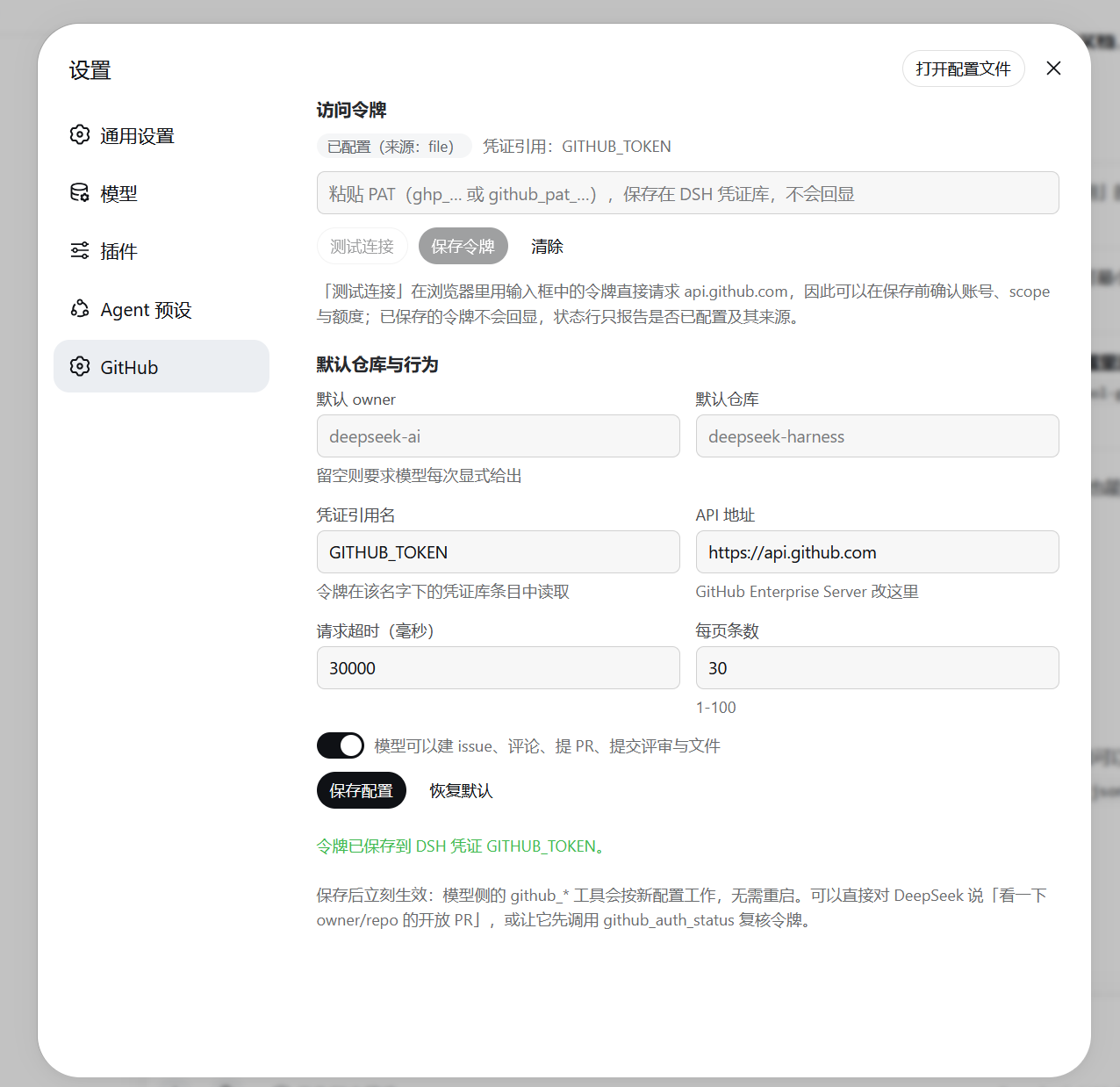
- Refresh the Web UI and open Settings → GitHub.
- Paste the PAT → Test connection (the page calls
api.github.comdirectly, so you see the account, scopes, and remaining quota before anything is stored) → Save token. - Optionally set default owner / default repository and save the configuration.
| Section | What it does |
|---|---|
| Access token | Shows whether a token is configured and where it comes from (credential store / launch environment); password field to paste one; Test connection; Save; Clear |
| Defaults & behaviour | Default owner, default repository, credential reference name, API base (GitHub Enterprise Server), request timeout, page size, write access switch; Save configuration; Reset to defaults |
Interaction decisions worth knowing:
- Testing happens in the browser. GitHub's REST API answers CORS preflights (
Access-Control-Allow-Origin: *, andX-OAuth-Scopes/X-RateLimit-*are exposed), so a candidate token can be validated without handing it to the host first. - Stored tokens are never read back. The credential store reports only whether a value is configured, its source, and whether it accepts writes; the page cannot display the secret. Re-paste to re-test, or ask the model to call
github_auth_status. - Saving applies immediately. Turning write access off unregisters the mutating tools and narrows
github_apitoGET; turning it on registers them again — no restart. - Empty means default. Clearing a text field and saving removes your override, so the value falls back to the composition default.
Tools
| Tool | Purpose | Read-only |
|---|---|---|
github_auth_status |
Token identity, scopes, remaining quota — the credential diagnostic entry point | yes |
github_get_repository |
Repository metadata | yes |
github_read_file |
Read a file at a ref, or list a directory | yes |
github_search |
Search repositories / code / issues / commits / users | yes |
github_list_issues |
List issues (state, labels, assignee, since) | yes |
github_get_issue |
One issue or PR, optionally with its comments | yes |
github_list_pull_requests |
List pull requests | yes |
github_get_pull_request |
One PR with changed files and an optional full diff | yes |
github_list_commits |
List commits, optionally filtered by path or author | yes |
github_list_branches |
List branches | yes |
github_get_checks |
CI status and check runs for a ref | yes |
github_api |
Raw REST escape hatch (GET-only when write access is off) |
depends |
github_create_issue |
Create an issue | no |
github_comment |
Comment on an issue or PR | no |
github_update_issue |
Change title, body, state, labels, assignees | no |
github_create_pull_request |
Create a pull request | no |
github_create_review |
Submit a review, with optional inline comments | no |
github_write_file |
Commit a file through the contents API (resolves the current sha) | no |
Read and write tools are modelled separately so permission presets can keep the mutating ones on ask, and one switch turns the plugin read-only.
Returned payloads are curated before they reach the model: GitHub objects carry far more than a model needs, so bodies, patches, and diffs are clipped to configured budgets and marked as truncated.
Configuration
The settings page writes the tool-github namespace in settings.yaml; the composition row only carries defaults:
| Field | Default | Meaning |
|---|---|---|
tokenRef |
GITHUB_TOKEN |
Credential reference name |
apiBase |
https://api.github.com |
Change for GitHub Enterprise Server |
defaultOwner / defaultRepo |
— | Without them the model must pass owner/repo |
timeoutMs |
30000 |
Per-request timeout |
perPage |
30 |
Default page size (max 100) |
maxTextChars |
6000 |
Clip budget for bodies and ordinary responses |
maxPatchChars |
3000 |
Clip budget per file patch |
maxDiffChars |
20000 |
Clip budget for a full diff |
maxFileBytes |
400000 |
Larger files return metadata only |
enableWrite |
true |
Whether the mutating tools are registered |
userAgent |
dsh-github-toolkit/0.3.0 |
Request User-Agent |
Credentials
The PAT lives in $DSH_HOME/.credentials.yaml:
refs:
  GITHUB_TOKEN: ghp_xxxxxxxx
Lookup precedence (owned by dsh-credentials-local): launch environment > credential file > project .env > $DSH_HOME/.env. A GITHUB_TOKEN exported before dsh starts therefore shadows the stored value, and the settings page reports that source.
Suggested fine-grained PAT permissions:
- Read-only use:
Contents: read,Issues: read,Pull requests: read,Metadata: read - Write tools as well:
Contents: write,Issues: write,Pull requests: write - CI status:
Actions: read,Checks: read - Organization repositories with SAML SSO need the token authorized for that organization, otherwise the API answers 403.
Troubleshooting
| Symptom | Cause and fix |
|---|---|
Test connection returns 401 |
The token itself is invalid — truncated paste, expired or deleted, or an app secret instead of a PAT. Generate a new one |
| "No GitHub token was found" | Neither the credential store, a .env, nor the process environment has a value. Save one in Settings → GitHub, or launch dsh with GITHUB_TOKEN=… |
Reads work, writes or repo creation fail with 403 Resource not accessible by personal access token |
The token lacks the permission (common with fine-grained tokens). Add it, or switch to a classic token |
403 reporting a rate limit |
Quota exhausted; the message states when it resets |
403 otherwise |
Usually a missing scope, or an organization behind SAML SSO where the token is not authorized |
404 |
The resource does not exist, or the token cannot see private resources (needs repo / Contents: read) |
422 |
GitHub rejected the fields: missing branch, head equal to base, a label or assignee that is not a collaborator — the error carries GitHub's field-level detail |
| No GitHub page in Settings | Refresh the page first. If it is still absent, the running host has not published the new client-plugin graph yet (observed once); restart dsh |
| A saved token seems to have no effect | Check whether the launching shell already exports GITHUB_TOKEN (it shadows the stored value; the page reports which source is in use) |
| You installed someone else's plugin | dsh-tool-github on npm is a different project; this package is dsh-github-toolkit |
git over HTTPS: schannel: AcquireCredentialsHandle failed: SEC_E_NO_CREDENTIALS |
Windows Schannel cannot acquire credentials in that environment (common inside sandboxes). git config --global http.sslBackend openssl switches git to OpenSSL; Node and pnpm are unaffected |
Security notes
- The token is resolved through
ctx.credentialsper request; the plugin never caches it, never logs it, and has no code path that writes it into configuration. - Test connection sends the typed value straight to
api.github.com(not to the host); it stays in page memory and the field is cleared after a successful save. github_apibypasses the purpose-built tools' field validation; with write access off it is restricted toGET.- The credential file is protected by file permissions, but the agent's tool processes run as the same OS user and can read it — keeping the location unadvertised is discretion, not isolation. A deployment that must keep keys away from its own agent needs a different store.
Development
npm install          # brings the @deepseek-ai peers the tests import
npm test             # host contracts + the browser bundle, offline (plus one live 401 check)
npm run test:installed
test/smoke.mjsneeds no PAT: it drives the plugin the way the loader does, renders the settings section against a minimal React runtime, and asserts the error mapping against stubbed responses. With a network it also checks that a deliberately invalid token comes back as a mapped 401, and skips that part offline.test/installed.mjschecks what the harness actually loads:node test/installed.mjs [profile] [pluginDir].
For a local checkout you can point a profile at this folder instead of publishing:
./install.ps1 -DryRun     # show what would be copied and written
./install.ps1             # copy into the web profile and add a manual row
./install.ps1 -Uninstall  # remove the copy and that row
Do not combine that with a dsh plugin add install: both resolve to the same package, and two active loader sources for one package are a composition error.
Layout
| File | Role |
|---|---|
cordis.patch.yml |
Bundle layer: the one row that mounts the host half |
lib/index.js |
Host half and package root: config, credential resolution, tool registration, settings namespace |
lib/client.js |
Browser half: the Settings → GitHub page (hand-written client bundle, no build) |
lib/rest.js |
GitHub REST client: timeouts, pagination, error mapping |
lib/tools-read.js, lib/tools-write.js |
Tool definitions |
lib/format.js, lib/shared.js |
Payload curation/rendering and parameter helpers |
test/smoke.mjs, test/installed.mjs |
Contract tests and an installed-copy check |
screenshots.json, assets/ |
Screenshots a storefront may show, declared inside the repository |
Known limitations
- The tools cover the REST surface this plugin models; anything else goes through
github_api, which returns bounded JSON rather than a typed result. - GitHub Search's
total_countis approximate for large result sets, and the plugin reports it as-is. - The browser half is a plain client bundle, so it renders its own controls rather than a schema-driven form; new options are added in
lib/client.jsandlib/index.jstogether. - A profile that has already loaded a client bundle needs a page refresh to pick up a new version of it.
License
MIT
No comments yet. Be the first to write one.