dsh-llm-manage
A persistent DeepSeek Harness plugin that manages the model inventory of a configured LLM route: pins and favorites, a per-model reason why each model is unusable, gateway directory reconciliation, and automatic fallback when one model's quota runs out.
No screenshots are committed, on purpose. screenshot.mjs captures a running harness,
so the images show whatever routes and model inventory that harness has — the maintainer's own
deployment. A route name rendered into a PNG cannot be found by a text scan, which is how a
set of them was published once. Run the script against your own harness (see
Looking at the panel without restarting) and you
get your own routes, which is the only version of that picture that means anything to you.
Why
A route that aggregates many providers behind one gateway exposes its whole catalogue as one flat list. Five things then go wrong at once, and none of them is the gateway's fault:
| Pain | What this plugin does |
|---|---|
| A long list, favorites buried | Pin and favorite models; the picker lifts them into their own sections at the top, and the panel sorts pinned → favorite → recent → rest |
| No sense of which models you actually rely on | A local ledger levels each model by how often you use it and ranks the rest by 14-day heat, shown as a Most used card in the panel and a ranked section in the picker |
| Retired models still listed; selecting one errors | Reconciles the route's models: list against the gateway's own GET {baseURL}/models directory and flags anything missing as retired |
| Quota exhausted, manual switching | Watches agent/request-error, moves the session to the next usable model on a model-scoped failure, and reports the switch only once the model that answered confirms it |
| The same model served by several providers | Marks each row with how many other routes also serve it, instead of hiding the copies |
| Models that cannot be called at all | Probes with a minimal request and labels the incompatibility honestly |
Nothing here is hard-coded to one gateway or one model id.
Install
From the npm registry (the packaged release, no toolchain needed):
dsh plugin --profile web add dsh-llm-manage
dsh plugin forwards the arguments after --profile <name> to pnpm inside that profile's
directory, so anything pnpm accepts works here (add, remove, why, …). The profile maps
node_modules/dsh-llm-manage to the package from the registry.
Development installs
Prefer the npm package for a normal installation. Two alternatives are useful while working on the plugin itself:
- Install from a path to link the directory, so local edits show up without reinstalling:
This symlinks the working copy — ideal when you are the author. Every edit is live, which is why "Applying a change" below is written for it.dsh plugin --profile web add /absolute/path/to/dsh-llm-manage - Install from the git URL to get a fixed copy of the latest source rather than the npm
release:
dsh plugin --profile web add git+https://github.com/PhilYue/dsh-llm-manage.git
The package installs as a bundle: its dsh.bundle.patch row inserts one Host plugin, and
its dsh.client declaration makes the web shell load the browser half. The Host half
needs a full harness restart; the browser half is picked up by the client HMR watcher,
so a page refresh is enough. See "Applying a change" below.
Configuration
Every value lives in the plugin row's config, so your own patch layer keeps overrides
across upgrades. Defaults:
- id: llm-manage
  name: 'dsh-llm-manage'
  config:
    selector:
      mode: managed     # our picker owns the seat; 'native' hands it back to the shipped one
    probe:
      intervalMs: 1200  # delay between deep probes
      timeoutMs: 30000
      batch: 40         # probes accepted per request
    directory:
      ttlMs: 1800000    # how long a gateway directory read is trusted
    fallback:
      enabled: true
      chain: []         # 'route/model' entries, tried first
    recovery:
      retryFirst: true  # let the platform retry a transient failure before we move
      autoContinue: true  # pick the work back up once the model has moved
      maxSwitches: 3    # automatic switches allowed per request (0 = never move)
      maxContinuations: 2  # pickups allowed per request (0 = move and stop)
      idleWaitMs: 1000  # how long to wait for the session to go idle before giving up
    usage:
      enabled: true     # local proficiency/heat counters
      seed: true        # one pass over existing session logs at startup
      flushMs: 5000     # counters are batched to disk on this interval
The fallback chain order is: fallback.chain, then pinned models, then favorites, then the
remaining models on the same route, then other routes. Models already known to be retired,
protocol-incompatible, hidden, or inside their quota cooldown are skipped. At most three
automatic switches happen per turn by default — see "Budgets are policy, not constants"
below for the three numbers and where to change them.
The host has to be new enough
package.json declares engines.dsh. DSH reads it before installing and before
activating a plugin, and it decides compatibility on its own (peer dependencies are
ignored once it is present), so a host outside the range fails at install time instead
of installing and then quietly rendering less than it should.
That matters more here than it usually does: this plugin takes over UI seats
(conversation.input.model and the session options that hang off it), a projection
(agentTeam), and SDK calls (agent.followup, sessionProjections, remote.agentTeams)
that only exist from 0.2.2 onwards. Installed into an older host it would still load, still
look right, and silently drop the rows whose plumbing is missing — which reads as "the
plugin forgot to implement it". A refused install is the honest failure.
Budgets are policy, not constants
Three numbers used to be constants in the Host. They are the ones an outage actually makes you want to change, so they are now config, and editable from Model manager → Failover → Automatic handling:
| Setting | Default | What it bounds |
|---|---|---|
| switches per request | 3 | automatic model switches inside one request |
| continuations per request | 2 | pickups of the interrupted work (0 = move and stop) |
| idle wait (ms) | 1000 | how long we wait for the session to go idle before giving up |
0 is a real value, not "unset": zero switches means never move automatically, zero
continuations means move but leave the work for you. Writing any of them stores an override
in the plugin's own config document — never in your cordis.patch.yml — and the dialog
reads the effective value back from the Host, so what you see is what the next failure will
use. Out-of-range input is refused both in the field and at the Host (400), because a
number that silently becomes something else is worse than a rejected edit.
Which failures switch, and which never do
The rule is scope, not severity:
| Failure | Scope | Switches? | Recorded against the model? |
|---|---|---|---|
| model not found / retired | one model | yes | yes |
| wrong protocol for this route | one model | yes | yes |
| per-model quota exhausted | one model | yes | yes |
| needs authorization on this account (401/403, OAuth, star-gated) | one model | never | yes |
| other per-model failures | one model | yes | yes |
| no adapter registered for this route | the whole route | yes | no |
| malformed request / context too long | the request itself | never | no |
| account-wide rate limit | the whole API key | never | no |
| account-wide quota | the whole API key | never | no |
| the route does not answer at all (DNS, TLS, refused socket) | the whole route | never | no |
A model-scoped failure moves to another model, because a different model can serve the turn. An account-scoped failure never moves: every model shares that key, so switching would only hide the real problem and burn another request.
A switch cannot rescue the turn that just failed. DSH freezes the provider, model and
reasoning effort at step preparation, re-validates them when the request is built, and
replays the same frozen selection on a retry — so the plugin commits the switch with
agent.model.select(), the one path the SDK documents, and the work continues on the new
model (see below). The failed turn reports its real error instead of a request-time
mismatch. If the Session still holds the broken selection when the next turn is claimed — a
refused controller call, or a level the session did not drop — the repair is finished
there, synchronously, before the step reads its selection.
A route with no adapter is its own scope. Switching models on that route cannot help — every model there fails the same way — but switching to another provider can, so Two of those scopes were learned the hard way, from a real log:
- Needs authorization (
AUTH) is a fact about this account and this model: the gateway answered, and the answer was "not for you" — an OAuth grant nobody completed, a model behind "star the repo first". Switching models cannot fix it, so it never switches, and burning the continuation budget on it would only produce the same answer twice. It is still recorded against the model, because "this one needs authorization" is exactly what the next fallback chain should skip. - The route does not answer (
NETWORK) is a fact about nothing in particular: DNS never resolved, the socket was refused, the certificate did not verify. The model was never asked, so blaming it would remove a perfectly good model from future chains.
it still switches. What it must not do is land in the model's health record: error is
in the set of reasons that make the fallback chain skip a model, and unlike quota that
verdict has no staleness escape, so a single route misconfiguration would have removed
an innocent model from every future chain permanently.
A probe is not a routing event
"Unusable" and "move the conversation" are two different conclusions, and only a failed request reaches the second one:
- A failed request (
agent/request-error) is the live conversation hitting a wall. If the failure is model-scoped, the turn is retried on the next usable model and a banner names the model it moved for. - A failed probe is an answer to a question you asked about a model. It records that model's health — so the next real switch skips it — but it does not touch whichever session happens to be using it. Moving a live conversation because of a diagnostic you ran would be switching models behind your back, which is the thing this design forbids.
Concretely, with model-gamma selected and its quota exhausted:
| Event | Selected model afterwards |
|---|---|
you deep-probe model-gamma, and the probe fails |
still model-gamma |
a real request on model-gamma fails with per-model quota |
model-beta (next usable), banner shown |
| a real request fails with an account-wide key limit (2008) | still model-gamma |
At most three automatic switches happen per turn, and if the chain finds nothing usable the failure is passed through untouched rather than retried in a way that cannot succeed.
Picking the work back up
Switching the model is only half the job: the turn that failed is gone, and until now this plugin stopped there and told you to send the next message yourself. That is the wrong place for the work — you asked the question to get an answer, not to learn which model answered it.
So when a switch is committed for a failure that interrupted work, the plugin queues the
next turn itself, with agent.followup() — the SDK's own path for "make this the sole
ordinary message of its own turn". The queued message does not pretend to be you: its
source is llm-manage-repair, and it says what happened and what to do about it. It asks
the new model to check the actual state first — the files it wrote, the task list it
updated, the command output it was reading — and only then continue, without repeating
work that already landed. A turn that died mid-tool-call may have finished its side
effects; continuing as if it had not is how a recovery turns into a mess.
What that buys, and what it does not:
- The queue is only filled at the turn boundary (
turn/end), after the switch is a fact. - If a message is already waiting — you typed while it was recovering — the plugin does not add another; yours gets answered on the new model, which is what you wanted anyway.
- At most two continuations per request. A model that fails, is replaced, and fails again is a fact about the route, not about the turn; three identical attempts is not resilience, it is a loop. Typing a new message resets the budget, because that is a new request.
- If it declines to continue it says so, in the same place it used to say "next message only" — the banner names the reason instead of leaving you to guess.
- "Took over" is a claim with evidence, not a hope. The turn boundary can only prove
that the frozen turn did not come back, so the record is written as
did not take overand keeps its id. When a later turn finally produces a message on the target model, that same record is amended totook over, with the time it happened. Records written before this version have no id and are markedlegacyin the history rather than silently counted as failures. - Ordering is deliberate: an ordinary transient failure goes to the harness's own retry policy first (it is bounded, it knows the backoff), and only a failure that survives it is treated as a model problem worth moving. A request that is malformed, too large for the context, or wrong in shape is never a model problem and never switches — that just spends another model's quota on the same invalid request.
Both halves are exposed where the rest of the policy lives: Model manager → Failover →
Automatic handling, two switches with their trade-off written underneath. They write the
moment they move (a switch that only took effect after pressing a Save button somewhere
else would be lying about what the plugin is doing), and they are stored in the plugin's
own config document — the same one the fallback chain uses, so cordis.patch.yml is never
edited behind your back. The Loader row still works as the default: recovery.retryFirst
and recovery.autoContinue, both on, and the UI switch simply overrides it.
The same dialog now also carries the numbers behind that policy — switches per request
(default 3), continuations per request (default 2), and how long to wait for the session to
go idle before giving up (default 1000 ms). They are ordinary number fields: Enter or blur
commits, an out-of-range value is refused on the spot instead of being sent, and 0 is a
real value ("switch nothing", "continue nothing"), not an empty box.
One more check belongs here: if the default model — the one new sessions start on — is itself retired, missing from the gateway directory, or sitting on an unhealthy record, the picker says so in one line and offers the model the fallback chain would pick, with a button that writes it. Otherwise every new session starts on a model that is about to fail, and the recovery machinery is doing nothing but cleaning up after a choice made somewhere else.
The line states the reason rather than a verdict — quota exhausted, needs authorization, route unreachable — because "cannot be called" sends you looking for a
network problem when the account has simply run out of free usage; the raw provider text
stays in the tooltip. It also says whose problem it is: a conversation that never picked
its own model inherits the default and is told so, while one that chose another model gets
"this conversation keeps its own model" instead of a warning about somebody else's
default.
The switch happens, and the banner proves it
Two mechanisms move a model, and the difference matters:
- The session's own selection (
sessionController.selectModel) is what makes the change real. It validates the target against a registered adapter and appends a durablemodel/selectionevent, so the model the conversation uses actually changes and every surface agrees. The saved default model is put back afterwards: an automatic recovery has no business permanently changing which model new sessions start on. - A per-request override, bound to the exact turn and step it was decided for, is what recovers the turn already in flight. It is needed because the harness applies the session selection during prompt assembly, which happens once per step — before the retry loop — so the session change alone would only take effect on the next turn.
The banner then reports what was proven, not what was decided. A switch is recorded as pending, and only promoted to something you are shown once a committed assistant message names the model that actually produced the response:
| What the answering model was | What the banner says |
|---|---|
| the model we switched to, work queued again | Model switched and the work was picked back up |
| the model we switched to, nothing queued | Model switched, with Switch back |
| a different model | Switch did not take effect, naming the model that actually ran |
| no message — the turn ended | Switch attempted, turn not recovered |
The earlier version wrote the banner when the switch was decided, so a retry that failed, was aborted, or ran on a third route produced the same "switched automatically" text. It also hardcoded "exhausted quota" as the cause for every failure, including failures that were not about quota at all. Each reason now has its own wording, and the provider's raw message is one clamped line with the full text on hover — inlined in full it was up to 400 characters, which made the banner taller than the conversation around it.
The banner carries the way forward, not just the news. When the plugin could not pick the work back up itself — automatic recovery is off, the budget is spent, or a message was already waiting — Continue appears instead: it fills an editable prompt ("continue from where the previous answer stopped") into the draft and persists it, so the decision to resend stays yours. It never sends on your behalf. Switch back is offered under the same condition, since it moves the session's model back. Stop switching suppresses automatic switching for that session until the harness restarts. Dismiss hides the report for that switch only.
Some gateways report a model's quota exhaustion as HTTP 429, which the harness's own
classifier maps to a retryable RATE_LIMIT — indistinguishable from an account-wide rate
limit. The two need opposite handling, so this plugin reads the gateway's numeric business
code out of the error body instead of trusting the mapped code. The code table is at the
top of index.js; adjust it there if your gateway numbers things differently.
Why probing is manual
GET /v1/models is free but is only a directory, not a callability list: a model can be
advertised and still fail on first use (wrong protocol, no capacity, image-only). Probing
each model deeply is therefore the only way to learn whether it works — and deep probes
spend the gateway's per-key rate budget, so a sweep large enough to be useful is also
large enough to rate-limit the user out of their own gateway.
Health is learned cheapest-first instead:
- the free directory set,
- real request failures as they happen (passive, zero extra traffic),
- explicit probes the user starts, throttled at
probe.intervalMsand capped atprobe.batch.
Each row's status is the strongest evidence available, in this order:
| Status | Means | Shown when |
|---|---|---|
retired |
the gateway no longer lists the model | the directory read succeeded and the model is absent from it |
| the recorded health | a probe or a real request produced a verdict | any health record exists for that route+model |
ok |
the gateway lists it, and no failure is known | the directory read succeeded and there is no health record |
unknown |
nothing is known | the route exposes no baseURL, so there is no directory to compare against |
ok therefore means "listed and not known to be broken", which is weaker than "verified
working" — a model can be advertised and still fail on first use. The panel keeps the
distinction visible by showing the source alongside the status, so a row reads
usable · deep probe once it has actually answered and usable · never checked while it
has not. Neither is hidden: the second is the honest label for the majority of a large
catalogue, because verifying all of it at once is what would rate-limit you out.
Verifying it
Five suites, all runnable without any particular deployment:
node verify.mjs          # Host half: registry, gateway, classification, fallback
node verify-client.mjs   # Browser half: renders the panel in jsdom and clicks it
node verify-browser.mjs  # Control geometry in a real engine (headless Chrome)
node verify-parity.mjs   # Did the shipped seats we take keep their capabilities?
node verify-live.mjs     # The whole thing against a RUNNING harness (opt-in)
verify-parity.mjs needs the harness source (DSH_CHECKOUT) and fails without
it, because its whole job is comparing this plugin against the shipped one. See
docs/upstream-parity.md.
Each suite picks a mode automatically:
real— this machine has a profile whose first provider route resolves, plus that route's credential. The settings under test are then the deployed ones, and the gateway directory is read live. This is the mode that catches a fixture agreeing with a wrong assumption.synthetic— otherwise. A local stub serves a synthetic catalogue, so every code path still runs: offline, deterministically, with no credential and no internal endpoint.
LLMM_VERIFY_MODE=synthetic node verify.mjs    # force a mode
DSH_CHECKOUT=/path/to/deepseek-harness node verify.mjs
DSH_CHECKOUT points at the harness checkout, which supplies the real Tool registry,
React and jsdom. It is not vendored here; the suites try a few conventional locations and
then tell you what to set.
verify.mjs also gates the publish surface: where the maintainer's
company-information scanner is present it fails if the runtime files (index.js,
client.js, package.json, cordis.patch.yml, icon.svg) contain anything identifying
a particular employer or internal service; in this published package the scanner is
absent, and the gate says so rather than reporting a pass it did not perform. The scanner
is not shipped because its own rule patterns have to quote the identifiers they look for.
Some checks exist because the live harness caught bugs a shallower suite passed:
The suites execute the registered tool, not just register it. A definition can register cleanly and throw on its first call.
The fixture context enforces Cordis's inject guard, so reading
ctx.llmfromapply's own context fails exactly as it does live.Never test one half alone. The two halves can agree on every type and still disagree on a field name: the panel once folded
data.snapshotwhile the Host returned the same state undervalue, so pin/favorite/hide updated nothing until the user reloaded by hand. A Host-only suite passed it, and so did a client suite whose other half was a mock returning whatever field the client asked for.verify-browser.mjsexists because jsdom has no layout: everygetBoundingClientRect()returns zeros, so a tooltip's position and a button's width cannot be measured in-process. It loads the real panel into headless Chrome and asserts the geometry the design depends on, then skips with exit 0 when no Chrome-family binary is present (CHROME_PATHoverrides).verify-live.mjsexists because every other suite builds its own page and hands the plugin a context it controls — so none of them can catch a contract they do not enforce. The plugin declaredslots,modelDirectoriesandsessionsat the top level, then calledmodelDirectories.directoryFor(), which internally reachesthis.ctx.remote.session. Cordis checks the consumer's inject list, so in the live app that read threwcannot get property "remote.session" without inject, the picker's slot entry crashed, and becauseStylerenders inside that same subtree the composer's model control lost every rule in its stylesheet. All three suites were green: the hand-built contexts were plain objects that enforced nothing.It opens the URL
dsh webprints — in a real engine, against the real profile, real catalogue and real composer — and skips with exit 0 when no live harness answers:DSH_LIVE_URL='http://127.0.0.1:3080/?token=...' node verify-live.mjs DSH_LIVE_URL=http://127.0.0.1:3080/ DSH_LIVE_COOKIE='dsh-auth-...=...' node verify-live.mjs
Two more contract mistakes the suites had to learn
Both of these shipped, both were green in every suite, and both were found by looking at the running app. They are worth stating because each one changed what the suites assert.
The theme cannot be supplied by the thing being tested. The card was painted with
--dsw-alias-bg-overlay, which the plugin token contract labels "Overlay and popover
background" — a reasonable reading of the docs. Measured in the app it is #e9ecf2, a mid
grey, darker than the white composer it drops out of; DSH's own popovers paint the
translucent --dsw-specific-menu on a child layer with a backdrop blur instead. The suites
could not catch it because they defined that token themselves: verify-browser.mjs had
--dsw-alias-bg-overlay:#fff, and the deleted preview.mjs invented the same white. The
suites now carry the values the app actually resolves, and verify-browser.mjs fails if the
stylesheet reads any token its theme block does not define — 27 are read. verify-live.mjs
asserts the painted surface against the token's real value.
A stylesheet in a template literal can truncate without a syntax error. A backtick or
${ inside a CSS comment ends the literal early. The pieces often still re-parse as
JavaScript, so node --check passes, and the failure that reaches you is a browser refusing
the import — the whole client half silently absent. verify-client.mjs extracts the literal
and asserts it is intact, which catches the case that parses but is wrong.
The lesson generalizes past this bug: a suite that supplies the context cannot verify the context. An inject declaration is a contract with the runtime, and only the runtime can check it.
Looking at the panel without restarting
DSH_LIVE_URL='http://127.0.0.1:3080/?token=…' node screenshot.mjs
Captures the panel and the model picker out of the running harness, light and dark, into
docs/ — which is gitignored, so the images stay on your machine. It is the preview of record
because it supplies nothing: it opens the URL dsh web printed and photographs what is there.
The images are not committed because a capture of a real harness is a picture of the routes
and model inventory that harness is configured with. That is the maintainer's deployment, and
it is also the one kind of content a text scan cannot inspect: a route name rendered into a
PNG reads as PNG bytes, matches no rule, and passes. Four such screenshots were published
before anyone noticed. build-public.mjs now refuses to stage any binary asset, and
scan-company-info.mjs reports files it cannot read as unscannable rather than counting them
as clean — the whitelist that decided which extensions to open was the whole defect.
This replaced a preview.mjs that rendered the plugin into a hand-written page with a
hand-written theme. That page defined --dsw-alias-bg-overlay:#fff — a value the token never
has in the app, where it is #e9ecf2 — and defined only the 14 tokens the plugin contract
documents while the stylesheet reads 27. The mock showed a white card; the app painted a grey
one. A preview that supplies its own theme cannot show you the theme, and an approved mock is
worse than no mock: it is the reason the grey card shipped.
The replacement supplies nothing of its own and skips with exit 0 when no harness answers, so
it never reports a picture it did not take. To reach the panel it sends the settings.open
chord — primary+alt+Comma on web, not the plain primary+Comma the desktop runtime uses —
then clicks through the settings nav until the panel appears, matching no label because the
labels are localised. A development aid, not a test.
Where it appears
- Settings → Models → the provider card: the management panel.
- The composer model picker: this plugin's picker in the shipped picker's seat — one
entry, one panel, with the shipped capabilities (search, provider grouping, keyboard
roaming, a trigger that names the current model and level) plus levels, probes, the
manager and the usage figures.
selector.mode: nativehands the seat back to the shipped picker and leaves only the health dot, level chip and listing badge on its rows. - Above the composer: a banner when this session's model was switched.
Decorating the shipped picker
As of DSH 0.2.2 the shipped picker carries its own reasoning levels, its own badges and the provider-default effort, so this plugin stopped shadowing it: the seat belongs to the owner and we contribute the marks the owner cannot know — the health verdict, the proficiency level use has earned, and the listing badge.
That is a slot contribution (conversation.input.model.label), and two of its rules decided
the implementation:
- A contribution replaces the owner's fallback, so the model name is ours to draw. A
label that returned nothing would blank the composer control — the failure is invisible in
a picker screenshot, so
verify-client.mjsasserts the name is rendered. - The label mounts once per catalogue row, so the plugin's stylesheet is mounted once into
<head>(re-found by attribute) rather than per instance: a sheet per row would multiply 20 KB by the size of the catalogue. A second mount is asserted to reuse it.
The level only appears once use has earned it (level 2 and up) and only where there is room: the collapsed trigger keeps the health dot alone, because the owner budgeted its width.
The composer controller
Inside the composer card, on the row the submit button lives on, sits a control cluster that changes shape with the session instead of holding a fixed row of buttons:
- idle — the manager button and a dimmed
⌘K; nothing else. The reasoning level is deliberately absent: the model trigger a few pixels away already names it and opens the panel that owns it, and one fact with two controls reads like two facts. - typing — adds
Draft 42 chars, plus attachment and queue counts when they exist. - a submit in flight — the phase it is in: reading command, command claimed, running command, sending.
- a running turn —
Running 1:07with a status dot. - waiting on you — the same line, followed by
waiting for you.
It is deliberately additive. conversation.composer.bar owns the editor — IME
composition, paste, slash adjudication, @-mentions, attachment drops, local echo, the hero
variant — and replacing it would mean reimplementing all of that while losing every shipped
conversation.input.* seat that renders inside it. The cluster lives in
conversation.input.right — the list the shipped editor already reads for "compact controls
before the submit action" — so it sits in the card instead of floating above it, and reads
the same live input state the editor publishes: it reacts without owning a keystroke.
Taking the model seat means inheriting its obligations, not only its space: the shipped
menu rendered conversation.input.model.options there, which is where the agent-team toggle
registers. The picker renders that slot with the same props (locked, dismiss,
reportFailure), so switching a team on still happens where it always did — a capability
that vanished because a replacement did not know the slot existed would be worse than not
replacing the menu at all.
⌘K (or ⌘J) opens the command palette: a session console, not a chat box. Its rows are
grouped — This session, Model, Diagnostics, Manage — because a flat list of
eleven rows with eight of them being reasoning stops is a list nobody reads.
- Search filters as you type. Matching is by subsequence over label, hint and alias, so
thfinds 探活 andmdlfinds the dialog row; every row carries English and Chinese aliases, which makes typing one word faster than reading a list. A word that matches nothing says so instead of drawing an empty card. - Levels are one row naming the stop actually in force (
Level · High), and that row opens a second page: the stops plus Auto, with exactly one of them marked as current.‹orEscgoes back. The stops used to sit in the root, where six of them outnumbered every other command and pushed the useful rows below the fold. - A command in flight says so. The running row carries a spinner, every other row is
disabled, and the answer — or the failure — lands on the row that was asked. Previously the
palette tracked a
busyflag in state and then never read it while rendering, so a probe that took a round trip looked like a dead row you could click again. - Diagnostics got the rows only it can offer: refresh the gateway catalogue (a snapshot that bypasses the Host's cached directory), probe every model on this route (batch probe, capped at 40 upstream, submitted and then reported in the probe log rather than blocking the panel for a minute), plus Recent failovers and Probe log, which open the manager on that tab.
- Escape peels one layer at a time: clear the search word, then leave a sub-page, then close.
Rows are the only things in the palette that are not the search box, and a row that names a
tab lands on that tab — opening the dialog on the catalogue and making the reader click
again answers a different question than the row promised. Entry points that name no tab
(the ⚙ button, ⌘⇧M, the picker footer) land on the catalogue even if the last visit sat
elsewhere.
Every row runs a real action through the seats the owner already provides
(inputActions.submit, inputActions.setDraft, directory.select, the plugin's own Host
route), so the palette never renders a command it cannot execute. Enter runs the
highlighted row and stops the event there, so it cannot also submit the draft behind it. The
palette is a fixed surface: the composer card clips its own children, so a popover born
inside it would be cut at the card's edge.
The palette is drawn from the same material as the model picker card — the theme's menu fill
on a ::before layer behind the content, the elevation stroke, border-l1 for the rule under
the header. An earlier version filled it with --dsw-alias-bg-overlay, which is the scrim
colour behind a dialog rather than a surface colour, so a 560px panel painted with it read
as a different product pasted over this one.
The composer model picker
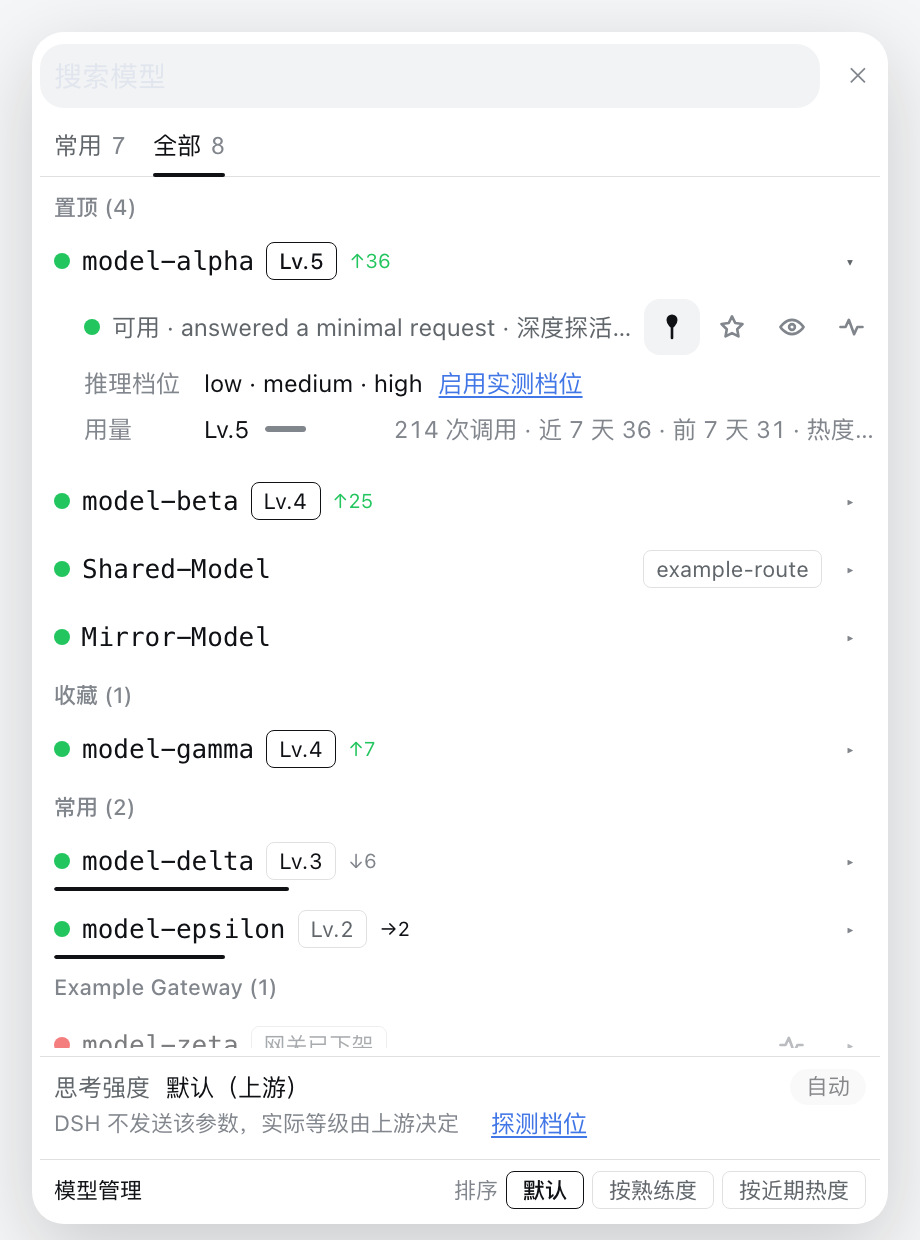
The picture is a synthetic render, not a photograph of anyone's harness: shots.mjs puts
the real client.js in front of a real engine with the app's own theme tokens and an
invented catalogue — fake models on fake routes — so a published screenshot cannot contain a
route you do not already have. That is also why shots.mjs exists next to screenshot.mjs:
the latter drives a running harness, which is the right tool for seeing your own
catalogue in your own theme, and the wrong one for a public image, because it photographs
whatever routes and models the author happens to have configured. Regenerate the images
here with DSH_CHECKOUT=… node shots.mjs.
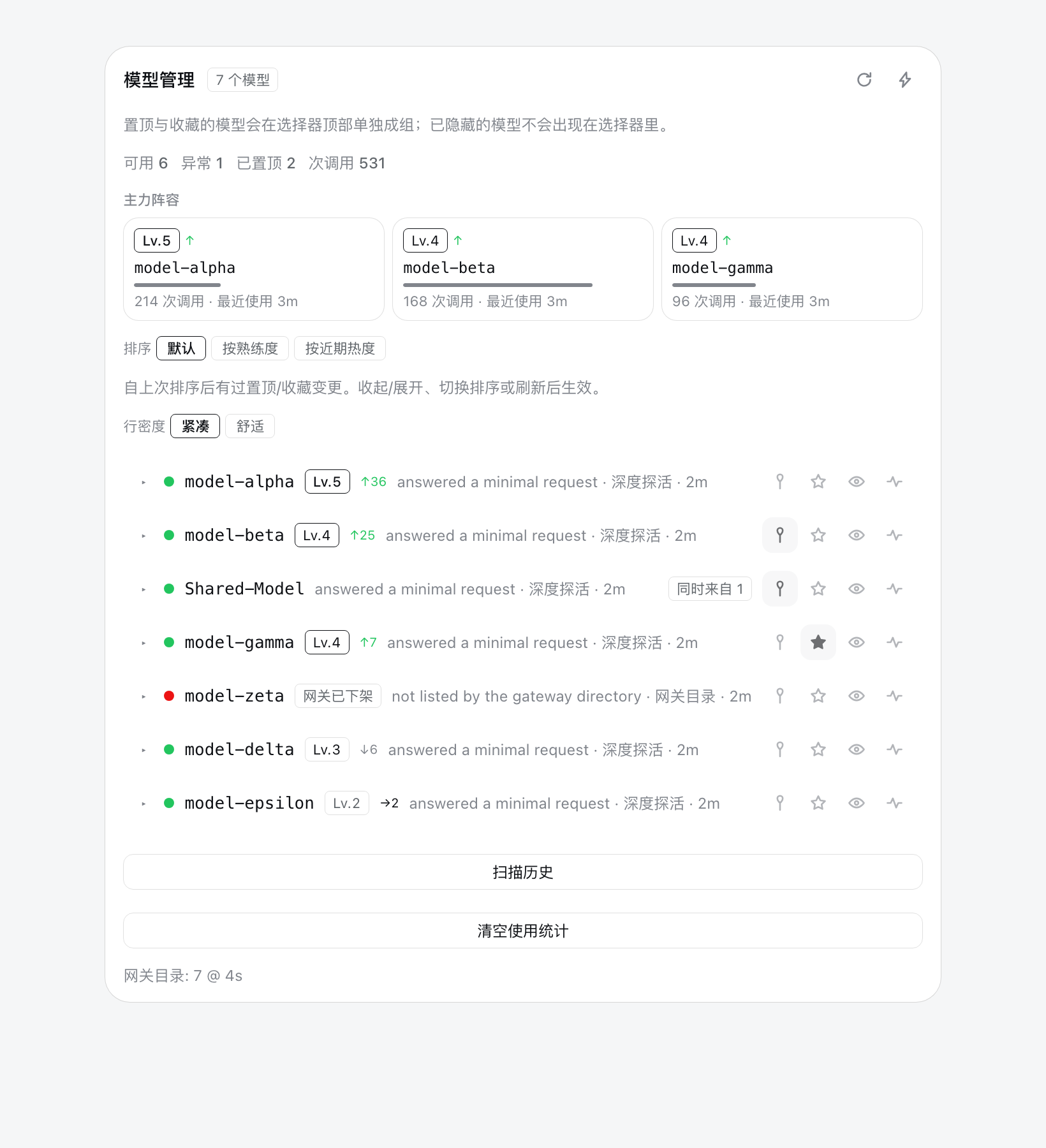
The panel, from the same renderer:
The picker opens on Pinned, then Favorites, then Most used, then one section per route. Pins and favorites are lifted out of their route and shown once, at the top, so a favorite is one click away no matter how many routes the profile has or how many models sit ahead of it alphabetically. Below the sections, each route still lists everything else, minus the rows already lifted — every listed model is offered exactly once. Hidden models are not selectable, but they are not discarded either: they collect in a Hidden section at the bottom, which is the only place the menu can offer them back.
A model that is both pinned and favorited appears under Pinned only, matching the fallback chain's own precedence, where a pin outranks a favorite.
Most used is earned rather than declared: it holds the five models this profile reaches for most, ranked by heat, so the models you actually work with rise to the top without being pinned by hand. It is capped, because it is a shortcut to the top of the list rather than a second copy of the catalogue, and it never repeats a pin or a favorite.
Because a lifted row is no longer under its route's heading, a section that spans more than one route prints the route beside each model. The same model id on two routes is two different selections, and the row has to say which one it means. A section that stays on one route prints nothing, since the label would be noise on every row.
Rows keep their health dot and reason chip, so an unusable model is visibly unusable here too — but it is still selectable. The plugin's view of a model can be stale, and hiding a model from the picker is the one thing this design refuses to do silently. Search filters across the lifted sections as well as the route groups.
A model that has been used carries a proficiency chip beside its name (Lv.3) and, when
this week differs from last, a trend arrow with the 7-day count attached (↑12, ↓4).
The count is the part that carries the meaning: an arrow alone cannot be told apart from one
extra request. A model that has been used carries no trend at all once it has been idle for a
week — there is no recent use to report, and a flat arrow would invent one. A model that has
never been used carries no chip at all: a wall of Lv.1 badges on an untouched catalogue
would be noise rather than information, so the chip itself is the signal that there is
history behind a row.
Most used carries a distance-to-next-level bar under each row, because it is the one section built entirely from usage and the one where the models you are actually choosing between live. The bar is a hairline on the row's bottom edge, so it costs the list no height. Each row's tooltip spells the whole figure out — level, uses, the count that reaches the next level, tokens in/out, and whether the number came from the history scan.
Once any model has usage, a Sort control at the foot of the card orders the rows inside every section: the default designed order, By proficiency, or By recent use. It sits outside the scrolling list so it stays reachable, and it exists only when there is usage to sort by — on a fresh profile it would offer three orderings that all look alike. The two usage orderings answer different questions, and on a real profile they disagree: the model you have used most is often not the one you are reaching for today.
The session options the shipped menu carried
The shipped menu renders two child seats under its root: the model label, and a list of
session options. The list has exactly one occupant today — the agent-team switch
(「启用智能体团队协作」 / Enable agent teamwork) from ui-agent-team.
Taking the seat takes those children with it, and a replacement cannot re-declare them: a child seat has one declaration and the shipped entry owns it. The options list therefore has to be re-provided by hand, against the same projection and the same remote call the shipped switch uses — which is what the row at the foot of the picker does. It keeps the shipped copy verbatim (compared against upstream every run, both languages), hides itself for a child session and when the capability is absent, and asks before turning teamwork off once the session has already run a model choice, because the next turn only keeps its cache if it keeps the same tools. The confirmation is inline in the menu rather than in the shipped modal store, which this plugin does not own.
If a future harness lets a replacing entry inherit children, that row should be deleted
and renderSlot used instead. Until then, docs/upstream-parity.md
records the rule and verify-parity.mjs enforces it: every shipped occupant of a child
seat we inherit must be accounted for, and an unlisted one fails the suite — which is
how a capability stops disappearing quietly.
Managing a model without leaving the conversation
The picker is where you look at models most often, so the moment you notice one is unusable is the moment you want to act on it. Every row therefore carries a chevron that opens its management block: pin, favorite, hide, and deep probe, each with a label rather than a bare icon, above the same record the panel's detail block shows — the two surfaces render it from one component, so they cannot describe a model differently.
The chevron is the whole cost of this on a row. Four always-on icon buttons would take about a hundred pixels from a menu that is between 240 and 420 wide, and the model name is the most important thing in it; they would also turn one click target into five, so a near miss on "select" would silently hide a model. A chevron is one glyph, and it keeps every action reachable by pointer, keyboard and touch — where a hover-only strip would be reachable by pointer only.
Two consequences of putting management inside the picker are handled explicitly:
- Pinning does not move the row between sections. Freezing matters more here than in the panel, because a pin lifts a row clean out of its route group into Pinned. Section membership is frozen at the first pin or favorite and settles when the menu is next opened; what the row reports stays live, so the button lights up immediately. Freezing the row's own flags — the first thing this did — also froze the pin indicator, and the menu claimed the click had done nothing.
- Hiding is not a one-way door. A hidden model leaves the menu, as hiding means it should, but the menu collects hidden rows into a Hidden section at the bottom and offers Unhide in the same block. Filtering hidden rows out of the catalogue entirely — the original behaviour — made hiding from the picker permanent unless you went to settings.
A hidden model still lists in the panel, dimmed, where the same action brings it back.
The picker is styled from the panel's own vocabulary rather than as a separate design: the
same row box (padding, radius, hover background and hover border), the same dimming for
a de-emphasised row, the same focus ring, the same .llmm-chip for the route as the panel
uses for "also on", and section headings in the secondary label color. The brand color stays
reserved for state — the panel's active controls and the picker's current row. Two suites
assert this property by property, so the two surfaces cannot drift apart again.
Reasoning levels
A model that declares reasoning efforts gets a level segment on the trigger, beside the
model name: · High ▾. Clicking it opens the levels that model declared, and the choice
applies to the current session — no second menu, no settings round-trip.
Two different facts decide what that segment can offer, and conflating them is the trap:
- Measured — what the gateway accepted when the model was probed. A probe sweeps
minimalthroughmax, one tiny request per level, and keeps both the accepted and the refused answers. - Declared — what the provider's
reasoningEffortsconfig names. The harness validates a switch against this, so a level the gateway accepts but nobody declared is offered by nobody: the segment readsdefaultand cannot be changed, however good the probe's answer.
A probe closes that gap by itself: when the sweep measures any level, the answer is written back through the Host's settings service in the same call, so the levels the gateway accepts become switchable without a second click. A route whose settings the Host cannot edit simply gets no declaration — the probe's verdict still returns, and the detail block keeps its manual Use measured levels action as the fallback.
The write merges, and since DSH 0.2.2 that is not a stylistic choice: the pi-ai schema reads
a declaration as closed, so every level the dict does not name is pinned to unsupported.
Replacing the dict would therefore delete facts the probe never measured — the official off
level, a wire spelling that is not the level id, rows another editor wrote. Only missing levels
are added, off is never invented (an unset level already means "send nothing", which is what
this plugin measures as the gateway's ceiling, so declaring off would be a claim it cannot
support), and a model the platform already offers every measured level for is left untouched
entirely: no write, and already: true in the answer.
The rollback is unchanged and narrow: delete that model's reasoningEfforts keys.
A level the provider refuses is repaired rather than repeated — but the repair is to clear the level, not to pick another: DSH 0.2.2 gives "no explicit level" its own meaning (the adapter default, validated against the declaration), so re-pinning one would turn an automatic setting into an explicit one. The session is moved once per turn and the retry carries no level.
The session row underneath
The shipped menu ends with a row of session options, and the one that exists today
is Enable agent teamwork. We cannot inherit it: the renderer only hands an entry
the renderSlot prop when that entry declares the child slots itself, and the
slot table refuses a second declaration of a key the shipped entry already
declared. A replacement therefore renders fewer things, silently.
So the row is drawn here instead (TeamModeRow), driving the same projection and
the same remote method the shipped one does, and matching its behaviour point for
point: hidden for a child session, hidden while the projection is missing, and a
confirmation before switching it off once a model has been chosen in this
session — turning teamwork off mid-conversation stops the shared task tools, and
that is worth one question. The copy is the shipped copy, verbatim, in both
languages.
This is a debt, not a design preference: if the framework ever lets a replacement
inherit a seat's children, delete the row and call renderSlot again. The
parity check below exists to make sure the opposite case — a row appearing
upstream that nobody reproduces — fails loudly instead of going quiet.
The model manager
A dialog for the questions a picker cannot hold: which models may replace a failing route, what proficiency each model has earned, and what the last probes said. It opens from the picker's footer, from Ctrl/⌘+Shift+M anywhere in the session, and from the composer palette's Manage models row — the last two matter because the shipped picker is the default, and a dialog reachable only from our own picker would be unreachable.
Four tabs, one draft:
- Catalog — the same model-first list as the picker, with the four tools inline (pin, favorite, visibility, probe) and a row that expands into the proficiency editor beside the reasoning source and the connection summary.
- Failover — the ordered candidates, the enable switch, and a local "check
the chain" that answers from the catalog and the recorded health instead of
spending a request per candidate. Four notes above the button say what the
policy will and will not do. Adding a candidate opens a searchable list, not a
<select>: eighty models in a native dropdown are eighty identical lines, so the list carries each candidate's health (dot and word), the measured level and the route, sorts answered routes first, and filters as you type. - Switches — the automatic switches that actually happened, kept across sessions: which model failed, what it moved to, whether that recovered the turn, and how long ago. The aggregate is listed first and sorted by how often the model failed, because "which model keeps doing this" is the only form of the answer that can change a chain; the raw events sit below it as evidence. The log is bounded (200 entries) and clearable, since a history nobody can clear eventually describes a machine that no longer exists. Only proven switches are written — the same event that puts a banner on screen — so the count cannot include an intent that never landed. Each raw event names the Session it happened in, and that name is a link: clicking it opens the Session, which is the one place a reader can go and look at what actually failed. The label comes from the shell's own Session list rather than from the log, so a Session renamed since is not remembered under its old name, and a Session the shell no longer lists falls back to the id it was recorded with. Leaving for a Session closes the dialog through the same guard as the close button — an unsaved chain is still not dropped by a stray click, even when the click was somewhere useful.
- Probes — the last forty probes, newest first, written by every deep probe whether it came from the panel, the picker, the tool or a batch.
The catalog, from the same synthetic renderer:

The switch history, same render — one card per incident, each row carrying the clock time it happened at as well as the relative age:

The dialog's buttons draw their own chrome from the theme (border-l3 hairline,
button-primary-fill for the committing action) instead of inheriting the
browser's grey <button> face, which reads as a disabled control in this theme.
A model the gateway has withdrawn can be taken out of the catalogue from the row it expands into. This is a local decision, not a gateway call — the plugin cannot unregister a model upstream, and a button claiming otherwise would do nothing — so it is kept in its own overlay document and is undone from the same tab: the removed models are listed underneath the catalogue, marked with whether the gateway still serves them. Removal is keyed by model, not by route and model, because the catalogue rows are model-first: hiding one route's copy would leave the row on screen and the removal would read as broken. A removed model also leaves the fallback chain, because routing a turn into a model the user just took away contradicts the list they edited.
The gateway retires models without telling anyone, so the directory read that decides which rows still exist is worth distrusting on a delay: it is cached for thirty minutes, because each read costs a round trip per route. The header's refresh control forces that read, and the catalog states in one line what it is based on — which route, how many models, how old the reading. The result is reported by route and, when the gateway dropped something, as the names; "3 retired" would hand the matching of ids back to the user, which is the work the control exists to remove. Routes that expose no baseURL have no directory to read at all, so they are left out of that line rather than listed as unavailable: the built-in routes are in that state on every pull, and saying so once per route buried the one reading that meant something under a dozen that could never change and had no action behind them. Only "not one route could be read" turns the pull red.
Only what has no immediate meaning elsewhere waits for Save: the fallback chain and the manual proficiency. Pins, favorites and visibility write the moment you click them, because they already behave that way in the panel and drafting them would make "hide" look broken until a button was pressed. Closing with unsaved edits asks first, and the discard path writes nothing.
Panel controls
Row actions are icon-only buttons with the label on hover and on keyboard focus, so
four controls fit beside a model name instead of wrapping the row: pin, favorite, hide,
probe. Each carries an aria-label, so it stays readable to a screen reader. The header's
two actions (re-check the gateway, deep-probe all) use the same treatment.
Pinning does not move the row
The default order puts pinned and favorite rows first, so re-sorting on every toggle moved the row you had just clicked to the top of the list and took your scroll position with it: scroll down to model 40 of 80, pin it, and you are looking at a different part of the list. Toggling pin, favorite or hide now changes that row's state and not its position.
The order is frozen at the first toggle and applied at the boundaries where you expect the list to settle:
- collapsing or expanding the list,
- changing the sort,
- re-checking the gateway.
While a pending change is outstanding the panel says so, because a frozen list is otherwise indistinguishable from a pin that silently did nothing. Without the freeze the row under the cursor moves; with it, the only thing that moves is the pin icon.
A row carries the decision; the detail block carries the record
A row shows what choosing needs — health dot, name, status, level, recent-form count, and a
one-line reason. Everything the Host knows does not fit on one line at a readable size, so
each row has a chevron that opens a detail block beneath it. Both the chevron and the
model name open it; the chevron is the one that carries aria-expanded and the label, so
the block is reachable from the keyboard without adding a second tab stop per row.
The block lists the record in full: status, the complete reason, what checked it and when, whether the route's gateway directory still lists it, level and distance to the next level, a progress bar, uses, the last and previous seven days, heat, first and last use, tokens in/out, and whether the numbers came from the history scan or were counted live.
A hover tooltip was the alternative and it is the weaker one: it needs a pointer, it cannot be read on a touch screen, and it cannot be held open beside a second row to compare.
Density, and why the reason leads
The reason is the most informative thing about a flagged model and the first thing a narrow row truncates. It is rendered first — the source and age trail it, because the status dot and the status chip already say most of what they say. Trailing the reason meant the ellipsis ate exactly the part worth reading.
Two densities are offered, and the choice is remembered:
- Compact (default) keeps one line per row and gives the reason the remaining space.
- Comfortable gives the reason a second line, wrapped to two lines before it truncates.
With eighty models, compact is what keeps the list scannable; comfortable is for when you are investigating one of them.
The tooltip is rendered at the panel root rather than inside the row, because the row list is a scroll container that would clip it; it is positioned against the viewport and clamped so a button near an edge cannot push the label off-screen.
Clicking an action updates the row in the same frame (the flag is applied locally first) and the Host's authoritative snapshot then replaces it. A failed request rolls the row back, so the panel never keeps claiming a state the Host refused. Row actions stay visible at reduced opacity instead of appearing only on hover, because a touch device has no hover.
Every mutating action returns the new state under a top-level snapshot; that is the
contract that makes the optimistic update safe.
Proficiency and recent use
The panel's top card is Most used: the three models this route is actually worked with, each with its level, a bar to the next level, and the number of uses. Below the counts, a sort control switches the list between the default order, proficiency, and recent use.
Both numbers come from a local ledger, and the distinction between them is the point:
- Level is earned from the lifetime count and never decreases. It answers "how much have I used this model", which is why it does not fall when you spend a week elsewhere.
- Heat decays with a 14-day half-life, so it answers "what am I reaching for now". Both Most used sections — the panel's card and the picker's — rank by heat by default, not by the lifetime total, so the oldest model does not win forever.
The level steps are 0, 10, 30, 80, 200, 500 and 1200 uses, giving levels 1–7. Tokens are recorded and displayed but deliberately do not score: a handful of enormous requests should not read as expertise.
The ledger is counted from committed assistant messages in this profile's own session logs. Nothing is sent anywhere and no request is made to build it. Concretely, three choices keep the numbers honest:
- Counting from committed messages rather than from clicks on the menu means the ledger reflects work actually done. Picking a model you then cancel does not count.
- A retried request is recorded as an attempt, never as a use. A flaky gateway would otherwise multiply one answer into several levels of proficiency. (This is also why the ledger does not hook the streaming event: that one wraps every call, including retries and replays.)
- A replayed session event is deduplicated, so resuming a session does not double count it.
The ledger starts empty, but your history does not. On startup the plugin folds the session logs already on disk into the counters, so a model you have been using for months starts at its real level instead of level 1. This runs in the background and is bounded: it scans for up to 20 seconds, yields, and resumes on the next pass, because replaying a large corpus is disk-heavy and must not compete with the live session you are in. Each session it has already counted is marked, so resuming never double counts.
When it finds an empty or partial ledger, the panel says where the pass stands — waiting for the session service, reading your logs, how many responses it counted from how many sessions, or why it stopped. It says so on failure too, deliberately: an earlier version sampled the session service once at startup, and on a host whose service registered a moment later it answered "service not available" and wrote nothing. That empty ledger was indistinguishable from a correct one, and the feature looked dead while reporting nothing at all. Scan history at the bottom of the panel starts a pass on demand.
Because the counters are local and describe your own habits, deleting them does not require
hunting for a file: Clear usage at the bottom of the panel, or the reset-usage tool
action, for one model, one route, or the whole profile. Set usage.enabled: false to turn
the ledger off entirely.
Keeping up with the shipped menu
Replacing a shipped seat means owing it the rows that seat appends. That debt is easy to pay once and then forget: Enable agent teamwork was missing for a week because the replacement simply rendered one fewer line, and nothing failed.
docs/upstream-parity.json is the ledger — every seat we shadow, its child slots,
and every upstream row in them, marked as reproduced (with where) or deliberately
skipped (with why). tools/check-upstream.mjs reads it and checks three things
against the checkout:
- each seat and child slot still exists where the ledger says;
- every upstream registration into those child slots has a line in the ledger —
an unfamiliar
idfails the check rather than shipping as a silent omission; - the copy we reproduce still matches the shipped copy, character for character, in both languages.
verify.mjs runs it as one of its checks, so the comparison happens whenever the
suite is run instead of whenever someone remembers:
npm run check:upstream # needs DSH_CHECKOUT
Storage
One atomically-written JSON document per route under
$DSH_HOME/storages/llm-manage/<route>.json, holding favorites, pins, hidden,
recent and health (status, source, detail, scope, at), plus the usage
counters. Deleting the file resets that route's overlay.
Usage is the one part of that document written in batches rather than per event — counters
are debounced (usage.flushMs) because a session can commit many messages in a row, and the
panel flushes before it reads. The backfill watermark lives in a separate
__usage__.json in the same directory.
Two more documents hold decisions that outlive a session: __failover__.json keeps
the proven switch history (bounded at 200 entries), and __removed__.json keeps the
models taken out of the catalogue (bounded at 400). Both are local to this profile
and deleting either one only forgets that history.
Agent tool
The llm_models tool exposes the same operations: snapshot, pin, unpin, favorite,
unfavorite, hide, unhide, probe, sync, usage, seed-usage, reset-usage,
diagnostics. snapshot and diagnostics need no extra arguments; sync needs route;
probe and the overlay actions need both route and model. usage reports the ledger,
seed-usage re-runs the historical scan, and reset-usage deletes counters (all of them
when given no route). The browser half reads the same data over POST /api/llm-manage.
Applying a change after install
The profile installs this package as a symlink, so file edits land in the running profile immediately. The two halves then behave differently.
index.js (Host half) needs a full harness restart. The host HMR watcher skips
node_modules, where the install symlink lives, and its watch root is the profile
directory — while the real file resolves outside it. A marker written into index.js was
still absent from the running Host's responses minutes later, against a listener process
started the previous evening.
client.js (Client half) reloads on its own. The client HMR watcher is a stat poll
(default 500 ms) over every row in the composed graph — no node_modules exclusion — and
it re-reads the bundle from disk. Touching client.js produces a
rebuilt frame on /plugins/events, and the revision the server then advertises matches
one computed from the new file's mtime/ctime/size.
Enabling or disabling the bundle does not bust the ESM module cache for either half.
Known limits
- Deep probing assumes the OpenAI-compatible
/chat/completionsshape. A route speaking another protocol is reported as probed-with-this-shape, not as protocol-aware. - Protocol mismatches are labelled, not fixed. A model's protocol cannot be set
per-model:
apiis a route-level setting. The supported workaround is registering the samebaseURLas a second route withapi: anthropic-messages— which only helps if your gateway actually serves that endpoint. If it does not, the model is reported as protocol-incompatible rather than silently "fixed". - Passive learning needs a real failed request to observe a reason.
- The usage ledger reads session logs through the host's session service. A host that does not expose it still counts live traffic, but the historical backfill reports itself as unavailable instead of silently reporting zero history.
- The ledger is per profile, not per project: sessions from different working directories share one set of counters, because the profile is what owns the model configuration.
- A message that arrives before the plugin is loaded is not counted live. The startup
backfill covers it on the next run, unless
usage.seedis off. - The quota fallback needs the failing model's id, which it takes from the last
agent/requestit observed for that session. - The
managedpicker (the default) shadows the shipped picker atpriority: -1and re-supplies itsinjectface. That face is a per-registration business contract, so a future change to the shipped picker's face needs this plugin updated in step.selector.mode: nativewithdraws the shadow without a restart and leaves the shipped picker in place, decorated by theconversation.input.model.labelseat.
Licence
MIT — see LICENSE.
No comments yet. Be the first to write one.