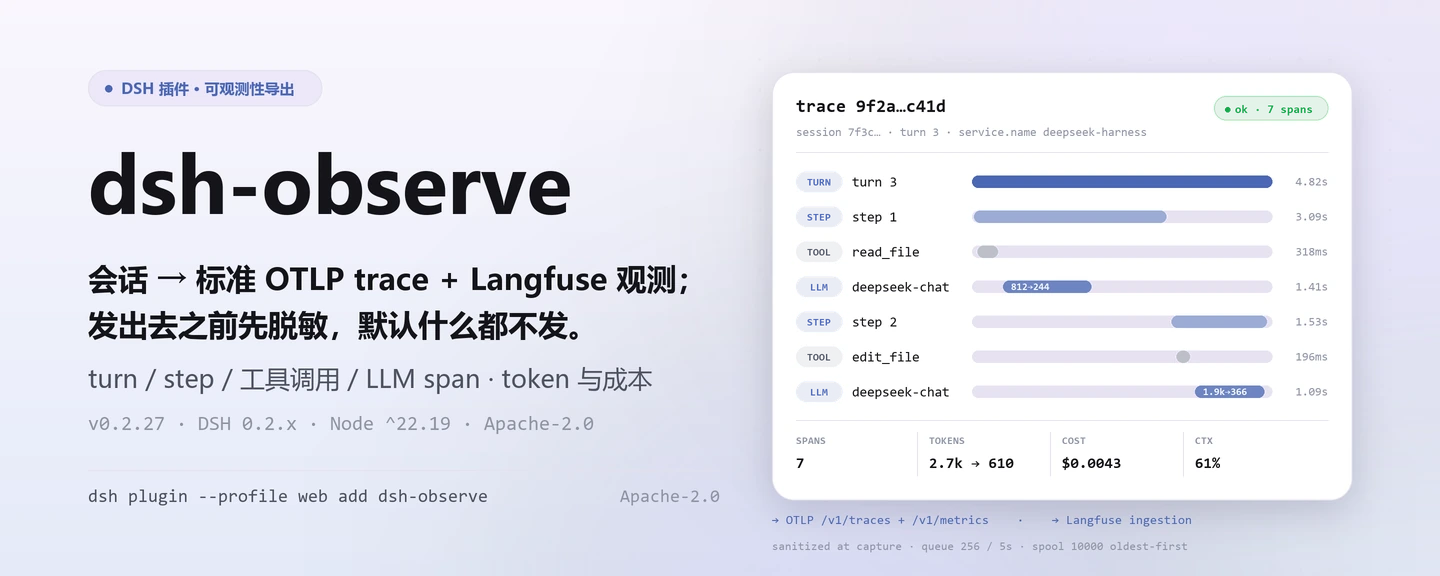
dsh-observe
把每次会话变成标准 OTLP trace 与 Langfuse 观测——发出去之前先脱敏,默认什么都不发。
面向 DeepSeek Harness 的可观测性导出器:turn/step/工具调用/LLM 生成 span,token 与 USD 成本指标,异步批量、有界离线缓冲、指数退避重试;OTLP 与 Langfuse 接其一或两个都接。
安装 · 配置 · FAQ · 简体中文 · English · Español · Português · हिन्दी









dsh plugin --profile <name> add dsh-observe
社区插件,与 DeepSeek 官方无关。唯一仓库:https://github.com/PerryLink/dsh-observe(Gitee 为镜像)。
它是什么
dsh-observe 把 harness 的 session/event 流翻译成标准可观测协议:一个 turn 一条 trace,step、工具调用与 LLM 生成各是一个 span,token 与成本是累计指标,prompt/completion 正文先脱敏截断再入队。它只做导出——不注册任何模型工具、不注册用户可见命令,全部行为由配置决定;配置了 OTLP 或 Langfuse 之后重启,数据自己流走,没配置就什么都不采集。
三步上手
安装(三选一):
# git 通道(最新 main;prepare 脚本只用生产依赖构建)
dsh plugin --profile web add github:PerryLink/dsh-observe
# npm 通道(已发布版本)
dsh plugin --profile web add dsh-observe
# tarball 通道:本仓库 pnpm pack 后
dsh plugin --profile web add ./dsh-observe-<version>.tgz
如果 pnpm 对本包报
ERR_PNPM_IGNORED_BUILDS(esbuild 的平台二进制无害校验),在你的pnpm-workspace.yaml中加入allowBuilds: { esbuild: true }——dshCLI 会打印确切片段。最小配置(在 profile patch 里打开
enabled并至少配一个后端;cordis.patch.yml里该行默认关闭):- insert: - id: dsh-observe name: dsh-observe config: enabled: true otlp: endpoint: http://localhost:4318Langfuse 侧同理:
langfuse.baseUrl+langfuse.publicKey+langfuse.secretKey,两者可以同时开。验证已生效:
dsh --profile web --dump-config | grep -A2 'id: dsh-observe'本插件不注册用户可见命令,所以没有
/observe之类的手动触发面;把remote.enabled设为true后,设置页可经observe/status读到已配置后端、队列深度与离线缓冲占用。
卸载:dsh plugin --profile web remove dsh-observe(或从 profile patch 删掉该行)。
所有 PerryLink 插件均可在 DSH Desktop 内置市场中浏览:市场 → 来源 → 添加来源 → 粘贴 https://perrylink-dsh-catalog.perrylink.workers.dev/catalog-source.json → 选中。安装仍需通过市场的 npm 身份校验与你的确认。
核心能力
dsh-observe 把会话事件流变成标准可观测协议:
- Spans —— turn、step、工具调用(耗时、状态、重试推导)与 LLM 生成 span,按 turn 连成 trace,id 确定性可复现。
- Metrics —— 按 provider/model 的 token 计数、USD 成本计数(可配价格表)、以及可选的
ctx.tokenMeter上下文压力 gauge。 - 脱敏采集 —— prompt 与 completion 正文先经结构性键名脱敏 + 内置密钥模式 + 自定义模式 + 字符预算截断,之后才进入队列或发送。
- 可靠性 —— 异步批量(数量与定时双触发)、有界持久离线缓冲(storage-domain,最旧优先淘汰)、确定性指数退避重试;未送达批次重启后仍在。
- 运行时总开关 —— 可选 Typert remote(
observe/status、observe/setEnabled)让设置页在不卸载的情况下停止/恢复导出。 - 默认关闭 ——
enabled: true且至少配置一个后端才是显式开启;否则不采集、不导出。
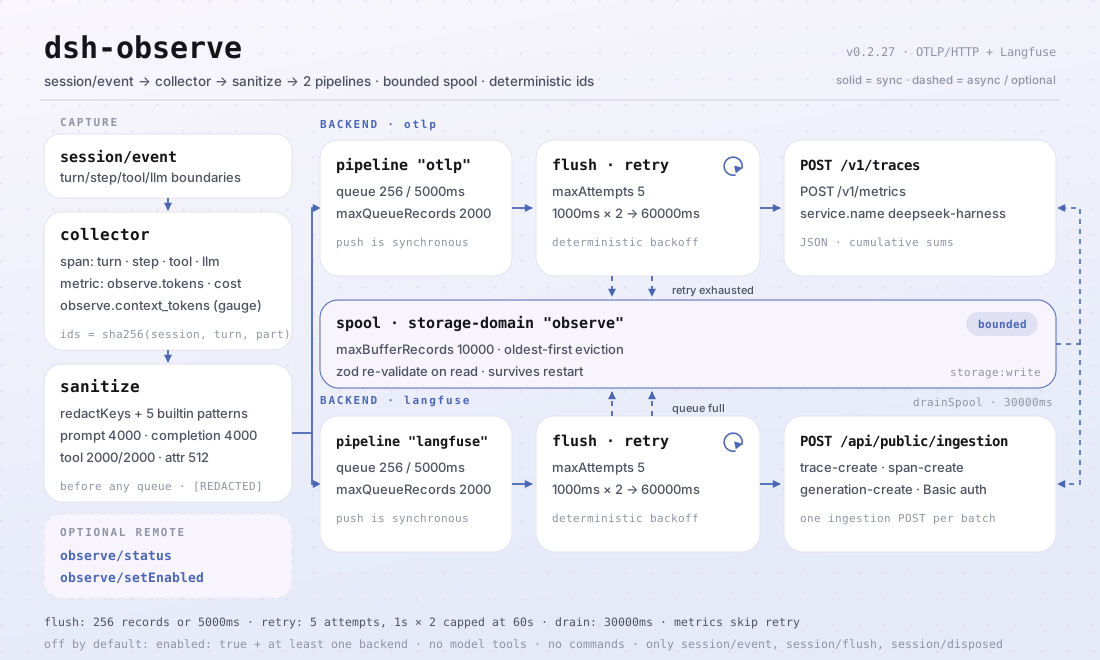
session/event 流
│ collector(turn/step/tool/llm span、metrics)
│ sanitize(键名、密钥、预算)
├──▶ pipeline "otlp" ── 队列 ── flush ──▶ OTLP /v1/traces + /v1/metrics
│ └─ 重试/退避 ──┐
├──▶ pipeline "langfuse" ── 队列 ── flush ──▶ Langfuse ingestion
│ └─ 重试/退避 ──┤
└────────── 持久 spool(离线缓冲,有界)◀┘
表面
本插件不注册任何模型工具,也不注册用户可见命令——它是后台导出器。它只有三类表面:
- 消费
session/event(span/metric 采集)、session/flush(尽力导出 kick —— 持久化检查点绝不等待远端后端)、session/disposed。 - 可选 remote 服务
observe(remote.enabled,默认关闭)——observe/status返回总开关状态、已配置后端、队列深度与缓冲占用;observe/setEnabled在运行时停止/恢复导出。 - 唯一注入的服务键
storageDomain,用于离线缓冲的持久表。
示例
没有手动触发面:安装后按上面的最小配置打开 enabled,重启后即可在 OTLP 后端看到 trace 与指标、在 Langfuse 看到 observations。要确认「确实在采集」,看后端收到的第一条 trace 即可;要确认「确实在发」,看 observe/status 的队列深度是否随会话推进而回落。
配置
所有可调项都是 Schemastery Config 字段(可在 cordis.yml / profile patch 中修改)。按 id 定向覆盖会替换整行 —— 需要重新声明每个键。cordis.patch.yml 逐键内联注释。
最常用键:
| 键 | 默认值 | 含义 |
|---|---|---|
enabled |
false |
总开关;true 且至少一个后端才是显式开启 |
otlp.endpoint |
(必填) | OTLP 基础 URL;/v1/traces 与 /v1/metrics 由插件追加 |
otlp.serviceName |
deepseek-harness |
service.name 资源属性 |
langfuse.baseUrl |
https://cloud.langfuse.com |
Langfuse 基础 URL |
langfuse.traceName |
session {session} turn {turn} |
trace 名称模板;{session}/{turn} 按 trace 插值 |
capture.llm |
true |
LLM 生成 span 开关 |
llm.prompt |
true |
采集脱敏后的请求 prompt(false 只记大小) |
batch.maxBufferRecords |
10000 |
持久离线缓冲上限;最旧记录先丢 |
remote.enabled |
false |
挂载 observe Typert remote(运行时总开关) |
| 键 | 默认值 | 含义 |
|---|---|---|
enabled |
false |
总开关;true 且至少一个后端才是显式开启 |
otlp |
null |
OTLP 后端配置,null 表示禁用 |
otlp.endpoint |
(必填) | OTLP 基础 URL;/v1/traces 与 /v1/metrics 由插件追加 |
otlp.serviceName |
deepseek-harness |
service.name 资源属性 |
otlp.serviceVersion |
(无) | service.version 资源属性 |
otlp.headers |
{} |
合并进每个导出请求的额外请求头 |
otlp.timeoutMs |
10000 |
单请求超时 |
langfuse |
null |
Langfuse 后端配置,null 表示禁用 |
langfuse.baseUrl |
https://cloud.langfuse.com |
Langfuse 基础 URL |
langfuse.publicKey |
(必填) | 项目公钥 |
langfuse.secretKey |
(必填) | 项目密钥 |
langfuse.release |
(无) | 打在各 trace 上的 release 标签 |
langfuse.traceName |
session {session} turn {turn} |
trace 名称模板;{session}/{turn} 按 trace 插值 |
langfuse.tags |
[] |
打在每个 trace 上的静态标签 |
langfuse.timeoutMs |
10000 |
单请求超时 |
capture.turns |
true |
turn 生命周期 span |
capture.steps |
true |
step 生命周期 span |
capture.tools |
true |
工具调用 span(参数/结果脱敏) |
capture.llm |
true |
LLM 生成 span |
llm.prompt |
true |
采集脱敏后的请求 prompt(false 只记大小) |
llm.completion |
true |
采集脱敏后的 completion(false 只记大小) |
metadata.sessionId |
true |
会话 id 属性 |
metadata.cwd |
false |
会话工作目录(本地路径——默认关闭) |
metadata.agentPreset |
true |
agent preset id 属性 |
metadata.model |
true |
provider/model 属性 |
metrics.tokens |
true |
按 provider/model 的 token 计数 |
metrics.cost |
true |
USD 成本计数(需 pricing 规则匹配) |
metrics.contextTokens |
true |
上下文压力 gauge(需 ctx.tokenMeter) |
pricing |
[] |
价格表,首个匹配生效:{ provider?, model, inputPerToken, outputPerToken, cacheReadPerToken?, cacheWritePerToken? } |
sanitize.enabled |
true |
脱敏总开关(false 只关脱敏,不关截断) |
sanitize.redactKeys |
[] |
额外键名子串(key/token/secret/password/authorization/credential/apiKey 恒生效) |
sanitize.redactPatterns |
[] |
额外密钥正则 |
sanitize.truncatePromptChars |
4000 |
prompt 字符预算 |
sanitize.truncateCompletionChars |
4000 |
completion 字符预算 |
sanitize.truncateToolInputChars |
2000 |
工具参数字符预算 |
sanitize.truncateToolOutputChars |
2000 |
工具结果字符预算 |
sanitize.truncateAttributeChars |
512 |
span 属性字符串预算 |
batch.maxRecords |
256 |
队列达到该数量即 flush |
batch.flushIntervalMs |
5000 |
定时 flush 间隔 |
batch.maxQueueRecords |
2000 |
内存队列上限;超出溢入缓冲 |
batch.maxBufferRecords |
10000 |
持久离线缓冲上限;最旧记录先丢 |
batch.bufferRetryIntervalMs |
30000 |
离线缓冲重试间隔 |
retry.maxAttempts |
5 |
每批尝试次数(含首次) |
retry.baseDelayMs |
1000 |
首次退避延迟 |
retry.factor |
2 |
每连续失败一次的退避倍数 |
retry.maxDelayMs |
60000 |
退避上限 |
remote.enabled |
false |
挂载 observe Typert remote(运行时总开关) |
按 id 覆盖的示例(会替换整行,所以重述需要的键):
- insert:
    - id: dsh-observe
      name: dsh-observe
      config:
        enabled: true
        otlp:
          endpoint: http://localhost:4318
capture:
tools: false
sanitize:
truncatePromptChars: 2000
batch:
maxBufferRecords: 20000
FAQ
会不会把 prompt、工具参数原文发到后端?不会按原文发出。每条记录在入队之前就完成三层脱敏:结构性键名(key/token/secret/password/authorization/credential/apiKey 恒在名单内,可用 sanitize.redactKeys 追加子串)、内置密钥模式(API key、GitHub token、AWS key、bearer 凭据、私钥)加 sanitize.redactPatterns 自定义正则、以及字符预算截断(prompt/completion 各 4000、工具参数与结果各 2000、span 属性 512)。只想要体积不想要正文时,把 llm.prompt 与 llm.completion 设为 false,记录里只剩大小与计数。
普通 span 与指标走「重试 → 溢出到离线缓冲」这条链:批次失败按 retry.maxAttempts(默认 5 次)与 retry.baseDelayMs × retry.factor 的确定性指数退避重试,重试耗尽或内存队列超过 batch.maxQueueRecords 时溢出到有界持久 spool(batch.maxBufferRecords 默认 10000,最旧优先淘汰),并有 batch.bufferRetryIntervalMs 的周期性回灌,重启后未送达批次仍在。OTLP metrics 是例外:它按累计聚合,丢一次 flush 会在下一次自愈。
离线缓冲里只有已脱敏的记录,且从存储读回时会再校验一次才交给 sink。插件本身不存任何凭据:Langfuse 公钥/密钥只出现在发往你配置的 Langfuse 端点的请求里,OTLP 请求头同理只发往你配置的 OTLP 端点——请用凭据引用或环境注入,不要写进 profile patch 提交。它只读会话事件流,从不读取或改写会话日志文件。
会不会拖慢会话?采集与脱敏都在事件处理里同步完成,但发送全部是异步的:队列按数量或定时 flush,session/flush 只是一次尽力而为的 kick——持久化检查点绝不等待远端后端。导出失败会告警、计数(observe.export_failures)、重试,最后进缓冲;会话事件处理器本身抛错会被捕获并记录,可观测性不会拖垮 harness 热路径。
只注入一个服务键 storageDomain,只监听三个 session/* 事件,不注册模型工具、不注册命令、不注册 client slot、不监听任何 waterfall,也不改全局对象。唯一需要留意的命名面是可选 remote 服务 observe(remote.enabled 默认关闭)——同一 profile 里若已有别的插件占用同名服务,只开其中一个。
安全边界
- 默认关闭 —— 不显式开启(
enabled: true且至少一个后端)则不采集、不导出。 - 发送前脱敏 —— 结构性键名脱敏、内置密钥模式(API key、GitHub token、AWS key、bearer 凭据、私钥)、自定义模式与字符预算,全部在任何记录离开内存前生效。
- 持久边界再校验 —— 从存储读回的记录在到达 sink 前再次检查。
- 失败大声、失败隔离 —— 导出失败会告警、计数、重试并最终入缓冲;会话事件处理失败被捕获并记录,可观测性永远不会拖垮 harness 热路径。
- 模型可见 ⟺ 已记录 —— prompt/completion 导出只投影会话 surface(其节点 0 即系统提示词)与已记录的 header(调用配置与工具);导出器不发明任何内容。
权限与数据
- 权限:对你配置的端点出网(
network:outbound)、读取事件流(session:read)、写离线缓冲(storage:write);无原生代码、无文件系统访问。 - 数据:所有外发内容都来自会话日志,并在入队、缓冲、发送前完成脱敏(脱敏 + 截断)。离线缓冲只存脱敏记录,读回时再次校验。
- 凭据:Langfuse 公钥/密钥只发往你配置的 Langfuse 端点;OTLP 请求头只发往你配置的 OTLP 端点。插件自身不存任何凭据 —— 请使用凭据引用或环境注入。
已知限制
- 基线
0.2.2-rc.1—— 插件针对@deepseek-ai/dsh@0.2.2-rc.1开发与测试(devDependencies 与 CI 的主尺子);engines.dsh的>=0.2.1-0 <0.3.0 || >=0.2.2-0 <0.3.0与 peer 复合范围让每条已发布线都可安装,更旧的基线由第二把尺子(typecheck:ci)与 compat 工作流覆盖。 - 审计事件不落盘 —— 本插件自身的
observe/*记录仅作审计:当前宿主线的会话 append 闸门只接纳 surface 事件,因此不会有observe/*事件写入会话日志;插件也不会用未标记 append 伪造一条(那会让会话不可读)。审计面请以observe/status输出(需remote.enabled: true)与 OTLP/Langfuse 后端为准。 - Metrics 不走重试/缓冲路径 —— OTLP metrics 按累计聚合,丢失一次 flush 会在下一次自愈(设计如此,非缺陷)。
- 无采样 —— 每个启用的 span 族都会导出;大流量会话请调整
capture.*开关与batch.maxBufferRecords。
与其他 DSH 插件的互操作性
本插件的注册面很窄,因此天然不易与别的插件冲突:
- 无工具名冲突 —— 不注册任何模型工具(README 与
src/index.ts均无工具注册)。 - 无命令名冲突 —— 不注册用户可见命令,斜杠命令命名空间完全不碰。
- 无 client slot 冲突 —— 本包不含浏览器半(无
client/目录),不注册任何 client slot。 - 无 waterfall 短路 —— 只读监听
session/event、session/flush、session/disposed,不监听任何 allow/passthrough 型 waterfall,因此不存在压住别人决策的问题。 - 唯一的服务键 ——
storageDomain(注入,不提供);另有一个可选的 remote 服务observe,仅在remote.enabled: true时注册。 - 出网只去你配置的端点 —— OTLP 与 Langfuse 各自独立,关掉一个不影响另一个。
如果你在同一个 profile 里同时装了别的可观测性插件,注意两点:两者都会消费 session/event(Cordis 的广播语义,互相不会饿死),但会产生两份 trace;以及不要同时注册 observe 这个 remote 服务名。
兼容性
| 维度 | 状态 |
|---|---|
| Harness | DeepSeek Harness dsh-v0.2.1-alpha.1(2026-10-04 已适配):会话格式 V4 把工具结果改为 role: 'tool' 的一等消息,顶层携带 toolCallId + content + 可选 isError —— V3 的 tool-result 内容块已从宿主 ContentBlockMap 移除,本插件只读 V4 形状(升级前的 V3 日志仍可经只读兼容路径投影)。会话格式 V3 的其余特征沿用:助手流内嵌到 assistant/message / assistant/attempt,系统提示词为 surface 节点 0(system/message);本插件只消费实时事件流,从不读取会话日志文件。engines.dsh 为 >=0.2.1-0 <0.3.0 || >=0.2.2-0 <0.3.0,profile 安装冒烟由 compat 工作流覆盖。 |
| Node | ^22.19.0 || >=24.9.0,纯 ESM("type": "module") |
| 后端 | OpenTelemetry OTLP/HTTP(traces + metrics,JSON 编码)与 Langfuse(LLM 可观测)——二选一或同时 |
| 模型 | 与模型无关:它导出 session/event 流,自身不调用任何模型 |
peer 依赖:@deepseek-ai/cordis ^4.0.5-alpha.1、@deepseek-ai/schemastery ^3.18.5,以及 @deepseek-ai/dsh-llm、@deepseek-ai/dsh-session、@deepseek-ai/dsh-storage、@deepseek-ai/dsh-storage-domain、@deepseek-ai/dsh-storage-json、@deepseek-ai/dsh-typert-protocol(>=0.1.2-rc.1 <0.2.0 || >=0.1.5-alpha.1 <0.2.0 || >=0.1.6-0 <0.2.0 || >=0.1.7-0 <0.2.0 || >=0.2.0-0 <0.3.0 || >=0.2.1-0 <0.3.0 || >=0.2.2-0 <0.3.0;devDependencies 钉 0.2.2-rc.1)。zod 是唯一的运行时依赖,用于离线缓冲的持久边界校验。
生态与质量
- Gitee 镜像(同步镜像,以 GitHub 为准)
- dshfind 插件页(安装量与排名)
- OpenSSF Scorecard 报告(由 .github/workflows/scorecard.yml 驱动)
- dsh-plugin-doctor 验证报告
- DSH Market(已上架)
- 1024 商店渠道:先
npm i -g dsh1024,再dsh1024 plugin --profile web add dsh-observe(计入 deepseek1024.com 安装排行) - 生态实测知识库:插件开发指南 · 选型实测数据 · 维护取舍判据
开发
pnpm install               # node ^22.19 || >=24.9
pnpm run typecheck         # tsc:src + tests,对照 0.2.2-rc.1 devDeps(无 tsconfig paths)
pnpm run typecheck:ci      # tsc:对照已发布线(无 paths)
pnpm run check:ruler-live  # canary:必须编译失败,以证明尺子仍是活的(需 checkout 面)
pnpm test                  # vitest:126 个测试、18 个套件(真实 Context/Session/storage 接缝)
pnpm run test:coverage     # 覆盖率门禁(90/80/90/90)
pnpm run build             # tsdown bundle + tsc 声明(lib/)
pnpm run verify:self-contained  # 依赖声明全部来自 registry
pnpm run verify:artifacts       # 构建产物 ESM 面 + bundle patch 齐全
node scripts/check-readme-sync.mjs  # 五语 README 同步门
pnpm pack                  # 发布用 tarball
配图由 scripts/gen-readme-assets.py 程序化生成(Pillow 绘制 1440×576 hero,结构图为手写 1100×660 SVG),输出 docs/assets/dsh-observe-hero-{zh,en}-{light,dark}.webp 四张与 docs/assets/dsh-observe-flow-v5-{light,dark}.svg 一对,可重复执行。旧的 docs/assets/dsh-observe-flow-{light,dark}.svg、dsh-observe-flow.svg、dsh-observe-hero.png 与 dsh-observe-demo.{png,gif} 保留在原处以防外链失效,README 不再引用。
Topics:dsh, dsh-plugin, deepseek-harness, deepseek, cordis, observability, opentelemetry, otlp, langfuse, tracing
家族与致谢
本项目是 PerryLink 维护的 DeepSeek Harness 插件家族成员(全部 Apache-2.0)。如果这个插件帮到了你,给个 star——它不解锁任何功能,但会让下一个人更容易找到它。
- @PerryLink —— 创建者与维护者:collector、pipeline、spool、OTLP/Langfuse sink、脱敏层与五语文档。
License
LICENSE(Apache License 2.0)© 2026 dsh-observe contributors
Apache-2.0 · 社区插件,与 DeepSeek 无关。
No comments yet. Be the first to write one.