dsh-all-usage

中文
DeepSeek Harness 全量用量看板:按模型、供应商、工作区和时间范围分析 Token、缓存与账户余额。
功能
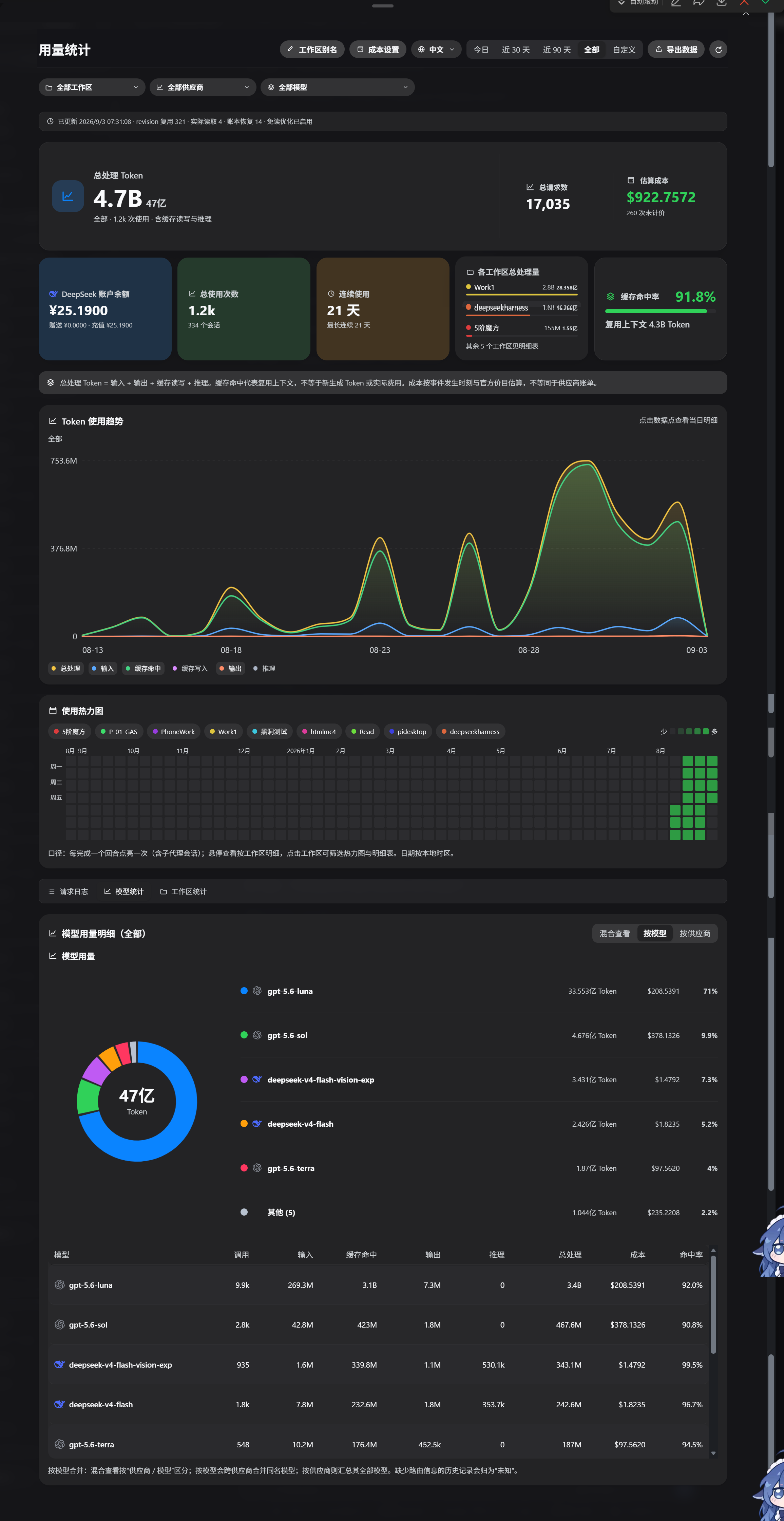
- 热力图:53 周使用热力图;按工作区筛选并查看每日回合与 Token 明细
- 模型统计:支持混合查看、按模型合并、按供应商汇总三种维度,展示调用次数、各类 Token 与缓存命中率;模型行与筛选下拉显示真实厂商品牌 SVG 图标(未知/混牌保持中性)
- 摘要与工作区:Token 用量、缓存命中、估算成本、账户余额、连续使用、工作区 Token 分布和明细
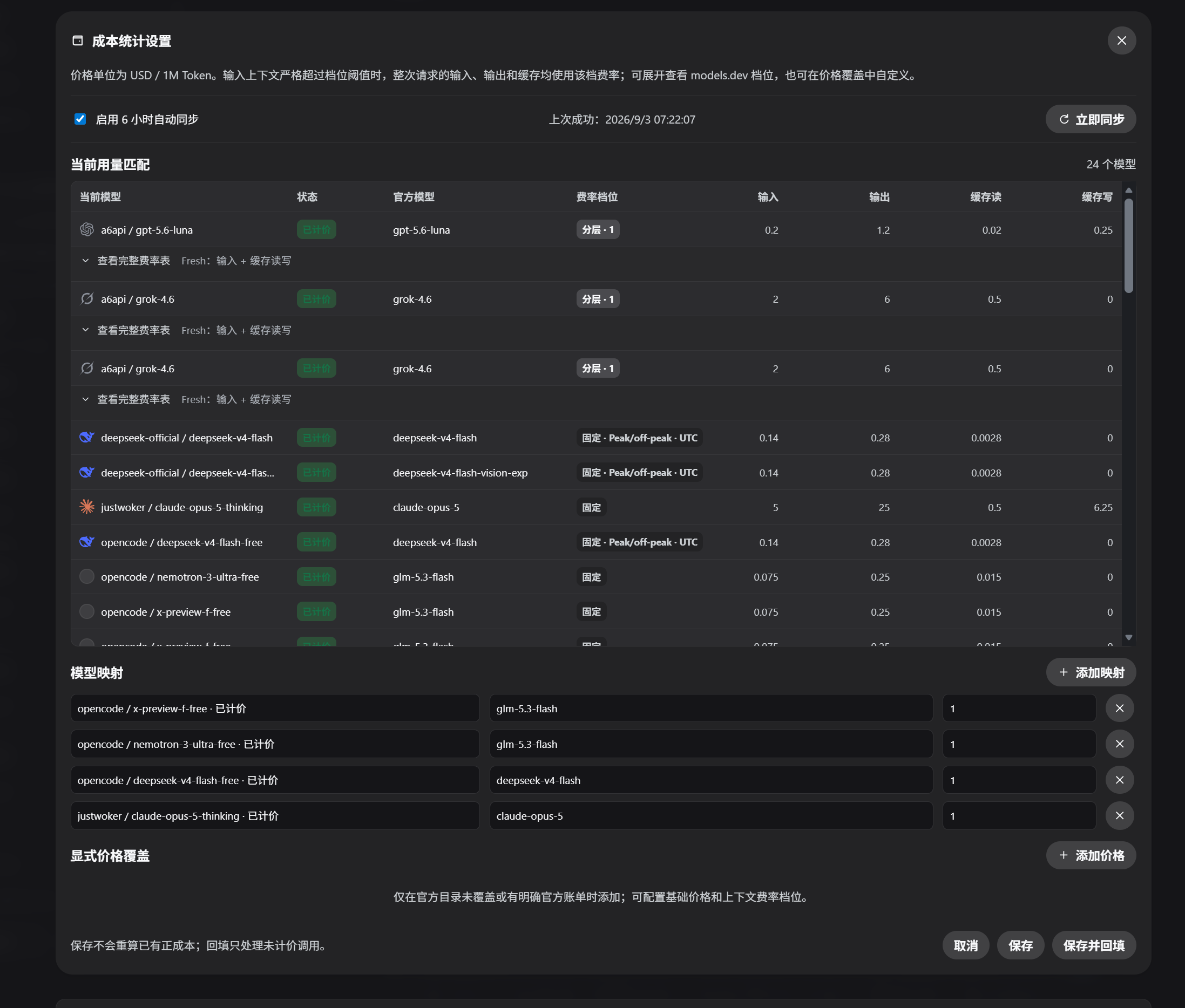
- 成本统计:从 models.dev 同步模型价格;按输入、输出、缓存读取和缓存写入四个桶计算,保存价格快照,明确区分已计价、免费模型和未计价调用
- 导出:按当前时间范围和模型聚合方式导出 CSV
- 时间范围:今日、近 30 天、近 90 天、全部,或在全部可扫描历史日数据中自定义起止日期;热力图始终展示最近 53 周
- 工作区别名:在侧栏入口打开看板后管理,持久化保存到 $DSH_HOME/storages 的 KV 单元
all_usage_aliases - 界面语言:在看板顶部切换中文与 English;选择会保存到浏览器本地
- 完整历史与增量重建:基线扫描全部可读历史会话;独立用量账本同时作为每会话游标——未变化的会话直接复用账本,新增事件只增量回填,长历史重启不再全量重建
- 重启免读:用持久化日志的 revision 作为每会话的变更信号(只读头部行 + stat,不读全量)——日志未变的会话重启时连事件都不读,直接从账本复用;仅日志变化(新增/修改)的会话才做增量读取
- 数据健康与按需刷新:扫描完成后浏览器只检查轻量状态版本,只有用量、别名或同步状态变化时才拉完整历史;显示本次数据更新时间、历史扫描健康、revision 免读、实际读取、账本恢复和失败,网络异常保留上次成功数据并可重试
- 工作区注册同步:监听 DSH 的
domain/changed事件自动跟随工作区注册表——注册表一有改动(创建/删除/重命名/重排/归档/成员变化)就重读workspaceRegistry.list();只对新增/删除的工作区做增量处理,未变化的已有工作区直接复用已计算账本(零重扫)。统计严格限定已注册工作区:未注册 cwd(含存在但未登记目录)一律忽略 - 性能优化:Host 在 ingest 时维护 local/UTC 的日期、工作区、模型身份日级 cube 与单日小时桶;scope 查询按 bucket 合并,成本使用精确 BigInt 小数累加,53 周热力图只生成实际需要的字段,并继续使用 revision-scoped snapshot/records 缓存和可回收的实时事件队列;Client 将热力图、tooltip、趋势、环形图、请求日志和定价对话框隔离为 memoized 边界,指针坐标通过 ref + requestAnimationFrame 更新,不再触发整页重渲染;浏览器入口在打包前确定性压缩
- 趋势折线图:按当前范围、时区、工作区、供应商和模型显示输入、缓存读写、输出、推理及总处理量;单日范围按小时聚合并显示小时轴,跨日范围按日聚合;使用平滑单调曲线与入场动画,悬停查看精确值,图例可切换曲线,点击点位进入当日明细
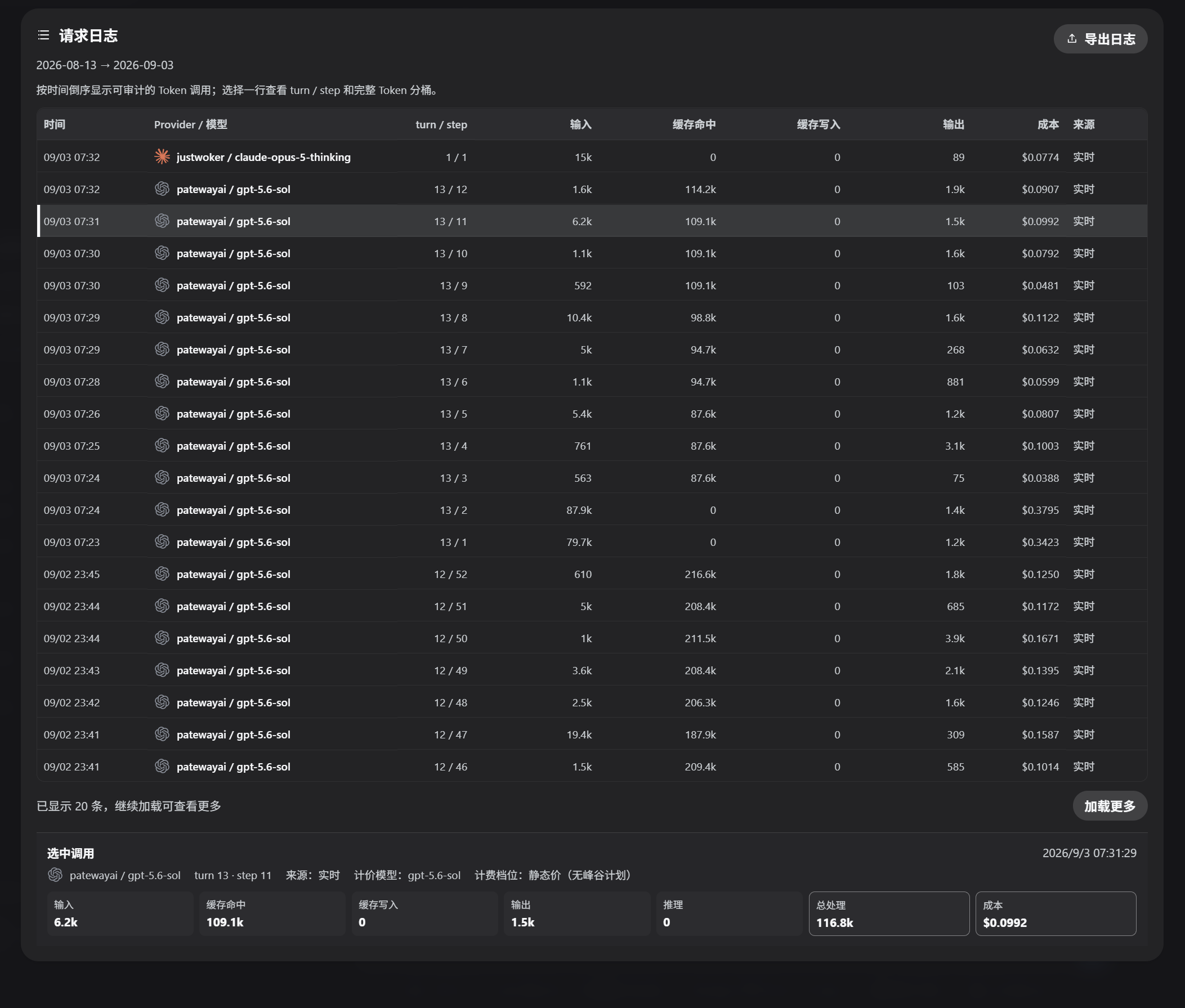
- 统一筛选与审计:工作区、供应商、模型和日期筛选贯穿摘要、热力图、趋势、表格与 CSV;工作区、供应商、模型三个筛选维度可独立自由组合,工作区、供应商和模型选项只展示当前日期范围内实际使用过的值;切换范围后失效筛选会自动清除;请求日志以紧凑分页表常驻显示,选择单条后查看分组 Token 详情
- Token 口径:输入按「未含缓存命中」计,缓存命中 / 写入与推理独立成桶;全 0 用量的重放事件不会覆盖已记录的真实用量,仅缓存命中的请求也会计入
- 成本口径:模型价格来自 models.dev 的 USD / 1M Token 目录;成本快照按 DSH 已归一化的 fresh input 和四类价格桶计算,倍率只作用于最终总价,已有正成本历史不会因价格更新重算;只按模型选择官方厂商条目,未找到官方价格时显示为未计价
兼容性与已知限制
- 运行环境:需要 Node.js
>=22 <25;CI 会在 Node 22 和 Node 24 上运行测试、语法检查和 npm 包内容检查。 - DSH 兼容:
package.json声明 DSH runtime>=0.1.1-rc.1 <0.1.2,已使用0.1.1-rc.2和0.1.1-rc.1的真实 Cordis 服务链验证;0.1.2-rc.1已通过本人实际使用验证兼容,但尚未纳入 CI smoke 矩阵。 - Web 服务依赖:Host 将
webServer声明为必需依赖,确保服务晚挂载时由 DSH 等待后再执行插件;该包面向 DSH Web profile,不提供无 WebServer 的 headless 路由。HTTP 守卫还会检查真实 socket peer,反向代理只有在连接本身来自 loopback 时才会被接受。
| DSH runtime | Node.js 支持 | 真实 Cordis smoke | 结论 |
|---|---|---|---|
0.1.2-rc.1 |
>=22 <25 |
通过(本人实际使用验证,未纳入 CI) | 已实际验证兼容 |
0.1.1-rc.2 |
>=22 <25,CI 覆盖 22/24 |
通过(当前 Node 24) | 已声明、已验证 |
0.1.1-rc.1 |
>=22 <25,CI 覆盖 22/24 |
通过(当前 Node 24) | 已声明、已验证 |
| 其他版本 | >=22 <25 |
未测试 | 不在已验证矩阵内 |
未列出的 DSH 版本不代表一定不兼容;提交问题时请附 DSH、Node.js 和插件版本。
- 中断请求:上游请求被中断时可能只有
assistant/chunk的 usage,没有最终assistant/message;本插件会保留该 chunk 用量。同一turn / step后续出现最终 message 时,message 会替换 chunk。若上游完全没有 usage 事件,则无法从响应内容精确恢复 Token。 - 估算成本:成本是基于 models.dev 价格和 DSH usage 桶的估算,不是供应商账单;目录不可用或模型没有官方匹配时不会猜测价格,而是显示未计价。缓存读取、缓存写入和 reasoning 的口径取决于 DSH 上游事件。
- 分层价格:models.dev 的 tiered/context-dependent 价格按本次请求的输入上下文(fresh input + cache read + cache write)选择对应档位;阈值边界遵循目录定义,无法验证的异常 tier 仍显示为 unsupported。
- 工作区边界:只有 cwd 能映射到 DSH 已注册工作区的会话才进入统计;未注册 cwd(包括已存在但未在 registry 中登记的目录)会被忽略。工作区注册列表通过 DSH 的
domain/changed探针自动同步:注册表一有改动就重读并只对新增/删除的工作区做增量处理,未变化的已有工作区直接复用已计算账本,不会全量重扫。会话尚未成功 flush 前删除或损坏的日志无法由独立账本恢复。
本地统计与官方账单
本插件展示的是 DSH 本地事件日志上的可重放统计,不是供应商账单的镜像:
- 本地统计读取 DSH 的
assistant/chunk、最终assistant/message和其他会话事件,按同一turn / step去重和替换;官方账单可能按供应商自己的请求、分词器、舍入、折扣、免费额度和结算周期计算。 - 失败请求只要留下 usage chunk,就会进入本地统计;供应商是否对该失败请求收费,应以官方账单为准。
- 价格来自 models.dev 的公开模型目录和本地显式覆盖;目录价格、供应商实际价格、区域费率和账单折扣可能不同。成本字段应理解为估算值。
- 本地统计只包含已注册工作区;未注册 cwd 与已删除目录的旧 ledger 不进入统计,并可能因日志损坏、清理或上游没有发出 usage 而少于官方账单。
可复现事件示例
下面的事件是脱敏的最小示例;完整可运行数据见 fixtures/usage-events.json。
失败请求仍保留 usage chunk
[
  {"type": "assistant/chunk", "data": {"turn": 1, "step": 1, "chunk": {"type": "usage", "usage": {"inputTokens": 100, "outputTokens": 20}}}},
  {"type": "request/error", "data": {"code": "upstream-failed"}}
]
没有最终 assistant/message 时,chunk 仍计为一个本地调用;这不等于官方一定收费。
孤立 usage chunk
{"type": "assistant/chunk", "data": {"turn": 1, "step": 1, "chunk": {"type": "usage", "usage": {"inputTokens": 7, "cacheReadTokens": 8}}}}
缺少 request/context 或 request/header 时,Token 仍可统计,但模型身份显示为 Unknown;插件不会从 Provider 名称或展示字符串猜测模型。
缓存 Token 的四桶含义
{"inputTokens": 100, "outputTokens": 20, "cacheReadTokens": 40, "cacheWriteTokens": 5, "reasoningTokens": 3}
本地 processed total 为 100 + 20 + 40 + 5 + 3 = 168;成本只对 input、output、cacheRead、cacheWrite 四个桶定价,reasoning 不会再次加到 output。
使用仓库中的 fixture 复现:
node scripts/replay-fixture.mjs fixtures/usage-events.json
该命令会加载真实插件 Host、调用兼容 API、校验预期 Token/records,并输出不含敏感信息的摘要。
报告问题
最近更新
v1.1.5
- 工作区注册探针:自动跟随 DSH 工作区注册表(
domain/changed事件);只对新增/删除的工作区增量重扫,未变化工作区直接复用账本,零全量重扫。移除了手动“刷新工作区”按钮与其POST /api/all-usage/workspaces/refresh路由。 - 严格注册边界:统计只包含 cwd 能映射到已注册工作区的会话;未登记目录(即使存在)与历史
unregistered:账本行不再进入统计,已删除目录的旧账本行在恢复时跳过(sourceCwd现在随每条账本持久化以校验归属)。
v1.1.4
- 模型品牌图标:请求日志、选中调用详情、模型统计表、成本设置匹配表、环形图图例与模型筛选下拉现在显示真实厂商品牌 SVG(DeepSeek、OpenAI、Claude、Gemini、Meta、Zhipu、xAI、Qwen、Doubao、Kimi、MiniMax);模型命名空间优先于 DSH 供应商名,未知或混牌行保持中性。图标在构建期以 data URI 内嵌并由 scripts/svg-guard.mjs 校验(实体解码、CSS 转义/CDO/命名空间、url()/image-set() 均覆盖,注释与文本不误杀),运行时零网络请求。
- 构建安全加固:补齐 CDO/CDC 邻接 at-import、命名空间 style 元素、CSS 转义 url() 与外部 image-set() 四类绕过,并把 CSS 检查收窄到 style 属性与 style 体;对抗用例现在断言拒绝原因。
- 三张用量仪表盘截图刷新为当前 UI。
v1.1.3
- 成本统计支持经验证的 context-tiered 官方费率、可展开费率表和显式价格覆盖。
- 性能优化:账本采用稳定分片、dirty flush 合并和 revision 快路径;查询、趋势和固定 53 周热力图改用写入时聚合索引,减少历史扫描、存储写放大和 Dashboard 重渲染。
- 定价目录、价格同步、模型检索和映射编辑强化确定性与并发刷新边界。
- 加强非法序列、旧账本、工作区重建、滞后 persistence revision 与复合账本键的恢复保护。
- 增加 Node 22/24、DSH rc.1/rc.2 runtime smoke、脱敏 fixture replay 和包内容发布门禁。
完整版本记录见 CHANGELOG.md。
截图 / Screenshots
安装
本插件是标准的 DSH 社区插件包(声明 dsh.bundle manifest 与 Web Client),数据来自持久化会话日志和独立用量账本,安装后自动回填历史。
官方插件命令(推荐)
dsh plugin --profile web add github:ParticleLight/dsh-all-usage
安装命令会装配 bundle;随后刷新浏览器页面以加载 Client,无需手动修改 profile。若当前 DSH 版本未动态装配新包,请按 DSH 的提示重载包或重启进程。
手动注册(本地包)
把本目录放入任意位置,并在 $DSH_HOME/profiles/node_modules/ 下创建指向本目录的符号链接(Windows 用 junction):
New-Item -ItemType Junction -Path (Join-Path $env:DSH_HOME 'profiles/node_modules/dsh-all-usage') -Target '<本目录绝对路径>'在 $DSH_HOME/profiles/web/cordis.patch.yml 添加一行:
- insert:
    - id: all-usage
      name: dsh-all-usage
用户 patch 层会被热重载:保存后刷新页面即可。
架构
- Host 端(入口
lib/index.js,组装lib/plugin.js):按职责拆分为aggregation.js(聚合与查询)、ledger.js(持久账本)、session-sync.js(历史/实时同步)、pricing-runtime.js(运行时定价)、balance.js(余额)、http.js(安全路由);扫描turn/end、assistant/chunkusage 和最终assistant/message.usage,监听session/event实时折叠,并通过webServer服务注册数据路由:GET /api/all-usage— 兼容统计快照GET /api/all-usage/status— 轻量 revision 与同步健康状态GET /api/all-usage/query— 按 scope 返回聚合、daily/hourly 趋势和 heatmap 数据;单日 scope 填充hourly,跨日 scope 的hourly为空GET /api/all-usage/records— 按 scope 分页返回脱敏 canonical usage rowsGET /api/all-usage/balance?force=1— 账户余额(复用llm-deepseek的 API Key 配置)POST /api/all-usage/alias— 设置工作区别名GET /api/all-usage/pricing— 查看 models.dev 同步状态、已用模型匹配和显式覆盖GET /api/all-usage/pricing/models?q=...— 检索官方模型 ID 与名称匹配结果POST /api/all-usage/pricing— 保存同步、mapping 和显式价格覆盖(含 context tier 档位)POST /api/all-usage/pricing/sync— 手动同步 models.dev 并回填未计价调用
- Client 端:可读源码位于
src/client.js,npm run build:client使用固定版本 Terser 生成window.__ModuleLoader__工厂格式的lib/client.js浏览器 bundle,并注册侧边栏「用量统计」入口(sidebar.footer.action槽位)。所有 API 仅接受本机 loopback 请求并拒绝显式跨域请求;余额读取与别名写入还要求插件启动时生成、仅在当前进程有效的令牌(余额 GET 兼容浏览器省略 Origin)。英文模式的日期分桶、范围筛选、连续使用、热力图和导出时间统一按 UTC;中文模式按本地时区。
数据说明
- 使用次数与 Token 来自 DSH 会话日志;
session/flush只在存在新的相关事件时重建并将派生账本写入异步队列,同一 session 的 pending record 会合并,插件退出时 drain;插件激活时会回填日志与账本历史,插件卸载/重启后已成功持久化的数据不丢 - 按日范围统计会保留全部可读取历史会话的有使用记录日期;热力图仅作为最近 53 周的固定视图窗口
- 会话删除后,已成功 flush 的用量仍从独立账本恢复;会话销毁提示和周期对账只负责触发重建,不会删除账本记录
- 同一会话的同一
turn / step只保留一份最终 usage;重试或替换消息会替换旧贡献,不重复累计 - 输入 Token 按「未含缓存命中」计(缓存命中 / 写入独立成桶);全 0 用量的重放事件不会覆盖已记录的真实用量,纯缓存命中的请求仍会计入
- 轻量状态接口只公开 Host 实例、统计 revision、扫描进度与同步计数,不公开会话 ID、工作区路径、提示词或回复正文;完整快照仅在状态变化或手动刷新时获取
- scope query 将回合(turns)、模型调用(calls)和去重会话(sessions)分开统计;Provider/模型筛选缺少路由信息时明确归为 Unknown,不从展示字符串猜测
- records 接口只返回短 hash、时间、工作区 ID、结构化模型身份、turn/step、Token buckets 和当前物化来源,不返回原始 session ID、路径、提示词、回复或凭据
- 看板中的总处理量 = 输入 + 输出 + 缓存读写 + 推理;缓存命中表示复用的上下文 Token,不等于新生成 Token 或实际费用
- 成本计算沿用 cc-switch 的四桶公式:输入、输出、缓存读取和缓存写入分别乘每百万价格,四项相加后再乘倍率;context tier 在输入上下文严格大于阈值时为整次请求切换四项费率,不做渐进分段;DSH 的 reasoning 字段不再次加到 output,避免底层 completion/thoughts 已含推理时重复计费
- 历史账本中带
tiered标志的旧 flat 成本会在加载升级时迁移为unsupported(tiered-pricing-not-modeled),不再继续显示为当前精确 priced;Token 统计不受影响。 - 价格同步默认关闭;models.dev 不可用时保留最近一次成功目录,未匹配模型不会套用默认价格;成本设置可展开查看官方档位,并为显式 override 增删 context tier;看板范围与明细视图保存在浏览器本地,6 小时自动同步开关会立即写入受保护的 pricing API
- Mapping 语义:带
identityKey的 mapping 只对精确路由身份生效;不带身份键的 mapping 才按模型做全局回退;旧配置中的usageIdentityKey会在加载时归一化。 - 余额查询走 DeepSeek 官方
/user/balance接口;未配置 API Key 时卡片显示引导文案 - 账本按 session ID 稳定 hash 到 32 个 JSON shard,单次 flush 只重写对应 shard;旧的
all_usage_ledger.json会在首次加载时迁移,异步写失败或退出前未落盘不会丢失内存统计,只会让下次启动重新扫描 - 仅统计能归属到已注册工作区(按会话 cwd 匹配)的会话
开发
- 修改
src/client.js后先运行npm run build:client,再让 DSH 重载客户端模块并刷新页面;lib/client.js是生成产物,不直接编辑。修改lib/plugin.js或其他 Host 模块后,需由 DSH 重载该包或重启进程 - 插件无第三方运行时依赖:Host 端只使用 Cordis 服务,Client 端只使用 runtime 提供的 React 模块;Terser 仅作为固定版本开发依赖生成浏览器产物
- 手动恢复 npm 发布时,GitHub Actions 要求输入目标
v<package.version>tag 和完整 commit SHA,并在 checkout 后校验 tag、SHA 与包版本一致;Release 事件同样执行 commit 校验。
English
A full usage dashboard for DeepSeek Harness. Analyze tokens, cache behavior, estimated cost, account balance, and activity by model, provider, workspace, and time range.
Features
- Heatmap: a 53-week activity heatmap with workspace filters and daily turn/token details
- Model analytics: mixed view, model-merged view, and provider summary with calls, token categories, and cache hit rate; model rows and the model filter dropdown render vendor brand SVG icons (neutral for unknown or mixed brands)
- Summary and workspaces: processed tokens, cache hits, estimated cost, account balance, usage streaks, workspace distribution, and details
- Cost statistics: sync model prices from models.dev, calculate four cost buckets, persist price snapshots, and distinguish priced, free, ambiguous, and unpriced calls
- CSV export: export data using the selected time range and aggregation mode
- Time ranges: today, last 30 days, last 90 days, all time, or a custom start/end date across all available historical daily data; the heatmap always shows the latest 53 weeks
- Workspace aliases: manage aliases from the sidebar dashboard; values persist in the $DSH_HOME/storages KV cell
all_usage_aliases - Interface language: switch between Chinese and English from the dashboard header; your choice persists locally in the browser
- Full history & incremental rebuild: the baseline scans every readable historical session; the durable usage ledger doubles as a per-session cursor, so unchanged sessions are reused straight from the ledger and only newly appended events are folded — long histories restart without a full rebuild
- Restart with no re-read: the persisted log revision (a header-line + stat via
sessionPersistence.listSnapshots()) acts as a per-session change signal — sessions whose log is unchanged are applied from the ledger on restart without reading their events at all; only changed/new sessions are read incrementally - Workspace registry sync: follows DSH's
domain/changedevent so the workspace registry stays fresh automatically — any durable registry write (create/delete/rename/reorder/archive/membership) triggers a reread ofworkspaceRegistry.list(), with only added/removed workspaces reprocessed incrementally while unchanged workspaces reuse their computed aggregates and ledger (zero rescan). Usage is strictly limited to registered workspaces: unregistered cwds, including existing directories absent from the registry, are ignored. - Data health and on-demand refresh: after a scan completes, the browser polls only a lightweight status revision and fetches full history only after usage, alias, or sync state changes; it shows the latest full-data update, historical scan health, revision skips, rereads, ledger recovery, and failures while preserving last-good data on network errors
- Performance: Host maintains ingest-time local/UTC day, workspace, model-identity cubes and single-day hour buckets; scope queries merge buckets, exact costs use BigInt decimal accumulators, and the 53-week heatmap emits only the fields it consumes, while revision-scoped snapshot/records caches and recyclable live-event queues remain in place. Client isolates the heatmap, tooltip, trend, donuts, request records, and pricing dialog behind memoized boundaries; pointer coordinates update through refs plus requestAnimationFrame instead of rerendering the page, and the browser entry is deterministically minified before packing
- Trend line chart: show input, cache read/write, output, reasoning, and total processed tokens for the active range, timezone, workspace, provider, and model scope; use hourly buckets for a single-day scope and daily buckets for cross-day scopes, with smooth monotone curves, staged entrance animation, hover for exact values, and click a point to inspect that day
- Unified filters and audit: workspace, provider, model, and date filters apply to the summary, heatmap, trend, tables, and CSV; workspace, provider, and model filters remain independent and can be combined freely, while workspace, provider, and model options are limited to values used in the selected date range and stale selections clear automatically; request logs stay visible as a compact paginated table with grouped Token details for the selected row
- Token accounting semantics: input tokens are fresh (exclude cache hits/writes, which sit in separate buckets along with reasoning); all-zero usage replays never overwrite recorded usage, while cache-only requests still count
- Cost semantics: prices come from the models.dev USD per 1M token catalog; DSH-normalized fresh input and the four cost buckets are snapshotted at calculation time, the multiplier applies only to final total, and existing positive historical costs are not recalculated; matching uses the model's official vendor entry and ignores the DSH provider, while missing official prices stay unpriced
Compatibility and Known Limitations
- Runtime: Node.js
>=22 <25is required. CI runs the test suite, syntax checks, and package-content checks on Node 22 and Node 24. - DSH compatibility:
package.jsondeclares DSH runtime>=0.1.1-rc.1 <0.1.2; the real Cordis service chain is verified on0.1.1-rc.2and0.1.1-rc.1.0.1.2-rc.1has also been verified compatible through the maintainer's real-world use, but is not yet covered by the CI smoke matrix. - Web service dependency: the Host declares
webServeras a required dependency, so DSH waits for a late-mounted service before applying the plugin; this package targets the DSH Web profile and does not expose routes without WebServer. The HTTP guard also checks the actual socket peer, so a reverse proxy is accepted only when the connection itself is loopback.
| DSH runtime | Node.js support | Real Cordis smoke | Conclusion |
|---|---|---|---|
0.1.2-rc.1 |
>=22 <25 |
Passed through maintainer use (not in CI) | Verified compatible in real-world use |
0.1.1-rc.2 |
>=22 <25, CI covers 22/24 |
Passed (current Node 24) | Declared and verified |
0.1.1-rc.1 |
>=22 <25, CI covers 22/24 |
Passed (current Node 24) | Declared and verified |
| Other versions | >=22 <25 |
Not tested | Outside the verified matrix |
An unlisted DSH version is not necessarily incompatible. Include the DSH, Node.js, and plugin versions when reporting an issue.
- Interrupted requests: an interrupted upstream request may emit only
assistant/chunkusage and never produce a finalassistant/message; that chunk is retained. A later final message for the same turn/step replaces it. If the upstream emits no usage event at all, exact token usage cannot be reconstructed from response text. - Estimated cost: cost is an estimate based on models.dev rates and DSH usage buckets, not a provider invoice. Unavailable catalogs and unmatched models remain unpriced instead of receiving guessed rates. Cache reads, cache writes, and reasoning follow the buckets reported by the upstream DSH event.
- Tiered prices: models.dev context-tiered entries select the applicable rate from the request input context (fresh input plus cache read/write tokens); malformed schedules remain unsupported.
- Workspace boundary: only sessions whose cwd maps to a DSH-registered workspace are included. Unregistered cwds, including existing directories absent from the registry, are ignored. The registry is kept fresh by a
domain/changedprobe: any durable workspace-domain write triggers a reread, and only added/removed workspaces are reprocessed incrementally — unchanged workspaces reuse their computed aggregates and ledger. Data deleted or corrupted before a successful session flush cannot be recovered from the separate ledger.
Local Statistics vs Official Billing
This plugin reports replayable statistics from local DSH event logs; it is not a mirror of a provider invoice:
- Local statistics read DSH
assistant/chunk, finalassistant/message, and related session events, then deduplicate and replace samples by logicalturn / step. Official billing may use a provider tokenizer, rounding rules, discounts, free quotas, and billing periods. - A failed request is included locally whenever it leaves a usage chunk; whether the provider charged for that failed request must be checked against the official bill.
- Prices come from the public models.dev catalog and local explicit overrides. Catalog prices can differ from provider prices, regional rates, and invoice discounts, so the cost field is an estimate.
- Local statistics include registered workspaces only; unregistered cwds and old ledger rows for deleted directories are excluded, and totals can still be lower than the official bill when logs are damaged, cleaned up, or the upstream emits no usage event.
Reproducible Event Examples
The following are redacted minimal examples; the complete runnable data is in fixtures/usage-events.json.
Retaining a failed request chunk
[
  {"type": "assistant/chunk", "data": {"turn": 1, "step": 1, "chunk": {"type": "usage", "usage": {"inputTokens": 100, "outputTokens": 20}}}},
  {"type": "request/error", "data": {"code": "upstream-failed"}}
]
Without a final assistant/message, the chunk remains one local call; this does not mean the provider necessarily charged for it.
Orphan usage chunk
{"type": "assistant/chunk", "data": {"turn": 1, "step": 1, "chunk": {"type": "usage", "usage": {"inputTokens": 7, "cacheReadTokens": 8}}}}
Without request/context or request/header, tokens are still counted, but the model identity is shown as Unknown; the plugin does not guess a model from a provider name or display string.
Cache token buckets
{"inputTokens": 100, "outputTokens": 20, "cacheReadTokens": 40, "cacheWriteTokens": 5, "reasoningTokens": 3}
The local processed total is 100 + 20 + 40 + 5 + 3 = 168; cost uses the input, output, cacheRead, and cacheWrite buckets, and reasoning is not added to output again.
Replay the repository fixture:
node scripts/replay-fixture.mjs fixtures/usage-events.json
The command loads the real plugin Host, calls its compatible APIs, checks the documented token/record totals, and prints a non-sensitive summary.
Report An Issue
Latest Update
v1.1.5
- Workspace registry probe: all-usage follows DSH's workspace registry automatically through the
domain/changedevent; only added/removed workspaces are reprocessed incrementally while unchanged workspaces reuse their ledger with zero rescan. The manual Refresh workspaces control and itsPOST /api/all-usage/workspaces/refreshroute were removed. - Strict registration boundary: only sessions whose cwd maps to a registered workspace are counted; unregistered directories (even existing ones) and legacy
unregistered:ledger rows never re-enter statistics, and ledger rows for deleted directories are skipped on recovery (sourceCwdis now persisted with every ledger record so ownership can be validated after a restart).
v1.1.4
- Vendor brand icons: request logs, selected-call details, the model summary table, the cost-settings match table, donut legends, and the model filter dropdown now render real vendor brand SVGs (DeepSeek, OpenAI, Claude, Gemini, Meta, Zhipu, xAI, Qwen, Doubao, Kimi, MiniMax); the model namespace wins over the DSH provider name, and unknown or mixed-brand rows stay neutral. Icons are embedded as data URIs at build time and validated by scripts/svg-guard.mjs (entity decoding, CSS escapes/CDO/namespaced styles, url()/image-set() all covered, comments and text stay inert), with zero runtime network access.
- Build hardening: per the independent audit, closed four bypass classes (CDO/CDC-adjacent at-import, namespaced style elements, CSS-escaped url(), external image-set()) and scoped the CSS checks to style attributes and bodies; adversarial fixtures now assert the rejection reason.
- Refreshed the three usage-dashboard screenshots to the current UI.
v1.1.3
- Added validated context-tiered official pricing, expandable rate schedules, and explicit price overrides.
- Performance optimizations: the durable ledger uses stable shards, dirty-flush coalescing, and revision reuse; scoped queries, trends, and the fixed 53-week heatmap use ingest-time aggregates to reduce historical scans, storage write amplification, and Dashboard rerenders.
- Hardened deterministic pricing catalogs, pricing sync, official-model search, and mapping refresh races.
- Strengthened recovery for invalid sequences, legacy ledgers, recreated workspaces, lagging persistence revisions, and composite ledger keys.
- Added Node 22/24, DSH rc.1/rc.2 runtime smoke, redacted fixture replay, and package-content release gates.
See CHANGELOG.md for the complete version history.
Installation
This is a standard DSH community bundle. It declares a dsh.bundle manifest and a web client, and backfills its data from persisted session logs and the durable usage ledger after installation.
Official plugin command (recommended)
dsh plugin --profile web add github:ParticleLight/dsh-all-usage
The installation command assembles the bundle. Refresh the browser page to load the client; no manual profile edits are required. If your DSH version does not dynamically assemble newly installed packages, use its supported package reload or restart the process.
Manual local registration
Place this directory anywhere and create a symlink to it under $DSH_HOME/profiles/node_modules/ (use a junction on Windows):
New-Item -ItemType Junction -Path (Join-Path $env:DSH_HOME 'profiles/node_modules/dsh-all-usage') -Target '<absolute plugin path>'Add this entry to $DSH_HOME/profiles/web/cordis.patch.yml:
- insert:
    - id: all-usage
      name: dsh-all-usage
The profile patch layer hot-reloads; save the file and refresh the page.
Architecture
- Host (entry
lib/index.js, assembled bylib/plugin.js): split by responsibility acrossaggregation.js(aggregation/query),ledger.js(durable ledger),session-sync.js(history/live sync),pricing-runtime.js(runtime pricing),balance.js(balance), andhttp.js(protected routes); aggregatesturn/end,assistant/chunkusage, and finalassistant/message.usage, folds livesession/eventupdates, and exposes data routes throughwebServer:GET /api/all-usage— compatible usage snapshotGET /api/all-usage/status— lightweight revision and sync healthGET /api/all-usage/query— scoped aggregate, daily/hourly trend, and heatmap data; single-day scopes populatehourly, while cross-day scopes return an emptyhourlyarrayGET /api/all-usage/records— paginated privacy-safe canonical usage rowsGET /api/all-usage/balance?force=1— account balance using the configuredllm-deepseekAPI keyPOST /api/all-usage/alias— update workspace aliasesGET /api/all-usage/pricing— inspect models.dev sync status, used-model matches, and explicit overridesGET /api/all-usage/pricing/models?q=...— search official model IDs and display-name matchesPOST /api/all-usage/pricing— save sync, mappings, and explicit price overrides, including context-tier bandsPOST /api/all-usage/pricing/sync— sync models.dev and backfill unpriced calls
- Client: readable source lives in
src/client.js;npm run build:clientuses the pinned Terser version to generate thewindow.__ModuleLoader__bundle atlib/client.js, which registers the “Usage statistics” sidebar entry through thesidebar.footer.actionslot. All API routes accept loopback requests and reject an explicit cross-origin Origin; balance reads and alias writes also require a process-scoped token generated when the plugin starts (the balance GET tolerates browsers omitting Origin).
Data semantics
- Calls and tokens come from DSH session logs;
session/flushrebuilds and queues the derived ledger only when related events are dirty, coalescing the latest pending record per session and draining on plugin disposal. Readable logs and ledger history are backfilled when the plugin activates, so successfully persisted data survives reloads or session deletion - Day-level range data retains every readable historical session date with tracked usage; the heatmap is only a fixed latest-53-week view
- After a session is deleted, successfully flushed usage is restored from the separate ledger; disposal hints and periodic reconciliation trigger rebuilds without deleting ledger rows
- For each session and logical
turn / step, only the final usage contribution is kept; retries or replaced messages do not double-count - Input tokens are fresh (exclude cache hits/writes, which sit in their own buckets); all-zero usage replays do not overwrite recorded usage and pure cache-read requests still count
- The lightweight status endpoint exposes only Host instance, stats revision, scan progress, and sync counters. It does not expose session IDs, workspace paths, prompts, or reply bodies; full snapshots are fetched only after status changes or a manual refresh
- Scoped results keep turns, model calls, and distinct sessions as separate metrics; missing route identity is explicitly Unknown rather than inferred from a display label
- The records endpoint returns only a short hash, time, workspace ID, structured model identity, turn/step, token buckets, and current materialization source. It omits raw session IDs, paths, prompts, replies, and credentials
- Processed tokens = input + output + cache read/write + reasoning; a cache hit means reused context, not newly generated tokens or actual cost
- Cost follows the cc-switch four-bucket formula: input, output, cache-read, and cache-write tokens are priced independently, summed, then multiplied by the final multiplier; when input context is strictly greater than a context-tier threshold, all four rates switch for the whole request instead of progressive band splitting, and DSH reasoning is not added to output a second time
- Legacy ledger costs carrying
tieredare migrated tounsupported(tiered-pricing-not-modeled) on load instead of remaining falsely marked as current flat priced estimates; token statistics are unchanged. - Pricing sync is off by default; when models.dev is unavailable the last good catalog remains in use, and unmatched models never receive a guessed default price; Cost Statistics can expand official tier schedules and add or remove context tiers on explicit overrides; dashboard range and detail-view preferences are stored in browser storage, while the 6-hour sync toggle is immediately saved through the protected pricing API
- Mapping semantics: a mapping with
identityKeyapplies only to that exact route identity; a mapping without an identity key is the model-wide fallback. LegacyusageIdentityKeyvalues are normalized when loaded. - Balance data comes from DeepSeek’s official
/user/balanceendpoint; the card shows guidance when no API key is configured - English mode uses UTC for date buckets, range filters, streaks, heatmap dates, and export timestamps; Chinese mode uses local time
- The ledger assigns each session ID to one of 32 stable-hash JSON shards, so a flush rewrites only its shard; the old
all_usage_ledger.jsonis migrated on first load. An async write failure or an unflushed shutdown does not lose in-memory statistics; the next startup simply scans that session again - Only sessions that can be mapped to a registered workspace by their working directory are included
Development
- After editing
src/client.js, runnpm run build:client, reload the DSH client module, and refresh the page;lib/client.jsis generated and should not be edited directly. After editinglib/plugin.jsor another Host module, reload the package through DSH or restart the process - The plugin has no third-party runtime dependencies: the Host uses Cordis services and the Client uses the runtime-provided React module; pinned Terser is only a development dependency for generating the browser artifact
- Manual npm recovery publishes require a target
v<package.version>tag and full commit SHA; GitHub Actions checks both against the checked-out tag and package version. Release events perform the same commit check.
License / 许可证
MIT
No comments yet. Be the first to write one.