dsh-live-loop
Your agent wrote the page. Now let it prove that the page actually works.
DeepSeek Harness frontend runtime verification for real local web applications.




English | 简体中文
Quick start · Capabilities · Agent tools · Security · Evidence
Give the agent a feedback loop
Coding tools can edit a page and build it. That does not prove the page loaded, the interaction worked, the browser stayed error-free, or the result matched the reference.
dsh-live-loop gives an installed DeepSeek Harness Agent one coherent runtime loop:
Understand → Edit → Detect → Run → Preview → Observe → Interact
→ Verify → Diagnose → Fix → Reload → Re-verify → Deliver with evidence
The plugin does not edit application code. DSH's normal coding tools remain responsible for that. Live Loop owns the dev-server lifecycle, isolated browser state, structured observation, interaction, verification, and durable evidence.
See it inside DSH Web
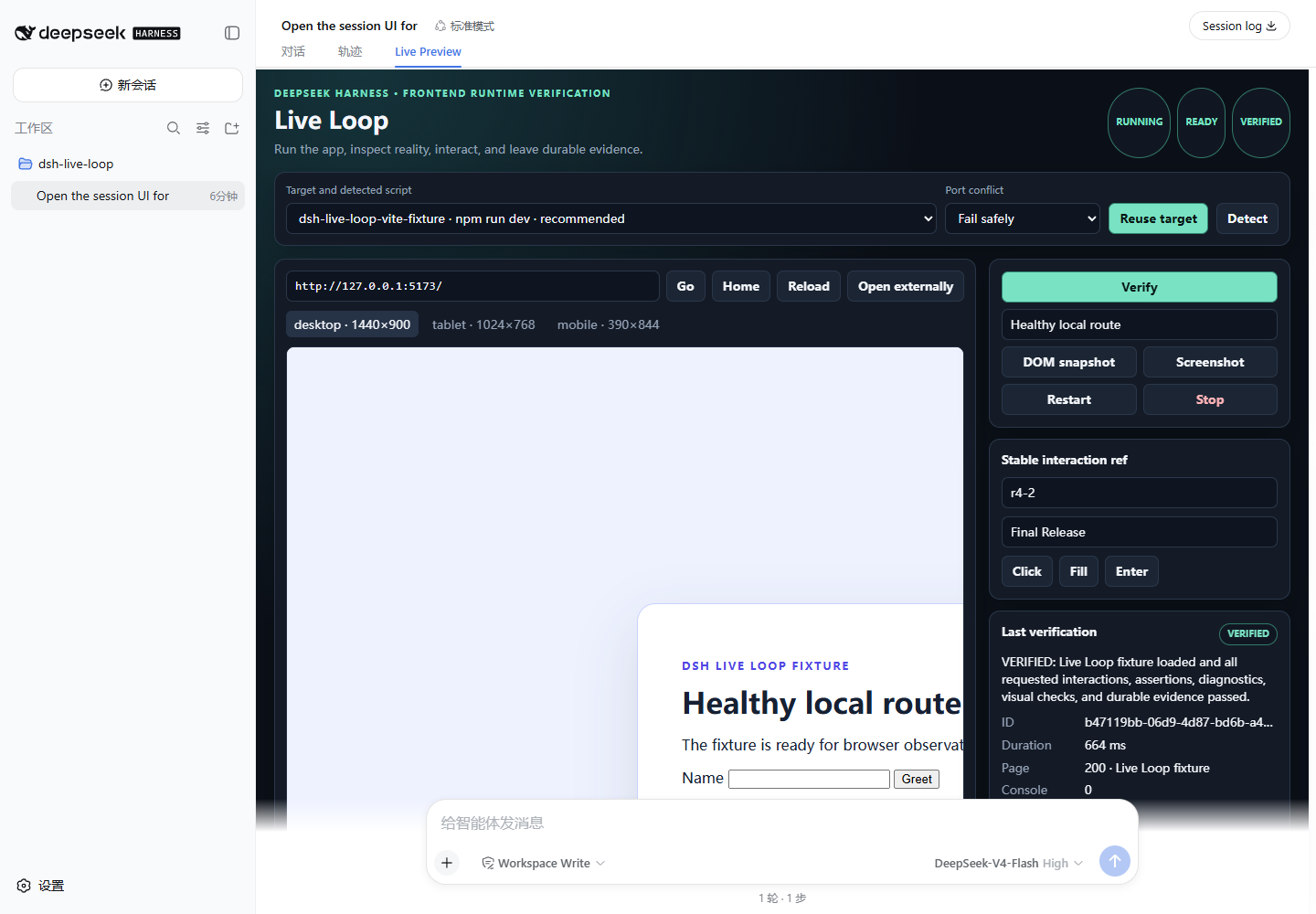
Real DSH 0.1.0-rc.7 clean-profile run: managed Vite app, native Live Preview, stable DOM ref, page status 200, zero Console errors, zero critical Network failures, and a VERIFIED report. This is not a mockup.
One loop, not another browser tool
| Detect | Run | Preview | Observe | Interact | Verify |
|---|---|---|---|---|---|
| Vite, React, Vue, Next.js, generic scripts, monorepos | DSH-owned process tree, health checks, safe port policy | Native DSH Web panel, viewports, iframe fallback | URL, title, DOM, Console, exceptions, Network | Stable refs, click, fill, type, press, scroll, history | Assertions, screenshots, visual diff, structured evidence |
What makes the plugin reusable is the system around the browser:
- structured target detection with explicit ambiguity instead of silently choosing the wrong app;
- argv-only execution through public DSH subprocess ownership, including bounded logs and cleanup;
- one isolated BrowserContext per DSH subject and Preview Session;
- bounded observation windows that work with HMR, WebSocket, SSE, and polling;
- DSH Attachment screenshots plus Reference / Current / Diff evidence;
- a strict four-state verdict that refuses to turn missing observation into a pass;
- a native DSH Web Live Preview, Verification Card, and Settings panel;
- failure diagnostics that tell the Agent what to fix before it verifies again.
Compatibility
| Component | Supported |
|---|---|
| DeepSeek Harness | exactly 0.1.0-rc.7 |
| Node.js | ^22.19.0 or >=24 |
| App package managers | npm, pnpm, Yarn; Bun detection is supported when Bun is on PATH |
| Browser runtime | installed Chrome, Edge, or Chromium |
| Tested app targets | Vite React, Vite Vue, Next.js, generic package script |
The DSH peer range is intentionally exact while the plugin ABI is release-candidate software. Do not run this plugin in a mixed rc.7/rc.8 dependency graph. Source installs use --legacy-peer-deps because several published rc.7 packages declare caret peer suggestions that npm otherwise tries to satisfy with rc.8; the committed lockfile itself contains no rc.8 package. See Compatibility for the verified seam and the published CLI resolution caveat.
Install from GitHub
The repository includes prebuilt lib/ artifacts so a Git checkout is inspectable and packageable without rebuilding DSH Web.
git clone https://github.com/POWERRRRRRRR/dsh-live-loop.git
cd dsh-live-loop
npm ci --legacy-peer-deps
npm run build
npm pack --ignore-scripts
dsh plugin --profile web add ./dsh-live-loop-1.0.0.tgz
Restart the web profile after installation because DSH resolves profile bundle membership at startup:
dsh --profile web --dump-config
dsh --profile web web
Run the final command from the workspace that contains the frontend you want the Agent to verify.
Quick start
- Open a DSH conversation in the frontend workspace.
- Select the Live Preview conversation view.
- Select Detect. If several targets or scripts are credible, choose one explicitly.
- Select Start. Live Loop waits for a discovered URL and a successful HTTP health check.
- Ask the Agent to modify the app and verify task-specific behavior.
- Accept completion only with a fresh
VERIFIEDor justifiedVERIFIED_WITH_WARNINGSreport and screenshot evidence.
Try this Agent request:
Fix the form, start or reuse the detected app, fill the Name textbox with Ada,
press Enter, assert that “Hello, Ada!” appears, and do not finish until
live_loop_verify returns VERIFIED with screenshot evidence.
The intended failure loop is equally important:
first verify: FAILED
→ inspect Console / Network / DOM / assertion / visual diff
→ edit the application
→ reload or let HMR apply
→ verify again: VERIFIED
→ deliver the report and evidence
Agent tools
The model-facing API stays deliberately small and non-overlapping.
| Tool | Purpose |
|---|---|
live_loop_detect |
Return structured target and run-profile candidates. |
live_loop_server |
start, stop, restart, and status with bounded logs. |
live_loop_browser |
Navigate, reload, history, snapshot, stable-ref interactions, wait, screenshot, diagnostics, and viewport. |
live_loop_verify |
Run the high-level observation, interaction, assertion, screenshot, optional visual-diff, and report transaction. |
Every result has a stable structured value, concise model-readable text, an explicit error code when applicable, a next action, bounded output, and a warning that page-derived content is untrusted evidence.
Truthful verification
A verification call establishes a fresh bounded observation window, loads or reloads the page, waits for DOM readiness plus network quiet, runs requested interactions and assertions, captures diagnostics and DOM state, persists a screenshot, optionally compares a reference, and writes a report.
| Status | Meaning |
|---|---|
VERIFIED |
Every requested check and required evidence completed without blocking diagnostics. |
VERIFIED_WITH_WARNINGS |
Required checks passed and all non-blocking warnings are explicit. |
FAILED |
The app was observed and a page, diagnostic, interaction, assertion, or visual requirement failed. |
UNVERIFIED |
Observation or evidence could not be completed, so no pass/fail claim is justified. |
VERIFIED is impossible when the browser is unavailable, the main document fails, stability times out, the observation boundary is unclear, an unignored Console error or critical Network failure exists, an interaction/assertion fails, a requested visual comparison is incomplete, or required screenshot evidence cannot be persisted.
Visual similarity is supporting evidence. It never overrides page loading, diagnostics, interactions, or assertions.
Architecture
The Host is the single source of truth. The Web client never guesses process, browser, target, or verdict state.
flowchart LR
    Agent[DSH Agent] --> Tools[4 Agent tools]
    Web[DSH Web client] --> RPC[Public Connection RPC]
    Tools --> Host[LiveLoop Host service]
    RPC --> Host
    Host --> Detect[Target detector]
    Host --> Process[DSH subprocess manager]
    Host --> Browser[Isolated browser provider]
    Host --> Verify[Verification engine]
    Verify --> Evidence[DSH Attachments + reports]
    Web --> Preview[Live Preview + Tool View + Settings]
The package uses public rc.7 Extension Points: Cordis bundle patching, DSH service injection, ctx.subprocess, Attachments, System Prompt sections, Agent tools, lazy dsh.client loading, public slots, and loopback-scoped Connection RPC. It does not patch DSH Core, monkey-patch the Agent loop, or use a global-window shortcut to bypass Client Modules.
Read Architecture and Decisions for the full provider, lifecycle, UI, and community-browser evaluation.
Security boundary
This plugin starts workspace code, controls a browser, and stores evidence, so it fails closed at the important boundaries:
- canonical workspace confinement, including symlink and junction resolution;
- detected package scripts only, argv execution, no Agent-provided shell string;
- DSH permission, approval, subprocess ownership, cancellation, and process-tree cleanup;
- no arbitrary Agent-facing page JavaScript evaluation;
- loopback-only managed origins by default and explicit external-host allowlisting;
- redirect-hop checks, DNS/private-range denial, and cross-origin WebSocket blocking;
- cookie, storage, browser context, and Host operation isolation by subject/session;
- bounded logs, DOM, diagnostics, screenshots, reports, retention, and timeouts;
- best-effort credential redaction and no ordinary client setting for secrets;
- page DOM, text, Console, Network, and errors labeled as untrusted content.
The direct Live Preview preserves target CSP and X-Frame-Options. If framing is not valid, the UI marks the limitation and falls back to screenshots or Open externally; it does not turn DSH into an open proxy.
Read the implemented controls and residual constraints in Security.
How it differs
| Compared with | dsh-live-loop adds |
|---|---|
| Ordinary browser-control plugin | target detection, dev-server ownership, URL health, native Preview UI, strict observation windows, evidence retention, visual diff, and fix/re-verify guidance |
| Playwright or Cypress suite | installable Agent-time runtime verification without replacing the app's long-lived authored test suite |
| A successful build | proof from a real loaded page, interaction, diagnostics, assertions, and screenshot evidence |
The project independently implements its rc.7 Browser Provider. It incorporates publicly validated design lessons from dsh-browser-playwright and evaluates dsh-plugin-browser, but does not copy either implementation. The compatibility and product-boundary decision is documented in Decisions.
Release evidence
The current release was exercised against a clean DSH 0.1.0-rc.7 Profile and a real Vite app:
- packaged tarball installed into the clean Profile;
- DSH Web and the lazy Client Plugin loaded successfully;
- target detection, managed start, DOM snapshot, fill/press interaction, verification, attachment evidence, stop, and cleanup completed;
- page response
200, Console errors0, critical Network failures0, final statusVERIFIED.
The screenshot above and reproducible command/results ledger are in Release evidence.
Development
npm ci --legacy-peer-deps
npm run check
npm test
npm run test:e2e
npm run build
npm pack
npm run test:e2e launches real Vite React, Vite Vue, Next.js, generic/failure fixtures, Chromium, DSH's rc.7 local subprocess provider, and a failure → fix → re-verify story. prepack runs the complete check/test/browser/build release gate.
The repository intentionally commits prebuilt lib/ output for community-plugin installation. If you change src/, run npm run build and include the matching generated output.
Documentation
| Document | Contents |
|---|---|
| Final product specification | unified product goal and acceptance boundary |
| Architecture | Host, Client, process, browser, verification, and evidence design |
| Decisions | DSH seam research and community-provider decision |
| Security | implemented controls and residual constraints |
| Compatibility | exact DSH and runtime compatibility |
| Release evidence | real build, browser, package, and clean-Profile results |
| Changelog | release history |
Contributing
Issues, compatibility reports, fixtures, security improvements, and translations are welcome. Read Contributing before opening a pull request.
To uninstall:
dsh plugin --profile web remove dsh-live-loop
Restart the Profile afterward. Uninstalling does not silently delete retained evidence.
License and project status
MIT. This is an independent community project and is not an official DeepSeek AI release or endorsement.
No comments yet. Be the first to write one.