DSH Selection Comments
简体中文 · Privacy · Compatibility & testing
Comment on a passage without filling your message box with copied text. A DeepSeek Harness Web/Desktop plugin with anchored numbered badges, editable comments, compact semantic references, and English / Simplified Chinese UI.
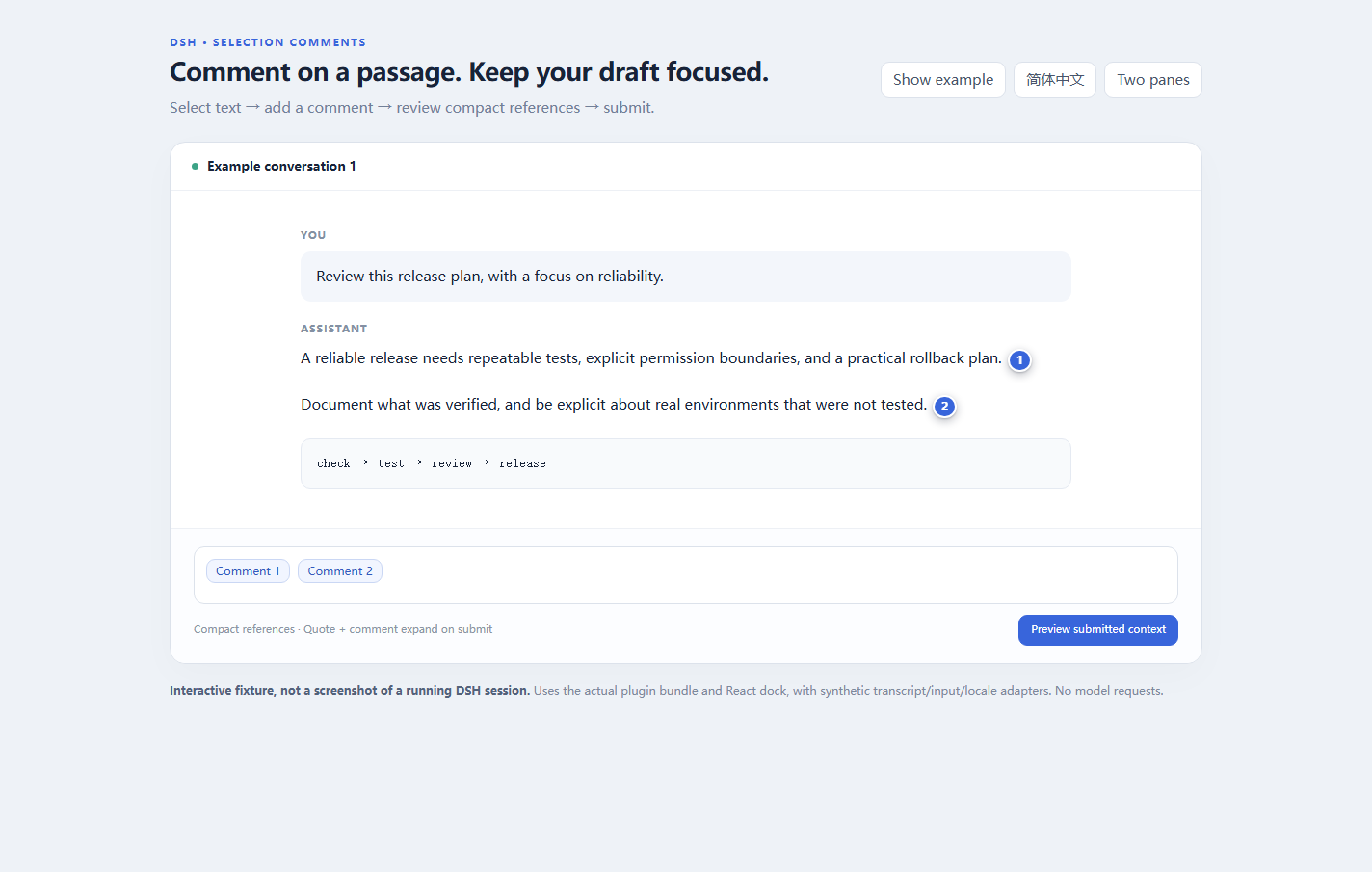
Demonstration screenshot: the actual plugin client and React dock running against a synthetic transcript, input bridge and locale service. This is not a capture of a private or live DSH conversation.
What it does
- Select conversation text, add a comment, then edit/delete it from its numbered badge or draft reference.
- Keep quote and comment together as one reference; expand both at submit time through DSH's reference codec.
- Keep the composer compact. No extra footer counter or permanent comments toolbar.
- Restore comments after refresh within the same browser tab, using
sessionStorage; there is no account/cloud synchronization. - Scope each overlay to its own conversation pane; ambiguous ownership fails closed instead of choosing the first transcript.
- Follow the DSH locale service (
en,zh-*→ Simplified Chinese); other locales fall back to English. Already inserted chip labels update without changing reference identity or text offsets. - Respect IME composition, busy submissions, keyboard focus, Escape and reduced motion.
Install
Target API baseline: DSH 0.2.1-rc.2, Web client or Windows Desktop. See the tested / not tested matrix; the package's compatibility range is not a claim of testing every future version.
git clone https://github.com/O-OII/dsh-selection-comments.git
cd dsh-selection-comments
# Use the DSH CLI supplied with the installation/profile you want to change:
dsh plugin --profile desktop add --ignore-scripts .
The deployable client bundle is committed, so installation does not need a build step or React development dependencies. The package bundle inserts selection-comments automatically. Replace desktop with your intended profile.
Migrating from the local selection-comment prototype: finish or remove its unsent references first, then disable its local entry before enabling this package. Both register the selection-comment reference source and must not run together. Prototype memory/storage is not imported. Do not restore an entire old profile backup over newer settings.
If a running installation does not reload the new host entry, finish in-flight work and perform a normal reload/restart. Do not start another server to replace an existing GUI, and do not assume arbitrary source edits hot-reload.
Use
- Select a passage in the conversation transcript. Click Comment.
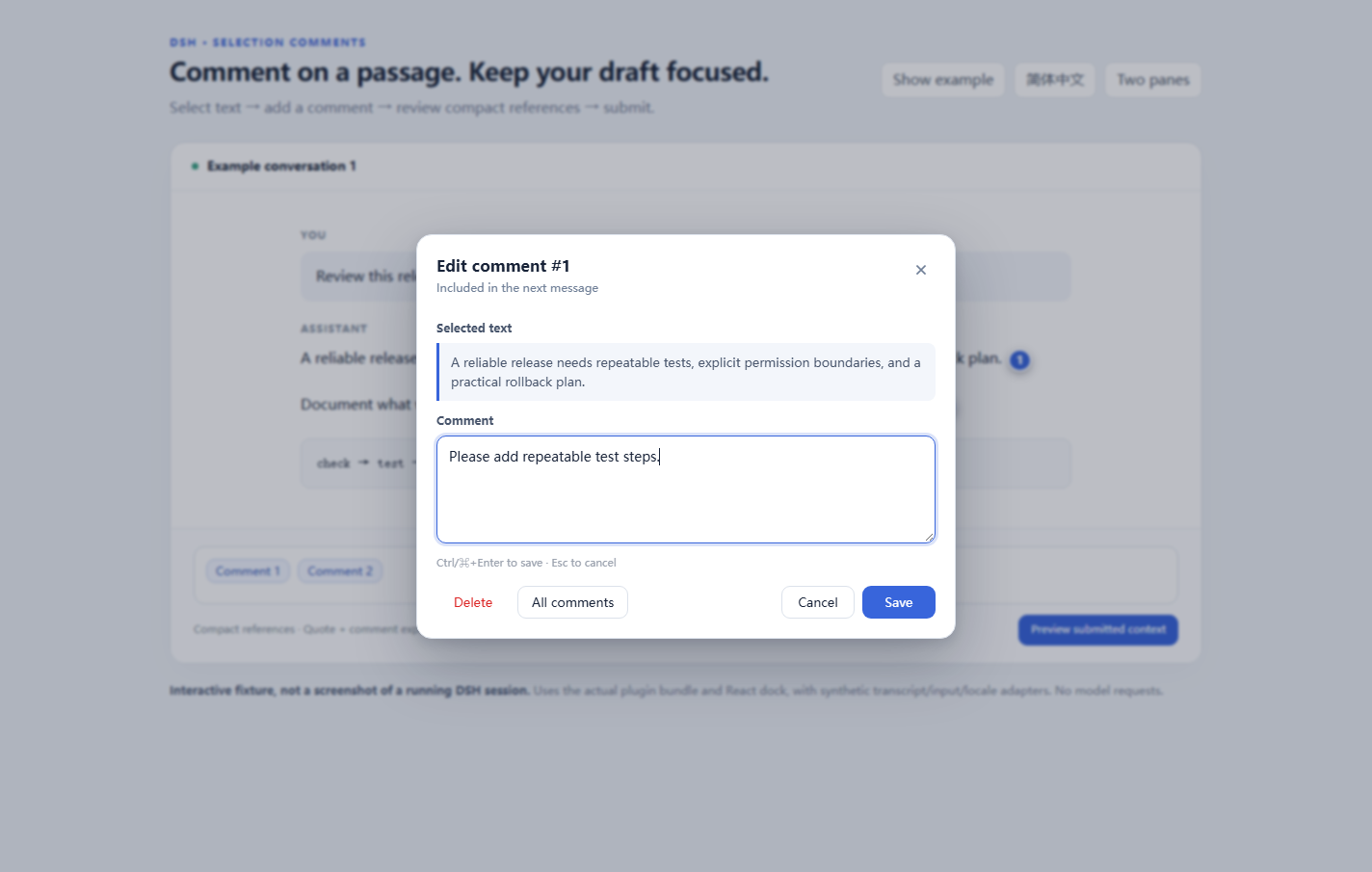
- Write the comment and choose Add comment (
Ctrl/⌘+Enter). Escape cancels. - A numbered badge appears near the passage; a compact Comment N reference is inserted into the existing draft.
- Click the badge/reference to edit, delete, add it again, or open All comments. Delete all comments also removes their draft references and this plugin's tab cache for that session.
- Submit using normal DSH controls. The codec expands each reference to the quote and comment, not merely its visible token.
A serialized reference is plain model context, for example:
<selection_comment index="1">
<quote>A passage from the conversation</quote>
<note>Please include a reproducible test.</note>
</selection_comment>
&, < and > are escaped. This is not a prompt-injection security boundary: quoted content remains untrusted user-supplied context.
Recovery and privacy
Comments (including their quote, note and anchor context) are saved to browser tab-scoped sessionStorage, partitioned by session ID. Refresh/HMR can recover them; closing the tab normally ends this storage session. Some browsers restore tab sessions after a crash or “reopen closed tab”, so this is not secure erasure. Use Delete all comments and normal browser data controls for sensitive material.
- No plugin-controlled remote storage, analytics or background network requests.
- Quotes/comments are transmitted by DSH to the selected model only when their references are submitted.
- When tab storage is blocked/full, comments keep working in memory and a warning explains that refresh recovery is unavailable. Known stale saved content is removed best-effort after a failed cache update.
- An unavailable reference rejects serialization rather than quietly sending
[CommentN]. Remove/recreate it if the originating tab or data is gone. - A submitted state only means the reference left the draft during submission; it is not a delivery receipt. Failure/cancellation and restored drafts remain the host's responsibility.
See privacy and limitations before using confidential passages. Cross-tab reference copy, cross-device persistence, session forks, and permanent note archives are not supported.
Development and verification
Node 22+; development uses React 18 only for the browser fixture.
npm ci --ignore-scripts
npm run build
npm run check
npm test
npm pack --dry-run
The locale dictionaries are in locale/en.json and locale/zh.json. Build validates equal keys/parameters and generates lib/client.js; edit the source/dictionaries, not the generated bundle. Reference IDs/source/clipboard tokens are stable and never translated.
For a visual fixture, open demo/index.html after npm ci. ?lang=zh-CN&seed=1 shows Chinese examples; ?lang=en&dual=1 mounts two real React dock contributions against synthetic host adapters. Previewing submitted context does not contact a model.
The optional Chromium harness uses an already-running, dedicated headless browser with a loopback CDP port (CDP_PORT, default 9333):
npm run test:browser
Do not expose CDP on a public interface or attach the test to a personal browser profile. CI starts its own isolated browser. Unit/fixture results are not a guarantee of real DSH transport or every Desktop version; see the verification matrix.
Alternatives and scope
This is a lightweight alternative, not the first DSH annotation plugin. Compare dsh-annotation, dsh-quote-annotate and dsh-inline-comments. Our trade-offs are a compact quote+comment semantic entity, numbered anchors, no composer footer, and explicit tab-scoped recovery rather than a permanent notes database.
MIT — © 2026 O-OII contributors. See LICENSE, contributing and security reporting.
No comments yet. Be the first to write one.