DSH Project Board
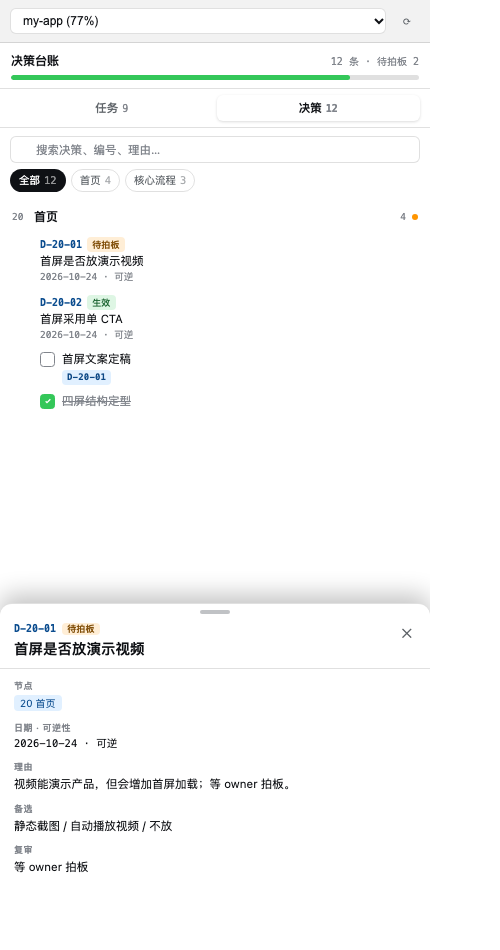
把「项目结构 + 待办 + 决策」收进一套可追踪的记录系统:一棵节点树、两份文件、右侧栏一键查看。
简体中文 | English
简体中文
它解决什么
- 待办和决策散落在聊天、文档、看板里,过两周就找不到;
- 看板按「阶段」分节,但每天是按「产品部位」干活,找不全一个页面的上下文;
- 决策只记结论不记理由,三个月后无法判断是否还成立;
- 汇总数字手写,改一处忘一处。
这套系统用三个约束解决:
- 节点树:
## 20 首页,节点 = 持久的产品面/领域,不是任务、不是阶段; - 双轨记录:进度看板放任务,决策台账放决策,共用同一套节点 ID;
- 派生视图:进度、未完成、待拍板全部算出来,不手写。
右侧栏
- 索引 chips + 互斥手风琴:一次只展开一个节点;
- 搜索、仅未完成、待拍板过滤;
- 决策按节点分组,点开底部抽屉看理由/备选/影响/复审;
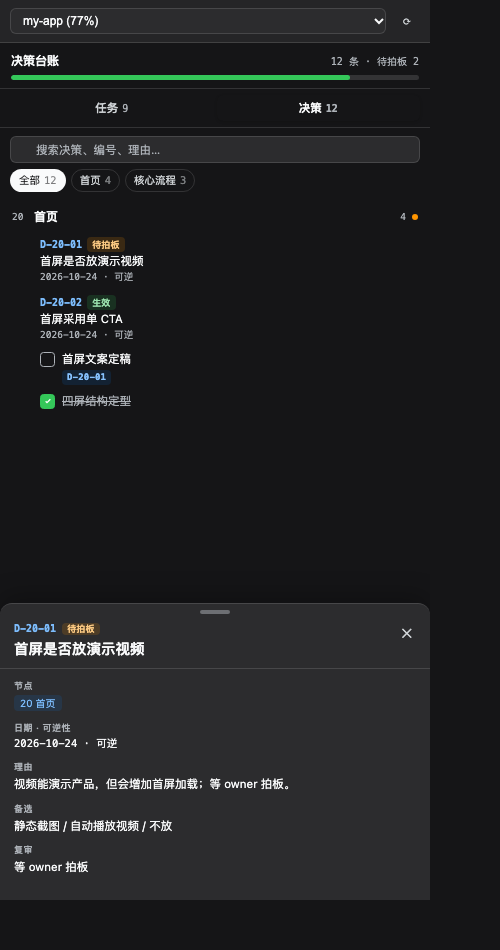
- 浅色 / 深色自动跟随 DSH 主题。
安装
作为 DSH 插件(推荐)
dsh plugin --profile web add @notoonex/dsh-project-board
从源码安装:
dsh plugin --profile web add github:Notoonex/dsh-project-board
重启 DSH 后,右侧栏会出现「项目看板」。
插件会自动把 skill 安装到 ~/.dsh/skills/project-board/,并托管本地 board server。
只装 Skill
在 dsh-skills-marketplace 里添加本仓库,稀疏路径填 skill。
Skill 本身不依赖插件,只要有 markdown 和 Node 就能用。
配置
| 环境变量 | 默认 | 说明 |
|---|---|---|
DSH_PROJECTS_DIR |
~/Documents/Projects |
项目根目录,每个子目录一个项目 |
DSH_PROJECT_BOARD_PORT |
自动 | 可选;不设时从 8791 起自动找空闲端口 |
如果你的项目在别的目录,启动 DSH 前设置
DSH_PROJECTS_DIR。 不设端口时,server 会自动找空闲端口,前端也会自动探测,不需要手动配。
目录结构
$DSH_PROJECTS_DIR/
└── my-app/
    ├── my-app 进度看板.md
    ├── my-app 决策台账.md
    ├── 踩坑.md            # 可选,只放教训
    └── README.md          # 可选,定位/背景
规则:
- 每个项目各恰好一个
* 进度看板.md和* 决策台账.md; - 两份文件 stem 必须一致,frontmatter 的
project:必须等于 stem; - 不建第三份记录,不用表格承载可勾选任务。
文件格式
进度看板
---
schema: project-board/1
project: my-app
archetype: web-app
nodes:
  "00": 治理
  "10": 全局与架构
  "20": 首页
  "90": 归档
---

## 20 首页
> 范围:首屏 / 导航 / 视觉

- [ ] 首屏文案定稿 · 验收: 3 秒内说清产品是什么 · 关联: D-20-01
- [ ] [[首屏是否放演示视频]] 等 owner 拍板
- [x] ~~四屏结构定型~~ `abc1234`
决策台账
---
schema: decision-log/1
project: my-app
---

### D-20-01 首屏采用单 CTA
- 节点: 20 首页
- 状态: 生效
- 日期: 2026-10-24
- 可逆性: 可逆
- 理由: 首屏只保留一个动作,降低选择成本
- 备选: 双 CTA / 无 CTA
- 影响: 20
- 复审: 上线两周看转化率
决策 ID 自带节点:D-20-01 = 节点 20 的第 1 条。台账扁平按 ID 排序,天然按节点分组,不需要复制章节骨架。
Skill
Skill 在 skill/:
references/init.md:首次接入与迁移;references/operate.md:日常写任务/决策;references/schema.md:完整字段与编号规则;references/packs/:web / business / life 域包;scripts/lint.mjs:跨文件校验;scripts/scan-legacy.mjs:旧看板只读扫描,输出 mapping 草稿。
node "$DSH_SKILL_DIR/scripts/lint.mjs" "$DSH_PROJECTS_DIR/my-app"
安全
- 只监听
127.0.0.1,公网访问不到; - 非本机来源的请求直接 403,不只是“不给读”;
project参数按目录白名单校验,拒绝路径穿越;- 只读写项目目录内的
* 进度看板.md/* 决策台账.md; - 勾选回写优先按任务 ID,其次按「节点 + 任务文本」定位,不依赖行号;
- 本地 token:首次启动自动生成,客户端自动携带;同一台机器上的其他页面没有 token,调用会被 401 拒绝。
Token
- 首次启动生成
~/.dsh/project-board/token(权限 600); - 插件启动时把 token 写进已安装的
client/client.js; - 客户端所有 API 请求带
X-Project-Board-Token; /api/health不校验 token,只用于端口探测;- 如果侧栏报 401:重载 DSH;或删除 token 文件后重启 DSH,让插件重新生成并注入。
这是一次性自动配置,不需要你输入任何东西。 只有一种情况会失败:插件安装目录本身是只读的(例如全局 npm 安装)。用
dsh plugin add装到 profile 目录通常是可写的。
更新
- 增量更新:只覆盖有变化的文件;
- 你新增的文件会保留;
- 你改过的文件会保留(日志提示
kept local skill edit); - 上游删除、且你没改过的文件会被删除;
- 想强制全量:删掉
~/.dsh/skills/project-board/或其中的.manifest.json,重启 DSH。
写入定位
侧栏勾选不再按行号硬写:
- 任务有
[T-<节点>-<序号>]→ 按 ID 找; - 没有 ID → 按「节点 + 任务文本」找;
- 都找不到 → 返回 409,让前端刷新,不会误勾别的任务;
- 勾选完成只加/去
~~删除线~~,不改任务原文(链接、反引号、加粗都保留)。
开发
npm test
测试包含:
lint正常/异常 fixture;- board server 的 board/decisions API;
- 路径穿越拦截;
- CORS 远程来源拒绝 / 本地来源放行。
兼容
- DSH(Cordis)插件;
- 纯 markdown,Obsidian 可直接打开;
- Skill 部分对 Codex / Claude 也可复用。
发布
上架步骤见 PUBLISHING.md。
License
MIT
English
DSH Project Board turns project structure, todos and decisions into one trackable system: a node tree, two Markdown files, and a right-sidebar view.
What it solves
- Todos and decisions are scattered across chats, docs and boards.
- Boards are grouped by phase, but you work by product surface.
- Decisions record the conclusion but not the reason.
- Summary numbers are hand-maintained and drift.
Three constraints:
- Node tree —
## 20 Home; a node is a durable product surface or domain, not a task or a phase. - Two records — the progress board holds tasks, the decision ledger holds decisions; both share node IDs.
- Derived views — progress, open items and pending decisions are computed, never typed by hand.
Right sidebar
- Index chips and an exclusive accordion: one node open at a time.
- Search, "open only" and "pending decision" filters.
- Decisions grouped by node; a bottom sheet shows reason, alternatives, impact and review.
- Light and dark modes follow the DSH theme.
Install
As a DSH plugin (recommended):
dsh plugin --profile web add @notoonex/dsh-project-board
Source install:
dsh plugin --profile web add github:Notoonex/dsh-project-board
Restart DSH; a "Project Board" tab appears in the right sidebar. The plugin installs the bundled skill into ~/.dsh/skills/project-board/ and manages the local board server.
Skill only: add this repo to dsh-skills-marketplace with sparse path skill.
Configuration
| Variable | Default | Description |
|---|---|---|
DSH_PROJECTS_DIR |
~/Documents/Projects |
Project root; one subdirectory per project |
DSH_PROJECT_BOARD_PORT |
auto | Optional fixed port; otherwise 8791–8800 are probed |
DSH_PROJECT_BOARD_SKILL_DIR |
~/.dsh/skills/project-board |
Advanced: override the skill install path |
Project layout
$DSH_PROJECTS_DIR/
└── my-app/
    ├── my-app 进度看板.md
    ├── my-app 决策台账.md
    ├── 踩坑.md            # optional
    └── README.md          # optional
The file suffixes are Chinese by design (进度看板.md, 决策台账.md). The project: frontmatter must equal the file stem.
File formats
Progress board
---
schema: project-board/1
project: my-app
archetype: web-app
nodes:
  "00": 治理
  "20": 首页
---

## 20 首页
> 范围:首屏 / 导航 / 视觉

- [ ] 首屏文案定稿 · 验收: 3 秒内说清产品是什么 · 关联: D-20-01
- [ ] [[首屏是否放演示视频]] 等 owner 拍板
- [x] ~~四屏结构定型~~ `abc1234`
Decision ledger
---
schema: decision-log/1
project: my-app
---

### D-20-01 首屏采用单 CTA
- 节点: 20 首页
- 状态: 生效
- 日期: 2026-10-24
- 可逆性: 可逆
- 理由: 首屏只保留一个动作,降低选择成本
- 备选: 双 CTA / 无 CTA
- 影响: 20
- 复审: 上线两周看转化率
Field names are Chinese (节点, 状态, 日期, ...) because the parser and the skill use them.
Token
- Generated on first start at
~/.dsh/project-board/token(mode 600). - The plugin injects it into the installed
client/client.js. - Every API request carries
X-Project-Board-Token;/api/healthis public for port probing. - Got a 401? Reload DSH, or delete the token file and restart DSH.
- This is a one-time automatic setup; no user input. A read-only plugin install directory is the only failure mode.
Updates
- The bundled skill updates incrementally.
- Locally added files are kept; local edits are kept (
kept local skill edit). - Files removed upstream are deleted only if unedited.
- Force a full refresh by deleting
~/.dsh/skills/project-board/or its.manifest.json.
Write-back
- Task IDs
[T-<node>-<seq>]are preferred; otherwise the server matches by node plus task text. - If the task changed, the server returns 409 and the client refreshes; it never toggles a different task.
- Toggling done only adds or removes
~~; links, code spans and bold are preserved.
Security
- Listens on
127.0.0.1only. - A non-local
Originis rejected with 403. projectis validated against the directory whitelist; path traversal is rejected.- Only reads and writes
* 进度看板.md/* 决策台账.mdinside the project directory. - Auto-generated token; remote pages and local pages without the token get 401.
Development
npm test
Covers lint fixtures, board and decisions APIs, 401, 403, path traversal, content-based toggle and markdown preservation.
Compatibility
- DSH (Cordis) plugin.
- Plain Markdown; opens in Obsidian.
- The skill is Markdown plus Node scripts and can be reused by other agents.
Publishing
See PUBLISHING.md.
License
MIT
No comments yet. Be the first to write one.