dsh-connection-card-host
中文 | English
Contribute: Card & adapter list → · Contribution guide → · 中文清单 Any ordinary DSH plugin can be listed as a card. One row per PR, with evidence.
Let your DSH sessions see each other, talk to each other, and share tools — without getting in each other's way.
Running several DSH sessions at once (one researching, one coding, one running experiments) is normal — but they're isolated: they can't see what the others are doing, and can't hand conclusions over.
This plugin makes a connection a first-class object in DSH: sessions are nodes, a connection is the container, cards are connection-scoped plugins.
In practice (screen recording) 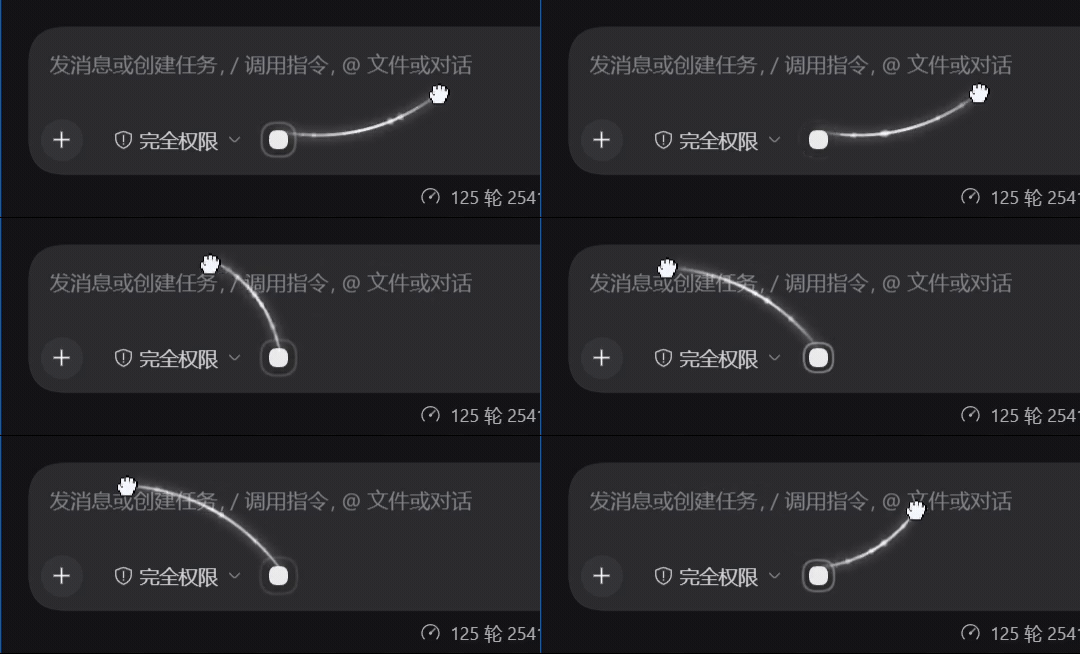 |
Structure (diagram) 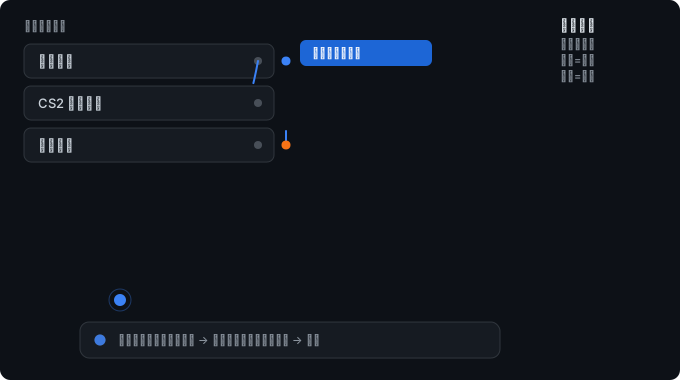 |
Left: the real thing (source video) · Right: the same action as a diagram, showing the toggle semantics
Contents
What it does
| See each other | Look up which files the other session is editing, how far its plan has got, what tools it last used — collected automatically, no effort required from the other side |
| Talk to each other | Send a message with one of three urgencies you choose: notify only (no interruption) / queue / interject |
| Share tools | Mount cards on a connection: a card can provide tools to the sessions, even with tens of MB of real dependencies |
| Shared premises | A "convention box" holds what you agreed on: interfaces, units, naming, who owns what |
| Stay out of the way | Awareness is pull-based — zero cost unless the other side asks. Unrelated connections never interrupt you |
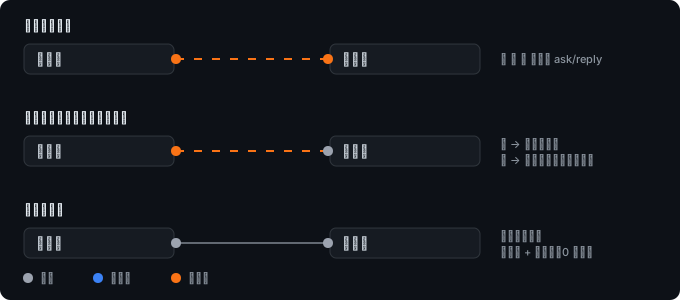
Quick start
- Connect: hold the circle to the left of the composer (or the
…on a session row) and drag it onto a row in the session list.
Drag from the anchor (recording) |
Drag from a session row → after connecting (recording) 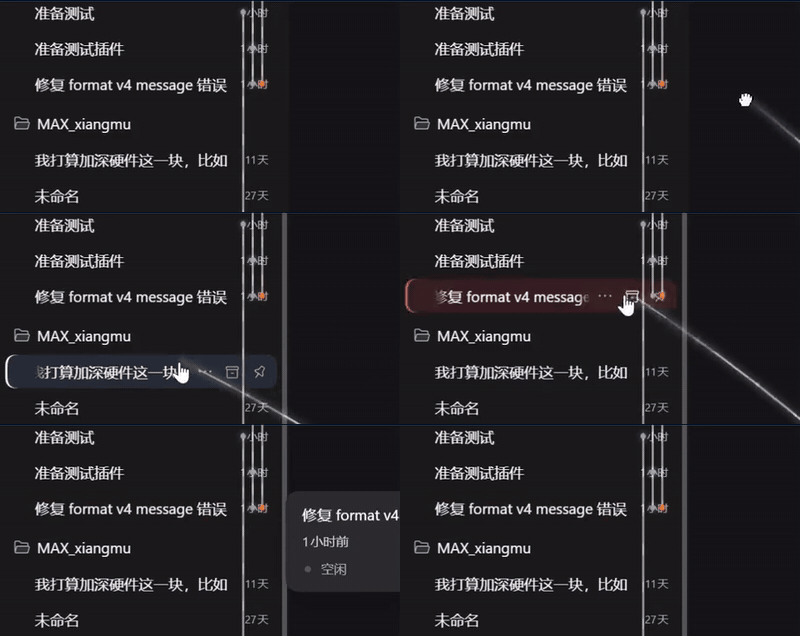 |
anchor source video · session-row source video
- Toggle semantics: drop on an unconnected row = connect; drop on an already connected row = disconnect (the hover hint tells you which)
- You can also pick two sessions from the "Connections" panel in the sidebar
- Done. Both ends get one quiet notice (who you're connected to, what it enables) — nobody is interrupted.
- Want more detail? Open "Connections" in the sidebar, or have the session call
connection_peer_workitself.
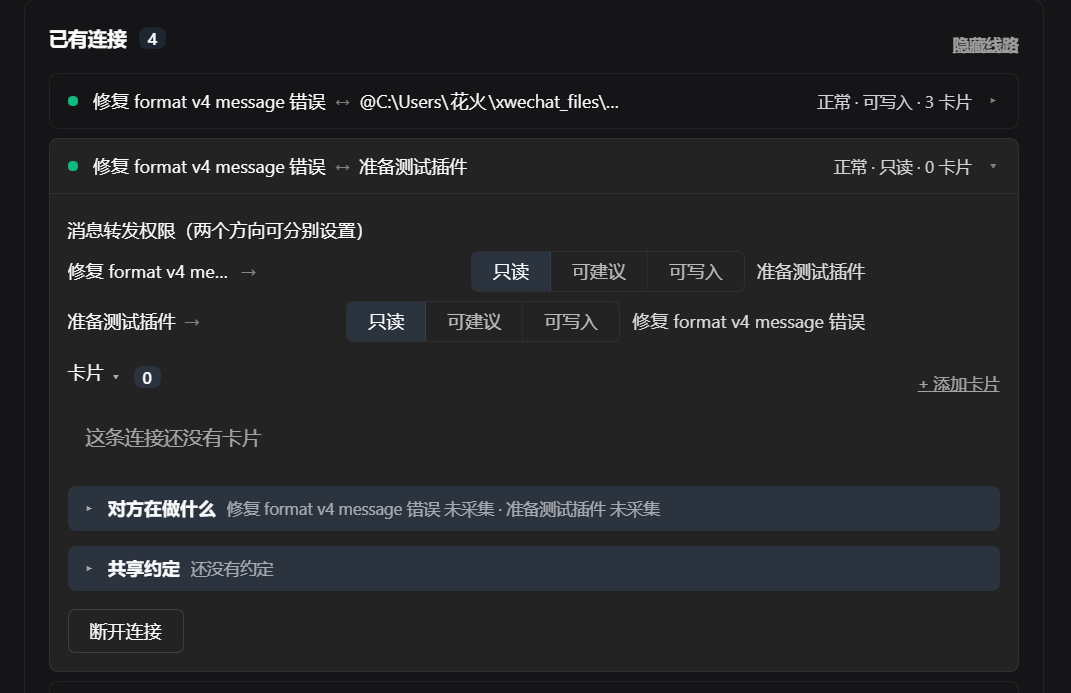
Once connected, a rail appears beside the session rows, with a coloured dot at each end — that's the permission for that direction:
Three layers: awareness / conventions / messaging
These are separate, because their costs differ enormously:
| Layer | Mechanism | Enters the other's context? | Forces the other to act? | Cost |
|---|---|---|---|---|
| A. Work state | pull (the other asks) | only when it asks | ❌ no | 0 |
| B. Convention box | pull (the other asks) | only when it asks | ❌ no | 0 |
| C. Messaging | push (into its inbox) | unconditionally | ✅ always | every message |
The key fact: in DSH, delivering a message forces the other session to run a turn — the agent loop has no "saw it but ignored it" state. So "talking" and "being aware" have to be built separately: to make the other side know, use A/B; only to make it act, use C.
A. Work state (automatic, zero cost)
Collected from runtime events — it asks nothing extra of the model:
【session-bd5ac1b1】
status: running a command (2s ago)
recently touched: water-boat/src/water.js
progress: turn 69 / step 39
B. Convention box (explicit, zero cost)
What you agreed on: interface signatures, units, coordinate systems, naming, who owns what.
Editable in the panel; sessions read and write it with connection_conventions / connection_declare.
Why pull, not push: pushing slowly fills the other's context, and most of it is never needed. Keeping it in a box that the other queries on demand costs zero.
C. Messaging (three urgencies, chosen by the sender)
| Urgency | Under the hood | What the other sees |
|---|---|---|
quiet |
inject |
placed in context without waking it — it sees the message next time it works, uninterrupted |
normal |
followup |
queued — it sees the message once it finishes what it's doing |
urgent |
steer |
interjected — inserted into the turn it's currently running, read immediately |
urgent on an idle peer degrades to queued automatically (the next turn starts
immediately, so the effect is the same), and never fails.
The rule (written into the tool description): interrupting has a cost — the other session has to drop its current line of thought. Most messages aren't urgent: default to
normal, and useurgentonly when it genuinely must change behaviour right now.
Cards on a connection
A card = a plugin mounted on a connection, with per-side visibility.
| DSH plugin | Card | |
|---|---|---|
| Mounted on | the whole DSH (profile) | one connection |
| Who can call it | every session | only sessions on that connection |
| Visibility | global | per side: both / A only / B only |
| Lifetime | DSH start/stop | mounted and unmounted with the connection |
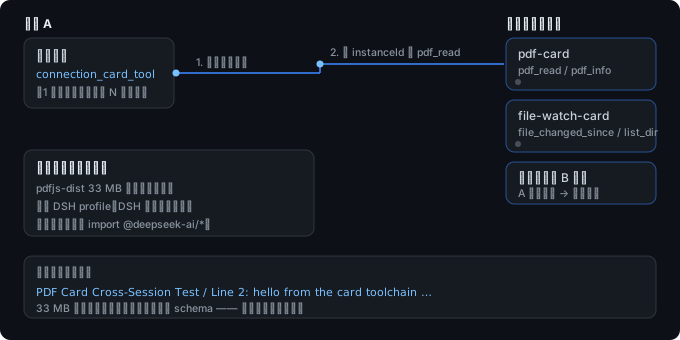
Cards can provide tools to sessions
Tools registered with api.registerTool(name, fn) inside a card are reachable by sessions
on that connection through one resident bridge tool:
connection_card_tool                                  ← the only resident one (1 schema)
  ├─ no `tool` argument → list the cards and tools visible to *your* side of this connection
  └─ with `tool`        → call it
Why one bridge instead of one schema per tool: the latter would make every session pay a resident cost for every card tool, while cards are mounted and unmounted dynamically. The bridge costs one schema, and it's the natural place to enforce visibility.
Visibility actually blocks:
Side A can see the card      ✅
Side B cannot see it         ✅
Side B calls it anyway       → 「这张卡片只对 A 端可见(你在 B 端)」
Cards can carry real dependencies
A card can carry real dependencies: wrapping a parsing core plus
pdfjs-dist as a card, installed under $DSH_HOME/connection-cards/cards/,
without touching the DSH profile. A session called it through the bridge and got real
parse results back.
Install and update from the panel
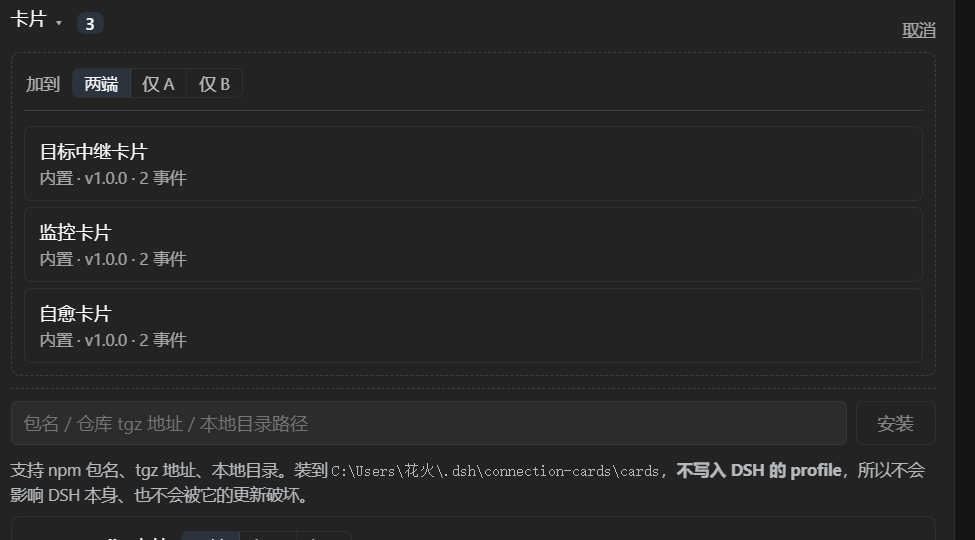
- Install: package name / repo tgz URL / local directory → into our own directory, no pnpm, no profile changes
- Update: installed cards get a "check for updates" entry with three distinct states
"Couldn't check" is never shown as "up to date" — that would be lying.「检查更新」→「↑ 更新到 x.y.z」/「已是最新」/「无法检查」
What a card can and cannot do
Any ordinary DSH plugin can be mounted as a card on a connection. Three static conditions decide it:
| Condition | Supported | Not supported |
|---|---|---|
| Scope | Registers into a connection-level location (conversation, input area), or is capability-only (no client UI) | Registers into an app-level location (sidebar, overall layout, settings page, theme, title bar, workspace) — those are meant to be installed into the app, not onto a connection |
| Host dependencies | Everything the entry actually loads can be resolved | A real runtime dependency is missing. Install reports it in two classes: missing host capability → the card needs a design change; missing third-party dependency → just add the dependency |
| Host capabilities | Uses only tools / effect / llm / prompt |
Needs other host services (credentials, web server, session control, commands, subprocess, …) — not provided; the mount is refused with a reason |
Only files the entry actually loads count: tests, build scripts, CLIs and type declarations are not runtime dependencies.
Client UI: what works
| Client shape | Result |
|---|---|
Uses only slot registration and effect hooks (slots / effect) |
Renders, and stays interactive |
| Needs more client services (localization, config forms, connection, routing, settings pages) | Mounts and registers slots, but cannot render — the panel shows the specific reason instead of a blank area |
| Client artifact size | Up to 32 MB (self-contained bundles with inlined assets are fine) |
| Component props | Components are called without props — ones that require slot props will error; the error is contained to that card |
Badges in the candidate list
Each card carries one badge: adapter / capability / local / global / undecided. It tells you before mounting whether a plugin suits a connection — advisory only, nothing is blocked.
Community cards and adapters
The built-in cards are a starting point, not the ceiling. Any ordinary DSH plugin can be mounted as a card, and a card is just a package — so this list can grow from outside this repository.
Source of truth: awesome/README.md (send PRs there — one row per PR,
guide) · 中文清单
Built-in cards
Shipped with the plugin — pick one in the card candidate list.
| Card | What it does | Needs (read / write) | Events |
|---|---|---|---|
Goal relay (goal-relay-card) |
Relays a goal and its status to the peer so both sides track the same "what are we doing" | goal_status / relay_goal |
goal_updated, goal_completed |
Monitor (monitor-card) |
Watches the peer's preset state and session activity; raises preset_error / session_idle |
preset_status, session_log / — |
preset_error, session_idle |
Self-heal (self-heal-card) |
On preset_error, asks the peer to repair its preset, then reports the outcome |
preset_status / repair_preset |
preset_error, preset_repaired |
Connection etiquette (connection-etiquette) |
Teaches the four urgency levels and forwards notes with the urgency you choose | — / send_message |
— |
Plugins that work as cards
| Plugin | What it brings to the connection | Status |
|---|---|---|
dsh-client-ui-voice |
A push-to-talk voice input control | ✅ mounts · UI captured and rendered · 1 slot |
gal-view |
A model/scene viewer panel | ⚠️ mounts · slots registered · rendering needs client hooks |
Known incompatible
Listed so you do not spend an evening on it. The panel's refusal names the exact reason.
| Plugin | Why it cannot mount (today) |
|---|---|
dsh-usage |
Its host half imports 11 packages this plugin does not provide (credentials, webServer, session, …) — it needs a different kind of host, not a card |
| Sidebar / theme / layout replacements | Global UI, not connection-scoped: they belong to the app. The candidate list marks them global |
Community cards
None listed yet — the first one could be yours.
A card is how one plugin teaches a connection: tools for that session, events between the two sides, and UI that sits next to the conversation instead of taking over the app.
Architecture and cost
Three layers, with hard boundaries — each talks only to the one below:
┌─────────────────────────────────────────────────────────────┐
│  Card layer (connection-scoped plugins)                     │
│  Depends only on CardAPI; NEVER imports @deepseek-ai/*      │
│  → DSH upgrades don't affect cards; our CardAPI changes do  │
│    (guarded by a version declaration)                       │
├─────────────────────────────────────────────────────────────┤
│  Connection layer (this plugin)                             │
│  connections / permissions / awareness / conventions /      │
│  card host / message delivery                               │
│  → on a DSH upgrade, this is the only layer to change       │
├─────────────────────────────────────────────────────────────┤
│  DSH adapter layer (DSHAdapter + allowlist + audit)         │
│  the single exit point for all DSH interaction; we do not   │
│  rewrite DSH's transport, permissions or plugin system      │
└─────────────────────────────────────────────────────────────┘
Permissions are per direction
One line, one dot at each end; the colour is the permission for that direction — the two directions are independent, so you can have "A may send, B may only watch":
Read-only does not affect awareness: work state and the convention box are both queried by the other side, independent of permission. Lowering a permission takes effect immediately; raising one requires confirmation from the side being granted it.
How card tools reach a session
Tools registered by cards do not each take a schema — a session sees one resident bridge, discovers on demand, calls on demand, and visibility is enforced at the bridge:
What it costs
| Item | Number | Notes |
|---|---|---|
| Awareness (layers A + B) | 0 context | pull-based; costs nothing unless the peer queries |
| Card tools | 1 resident schema | instead of one per card tool |
| Automatic mirroring | 0 (disabled) | mostly irrelevant content before it was turned off |
| Unrelated connections | 0 interruptions | connecting doesn't wake anyone; unrelated sessions carry on |
The one fixed cost: this plugin's five connection_* tools cost roughly 1,700 tokens
resident — and only in sessions that have connections: sessions with none have them
stripped automatically by system-prompt/assemble (a 0-connection session has 5
tools removed, logged as 按会话 scope 隐藏了 5 个感知工具).
Install
This plugin is not published to npm (DSH's peer dependencies aren't on the public
registry, so npm install is guaranteed to fail — verified). Install from GitHub:
# Preview line (latest development build — the repo you're reading)
dsh plugin --profile web add github:Noob-stupid/dsh-connection-card-host-preview

# Stable line (the public facade, synced only at release time)
dsh plugin --profile web add github:Noob-stupid/dsh-connection-card-host

# Or a pinned tarball (grab the asset URL from the Releases page)
dsh plugin --profile web add https://github.com/…/releases/download/v1.0.0/noob-stupid-dsh-connection-card-host-1.0.0.tgz
The two
github:commands above are verified working (161 files land inlib, using the profile's own settings:autoInstallPeers: false). The bare namesdsh-connection-card-hostand@noob-stupid/dsh-connection-card-hostboth 404 on npm and won't work for anyone else — don't use them.
Compatibility: peerDependencies declares @deepseek-ai/dsh >=0.2.0-rc.1 <0.3.0 — DSH
gates on version at install time and refuses clearly, with a reason, rather than
installing and crashing later.
Use
- Create a connection — pick two sessions in the panel; each direction has its own permissions.
- Mount a card — open a connection, choose a card from the candidate list. It takes effect on
the side you pick (
A/B/ both). - Talk to the peer — the card's tools become available to that session; messages carry the
urgency you choose (
quiet/normal/urgent/preempt). - Unmount — remove the card from the connection; the card itself stays installed.
The agent skill ships with the plugin
Installing the plugin is enough: it registers a connection-card skill through DSH's
skill-provider channel, so any agent in that install finds instructions for the connection
tools in its session catalog — no copying files into ~/.dsh/skills/ and no extra step.
- Source of truth for the text:
skills/connection-card.md. - It appears while the plugin is loaded and disappears when you uninstall the plugin (the registration is bound to the plugin's lifecycle).
- It covers when to use each of the host tools and how to choose an urgency level
(
quiet/normal/urgent/preempt). - Prefer to use it as a plain local skill instead? The same file is a valid flat skill —
copy it to
~/.dsh/skills/connection-card.md.
Configuration
| Setting | Default | What it does |
|---|---|---|
| Adapter layer | off | Allows ordinary DSH plugins to be mounted as cards. Nothing is touched until you turn it on. |
| Automatic mirroring | off | Auto-forwarding session content to the peer. Kept off on purpose (it mostly sends noise). |
| View preferences | per connection | Number of lanes shown on the connection track. |
Uninstall
- A card — the candidate list has an Uninstall entry for installed cards (a confirmation states how many connections it is mounted on). Built-in cards do not offer it: they ship with the plugin and come back on upgrade. What could not be removed is reported honestly.
- The whole plugin — remove it from your DSH profile. Cards and connections live under
$DSH_HOME/connection-cards/and are left untouched.
FAQ
Do I need to install anything for cards?
No. Cards install into the plugin's own directory; no pnpm runs in your profile and your DSH
profile is not modified.
A plugin will not mount. Why? The refusal names the class: host capability (the card needs something this plugin does not provide) or third-party dependency (the dependency is missing). The first requires a change on the card side; the second can be fixed by shipping the dependency with the card.
A mounted card shows no UI. Its client half needs client services beyond slots/effect. The panel shows the exact reason — it is not a blank screen.
Does mounting a card change my DSH install? No. It does not rewrite DSH, does not touch your profile, and can be undone at any time.
License
MIT — see LICENSE.
Writing a card
A card is just an npm package with a dshCard manifest:
{
  "name": "my-card",
  "version": "1.0.0",
  "main": "index.js",
  "dshCard": { "id": "my-card", "name": "My card", "entry": "index.js", "api": 1 }
}
// index.js — NEVER import anything from @deepseek-ai/*; go through `api`
export function apply(api) {
  api.log(`mounted (scope=${api.scope})`)

  // provide a tool to sessions on the connection
  api.registerTool('greet', async (args) => {
    return `Hello, ${args?.name ?? 'world'}`
  })
}

// panel HTML (optional)
export function renderPanel(api) {
  return `<div>visible to: ${api.scope}</div>`
}
api member |
Meaning |
|---|---|
registerTool(name, fn) |
register a tool → sessions call it via connection_card_tool |
send(kind, text) / read() |
send and receive connection messages as one side |
on(event, handler) / emit(event, data) |
connection-scoped events |
scope |
which side this instance serves (both / a / b) |
log(...) |
write to the host log |
dshCard.api declares the CardAPI version the card needs (defaults to 1):
- Adding things does not bump the version — older cards keep working
- Only removals or semantic changes bump it — the host refuses to mount a card that requires a newer version, and says why
This is our own compatibility guard: cards don't depend on DSH internals, so a DSH upgrade doesn't affect them; but changing our
CardAPIdoes — and DSH's version gate can't see that layer.
See docs/card-protocol.md for details.
Docs
| Document | Contents |
|---|---|
docs/capabilities.md |
Capability report: per-item measurements, total context cost, known limits |
docs/card-protocol.md |
Card protocol: manifest, CardAPI, install validation, distribution |
docs/compatibility.md |
Compatibility: how DSH's version gate works, the two lines of defence |
docs/adapter-api.md |
DSH adapter: the stable interface and its allowlist |
MIT · not affiliated with the DSH project
Maintenance
Implemented
- Connections: drag to connect (toggle semantics), three sessions fully interconnected, persistence and restore across restarts
- Permissions: three levels per direction, asymmetric, upgrades need the other side's confirmation, refusals explain themselves
- Awareness A: work state collected automatically (0 context)
- Conventions B: the convention box (0 context)
- Messaging C: three urgencies, with automatic degradation
- Cards: template discovery / mounting / per-side visibility / in-panel install / update / crash isolation
- Card tools: bridge invocation with enforced visibility
- Card directories are versioned (so a mounted card can still be updated)
- Per-session tool scoping: sessions with no connections do not carry the
connection_*schemas (~1,700 tokens saved), via the officialsystem-prompt/assemblewaterfall; the whole chain is fail-open — behaviour introduced inv1.0.1(v1.0.0registers them globally)
Known gaps
| Item | Notes |
|---|---|
mountUI / requestRemote |
Interface in place, implementation pending (mountUI currently only sets a dataset attribute) |
| Card tool schemas | Deliberately take no separate schema; callers must list before calling |
| Rail layering trade-off | The rail is portaled onto document.body — decoupled from slot containers, which is the only way to keep someone else's skin/overlay from beating it via stacking context (z-index is only comparable within one stacking context). The cost: it always sits at body level, so a future "must be on top" full-screen modal would have the rail drawn over it. pointer-events: none keeps interaction unaffected, so the risk is low; if it ever needs tightening, the suggested fix is a minimal predicate — while [role="dialog"][aria-modal="true"] is present, drop the rail below that modal and restore when it closes (not an unconditional hide) |
No comments yet. Be the first to write one.