DSH Browser
English | 中文
Embedded browser for the DSH Web GUI: browse the web and your workspace files inside the chat interface — multi-tab, address bar, per-workspace tab persistence, page-region review comments, and a lightweight workspace editor — plus agent tools (
browser_open,browser_read,browser_review). Pages are rendered by a headless Chromium (Puppeteer) on the host, so sites that sendX-Frame-Optionsload correctly.
An external plugin package for DeepSeek Harness (DSH). It is a single
dual-face cordis bundle: the host half owns the agent tools, the
/api/dsh-browser route family (Puppeteer page proxy + SSE open-event stream
- workspace file listing/serving/editing + review storage), the settings namespace, and the
system-prompt announcement; the browser half renders the sidebar entry, the
multi-tab panel, and the plugin settings card. Hot-pluggable — mounted via
dsh plugin --profile <name> add link:<repo>.
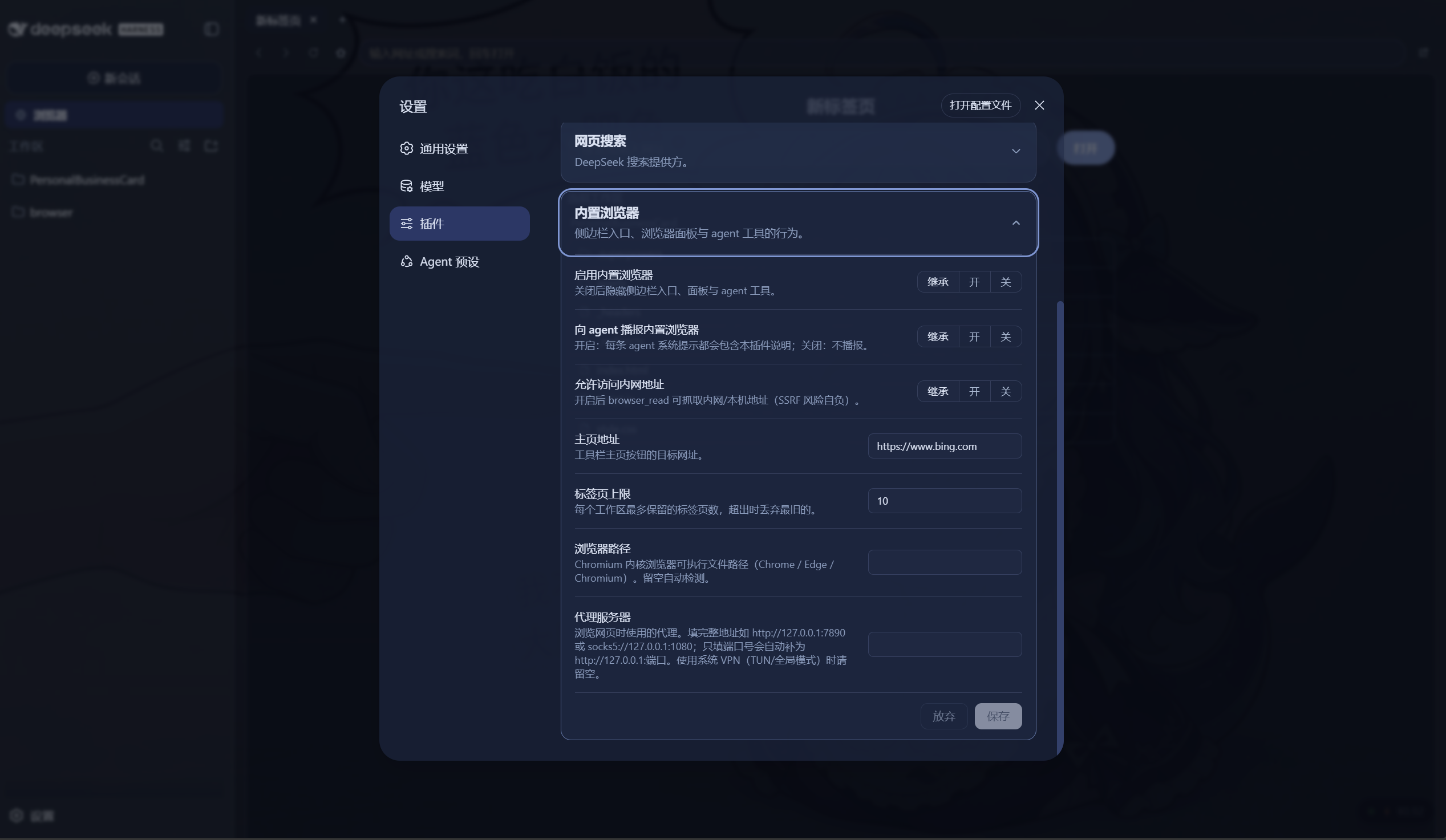
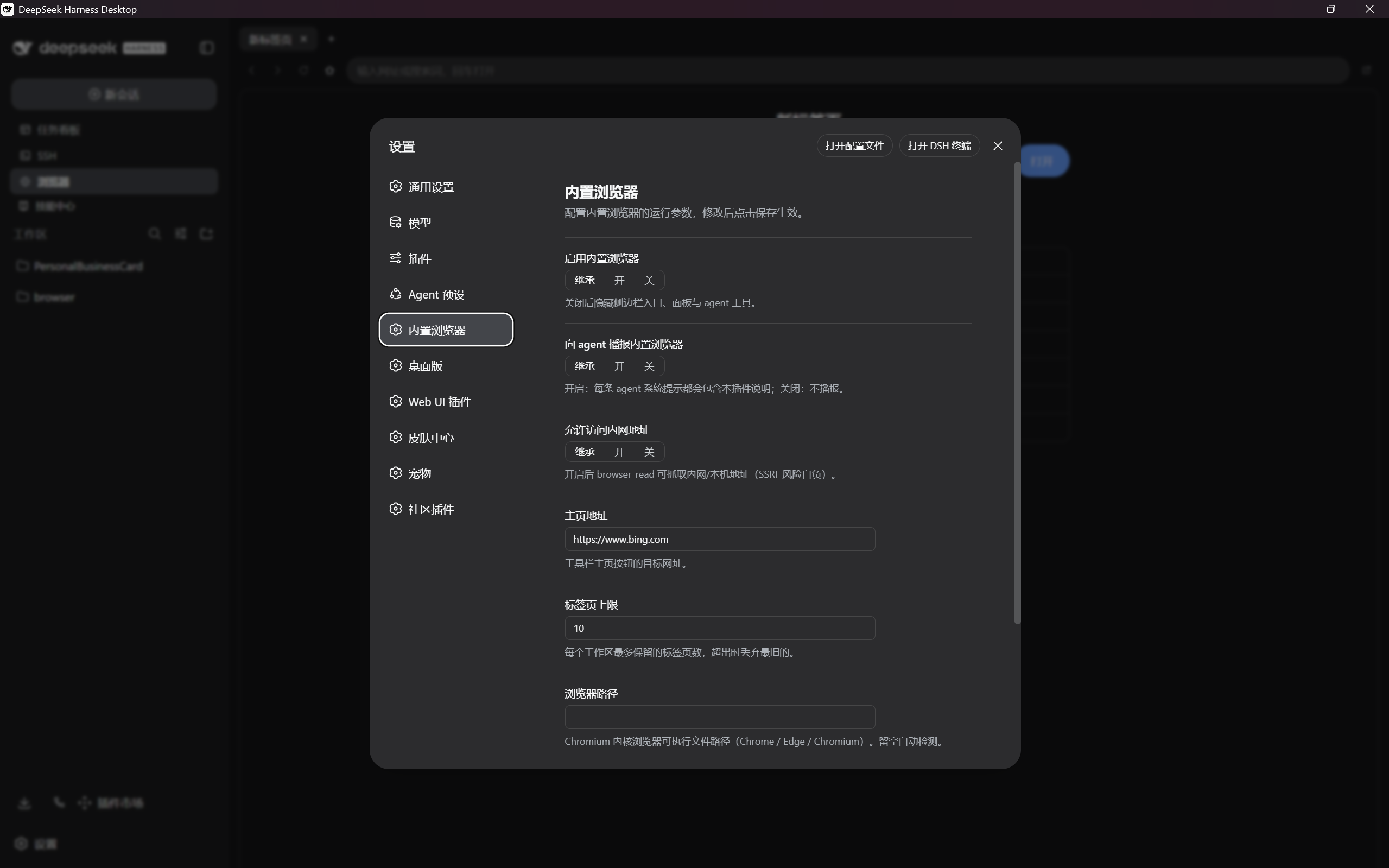
Platform support. Works with both DSH Web and Desktop (requires DSH v0.1.1-rc.1 or later). The visual settings card works out of the box on both platforms — no DSH source changes needed. On Web it appears under Settings → Plugins; on Desktop it appears as a standalone "Embedded browser" entry in the left nav.
Prerequisites
A Chromium-based browser must be installed on the host machine (Chrome,
Edge, or Chromium). The plugin auto-detects the executable on Windows, macOS,
and Linux; you can also set an explicit path in the settings card. The plugin
uses puppeteer-core (not puppeteer), so it never downloads its own
Chromium.
What it does
- Entry: a "Browser" row in the sidebar, below the New Session button.
- Update notifications: a separate button next to Browser shows "Update available" when a newer version is available for that installation source. It opens version details, release notes, manual checking, update guidance, and ignore/restore controls without navigating or reloading the preview. This feature only notifies; it never installs packages, modifies files, or restarts the Host.
- Panel: takes over the center column with a tab strip, a toolbar
(back / forward / reload / home / open-in-system-browser), an address bar
(URL or search, Enter opens), and an iframe content area. Each page is
rendered by a shared headless Chromium on the host — the proxy route waits
for
networkidle, reads the fully-executed DOM, injects a<base>and a link-interception script, and returns it to the iframe. Inactive tabs stay mounted and stateful; iframes lazy-load on first activation. In DSH Desktop, iframe documents use an isolated loopback preview carrier so Desktop's native renderer gate does not replace sandboxed subframe responses withforbidden; Web clients continue using the shared/api/dsh-browsercarrier. - Link interception: clicks on
http(s)links inside a proxied page are caught and posted to the panel —target="_blank"/window.openopens a new tab, ordinary links navigate the current tab. Nothing ever pops the system browser. - Tabs per workspace: the tab set is persisted per project root
(localStorage, debounced + flushed on page hide). Switching sessions swaps
the whole tab set; switching back restores it. A configurable cap (default
- trims the oldest inactive tab.
- Workspace browsing: the new-tab page lists the current workspace
directory (folders navigate, breadcrumbs, up button); clicking a file opens
it in the panel through the host's file route. HTML previews get a
<base>injection so relative images/styles resolve, and a CSPsandboxheader so a previewed file can never run scripts in the GUI origin. - Frontend review comments: on a workspace HTML preview, Review activates a capability-scoped bridge inside the already-mounted iframe. Entering selection neither navigates nor screenshots that page, so its current component state, animation, and scroll position remain live. Click any visible point to select its DOM element; a numbered marker and comment box appear beside it in the parent surface, and stay aligned while the top-level page scrolls. Proxied development-server pages use the compatible parent-layer picker instead: it freezes a screenshot when possible and also supports dragging a larger region, with a live coordinate-layer fallback when capture is unavailable. Add one or more comments, then explicitly confirm and send all drafts to the current Agent. Before handoff, any mistaken draft can be deleted after a separate confirmation; comments already sent to the Agent remain in the review history. Each comment includes the trusted user text plus untrusted page context such as its URL, selector, nearby text/HTML, viewport rectangle, document size, and scroll position at selection. At handoff, the Host makes a best-effort capture of one screenshot per reviewed page as optional Agent context; capture failure does not block the comments. Review comments live in host memory for the current DSH run. If the Agent message or its image attachments cannot be queued, the batch is restored to drafts so it can be retried.
- Lightweight workspace editor: the Editor drawer browses the registered workspace and opens text files in CodeMirror with syntax support for common frontend formats. Common PNG/JPEG/GIF/WebP/AVIF/SVG/BMP/ICO images open in a read-only fitted preview. Text saves use a content hash to detect concurrent changes; stale edits are refused instead of overwriting a newer file. A full VS Code experience is intentionally deferred to a later release.
- Agent tools:
browser_openpushes a URL into the panel (a new tab opens and the panel gains focus);browser_readfetches a page from the host and returns extracted readable text (static-HTML approximation, no JavaScript);browser_reviewreads a user-confirmed review batch with page-region coordinates andbrowser_review_resolvemarks completed comments as resolved. - Settings card: On Web, an "Embedded browser" card appears under Settings → Plugins; on Desktop, a standalone "Embedded browser" page appears in the left navigation. Both support staged edits, save/discard, and inherit/reset semantics. Fields: enable, agent announcement, home page, tab cap, private-address override, browser executable path, proxy server, automatic update checking, and optional repository tracking.
- Agent announcement: a system-prompt section tells every agent the plugin exists, what its tools do, and its limits (same mechanism dsh-ssh uses).
Install
# from a local checkout (development)
dsh plugin --profile <name> add link:<repo>

# from npm (once published)
dsh plugin --profile <name> add @nono-neko/dsh-browser
Restart dsh web; the sidebar entry appears. The web profile needs the
@deepseek-ai/* client packages the bundle injects (any rc.6 web deployment
has them). Make sure a Chromium-based browser is installed on the host.
Uninstall
# remove from a profile
dsh plugin --profile <name> remove @nono-neko/dsh-browser

# if installed from a local checkout
dsh plugin --profile <name> remove link:<repo>
Restart dsh web after removal.
Configuration
The plugin reads its settings from a layered source: schema defaults, then the
plugin's cordis.yml entry (composition base), then the user settings
document. All fields are optional.
| Field | Type | Default | Description |
|---|---|---|---|
enabled |
boolean | true |
Mount the sidebar entry, tools, and proxy routes. |
announceToAgent |
boolean | true |
Inject a system-prompt section telling agents about the browser and review tools. |
autoCheckUpdates |
boolean | true |
Check public plugin releases at startup and every six hours. |
followRepositoryUpdates |
boolean | false |
Source installs only: compare the built commit with the repository default branch instead of stable Releases. |
defaultHome |
string | https://www.bing.com |
URL loaded by the new-tab / home button. |
maxTabs |
number | 10 |
Per-workspace tab cap; oldest inactive tab is trimmed. |
allowPrivateAccess |
boolean | false |
Let browser_read fetch private / loopback addresses. |
browserExecutable |
string | auto-detect | Absolute path to a Chromium-based browser (Chrome / Edge / Chromium). |
proxyServer |
string | empty | Route Puppeteer traffic through a proxy, e.g. http://127.0.0.1:7890. |
Visual settings card
The plugin provides an interactive settings form out of the box (requires DSH v0.1.1-rc.1 or later):
- Web: Settings → Plugins → Embedded browser
- Desktop: standalone Embedded browser entry in the left nav
| Web settings card | Desktop settings page |
|---|---|
 |
 |
Config file method (without the visual settings card)
If you prefer not to use the visual settings card, set the same fields directly. Two layers are available:
Plugin entry config (cordis.yml or your profile's plugin config) — the
composition base, applies to every user of that profile:
plugins:
  dsh-browser:
    defaultHome: https://www.google.com
    maxTabs: 20
    proxyServer: http://127.0.0.1:7890
User settings document (~/.dsh/settings.yaml) — per-user overrides that
layer on top of the entry config:
dsh-browser:
  browserExecutable: C:\Program Files\Google\Chrome\Application\chrome.exe
  allowPrivateAccess: true
Update notification behavior
- The Host checks
@nono-neko/dsh-browseron npm and stable Releases inNono-neko/dsh-browseron GitHub. npm installations follow the stable version at thelatesttag; source checkouts follow GitHub Releases. A GitHub-only release is not advertised as installable from npm. Prereleases, equal versions, and downgrades do not trigger a badge. Unknown installations are labeled and may display either source; confirm your installation method before updating. - The running version is stamped from this plugin's package at build time, not
from the active workspace. A package-root
.gitidentifies source installs; anode_modulespackage identifies npm installs. Other layouts are unknown. Optional default-branch tracking compares a clean build's commit with the remote tip and only prompts when that tip is ahead. Dirty/watch builds, missing revisions, unpublished local commits, and diverged histories cannot be reliably compared; consult the repository instead. Rebuild and restart the Host after updating source, then refresh the GUI. - Results and ETags are cached in Host memory. Concurrent requests are coalesced; manual checks are limited to once per minute. Automatic checks run six hours after the last completed check. Turning them off still permits manual checks; disabling the plugin or disposing it stops background checks. The GUI polls only the local cache, not GitHub/npm. Network and rate-limit failures are displayed as unavailable, never as "no newer version".
- Ignoring a version suppresses only that version's sidebar badge, not its details. The choice is stored per GUI origin in localStorage (memory-only if storage is unavailable). A subsequent version can notify again. These settings and results are plugin-wide, not per workspace.
- Checks use the Host's network connection, not Puppeteer's
proxyServeroption. Save editor contents and local changes before manually updating. No automatic upgrade, Git operation, or restart is exposed by the update button.
FAQ
Q: Install fails with ERR_PNPM_GIT_DEP_PREPARE_NOT_ALLOWED?
A: This happens when installing from git — pnpm blocks the prepare build
script by default. Recommended fix: install from npm instead (pre-built, no
build needed):
dsh plugin --profile <name> add @nono-neko/dsh-browser
If you prefer git install, add the package to allowBuilds in your profile's
pnpm-workspace.yaml:
allowBuilds:
  - '@nono-neko/dsh-browser'
Development
For an isolated update-UI smoke check, run pnpm exec vite --host 127.0.0.1
and open /tests/fixtures/update-notifier.html on the printed local URL. The
fixture uses synthetic update responses and a live animated iframe; it does not
contact registries or modify DSH. Verify badges, ignore/restore, failure states,
dark/light themes, modal keyboard behavior, and unchanged preview scroll.
pnpm install    # @deepseek-ai/* SDK packages are public on npm (or a mirror)
pnpm build      # tsc types + tsdown dual-half bundle (lib/index.js + lib/client.js)
pnpm typecheck  # tsc --noEmit
pnpm test       # vitest
The build emits two artifacts from one config: the node half (lib/index.js,
esm) and the browser half (lib/client.js, a window.__ModuleLoader__
closure-factory served at /plugins/dsh-browser/client.js). CSS Modules are
compiled into the client bundle by lightningcss; the client bundle enforces a
purity gate — value imports from @deepseek-ai/* are only allowed for the
platform seed modules, everything else must inline or go through cordis
services.
Security model
- Loopback fence: every
/api/dsh-browserroute (proxy, SSE, files, preview-session negotiation, review screenshots, source editing, reviews, and update metadata) refuses non-loopback clients (socket address + Host header + same-origin markers). A LAN-exposed dsh web cannot serve workspace files or the proxy to unpaired devices. - Desktop preview carrier: Desktop's native capability header is deliberately
unavailable inside opaque sandbox frames. The authenticated parent therefore
negotiates an on-demand HTTP listener bound only to
127.0.0.1and moves only iframeGETrequests for proxy/file content to a random 256-bit path on that listener. The capability is process-memory-only, responses useReferrer-Policy: no-referrer, unknown paths are denied, and the listener is closed with the plugin routes. It does not expose mutation, SSE, settings, or other DSH APIs and does not enable Desktop's ordinary-browser access. Workspace paths still pass through the normal workspace gate and per-preview resource capability checks. - Workspace gate: file listing, serving, review screenshots, review storage, and source editing canonicalize the requested root (realpath) and require it to be a registered workspace or inside one; every requested path is re-checked after resolution, so symlinks cannot escape the root.
- Update metadata boundary:
GET /api/dsh-browser/updatesreads a cached snapshot;POST /api/dsh-browser/updates/checkrequests a rate-limited refresh. Both enforce the same loopback fence, but need no workspace because they never read project files. Outbound requests use only fixed HTTPS endpoints atregistry.npmjs.organdapi.github.com, refuse redirects, and are capped at 10 seconds and 512 KiB per response. No workspace paths, source contents, credentials, or comments are sent. The package version is sent as User-Agent; optional repository tracking also sends the plugin's built commit for comparison. Release notes are untrusted plain text, not HTML or Agent instructions. Links are constructed from fixed repository/package URLs, never remote-provided URLs. - Served HTML sandbox: workspace-previewed HTML is served with
Content-Security-Policy: sandboxand an opaque iframe origin. The host adds one response nonce to the page's existing scripts, so local styling and interactivity still work without granting access to GUI APIs. Opaque-origin asset GETs require both a browser-classified subresource destination and a short-lived random capability registered by the initial same-origin document load; scriptfetch()and all mutation routes remain behind the normal same-origin fence. The same capability scopes the live-review bridge; the parent accepts its messages only from the active iframe with the matching token, and treats every reported selector, attribute, and rectangle as untrusted page context. - Proxied pages use an opaque-origin iframe sandbox: the
Puppeteer-rendered HTML is returned without CSP / X-Frame-Options, then the
panel iframe permits scripts and forms but deliberately omits
allow-same-origin. Rendered page scripts therefore cannot read the parent GUI or call its loopback APIs. Review selection and numbered markers for these proxied pages live in the parent browser surface and do not require DOM access inside the frame. Page URLs and all page-derived context are explicitly treated as untrusted, never as Agent instructions. - Source writes are guarded: the editor accepts text files up to 4 MB, resolves real paths inside the registered workspace, rejects symlink/path escapes, checks the expected SHA-256 hash, and replaces the file atomically.
- SSRF guard on
browser_read: the target hostname is resolved through DNS before the request leaves the process and every address must be public (private/loopback/link-local/reserved ranges are refused). Redirects are followed manually and each hop is re-checked. TheallowPrivateAccesssetting is an explicit override; the risk is yours. - Proxy route uses Puppeteer: the headless Chromium fetches the page, so
the SSRF guard from
browser_readdoes not apply to the panel proxy or review screenshots. TheproxyServersetting lets you route browsing traffic through a local VPN / proxy. Screenshot viewports are bounded to 1920 by 1080 pixels. - Size/time caps:
browser_readbodies over 2 MB answer an error before being read; served workspace files over 64 MB are refused; each Puppeteer render times out after 30 seconds; editor source files are capped at 4 MB.
Limitations
- No persistent login: each proxied page opens a fresh Puppeteer page and closes it after rendering. Cookies and login state are not retained between requests, so sites that require authentication will show a logged-out view.
- GET only: the panel proxy supports GET requests. Form submissions (POST)
and file uploads are not proxied — they will execute inside the iframe and
may be blocked by the target site's
X-Frame-Options. - JavaScript-rendered navigation: the initial page is fully rendered by
Puppeteer, but subsequent in-page navigation (SPA routing, form posts)
happens inside the iframe and may hit
X-Frame-Optionson the new URL. Ordinary<a>links are intercepted and re-proxied. browser_readsees only static HTML: JavaScript-rendered pages come back without their client-side content, and it cannot use your logins.- Live DOM target selection is workspace-only: proxied development-server pages still use screenshot/coordinate selection, so their transient animation state may not match an attachment captured later.
- Workspace handoff screenshots are a fresh headless render: they do not reload or move the visible iframe, but transient animation and scroll state in the attachment can differ from the live state where the user clicked. The structured selector, click point, and selection-time scroll remain authoritative.
- Review storage is not persistent yet: comments and batches are cleared when the DSH host restarts.
- Browsing consumes real network traffic on the host machine.
License
Apache-2.0
No comments yet. Be the first to write one.