DSH Persona & Skill Kit
给 DeepSeek Harness(DSH)补上两件它本身没有的事:
- 全局个性提示词 —— 在设置里写一段「我是谁、你该怎么说话」,每个会话、每次请求都自动带上,保存即刻生效。
- 技能菜单 —— 侧边栏多一个页面,列出你本机所有可用技能,支持模糊检索、悬停看简介、一键复制名称,让 agent 直接按名字调用。
这个仓库不包含任何人的个人数据:没有内置技能列表、没有个人提示词、没有本地路径。装好之后,菜单显示的是你自己机器上的技能。
English quick start: see below.
安装
方式一:把仓库链接丢给 DSH(推荐)
在 DSH 里发一句:
帮我安装这个仓库里的两个插件:
https://github.com/Nina0-0/dsh-persona-skill-kit,装好后告诉我怎么重启。
Agent 会读本仓库的 INSTALL.md,执行安装脚本,并告诉你重启。
方式二:自己跑
git clone https://github.com/Nina0-0/dsh-persona-skill-kit
cd dsh-persona-skill-kit
node scripts/install.mjs --check     # 先看会改什么,不写入
node scripts/install.mjs             # 安装到 detect 到的 profile
安装脚本只做三件事:把两个插件复制进 <profile>/plugins/、在 package.json 里登记依赖与 bundle、用 DSH 自带的 pnpm 建立链接。它不会动你的 cordis.patch.yml,也不会改任何已有设置。
装完完全退出 DSH 再打开(关窗口不算)。
如果 DSH 装在非默认 profile,用 --profile=<目录> 指定,或设置 DSH_PROFILE_DIR。
用法
1. 个性(Settings → 个性 / Personality)
打开 设置 → 个性,写一段话,例如:
- 说话像一位简洁的资深工程师,默认用中文。
- 不要开场白,先给结论,再给理由。
- 我在 Windows 上用 PowerShell,优先用它而不是 bash。
- 记住:我在做情感体验设计,讨论时先问目标再给方案。
保存后,当前会话的下一条消息就会带上它,不用新开会话、不用重启。留空保存即关闭。
它被放在系统提示词里「身份声明」之后、工具说明之前,位置稳定,不会每轮漂移。
2. 技能菜单(侧边栏「技能菜单」/ Skills)
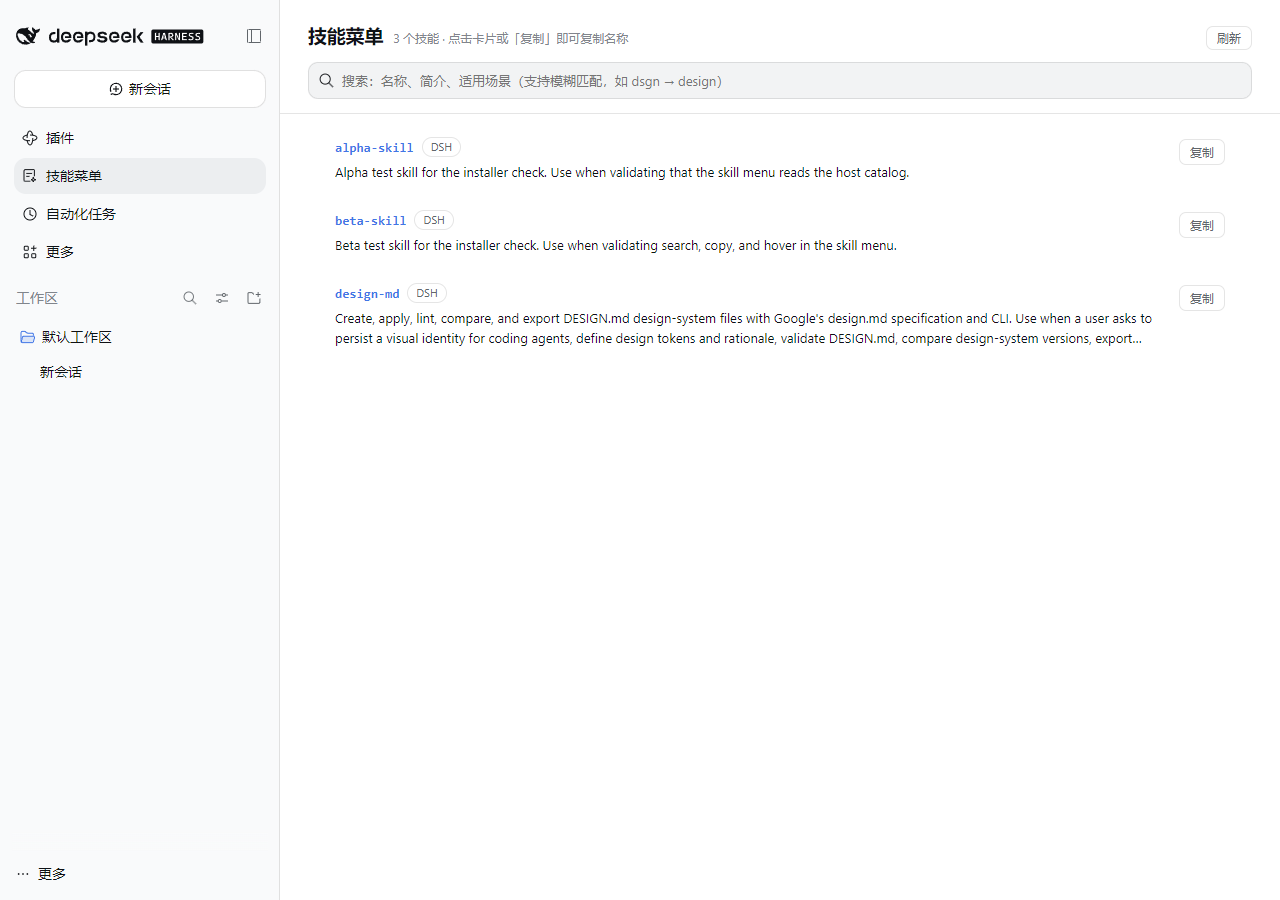
- 列出 DSH 技能根目录里的技能:
$DSH_HOME/skills(跳过.system)与~/.agents/skills,两者都是 DSH 自己会加载的位置;需要更多目录时给插件配extraRoots。 - 只列每个根目录的直接子目录(
<name>/SKILL.md)或顶层<name>.md,与 DSH 的发现规则一致——菜单里出现的,就是 agent 能调用到的。 - 搜索框支持子序列模糊匹配:
dsgn能找到design-md,中文关键词直接搜中文简介。 - 悬停弹出完整简介、适用场景、技能文件路径。
- 点卡片或「复制」按钮复制技能名;把名字贴回对话,agent 就能用原生
skill工具加载它。 - 有「刷新」按钮,装完新技能不用重启。
怎么让技能变得可调用? DSH 原生只扫描 ~/.dsh/skills/<name>/SKILL.md(一层)。把你的技能目录链接进去即可,不用复制:
# Windows:为每个技能建目录联接(junction)
New-Item -ItemType Junction -Path "$HOME\.dsh\skills\my-skill" -Target "D:\skills\my-skill"
# macOS / Linux
ln -s ~/somewhere/my-skill ~/.dsh/skills/my-skill
菜单里出现,就说明 DSH 已经能调用它了。
隐私与安全
- 没有网络请求:两个插件都不联网、不上报、不下载。
- 技能目录接口只监听本机:菜单通过
/skill-menu/catalog读取本机技能目录;该路由只接受 loopback 请求,绑定到局域网地址时对外返回 403。 - 个性文本存在你自己的 profile 里:
<profile>/cordis.patch.yml的global-persona条目,随时可手改或删除。 - 仓库不含个人数据:技能列表是运行时从你的机器读取的,不在仓库里。
- 插件以你的用户权限在同一进程内运行——装第三方插件前请自己过一眼代码,这一条对任何 DSH 插件都成立。
结构
plugins/global-persona/   宿主一半:注册系统提示词 section;浏览器一半:设置页
plugins/skill-menu/       宿主一半:只读技能目录接口;浏览器一半:侧边栏面板
scripts/install.mjs       安装(幂等,可 --check)
scripts/uninstall.mjs     卸载(保留你写的个性文本)
INSTALL.md                给 agent 看的安装步骤
两个插件都是 DSH 的 bundle:package.json 里 dsh.bundle.patch 指向各自补丁层,dsh.client 声明浏览器端。宿主端分别用 ctx.systemPrompt 和 ctx.webServer,没有改 DSH 本体任何文件。
兼容性
在 DSH Desktop 0.2.1-rc.3(Windows)上开发与验证。插件只依赖公开的 Cordis 服务(systemPrompt、skills、webServer、slots、configForms、locale),理论上兼容 0.2.x;大版本升级后若有服务更名,需要同步调整。
已知限制
- 项目级技能目录(
<project>/.dsh/skills、<project>/.agents/skills)默认不列出,因为它们随会话工作目录变化;需要的话把它们加进extraRoots。 - 简介文字来自技能自身的
SKILL.mdfrontmatter,不会被翻译;中文技能显示中文,英文技能显示英文。 - 菜单只读:删技能、改技能仍需在你自己的目录里操作(改完点刷新)。
- Windows 上用 PowerShell 的
Set-Content -Encoding utf8写SKILL.md会带 BOM,DSH 会把该技能判为无效;请用无 BOM 的 UTF-8。
License
MIT
English
Two add-ons for the DeepSeek Harness Web GUI:
- Global persona — one editable prompt injected into every session's system prompt; a Settings page reads and writes it, and saving applies on the next request.
- Skill menu — a sidebar page listing the skills in the directories DSH loads from (
$DSH_HOME/skills,~/.agents/skills), with fuzzy search, hover descriptions, one-click copy, and a live refresh. The host scans those roots over a loopback-only route, so the repo ships no skill data.
Install: hand the repo URL to your DSH agent (it follows INSTALL.md), or run node scripts/install.mjs, then restart DSH completely.
Skills become callable when each one is a folder with a SKILL.md directly under ~/.dsh/skills/ (or another root DSH scans). Link them instead of copying.
MIT licensed. No network calls, no telemetry, no personal data in this repository.
No comments yet. Be the first to write one.