dsh-mcp-manager


Manage MCP servers right from the DeepSeek Harness Web settings page — add, edit, enable/disable, reconnect and delete servers at runtime, with live status, automatic reconnect and config-file hot sync.
Features
- Web settings UI — a dedicated "MCP Server Manager" page: server cards with live status, an add/edit form, and two-step delete protection.
- OAuth 2.0 / RFC 9728 support — native MCP OAuth 2.1 authorization with PKCE, automated metadata discovery, browser-based login flow, token auto-refresh and management.
- Runtime connections — servers connect/disconnect on the fly; tools are registered globally as
mcp__<serverName>__<tool>for every session. - Live status — reachability probing so a closed server shows offline instead of a stale "connected"; a stuck connection times out after 30 s.
- Auto-reconnect — a failed initial connect retries with exponential backoff (3 s → 60 s); pressing refresh retries immediately.
- Enable/disable — switch a server off to disconnect and unload its tools; switch it on to reconnect.
- Config file hot sync —
$DSH_HOME/mcp-servers.jsonis watched; external edits take effect within ~1 s, no restart needed. - Themes & i18n — follows DSH light/dark mode (and
--dsw-alias-*token overrides from appearance plugins); UI ships in 简体中文 / English.
Screenshot
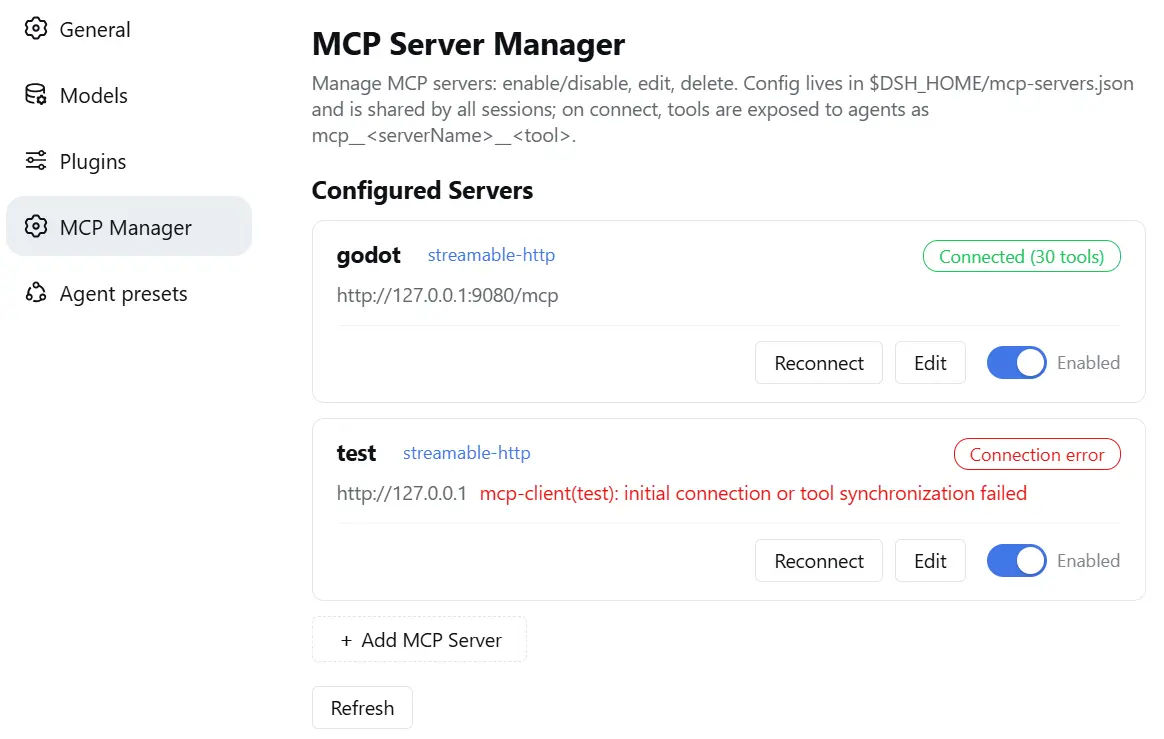
Install
For humans
Option 1 — from npm (easiest):
dsh plugin --profile web add dsh-mcp-manager
Option 2 — from source:
Clone and build:
git clone https://github.com/Nichts0v0/dsh-mcp-manager.git
cd dsh-mcp-manager && npm install      # the prepare script builds lib/ automatically
Make the package resolvable from the profile (pick one):
Run from the folder that contains the clone (no absolute path needed):
dsh plugin --profile web add ./dsh-mcp-managerThis installs the package as a plain pnpm dependency (this package has no
dsh.bundlelayer), which only makes it resolvable — you still need step 3 to mount the plugin row.Or symlink the repository directory itself into the profile's
node_modules(avoid copying, which would drag in devnode_modules):- Windows:
mklink /J "%DSH_HOME%\profiles\web\node_modules\dsh-mcp-manager" <path-to-clone>— replace<path-to-clone>with your local clone path - macOS/Linux:
ln -s <path-to-clone> $DSH_HOME/profiles/web/node_modules/dsh-mcp-manager
- Windows:
Then, whichever option — mount the plugin row in $DSH_HOME/profiles/web/cordis.patch.yml:
- insert:
    - id: mcp-manager
      name: dsh-mcp-manager
Restart dsh web and hard-refresh the browser page (Ctrl+Shift+R) so the new __DSH_BOOT__ loads, then open Settings → MCP Server Manager and add your first server.
Note: hot reload of
cordis.patch.ymlis disabled on the Web surface (DSH's shared HMR row is off), so configuration changes need a restart.
For AI agents
Follow every step, in order:
Read this README in full (especially Features, Known limitations, and this install section).
Install the package (npm is preferred): run
dsh plugin --profile <profile> add dsh-mcp-managerin the profile you use (ornpm install dsh-mcp-managerin$DSH_HOME/profiles/<profile>and use Option 2 below for the file layout).- Build/source fallback: clone this repo,
cd dsh-mcp-manager, runnpm install --ignore-scripts && npm run build(produces self-containedlib/index.js+lib/client.js; zero runtime dependencies), then link the folder into$DSH_HOME/profiles/<profile>/node_modules/dsh-mcp-manager(directory junction on Windows, symlink on POSIX).
- Build/source fallback: clone this repo,
Mount the plugin row: append to
$DSH_HOME/profiles/<profile>/cordis.patch.yml:- insert: - id: mcp-manager name: dsh-mcp-managerRestart
dsh web(Web-surface config hot reload is disabled) and tell the user to hard-refresh the browser so the settings page shows the new section.Verify:
GET http://127.0.0.1:3080/mcp-manager/api/healthmust return{"ok":true,"name":"mcp-manager","version":"<x.y.z>",...}.
Usage
Open Settings → MCP Server Manager:
- Server cards show the name, transport, status badge, endpoint and
OAuthtags; disabled cards are dimmed. - Enable/disable switch — disabling disconnects immediately and unloads the server's tools.
- Reconnect — waits for the connection result and refreshes automatically (configurable wait, default 15 s).
- Edit — change transport / URL / command / headers / OAuth settings (
serverNameis immutable); saving hot-reconfigures the live connection. - OAuth authorization — for
streamable-httpservers requiring authentication, chooseOAuth 2.0, click Authorize (OAuth) to log in via browser popup, and manage token revocation. - Delete — lives at the top of the edit page, behind a two-step confirm (3 s window).
- Add —
streamable-http(URL + optional headers or OAuth 2.0) orstdio(command + args), with a configurable connection-wait timeout.
Statuses
| Status | Meaning |
|---|---|
| Connected (n tools) | tools are registered |
| Connecting | handshake / reconnecting in progress |
| Offline | was connected, but the server process is unreachable (probed) |
| Error | initial connect failed (reason shown) or 30 s connect timeout |
| Disabled | switched off — not connected, no tools |
Configuration file
$DSH_HOME/mcp-servers.json — shared by every profile and session:
{
  "version": 1,
  "servers": [
    {
      "serverName": "my-http-server",
      "transport": "streamable-http",
      "url": "http://127.0.0.1:8080/mcp",
      "enabled": true
    },
    {
      "serverName": "my-oauth-server",
      "transport": "streamable-http",
      "url": "https://api.example.com/mcp",
      "authType": "oauth",
      "enabled": true,
      "oauth": {
        "clientId": "client-id-123",
        "scopes": ["read", "write"],
        "tokens": {
          "accessToken": "secret_access_token",
          "refreshToken": "secret_refresh_token",
          "expiresAt": 1787304425000
        }
      }
    }
  ]
}
The file is watched live: manual edits (add / remove / change / enable) take effect within ~1 s; POST /mcp-manager/api/reload triggers it on demand.
HTTP API
| Method | Path | Purpose |
|---|---|---|
| GET | /mcp-manager/api/health |
liveness + version + store path |
| GET | /mcp-manager/api/servers |
list with live (probed) status |
| GET | /mcp-manager/api/servers/<name> |
single server |
| POST | /mcp-manager/api/servers |
add & connect |
| POST | /mcp-manager/api/servers/<name>/update |
update config & hot-reconnect (serverName immutable) |
| POST | /mcp-manager/api/servers/<name>/toggle |
enable / disable (`{"enabled": true |
| POST | /mcp-manager/api/servers/<name>/reconnect |
disconnect & reconnect |
| DELETE | /mcp-manager/api/servers/<name> |
disconnect & delete |
| POST | /mcp-manager/api/reload |
re-read the config file from disk |
| POST | /mcp-manager/api/oauth/discover |
probe RFC 9728 OAuth metadata for an MCP URL |
| POST | /mcp-manager/api/oauth/start |
generate PKCE authorization URL for browser login |
| GET | /mcp-manager/api/oauth/callback |
OAuth redirect callback & token exchange |
| POST | /mcp-manager/api/oauth/revoke |
clear saved OAuth credentials and disconnect |
Security
The /mcp-manager/* API can start stdio servers — i.e. execute arbitrary commands — so it is access-controlled:
Optional access token. Set a top-level
tokenin$DSH_HOME/mcp-servers.json:{ "version": 1, "token": "use-a-random-long-string", "servers": [] }Generate one with
node -e "console.log(require('crypto').randomBytes(24).toString('hex'))". When set, every request must carryAuthorization: Bearer <token>(all endpoints, includinghealth):curl -H "Authorization: Bearer <token>" http://127.0.0.1:3080/mcp-manager/api/serversThe settings page shows an "Access token" field — enter it there once (stored locally in the browser) and it is sent automatically.
Network-exposure guard. When
dsh webbinds to a non-loopback address (--host 0.0.0.0) and no token is configured, the manager logs a loud error and rejects all/mcp-manager/*requests (403) until a token is set and dsh is restarted. Loopback-only + no token stays fully open, matching the single-user local posture.Token comparison is timing-safe (
crypto.timingSafeEqual).The token is stored in plaintext in
mcp-servers.json— protect that file (same trust level as the DSH credentials store).
Development
npm install      # build-only devDependencies; prepare auto-builds
npm run build    # esbuild: lib/index.js (host, fully bundled) + lib/client.js (browser)
npm run watch    # watch the client bundle (works with dsh-client-hmr)
Publishing: bump version in package.json, then npm publish (the prepare script builds lib/ automatically before packing; the package ships lib/ + both READMEs + LICENSE).
No runtime dependencies: the host half inlines @deepseek-ai/dsh-mcp-client, the MCP SDK and cross-spawn; the browser half is a closure-factory bundle served by DSH's client module system.
Known limitations
- Initial failure retries with backoff, not instantly —
failOnStartupErroris on, so a failed first connect showserrorand retries up to every 60 s; once connected, mcp-client's own reconnect handles drops. - Reachability probing is HTTP-level — a GET with a 2.5 s timeout for
streamable-httpservers (any HTTP response counts as reachable);stdioservers are not probed. - Tools only — MCP Resources/Prompts are not bridged (same as the official mcp-client).
- Auth is token-only, loopback-by-default —
/mcp-manager/*has no built-in user accounts; use the optionaltoken(see Security) before exposing--host 0.0.0.0(stdio servers execute arbitrary commands). - Some MCP servers allow only one active client (e.g. Godot MCP) — a second connection is rejected until the first is released.
License
MIT
No comments yet. Be the first to write one.