dsh-budget-watcher
English | 简体中文
A DeepSeek Harness (dsh) plugin that floats a small
window over the conversation showing how much balance is left on your API account, what the turns
you just ran actually cost and how fast is your balance decreasing when performing different tasks.
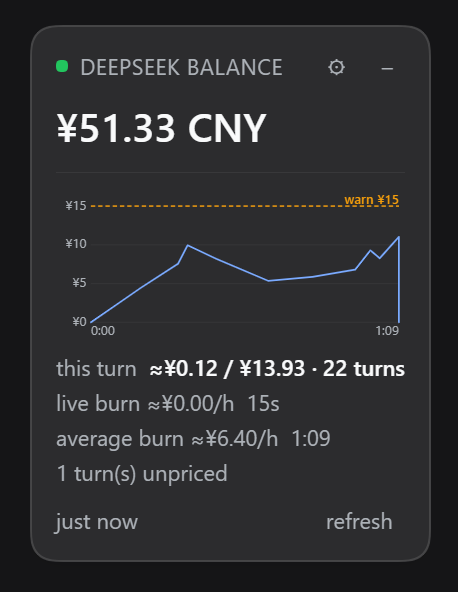
The expanded panel on a real account: the balance, this turn's cost beside the conversation's, both burn
rates, and the live-burn chart drawn against the turn's own elapsed time. Captured at 0.6.2.
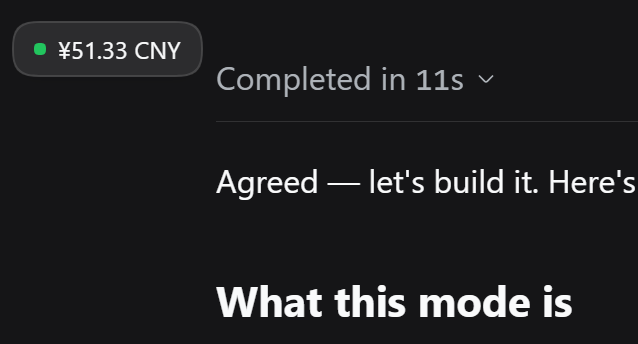
Collapsed to a pill — one click, or a double-click on the header — it leaves only the status dot and the amount. The dot keeps its colour, so a spend warning survives the collapse.
The headline is total_balance from DeepSeek's public balance API: topped-up money plus granted credit,
which is the number that decides whether the next call works. The two parts are not shown separately — one
figure is the honest report, because topped_up_balance alone reads 0.00 on an account living on granted
credit and would say "broke" about an account that is working fine.
The cost figures are computed from the token usage DeepSeek already reports on every assistant message, which DSH already records. They spend no tokens of their own: no model call, no extra request, no estimation prompt. See What it costs you.
- Collapse to a pill — one click, or double-click the header, leaves just the amount on screen.
- Drag it anywhere — grab the expanded panel anywhere on it, not just its title bar. The position is remembered across reloads. The collapsed pill deliberately stays put, because a pill you can nudge by accident is a pill you cannot click.
- Refresh on demand — or let it poll on its own schedule.
What it shows
Every figure below is read off the screenshot above, so the examples are real rather than illustrative.
| Element | Meaning |
|---|---|
¥51.33 CNY |
total_balance — the whole balance: topped-up money plus granted credit. The headline, and the only balance row. |
| Green dot🟢 | is_available: true — the account can make API calls. |
| Amber dot🟡 | The balance is stale, the last check failed, is_available is false, or the live burn is over the warning threshold. |
| Red dot🔴 | The spend limit was crossed and the plugin interrupted the turn. Reserved for that one event. |
| Red dot (other) | Nothing could be read and no previous value is on screen. |
just now |
When the host last got an answer. A stale number is labelled, never passed off as current. |
this turn ≈¥0.12 / ¥13.93 · 22 turns |
The turn you are waiting on, and after the slash the whole conversation — including the agents either of them spawned. One row, because "what this cost" and "what it all costs" is one thought. |
live burn ≈¥0.00/h · 15s |
What the last 15 seconds cost, projected to an hour. The sudden-loss figure, and the one both thresholds act on. It reads ¥0.00/h here because nothing settled inside those 15 seconds — a true reading, not a fault. A pulsing dot marks a turn still in flight. |
average burn ≈¥6.40/h · 1:09 |
That turn's cost over its own elapsed time: ¥0.12 across 1 min 9 s. A running average, frozen the moment the turn ends. |
| The chart | live burn against the turn's elapsed time, 0:00 → 1:09. The blue line is anchored at the origin — nothing had been spent yet — and the amber warn ¥15 line is the warning threshold. |
1 turn(s) unpriced |
A model with no published rate was seen, so those turns are reported rather than costed at a guess. |
session ¥15.12 · 4 turns |
The conversation total on a row of its own — only when there is no turn yet to pair it with. |
Not available for API calls |
is_available: false. |
No API key is configured… |
The host found no key; the message names the credential reference to set. |
The header already says DeepSeek balance, so the amount carries no caption and there is no second balance line. Every setting lives behind the gear button.
What it costs you
A research turn that fans out to sixty subagents is invisible from the conversation: one turn is open, no answer has arrived, and the balance is falling. Balance alone tells you that you are spending; it does not tell you how fast, which is the number you need to decide whether to stop.
The panel answers that with four figures, all derived from data already on disk:
this turn— what the turn you are waiting on has cost so far. It updates as each step settles, because usage is reported per assistant message rather than per turn.live burn— what the last window cost (burnWindowMs, 15 seconds by default), projected to an hour. This is the sudden-loss detector and the figure the two thresholds act on. It is deliberately short and therefore jumpy:0whenever nothing has settled inside the window, which is true rather than broken. A 15-second window is the price of noticing within seconds instead of minutes.average burn— that turn's cost divided by its elapsed time. A running average, recomputed once a second against the live clock and frozen when the turn ends, which is what makes two finished tasks comparable: one turn's rate is a fact about that task, not about the profile's recent mood.session— every turn in this conversation plus every subagent session beneath it. A fan-out bills in the children, so counting only the session you are looking at would report the calm, not the fire. TheN agentssuffix tells you how many are in flight.
Two rates rather than one, because one number hid both: averaging a 15-second window into a task-long mean gives a figure that is neither immediate enough to catch a runaway nor stable enough to compare tasks.
Because the whole point is spotting the expensive task, this turn and both burns count the agents that
turn spawned, attributed by time window rather than by turn number. A subagent has its own private turn
sequence, so summing only the conversation's own turns would report a calm rate while sixty agents burn.
The settings tab lists recent turns hottest first — cost, rate and duration — so the expensive tasks are identifiable after the fact rather than only while they run.
The two thresholds, and the one that stops the turn
Both are expressed in the balance's own currency: CNY per hour on a CNY account, USD per hour on a USD one.
burnWarnPerHourturns the dot amber and tints the live burn figure. Purely informational.terminateAbovePerHourgoes further: when the live burn crosses it, the plugin interrupts the running turn, exactly as pressing stop does, and the dot turns red.
It is off by default (0), deliberately. Stopping a task is destructive and the rate is an estimate, so it
has to be asked for. When it does fire: the stop is latched per turn number, so one runaway turn is interrupted
once rather than once per poll; queued input you have already typed is preserved; and the session log records
turn/end with reason: { kind: "aborted", reason: { kind: "hook", reason: "dsh-budget-watcher/over-budget" } },
so the turn's end has a stated cause rather than looking like a crash. See
Known limitations for how precise the turn targeting is, which is the honest caveat.
Both thresholds and the burn window are on the settings tab.
The chart
Under the figures, and above the refresh row, the panel draws this turn's live burn rate against its own
elapsed time — d(currency)/dt for the turn in hand. It is on by default and can be switched off
(graphEnabled).
It spans the panel's full content width, so it lines up exactly with the this turn row — and it cannot make
the panel any wider than the text already does, which is what keeps the panel narrow.
- The x-axis is the turn, not a window. It grows one second at a time while the turn runs and stops the moment the turn ends, so the picture is one task start-to-finish rather than a sliding window that forgets what it saw. A frozen chart is a finished turn's whole history.
- The y-axis only ever grows, and only when a new high-water mark is set. It never rescales downwards under the line mid-turn, which would make a falling rate look like a cliff. Gridlines land on 1, 2 or 5 times a power of ten, and the peak is labelled in the chart's accessible description.
- Blue is the live burn, amber is
burnWarnPerHour, and red isterminateAbovePerHour— drawn only when that is above0, since a stop line at "off" would mean nothing. The caption beside each line takes that line's colour, so the pairing survives both themes. - A threshold above the drawn range is pinned to the top edge, dashed and marked
▲, rather than dropped. Hiding the line you set would be worse than showing it out of scale. - Every gridline on an axis shares one precision, chosen from the step, so an axis reads
¥0 / ¥20 / ¥40rather than¥10above¥5.00. - The line is anchored to the axis origin. Nothing has been spent at
t=0, so the rate there is honestly zero; starting at the first settled step instead made the left of the plot look like missing data. - The line is the same windowed figure as the
live burnrow, so the two cannot disagree; the host samples it at each settled step and the panel extends it to now once a second.
Where the numbers come from
DeepSeek reports exact token usage on every assistant message, and DSH writes it into the session log. The plugin reads that log and multiplies by DeepSeek's published rates:
cost = uncached input × cache-miss rate
     + cache-read tokens × cache-hit rate
     + output tokens × output rate
Two details make the difference between an estimate and a wrong number:
- DSH's
inputTokensis the uncached half. The cache buckets are separate. Subtracting cache reads frominputTokens— the obvious-looking arithmetic — collapses the uncached half to zero on a well-cached turn and under-reports exactly the turns worth watching.dsh-llm-deepseekstates the identity outright:totalTokens = inputTokens + outputTokens + cacheReadTokens + cacheWriteTokens. - Retried attempts are billed. A failed attempt settles as
assistant/attempt, which carries nousagefield at all — its numbers survive only in the lastusagechunk of its stream. Reading justusagewould silently drop the cost of every retry.
Peak and off-peak rates are applied per call from the timestamp (peak is 01:00–04:00 and 06:00–10:00 UTC,
Monday to Friday, which is 09:00–12:00 and 14:00–18:00 Beijing time on the same days). reasoningTokens is recorded but never priced separately: it is a subset of output tokens,
so charging for it as well would double-bill.
Install
dsh plugin --profile <your-profile> add dsh-budget-watcher
For a profile installed from this repository instead of npm:
dsh plugin --profile <your-profile> add github:NeutronStar714/dsh-budget-watcher
Then restart that profile. dsh plugin add writes the dependency and appends the package to
dsh.profile.bundles; a running process does not pick up a new bundle on its own. Configuration edits to the
row are live afterwards when the profile sets "patchReload": "live".
Confirm it landed:
dsh plugin --profile <your-profile> list
The widget appears in the bottom-right corner as soon as the profile is up. If it does not, see Troubleshooting.
[!NOTE] The DSH desktop application owns its bundled profile exclusively, and the CLI refuses to modify it (
error: profile "desktop" is managed exclusively by the Electron application). Install into that profile from the app's own Settings → Plugins page instead, then restart the app. The CLI path above is for profiles you create and run yourself, such asdsh web.
Uninstall
dsh plugin --profile <your-profile> remove dsh-budget-watcher
The API key
The plugin never asks for a key of its own. It reads the same DEEPSEEK_API_KEY credential reference the
shipped DeepSeek adapter uses, so a key you already configured for inference is reused. Resolution order:
apiKeyfrom this plugin's config, when set.apiKeyEnv(defaultDEEPSEEK_API_KEY) throughctx.credentials— this is what the Web Models page writes.DEEPSEEK_API_KEYfrom the environment that launcheddsh.
It is resolved at every refresh, so storing a key takes effect on the next poll without a restart. The key is used for one outbound request and is never written to the page, the route response, or a log.
[!IMPORTANT] This reads the public API balance at
https://api.deepseek.com/user/balance, which is what an API key unlocks. It is not the same number as Settings → Account, which comes from the DeepSeek Platform web API through a signed-in OAuth grant. If you sign in with an account and never stored an API key, the widget reports that no key is configured. See Known limitations.
Configuration
Edit your profile's cordis.patch.yml, keeping the comments and replacing [] if the file is still empty:
- id: budget-watcher
  config:
    provider: deepseek
    apiKeyEnv: DEEPSEEK_API_KEY
    refreshIntervalMs: 60000
    currency: auto
A patch replaces the row's whole config object, so keep every override together. All fields are optional.
| Option | Default | Purpose |
|---|---|---|
provider |
deepseek |
Which API account to read. Only deepseek is implemented; see Known limitations. |
apiKey |
(empty) | An explicit key. Prefer apiKeyEnv: a key written here lives in your profile file. |
apiKeyEnv |
DEEPSEEK_API_KEY |
Credential reference resolved through ctx.credentials. |
endpoint |
(the provider's) | Override the balance endpoint. Intended for testing against a stand-in server. |
refreshIntervalMs |
60000 |
How long the host reuses one balance answer before calling DeepSeek again. Minimum 15000. This paces the upstream API call, not the panel — see Known limitations. |
requestTimeoutMs |
10000 |
Deadline for one balance request. |
currency |
auto |
Which currency the cost figures and both thresholds are shown in. auto follows the featured balance wallet; CNY or USD force it. A closed set, because DeepSeek publishes rates in exactly those two currencies. |
allowNonLoopback |
false |
Allow the widget to read balance when the GUI is served on a non-loopback address. |
costEnabled |
true |
Estimate what recent turns cost from the usage the provider already reports. Spends nothing. |
graphEnabled |
true |
Draw the live-burn chart in the panel. Turning it off leaves every figure in place. |
burnWindowMs |
15000 |
Window for the live burn rate, in milliseconds (minimum 5000). Short on purpose: this is the figure that catches a sudden loss. |
burnWarnPerHour |
2 |
Per-hour spend above which the panel turns amber, in the balance's currency. 0 disables the warning. |
terminateAbovePerHour |
0 |
Per-hour spend above which the running turn is interrupted, in the balance's currency. 0 — the default — disables it. |
usdToCny |
auto |
Exchange rate for models priced in USD by a third party. auto fetches the European Central Bank's daily reference rate; a number (7.2) uses that rate and makes no network request. Defaults to auto. |
There is no exchange-rate setting, because there is no exchange rate: costs are priced from DeepSeek's published CNY or USD rate card, matching whichever currency the featured balance is held in. See Where the numbers come from.
To disable the plugin without uninstalling it:
- id: budget-watcher
  disabled: true
Settings
The panel's gear button opens a Budget tab in DSH's right sidebar: every option above as an editable field, with Save. The gear only appears when a tab could actually be registered, so it is never a control that does nothing.
Durations are shown in the units you think in — the balance cache and the live burn window in seconds — and converted back on save. The API key field is write-only: it starts blank, blank means leave it alone, and clearing it removes the key from the profile. The running key value is never sent to the page; the form only knows whether one is set.
Currency is a drop-down of auto / CNY / USD, not a text field: those are the only currencies
DeepSeek publishes rates in, so anything else could only ever be wrong. The two thresholds are labelled with
the currency the balance is actually held in.
The form scrolls, and Save is pinned to the bottom of it, so the button stays reachable however long the settings and the recent-turns list grow. The turn list is bounded and scrolls separately.
Saving goes through DSH's own config editor, so the change lands in your profile's cordis.patch.yml and is
applied by the normal loader path — the same file and the same mechanism you would edit by hand:
- id: budget-watcher
  name: dsh-budget-watcher
  config:
    currency: CNY
    burnWindowMs: 15000
    burnWarnPerHour: 3.5
    terminateAbovePerHour: 0
A value set back to its default is removed rather than written, so the row goes back to inheriting. Config edits apply without restarting DSH.
If the row cannot be written — no config editor in the composition, or a home patch or --patch overlay that
also sets it — the tab says so and disables Save rather than failing on click.
[!NOTE] This uses the plugin's own route plus the host
configEditorservice rather than DSH's generatedremote.settingstransport. The generated path needs a schemasteryConfigwhose fields are all.volatile(), and a client-side form built onconfigForms; the route is smaller, is covered by tests, and was verified writing a real profile patch. Migrating to the generated transport is the natural next step if the plugin grows more settings.
How it works
Two halves in one package, which is what dsh.bundle.patch plus dsh.client describe.
Host half (index.js) does everything that needs a secret or a socket. It resolves the key, calls
GET https://api.deepseek.com/user/balance with Authorization: Bearer <key>, normalizes the response, and
serves it to the page as JSON over one route: GET /dsh-budget-watcher/balance.
- Caching with single flight. One answer is reused for
refreshIntervalMs, and concurrent requests share one in-flight upstream call, so ten open windows do not mean ten requests. - A failure keeps the last number. The previous balance stays on screen marked stale rather than blanking.
An unreadable body is a protocol error, never a rendered
0.00. ?refresh=1bypasses the freshness window; that is what the refresh button does.- A same-origin fence. The route lives outside
/api, so it applies its own checks: theHostheader must name a loopback authority (which is what stops a DNS-rebinding page), a presentOriginmust matchHost, andsec-fetch-site: cross-siteis refused. OnlyGETis served.
Client half (lib/client.cjs) is a hand-written classic script in the loader's lazy-CJS format — no
bundler, no JSX, no runtime dependencies. It registers into the frame-wide shell.overlay slot, the seat
described by DSH as "above every column and outside their scroll containers", and draws with React.createElement
and the --dsw-* theme tokens so it follows the active light or dark theme. Its stylesheet carries
data-plugin / data-plugin-css, which is how the shell reclaims plugin CSS on unload.
Which conversation to price comes from the client, not from a guess. A root-scoped slot entry receives the
frame's standard kit as props, so the panel reads the retained session the same way DSH's own title bar does —
useSessions, selecting the row with retainedBy.mainView > 0 — and sends it as ?session=. The host falls
back to the newest live root session when the parameter is absent, so an older client still gets an answer
rather than nothing.
The package declares no @deepseek-ai/dsh* peer dependencies and imports none, so the compatibility gate
cannot refuse it and there is nothing for pnpm to install. The one optional import, @deepseek-ai/schemastery
for config validation, is dynamic and degrades to unvalidated config rather than failing the profile.
Files
| Path | What it is |
|---|---|
index.js |
Host half: config, credential resolution, the upstream request, caching, the /dsh-budget-watcher/balance route and its fence, and the cost payload. |
lib/balance.js |
Pure helpers: normalizing the payload, choosing a currency, mapping HTTP failures to messages. No DSH or fetch imports, so it is directly testable. |
lib/cost.js |
Pure cost model: DeepSeek's rate card, peak/off-peak selection, usage→USD, and the fold from session events to per-turn totals. |
lib/ledger.js |
Which sessions count as one conversation's spend: the live tree, descendants, and a total that does not fall when a subagent finishes. |
lib/client.cjs |
Client half: the floating window, drag/collapse state, session handshake, polling, and the panel stylesheet. |
cordis.patch.yml |
The bundle patch inserting the loader row. |
test/ |
node --test suite: balance, cost, ledger, host (the route against a stubbed API) and client (the bundle in a VM with a stubbed loader). |
docs/screenshotnew.png |
The expanded panel, captured at 0.6.2 on a real account. Named screenshotnew rather than screenshot so GitHub serves the current image instead of a cached copy of the previous one. |
docs/screenshot_pill.png |
The same watcher collapsed to a pill, captured at 0.6.2. |
README.zh-CN.md |
简体中文翻译。The English file is authoritative where the two differ. |
Development
No build step and no dependencies — node --test is the whole toolchain.
node --test
To try a local checkout against a real profile without publishing:
dsh plugin --profile <your-profile> add link:/absolute/path/to/dsh-budget-watcher
Then restart the profile. Because the dependency is a symlink, edits to index.js are picked up by a profile
restart, and edits to lib/client.cjs are served on the next request.
Troubleshooting
| Symptom | Cause and fix |
|---|---|
| No widget at all | The profile was not restarted after dsh plugin add, or the row is disabled. Check dsh plugin --profile <name> list. |
No API key is configured |
Store a DeepSeek API key on the Models page, or export DEEPSEEK_API_KEY before launching dsh. |
DeepSeek rejected the API key |
The key is wrong, revoked, or belongs to a different account. |
Could not reach api.deepseek.com |
Offline, or a proxy that DSH's global dispatcher does not know about. See Known limitations. |
forbidden: host is not a loopback authority |
You reached the GUI through a LAN name or a non-loopback reverse proxy. Set allowNonLoopback: true only if you accept that the route is then reachable by anyone who can reach that address. |
| The number never changes | refreshIntervalMs has not elapsed, so the host is still serving the cached answer. The relative timestamp tells you when it last moved. |
| The cost figures do not appear when you send a prompt | Fixed in 0.6.3. Before that the panel polled on the balance-cache window, so a prompt sent just after a poll could go unnoticed for a minute. If it still happens, the host is on a stale module — check pluginVersion and restart DSH. |
| No cost rows at all | Check cost.reason in GET /dsh-budget-watcher/balance: disabled means costEnabled: false; no-live-sessions means no session is live in the host process; failed means the ledger threw and the warning is in the dsh log. If pluginVersion is missing from that response, the host is running a stale module — restart DSH. |
| Balance shows but a feature you just added does not | The host module was imported before your edit and is cached. Restart DSH; see limitation 14. |
N turn(s) unpriced |
A turn ran on a model missing from the rate card. Add it to PRICING in lib/cost.js, or ignore it if you know that turn was not a DeepSeek one. |
| Live burn is amber but nothing feels wrong | burnWarnPerHour is being crossed. Raise it, or set it to 0 to turn the warning off. A short window makes this jumpy, so a single spike is usually not worth acting on. |
| The dot is red and the turn stopped by itself | terminateAbovePerHour fired. The reason is in the log as dsh-budget-watcher/over-budget; raise the limit or set it to 0. |
| Live burn reads ¥0.00/h mid-turn | Correct, not broken: nothing has settled inside the window. 15 seconds is short by design. Check average burn or session instead. |
| Cost figures look too small | The session total only covers spend observed since the plugin loaded. See limitation 19. |
Known limitations
Recorded honestly, because each one is a decision rather than an oversight.
- DeepSeek only.
providerexists and the request path is written per provider, butPROVIDERSinindex.jsholds a single entry. Any other provider is currently a code change, not a config change. - The API-key balance, not the signed-in account balance. The widget reads
https://api.deepseek.com/user/balance, which needs an API key and returnstopped_up_balance. DSH's own Settings → Account reads a different figure from the DeepSeek Platform web API through an OAuth grant. The two can disagree, and this plugin deliberately does not mix them. A user who signs in with an account but has no API key sees "no API key configured" rather than the platform number. - No
is_availablefor the platform account, and no expiry information for granted credit. The public API does not expose them. - One currency is featured.
balance_infosis an array and an account may hold more than one currency. All wallets are returned to the client, but the panel draws the onecurrencyselects (autoprefers CNY, then whatever came first). The rest are not shown. - Amounts are strings and are never arithmetic. DeepSeek documents all three amounts as decimal strings.
The widget prints what it received, so
totalis displayed as returned rather than recomputed. - Polling, not push. There is no SSE stream, so the panel polls. Two different intervals are involved and
they are deliberately separate: the panel polls its own local host route every few seconds (2 s while a
turn runs, 3 s when idle) so a prompt is noticed promptly, while
refreshIntervalMs— 15 s minimum, 60 s default — is how long the host reuses one balance answer before calling DeepSeek. Conflating the two was the0.6.3bug: the panel inherited a 60 s poll and looked frozen until the refresh button was pressed. - The route is unauthenticated beyond its fence. It is not on DSH's authenticated
/apiprefix, so the plugin applies its own loopback + same-origin checks. It returns a balance figure and never a credential. If your deployment sets a non-loopback bind host, the route answers to that network unless you leaveallowNonLoopbackoff — in which case the widget will simply report a 403. - Config validation is optional. With
@deepseek-ai/schemasteryimportable, config is validated and defaulted by Cordis, producing proper errors. Without it, config is read defensively and a typo is silently ignored rather than reported. - Web profiles only.
dsh.client.platformisweb. Atuiorheadlessprofile loads the host half and serves the route, but there is no window to draw in. - No web server, no data. In a profile without
webServerthe plugin loads and does nothing, rather than failing the profile. - The overlay cell id is not namespaced. The entry registers as
budget-watcherinshell.overlay. It is a fresh id today; another plugin choosing the same id would land in the same cell. - Proxy support is inherited, not implemented. Requests use plain
fetch, so DSH's process-wide proxy dispatcher routes them. A proxy configured only in operating-system settings, or a SOCKS URL, is not honoured — the same boundarydsh-http-proxydocuments for every outbound call in the harness. dsh.engines.dshanddsh.compatibilityare declarative only. The real compatibility gate in this build readspeerDependencieson@deepseek-ai/dsh*names; this package declares none, so it is never refused — and never verified either.- A host half is only ever loaded once. Adding the bundle needs a profile restart, and so does editing
it afterwards: Node caches an imported ES module for the life of the DSH process, so changing
index.json disk has no effect on a running profile. The client half is re-served from disk on every request, so an edit there does appear — which is how you can end up with a current client drawing a stale host's data. Every payload carriespluginVersionprecisely so that state is visible rather than guessed at. - The DSH desktop application's bundled profile cannot be installed into from the CLI. It is managed
exclusively by the Electron app, and
dsh plugin --profile desktop add …fails by design. Use the app's Settings → Plugins page there; the CLI path is for profiles you run yourself.
Cost estimates
- The rate card is a snapshot, not a feed. Prices live in
lib/cost.jswith the date they were read (PRICING_READ_ON) and that date is reported in the payload. DeepSeek changing a price will not be noticed until the table is updated, and the panel will keep reporting the old rate while looking confident. - Public holidays are not modelled. Peak/off-peak is computed from the UTC windows, but the exclusion of Chinese public holidays is not — the calendar is not published in the API docs and changes yearly. A holiday weekday is therefore priced at the peak rate, which overstates cost. That is the safe direction for a spend warning, and it is the only part of the peak calculation that is wrong.
- The rate card is two published tables, not one converted into the other. DeepSeek publishes its prices
in both CNY and USD, and the plugin carries both, pricing in whichever currency you select — or, under
auto, whichever the featured balance is held in. No exchange rate is involved anywhere, which also means the figures are not a conversion of each other: flash off-peak output is $0.60 or ¥4 (an implied ~6.67) while a spot rate is nearer 7.2. Only those two currencies are supported; anything else falls back to USD. - Only the live agent tree is counted. Spend is attributed to sessions that are live at poll time, plus any already remembered this process. A fan-out that finished before the plugin loaded is not in the live session list, so its subagent spend is missing from the session total — the root session's own turns still count. Restarting the profile therefore resets the session total to whatever is still live.
- A remembered total can exceed the live one. By design, a finished subagent keeps contributing so the number never falls. That means the session total is "spend observed while this plugin has been loaded", not a re-derivation from the log on every poll.
ownEvents()andsnapshotEvents()are deprecated in DSH. They are the only whole-log reads available to a plugin, they are what the fold uses, and DSH's own README says new production calls are prohibited. Every call is wrapped: if a future release removes them the cost section disappears and the balance keeps working, rather than the plugin failing.- An unpriced model is reported, not estimated. If a turn ran on a model with no entry in the rate card
(a MiMo or Gemini turn in the same profile, say) its cost is excluded and the count is shown as
N turn(s) unpriced. A silent zero would read as "that turn was free". - A retried attempt's model is inferred.
assistant/attemptevents name no model, so the attempt is priced with its turn's model, falling back to the session's own request context. If a turn somehow changed model mid-retry, the retry is priced at the wrong rate. - Reasoning tokens are not priced. DSH does populate
reasoningTokenson real DeepSeek calls, but they are a subset ofoutputTokens, so they are recorded and deliberately not charged again. - The estimate is not an invoice. It is published rates applied to recorded token counts. Rounding, promotional credit, granted-balance expiry, and any future billing change all sit outside it. Treat it as a magnitude, which is what it is for.
Settings
- The gear button needs a right sidebar.
sidebarRight/sidebarRightTabsare optional faces. Without them no tab is registered and the button is not rendered — the panel and its figures still work. - Save needs the host
configEditorservice. Without it the tab renders read-only and says which reason applies, rather than offering a Save that would fail. - Saving the config restarts the plugin's fiber. The fields are ordinary (non-volatile) config, so the loader reloads the row: the panel's poll restarts and its in-memory cost ledger is cleared. It re-reads its own config on every request, so this is a blip, not a stale state.
- A home patch or
--patchoverlay that also sets this row makes it unwritable. DSH's config editor refuses rather than writing a value it cannot make effective; the tab reports it. @deepseek-ai/schemasteryis a declared peer dependency. It is resolvable from the DSH installation, and declaring it is what lets the plugin'sConfigschema reach the runtime at all — without itConfigwas silentlyundefined, so config was read defensively and never validated. Peers are not installed (autoInstallPeers: false); the harness supplies it..volatile()is not used, deliberately. Volatile fields let DSH apply a change without reloading the fiber, but they arrive as live getter objects that must be dereferenced on every read. Ordinary fields plus a fiber reload are simpler and were verified applying a real edit; a settings-heavy future may prefer the other trade.
Turn cost and burn
- Burn is a cumulative average, not an instantaneous rate. Cost arrives in lumps as each step settles, so an instantaneous rate would spike at every step and read zero between them. Cost-so-far over time-so-far is stable while a turn runs and lands exactly on the turn's true average when it closes — which is the point, since it is meant to characterise a finished task.
- A running turn's rate decays between steps. The numerator only moves when a step settles; the denominator moves every second. A long silence mid-turn therefore makes the figure drift down, correctly but unintuitively.
- The live figure is computed in the browser. The host sends cost and the turn's start; the panel ticks elapsed time locally at 1 Hz and recomputes the rate. That keeps the display live without a request per second. The numerator refreshes on a tighter 2 s poll while a turn runs, up from the configured interval, which is real extra load on the host route during a turn.
- A turn's figure includes its descendants, attributed by time window. That is deliberate — a fan-out bills in the children — but it means a long-lived subagent from an earlier turn whose calls land inside this turn's window is counted here. Work that continues after the turn ends is not, so a frozen figure can understate a fan-out that outlives its root turn.
- The live rate flickers, by design. A 15-second window reads
0whenever nothing has settled inside it, which happens during any step that takes longer than 15 seconds to come back. That is a true reading — no spend settled in that window — not a bug, but it does mean the figure alternates between zero and a spike on a turn with slow steps.average burnis the stable companion for that reason. - Turn history is capped and root-scoped. The comparison table keeps the last 10 closed turns of the conversation and is not persisted, so it is empty after a restart and cannot compare across sessions.
- The elapsed clock trusts the host. The payload carries the host's
serverNowand the page corrects for the offset, so a drifted browser clock cannot distort a turn's duration. It assumes both are the same machine, which holds for the loopback-only route this plugin serves.
Terminating a turn
- Turn targeting is advisory, not atomic. This is the important one. An
Agentoutlives any one turn, so holding a reference identifies the agent, not the turn — there is a real window between reading the live burn and callingcancelin which the turn can end and a successor begin, and nothing in the API can cancel "turn N". The plugin samples the open-turn boundary immediately before and after the call, which cannot prevent a wrong-turn abort but does convert it from a silent one into a loggedraced-next-turn. If it fires when you did not expect, read that line. - It is off by default, and should stay off until you have watched the rates.
terminateAbovePerHourdefaults to0. Stopping a task is destructive and the number it acts on is an estimate built from a 15-second window, so a threshold set too low will interrupt legitimate work. SetburnWarnPerHourfirst, watch what your real turns actually burn, then set the limit above that. - The check runs on the read route. The interrupt is decided inside the balance
GET, which is a side effect on a read — not lovely. The burn rate is only computed there, and the alternative was a second timer recomputing the same ledger on its own schedule. Being off by default is what makes the compromise acceptable. - The exit point is cooperative.
cancelaborts the in-flight request and drains or skips tool calls, but a tool already executing is drained rather than force-killed, and whether the provider socket is torn down immediately is adapter-dependent. A turn may finish its current tool call before it stops. - Descendants are not reliably stopped. A foreground in-process subagent inherits the parent's abort signal and does stop; background and continuable children may not. The plugin stops the root turn and does not walk the tree, so a fan-out's background agents can outlive the turn that was terminated.
- Only one stop per turn, and it is not re-armed. The fire is latched on the turn number, so a turn is interrupted at most once. A later turn can be stopped normally, but if the same turn somehow continues after being cancelled, it will not be stopped again.
The settings tab
- The form owns its own scrolling. The sidebar pane gives the tab a bounded height and does not scroll it, so the form is a scroll container and Save is pinned to its bottom; the recent-turns list is separately capped and scrolls. Without this the content below the fold was simply unreachable — which is exactly the bug this arrangement fixes.
Currency
- The balance row cannot follow the
currencysetting. Costs and thresholds are priced, so they can be expressed in whichever currency you choose. The balance is not priced — it is a number the API returns in the account's own currencies — so it can only ever be shown in a currency the account actually holds. ForcingUSDon an account with no USD wallet therefore leaves the balance in CNY and the costs in USD, and the settings tab says so in a line under the thresholds. Showing the balance in USD would mean converting it, and the plugin has no exchange-rate source by design; inventing one would put a made-up number next to real ones. - Every cost figure moves together. The 15 s live burn, the turn average, the session total and each row of the recent-turns table are all re-priced from the token counts when the currency changes, so the comparison table stays internally comparable. Mixing a table of past turns priced in one currency with a current turn priced in another would make the table's one job — comparing tasks — impossible.
The chart
- The chart needs a turn. With no turn yet in the conversation there is no timeline to draw, so the chart is absent rather than empty. It also does not persist: the series is rebuilt from the session log on each poll, so it survives a panel reload and a DSH restart, but it is not stored anywhere of its own.
- The line is a windowed rate, so it steps down as well as up. It is the same 15-second figure as the
live burnrow, which means a quiet stretch longer than the window drops the line back towards zero. That is the rate being honest, not the chart misbehaving. - The y-axis latches to the high-water mark. It only changes when a new maximum appears, so a rate that falls will not bring the scale down with it — the line dips inside a fixed frame instead of the whole picture rescaling under you. The cost is that a long turn's later detail can look flat once an early spike has set a tall ceiling.
- A threshold above the range is drawn pinned, not omitted. It sits on the top edge, dashed and marked
▲. Reading a value off a pinned line is not possible; the label carries the real number. - The series is thinned, not truncated. A fan-out can settle hundreds of steps; past 240 samples the host thins them evenly so the shape of the whole turn survives rather than only its first half.
- Gridlines are round numbers, not round fractions of the data. The step is 1, 2 or 5 times a power of ten, which keeps the axis legible at any magnitude but means the top line is usually above the peak rather than exactly on it.
- The chart's height is a ratio, and the panel's width is its text's. The chart is a fixed proportion of the content box (240:100), so it tracks whatever width the widest text row asks for. A very narrow panel therefore shrinks the axis labels with everything else — below roughly 100 CSS pixels of chart width they stop being comfortable, and the honest fix there is to switch the chart off.
- The panel's width is set by its longest text row, which in practice is
this turn ≈¥0.78 / ¥13.05 · 19 turns. Nothing else in the panel can widen it: the chart is deliberately prevented from contributing its own intrinsic width, and the balance and header are shorter. If that row grows, the panel grows with it.
Third-party pricing
- Prices for other providers come from a third party's list, not from your invoice. They are read from
OpenRouter's public model list, and for a model routed through OpenRouter they can carry its margin. Treat
every figure that did not come from DeepSeek as an estimate of list price, which is what the
≈is for. - DeepSeek is never priced from that list. OpenRouter lists
deepseek/deepseek-v4.1-flashat $0.003/M input where DeepSeek's own published off-peak rate is $0.15/M — 50× apart. DeepSeek's own table wins, and the fetched list is not even consulted for a model DeepSeek publishes. - A Chinese provider's own CNY prices are not used, because they cannot be read. GLM's pricing page is a JavaScript shell with 127 characters of visible text and Kimi's numbers are not in its static HTML either, so those models are priced in USD from the fetched list and converted. A hand-copied CNY snapshot would go stale silently, which is worse than a rate that is at least dated and visible.
- The exchange rate is a central-bank reference rate, not what you are billed at.
usdToCny: autouses the ECB's daily file, which is published on business days and quoted against the euro — so USD→CNY is a cross rate, not the PBOC's 中间价. Card spreads and a provider's own conversion both move the real number, and a mid-market rate cannot know about either. Set a number inusdToCnyto use the rate you were actually charged instead; that also stops the plugin making any request for a rate. - An unfetchable price leaves the turn unpriced, never converted at a guess. If the rate or the model list
is unavailable, the model lands in
N turn(s) unpricedand the payload'scost.pricingsays which of the two is missing. A wrong price is invisible on the panel; a missing one is not. - The fetched list and the rate are cached on their own timers, a day and half a day respectively, and a
failed fetch backs off rather than retrying on every poll. So a price change is picked up within a day, not
immediately — and DeepSeek's own table, which is bundled, is still only as fresh as
PRICING_READ_ON.
Verified against
- DSH
0.2.0-rc.2on Windows, installed withdsh plugin --profile <name> add link:<path>. - Two screenshots of the running panel at
0.6.2, both indocs/and both used in this README: the expanded panel and the collapsed pill. Everything the element table above describes is visible in them, and they were taken from a real account with a real balance —¥51.33 CNY, a turn of≈¥0.12, a conversation of¥13.93across 22 turns. - A live
GET /user/balancefor a real account, read both directly from the route and through the panel in a real browser, where the collapse-to-pill and expand-back toggle, the accessible labels and the relative timestamp were exercised. Dragging and the refresh control are covered by the test suite rather than by a browser gesture. - The session handshake observed in real network traffic: a root-scoped
shell.overlayentry does receiveuseSessions, and the panel's poll is issued asGET /dsh-budget-watcher/balance?session=session-…once a session exists. - The cost model replayed over real session logs on disk, not fixtures: 254 of 254 real assistant messages
carried a usage report, every one on a priced model, and the arithmetic reproduced DeepSeek's own identity
exactly — one real turn of 67,223 uncached + 10,244,352 cache-read + 138,018 output tokens priced to
$0.1236, matching the published rates to the cent. - A real settings write end to end:
POST /dsh-budget-watcher/configon a running profile put the row'sconfiginto that profile'scordis.patch.yml, and re-reading the payload showed the new values effective. node --test, 160 tests covering the payload normalizer, the cost model and both rate cards, the session ledger (fan-out, descendants, finish-must-not-subtract, wrong-session isolation, per-turn burn, frozen duration and the windowed burn series), the route (caching, single flight,?refresh=1, the fence, the config write, the cost payload, the terminate path firing once and only once, every failure mode) and the client bundle (registration shape, slot mounting, drag scoping, session handshake, live versus average burn, the settings form's scroll container and pinned Save, the chart's polyline, thresholds, on/off switch, the absence of a stop line at0, the caption fills, the one-precision axis, the axis-origin anchor and the containment that stops the chart widening the panel, the combined turn/session row, the poll cadence being seconds rather than the 60 s balance window, rendering per host state, unmount cleanup). The multi-provider layer adds its own: the ECB cross-rate arithmetic and its sanity band, the fallback order when a fetch fails, the failure backoff and that concurrent callers still share one attempt, OpenRouter's per-token prices becoming a per-million card, a bare model name resolving against vendor-prefixed ids, a bundled price beating a fetched one, and a price change invalidating a cached fold.- Pricing sources probed against the live services, not assumed: the ECB file returned a USD→CNY cross rate of 6.7046 for 2026-10-02 (and DeepSeek's own published CNY/USD pairs imply ~6.67, so the two agree inside 1%), and OpenRouter returned 466 models covering every provider named here. The same probe is how the claim that Kimi's pricing page was readable got corrected — it is not, and neither is GLM's.
- Two real browser screenshots of the running panel. The first found the fixed-size chart, the invisible
black threshold caption and the mixed-precision axis. The second found that the chart was still setting the
panel's width:
<svg>is a replaced element with a 300×150 intrinsic size, so its default width — not the text — was pinning the panel at its cap. Neither defect was reachable by assertion, and the second was reachable only by measuring a screenshot against the CSS. - The termination primitive read out of DSH's own source rather than guessed:
ctx.get("agents").get(id)→agent.cancel({ kind: "hook", reason }, { keepInbox: true })is the same call the stop button's Remote wrapper makes (dsh-api-session-controller), anddsh-deepseek-accountsets the precedent for a programmatichook-caused stop.
[!NOTE] Three rounds of screenshots, and every round found something no assertion could. The first showed a chart at full panel width, a threshold caption rendering black on the dark theme (an SVG
<text>with nofilldefaults to black), and an axis mixing¥10with¥5.00. The second showed the panel was still too wide — the chart's 300 px intrinsic width, not the text, was setting it. The third, at0.6.2and linked above, confirms all of it: the chart spans the panel and starts at the origin, thewarn ¥15caption is legible, the axis reads¥0 / ¥5 / ¥10 / ¥15, and the panel is narrow.Still test-verified only, and honestly so: the settings form's scrolling and pinned Save (
0.5.1) — no screenshot has shown that tab yet — and the red stop line, which needsterminateAbovePerHourabove0and has not been seen firing. Tests can prove elements and CSS rules exist; only eyes can say whether they look right, which this project has now learned three times over.
Changelog
See CHANGELOG.md. Every change updates it and this README together.
No comments yet. Be the first to write one.