dsh-restart-button
A draggable floating restart button for the DeepSeek Harness (dsh) Web GUI.
Drag it where you want it, click it, confirm — the desktop app and its host process close and come back by themselves. Handy while developing plugins, where every manifest change otherwise means quitting the app from the tray menu.

Features
- Draggable — the button sits in the corner you drag it to; the position is stored in
~/.dsh/restart-button.jsonand survives a restart. - Confirm before restarting — a click opens a dialog;
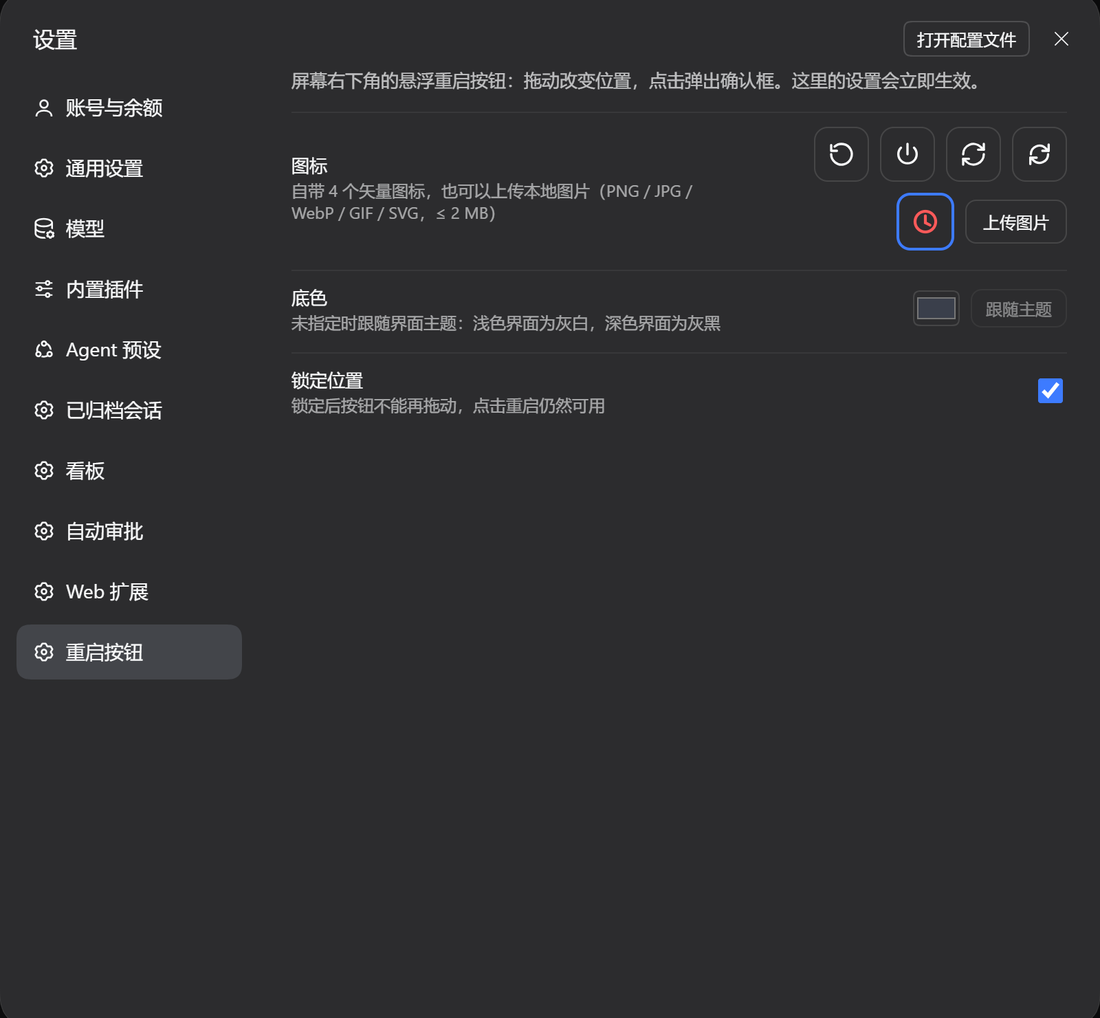
Esc, the backdrop or Cancel just close it. Only Restart actually closes the app. - Custom icon — four built-in vector glyphs, or upload your own image (PNG / JPG / WebP / GIF / SVG, ≤ 2 MB).
- Custom background colour — pick any colour; the glyph switches between dark and light ink automatically. Unset, it follows the UI theme (light grey on light, dark grey on dark).
- Lockable position — freeze the button in place so a stray drag cannot move it; clicking still works.
- Everything is editable in Settings → Restart button and applies immediately.

Install
Through the plugin manager: open 插件 / Plugins → 安装插件 and paste the package URL below. From a terminal, in the profile you use:
dsh plugin --profile desktop add https://codeload.github.com/NYSM803/dsh-restart-button/tar.gz/refs/heads/main
That URL form needs nothing but pnpm. The
github:NYSM803/dsh-restart-buttonshorthand also works, but only whengitis installed — pnpm resolves it withgit ls-remote, and without git the install stops withERR_PNPM_GIT_RESOLVE_FAILED.
The host half mounts on the next app start; the browser half after the page reloads. Restart the app once after installing and the button appears.
How the restart works
POST /api/restart-button/restart writes %LOCALAPPDATA%\dsh-restart-button\restart.ps1 and
starts it through a scheduled task, so the launcher outlives the process tree it is about to
close. The script asks the app to close (CloseMainWindow), force-closes whatever is left after
2 s, then starts the executable again, retrying up to three times. Every step is appended to
%LOCALAPPDATA%\dsh-restart-button\restart.log; if the app does not come back, read that log and
start DeepSeek Harness.exe by hand.
An in-flight answer is interrupted by the restart; the saved session transcript is not.
Settings
| Field | Effect |
|---|---|
| Icon | four built-in glyphs, or an uploaded image stored in ~/.dsh/restart-button/icon.* |
| Background | any colour, or follow theme (the default) |
| Lock position | stops dragging, keeps the click |
API
| Method | Path | Purpose |
|---|---|---|
| GET | /api/restart-button/config |
read the configuration |
| POST | /api/restart-button/config |
merge a patch into it |
| GET | /api/restart-button/icon |
the uploaded icon (404 when there is none) |
| POST | /api/restart-button/icon |
upload one as {"dataUrl":"data:image/png;base64,…"} |
| POST | /api/restart-button/restart |
restart the app; {"dryRun":true} only resolves the paths |
Package layout
package.json      declares dsh.bundle (the cordis patch) and dsh.client (the browser half)
cordis.patch.yml  inserts the restart-button row
lib/index.js      host half: config store, icon upload, relauncher
lib/client.js     browser half: the floating button and the settings page
Requirements
- dsh >= 0.2.2-rc.1, Windows (the relauncher is PowerShell + Task Scheduler).
- React 18 is provided by the host.
License
MIT
No comments yet. Be the first to write one.