dsh-llm-commandcode
English | 中文
Command Code Provider API chat for DeepSeek Harness. This plugin is a separate provider route (commandcode) and settings namespace (llm-commandcode). Chat uses the documented Provider API through DSH PiAiAdapter. Account quota is a Host-only, best-effort extra and never blocks chat.
The package root exposes the Cordis plugin contract. The same artifact exports ./client, which contributes the Command Code card under Settings → LLM Providers.
Installation
DeepSeek Harness 0.1.1-rc.2 or later is required. Install directly from GitHub:
dsh plugin --profile web add github:NOirBRight/dsh-llm-commandcode#v0.1.1
dsh web
The repository tracks release-ready lib artifacts, so GitHub installation needs no build-script allowlist. A source checkout can use a link installation after running pnpm run build.
Shared LLM Providers section owners from before this plugin need a matching patch so the Command Code card is visible on PC web:
dsh plugin --profile web add github:NOirBRight/dsh-llm-cursor#v0.2.7
dsh plugin --profile web add github:NOirBRight/dsh-llm-grok#v0.3.1
dsh plugin --profile web add github:NOirBRight/dsh-llm-codex#v0.3.1
dsh plugin --profile web add github:NOirBRight/dsh-llm-ollama#v0.6.8
Remote management
By default the plugin's settings RPC is loopback-only. When you open DSH from a non-loopback host (e.g. https://dsh.noirbright.top or http://192.168.50.75:3080), the card shows “A remote browser cannot edit plugin settings”.
To allow editing from a trusted host:
- Add to your profile patch (
~/.dsh/profiles/web/cordis.patch.ymlfor production,~/.dsh-lab/profiles/web/cordis.patch.ymlfor lab):- id: llm-commandcode config: remoteManagement: true - Restart DSH with the host allowlisted:
The current production launch already usesdsh web --trusted-host 192.168.50.75 --trusted-host dsh.noirbright.top--trusted-host 192.168.50.75 --trusted-host dsh.noirbright.top; add any additional host you use. - Refresh the browser. Settings saved on the host keep working for remote sessions.
Without remoteManagement: true, use ssh -L 3080:127.0.0.1:3080 user@host and open http://127.0.0.1:3080.
Web configuration
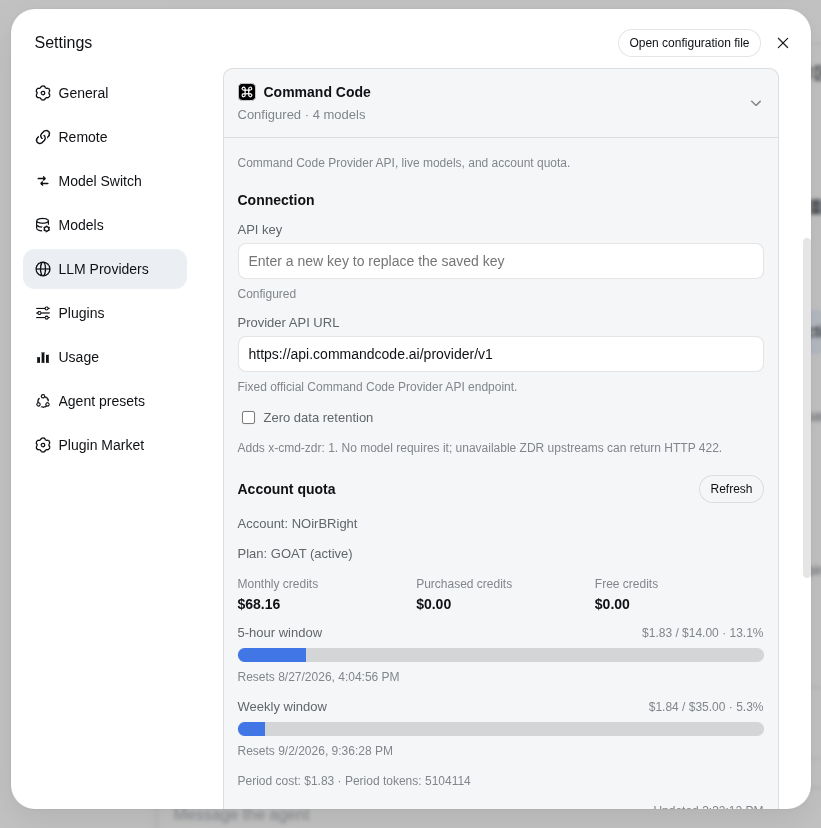
Open Settings → LLM Providers → Command Code. If this is the first provider plugin, it creates that left-nav section; otherwise it joins the existing one. The card stores the API key through the DSH credentials service under COMMANDCODE_API_KEY (set apiKeyEnv to CMD_API_KEY if needed). The Host never returns the stored literal.
The only visible Provider API URL is the fixed, read-only official https://api.commandcode.ai/provider/v1. Discovery is a public GET and carries neither an endpoint nor a key. Quota uses the same official origin on the Host; the custom browser RPC never carries the secret.
Zero data retention is a request-level switch. When checked, chat requests add x-cmd-zdr: 1. No model requires it; an unavailable ZDR upstream can return HTTP 422.
The catalog starts collapsed. Fetch models opens an overlay grouped by Go / Pro / Provider+ access, then adds the selection. Each row can expand for context, max output, and official effort options; drag reorders, trash removes. Saved defaults: GLM-5.3 Flash and all DeepSeek models use max; Muse uses its highest published level; GPT follows the local Codex policy (Sol high, Terra xhigh, Luna max, other GPT prefer xhigh with a valid-level fallback). A saved valid override wins.
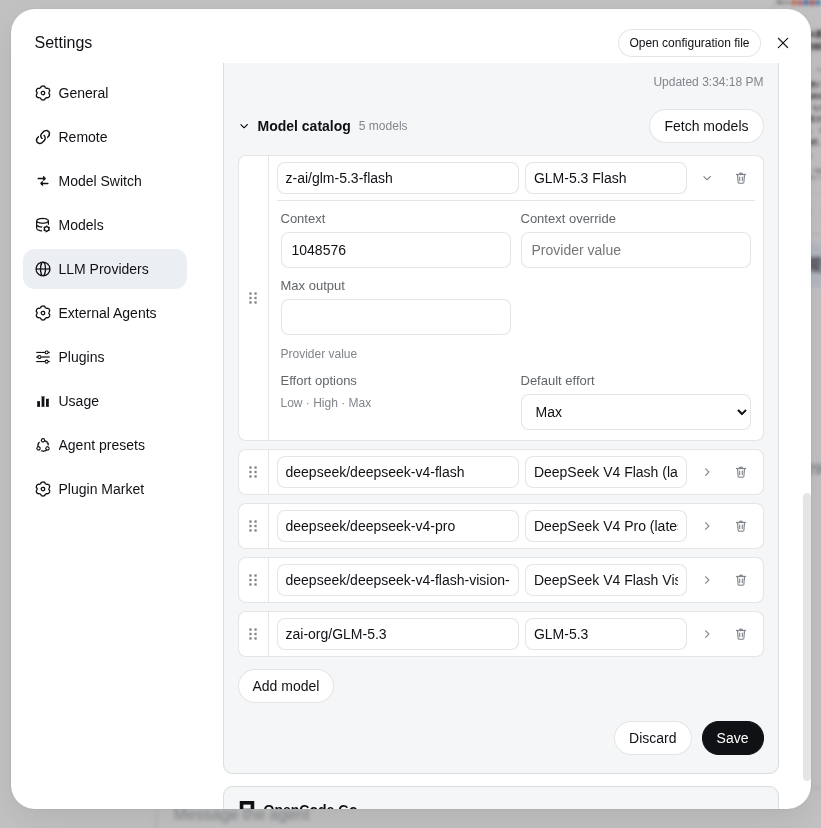
The default catalog is empty. Press Fetch models before selecting a model; the plugin does not invent startup capacities. contextWindowOverride wins over the live context_length; the default context is only a fallback for hand-added rows.
Cordis config (the card writes the same fields):
- id: llm-commandcode
  name: dsh-llm-commandcode
  config:
    apiKeyEnv: COMMANDCODE_API_KEY
    usageEnabled: true
    zeroDataRetention: false
    remoteManagement: false
Chat protocol
The protocol is fixed by model id, not a user toggle:
claude-*→POST /provider/v1/messages(Anthropic Messages)- every other id →
POST /provider/v1/chat/completions(OpenAI Chat Completions)
Serialization, SSE, tools, attachments, and reasoning go through DSH PiAiAdapter. There is no vision toggle on the card; image-capable models keep the modalities they advertised.
External-auth / remote management
API keys are entered in the browser but stored only by the Host credentials service; the provider RPC exposes only { configured, writable }, never the value. Settings reads, saves, model discovery, usage, and credential writes use the provider management RPC. Settings revision fencing and credential storage are separate operations and are not falsely presented as one atomic transaction.
For a non-loopback deployment, set remoteManagement: true, restart DSH, and start it with the browser authority explicitly trusted (for example dsh web --trusted-host app.example.com). Keep it false for loopback-only operation; if disabled remotely, the card explains that trusted-host access plus a restart is required.
Account quota
Quota is separate from chat. The Host best-effort-calls the unofficial account routes used by the official CLI (/alpha/whoami, /alpha/billing/credits, /alpha/billing/subscriptions, /alpha/usage/summary) on https://api.commandcode.ai. Failures never block chat. Set usageEnabled: false to hide the panel.
The card shows the account name, plan, monthly / purchased / free credits, 5-hour and weekly windows, and optional period cost/tokens plus a refresh time.
Verification
pnpm test
pnpm run build
pnpm run pack:check
pnpm run lab:check   # existing lab GUI on 127.0.0.1:3082
Provider API documentation: https://commandcode.ai/docs/provider
No comments yet. Be the first to write one.