dsh-rdm
A resident multi-connection download engine for DeepSeek Harness.
dsh-rdm keeps one long-lived Rust rdm-kernel process warm behind five
model-facing tools and a sidebar download panel. Downloads are segmented,
resumable, verifiable and bandwidth-limited, and they survive pauses, crashes,
kernel restarts and DSH restarts — without spawning a process per file and
without asking an agent to shell out to curl.
Features
- Resident kernel, started lazily — one
rdm-kernelchild process per DSH host, spawned on first tool/panel use and kept warm. NDJSON over stdio; no listening port. Idles at roughly 5.7–6.7 MiB resident memory. - Segmented multi-connection transfer — 1–32 connections per task, a chunk
queue with in-flight tail stealing, and an AIMD concurrency controller with
429/503 pushback. Transfers with no
Content-Lengthare followed to EOF. - Resumable by design — pause state is persisted every ~500 ms as
<target>.part+<target>.part.json, so a paused, killed or interrupted transfer resumes from its own byte ranges after a kernel or DSH restart. Validator checks (ETag, Last-Modified, total size) catch a remote file that changed while paused instead of mixing stale bytes. - Integrity — optional SHA-256 is verified before the
.partfile is atomically renamed to its final name; a mismatch fails the task and leaves the target path untouched. - Bandwidth control — per-task
speedLimitBpscap, plus a profile-wide default. - Probe without downloading —
rdm_probereturns final URL, file name, size, range support, content type and validators using HEAD (with a ranged GET fallback). - Agent-first tools —
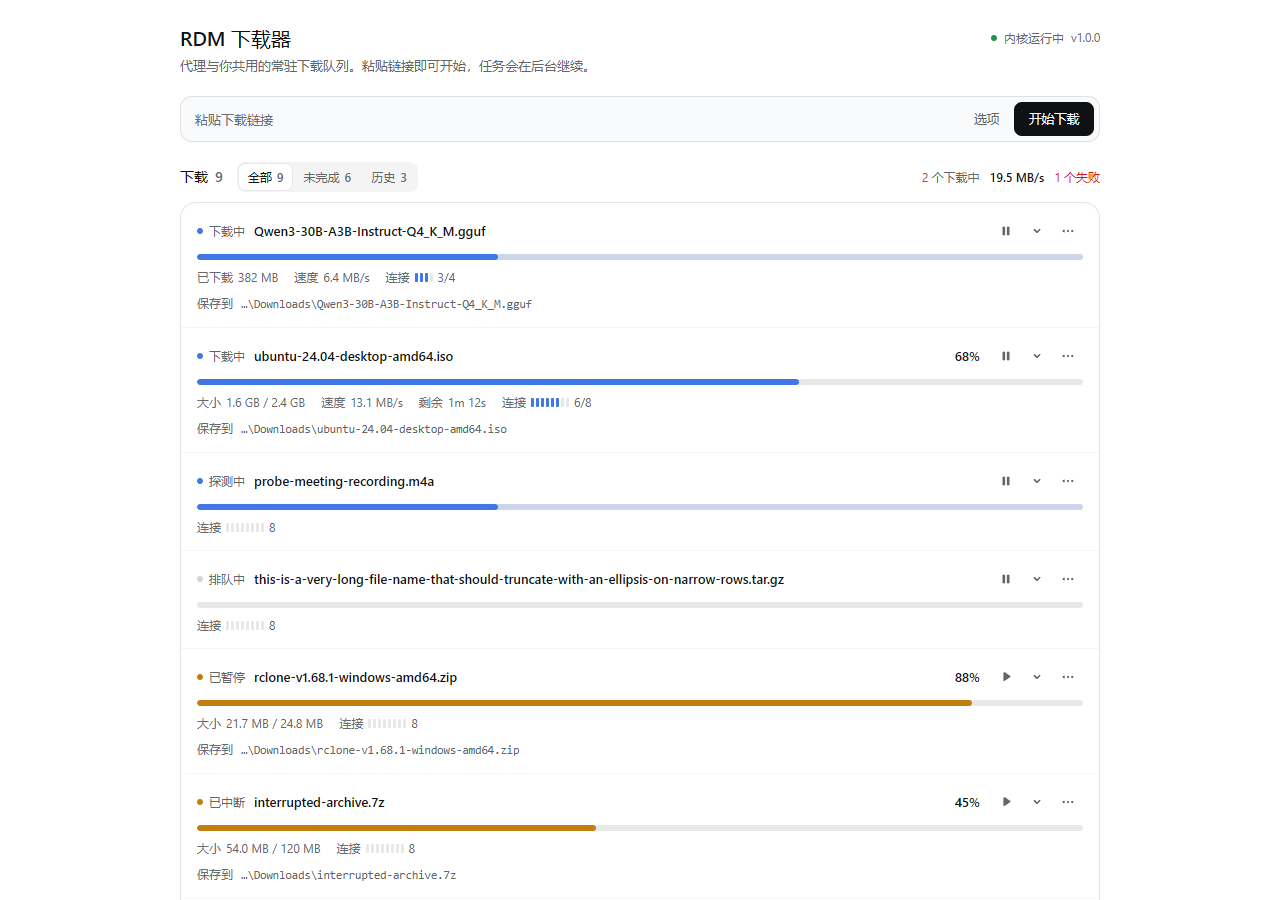
rdm_download,rdm_probe,rdm_tasks,rdm_waitandrdm_control, plus a system-prompt section that tells every agent to route file downloads through them. - Sidebar panel — a download icon in the left sidebar opens a transfer ledger: live status, percent, speed, ETA, a per-task connection lane meter, filters, per-row pause / resume / retry / cancel / remove / copy-path, inline details with the kernel event log, and a start composer.
- Bounded and local — every response is bounded and stable JSON; task
events are capped; the kernel never buffers a full body. The browser half
talks to the host over the authenticated
POST /api/dsh-rdm/apiroute. - Self-contained host half — the host bundle imports only Node built-ins; the schema library it needs is vendored (MIT) and bundled.
Tools
All tools return bounded, stable JSON. Long downloads run in the background and
are monitored with rdm_wait / rdm_tasks.
| tool | purpose |
|---|---|
rdm_download |
Start a download (url, dir, fileName, connections, headers, cookie, referer, userAgent, expectedSha256, speedLimitBps, resume, singleStream, proxy, insecure). Returns the task immediately; waitSec optionally waits up to 300 s. |
rdm_probe |
Metadata only: final URL, file name, total size, range support, content type. |
rdm_tasks |
Kernel status + task list (filter by status) or one task detail with recent kernel events. |
rdm_wait |
Wait for up to 20 task ids to become terminal (timeout ≤ 300 s). |
rdm_control |
pause / resume / cancel / retry / remove a task. |
Example agent flow:
rdm_download { url: "https://example.com/img.iso", dir: "C:\\Downloads\\iso", expectedSha256: "…" }
→ { id: "t_9f3a…", status: "running", … }
rdm_wait     { taskIds: ["t_9f3a…"], timeoutSec: 120 }
→ { tasks: [{ status: "completed", path: "C:\\Downloads\\iso\\img.iso", sha256: "…" }], timedOut: false }
Install
Install straight from GitHub into a profile:
dsh plugin --profile web add github:NIRVANA-APOC/dsh-rdm
Or install a local checkout as a directory bundle from a DSH session:
plugin_manager install_bundle target=<absolute path to dsh-rdm>
Refresh the Web page after the first install. The plugin row is inserted by
cordis.patch.yml; the kernel binary is resolved from
bin/<platform>-<arch>/rdm-kernel[.exe] inside the package.
The repository ships its built lib/ bundles and the Windows x64 kernel
binary, so a GitHub install needs no build step.
UI
The downloader lives behind a left-sidebar entry (sidebar.panellist, id
rdm, order 30); selecting it opens the matching main panel (main, key
rdm). The panel is a transfer ledger rather than a form plus cards:
- header: page title and a plain engine status line (version and pid in its tooltip), no refresh chrome — the page polls once a second and pauses while the document is hidden;
- start composer: one URL bar with a primary Start button. Directory and connection count sit behind 选项 / Options; Enter starts, invalid input is explained inline, and focus returns to the bar after a successful start;
- one ledger surface for all downloads: status dot and status word, filename, percent, and a thin byte rail. Unknown-length transfers sweep instead of faking a percentage; paused, completed and failed states change the rail color and stop the motion;
- a connection lane meter in each row's meta line: one tick per planned connection, staffed ticks lit, and only those breathing while the transfer runs;
- state-specific telemetry — size, speed, ETA and connection use only while they matter; completed rows show the saved path and a copy action; failed rows show the kernel error;
- filters (all / unfinished / history) with counts, plus a live aggregate for running count, total speed and failures;
- per-row icon actions: pause / resume / retry / copy path, details, and an
overflow menu (cancel download, remove from list, copy link). At ≤520 px the
icon actions fold into that menu so filenames keep their room. Row-level
errors are announced with
role="alert"; - inline details: source and final URL, saved path, chunk size, resumed chunks, SHA-256 verification, timing, retries, and a bounded kernel event log;
- copy actions confirm with a short toast; all copy in Chinese and English
comes from
locale/*.json.
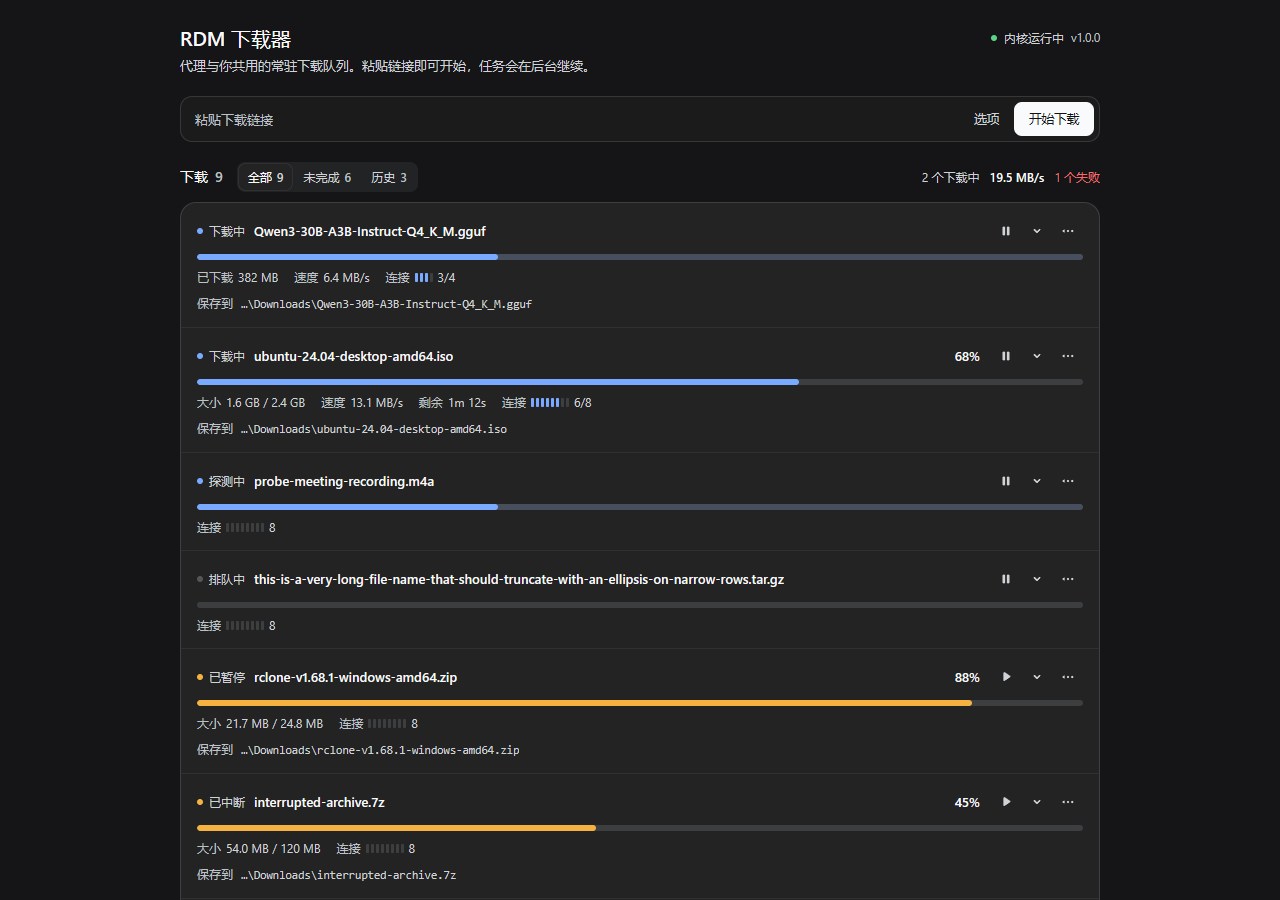
Styling uses host theme tokens only (--dsw-alias-*, --dsw-specific-*,
--ds-*), so light/dark mode, fonts and radii come from the host. The lane rail
is the panel's only animated element; prefers-reduced-motion disables it and
the skeleton/menu/detail motion, and focus rings are visible for every control.
Configuration
Set fields in the plugin row's config (profile patch layer or plugin
settings); defaults are shown in cordis.patch.yml.
| key | default | meaning |
|---|---|---|
defaultDir |
"" |
default download directory; empty = <active dataDir>/downloads |
connections |
8 |
per-task connection cap (1–32) |
chunkSizeMiB |
4 |
request chunk size used by the planner |
speedLimitBps |
0 |
default per-task bandwidth limit (0 = unlimited) |
maxAttempts |
6 |
per-chunk retry budget |
autoResume |
true |
resume interrupted tasks on kernel restart |
dataDir |
"" |
kernel data dir (default $DSH_HOME/dsh-rdm, with sandbox fallback) |
kernelPath |
"" |
explicit kernel binary override |
logLevel |
warn |
kernel stderr log level |
startOnDemand |
true |
start the kernel on first use instead of plugin load |
Kernel state lives in <dataDir>/tasks/*.json; incomplete downloads use
<target>.part + <target>.part.json next to the final file and resume from
there after a pause or a kernel/DSH restart.
Data directory fallback
Some DSH hosts confine child-process writes to the session workspace. If no
dataDir is configured and the kernel cannot create $DSH_HOME/dsh-rdm/tasks,
the plugin retries once with <packageRoot>/.rdm-data and defaults download
destinations to <dataDir>/downloads. Configure dataDir to pin a location.
How it works
src/            host half (TypeScript → lib/index.js): tools, KernelService, browser route
src/client/     browser half (sidebar entry + panel → lib/client.js)
kernel/         standalone Rust rdm-kernel crate: NDJSON task API, transfer engine
bin/<platform>/ built kernel binary shipped with the plugin
Engine flow: probe (HEAD → ranged GET fallback) → plan (chunk size, target name, resume scan) → chunked worker pool with a dynamic chunk queue and AIMD concurrency → retries/backoff/Retry-After → SHA-256 verify → atomic rename.
Pause/cancel are cooperative; one kernel process is restarted with backoff if it
crashes, and task records plus resume state persist across restarts.
PROTOCOL.md documents the exact kernel contract; docs/ARCHITECTURE.md describes the design.
Build
Requirements: Node ≥ 20 (plugin build), Rust stable with the platform's C toolchain
(kernel build; the Windows x64 binary here is built with the
x86_64-pc-windows-gnu target and MinGW-w64 GCC on PATH).
cd dsh-rdm
npm install                    # esbuild + typescript (dev only)
node scripts/build-kernel.mjs  # cargo build --release → bin/<platform>-<arch>/rdm-kernel
node scripts/build.mjs         # esbuild → lib/index.js + lib/client.js
npm run verify                 # fixture self-test + kernel e2e suite + measurements
Only the current platform binary is produced. Linux/macOS binaries are not shipped here — build them with the same script on that platform.
Verification
Independent QA coverage lives in docs/verification.md:
14/14 kernel e2e scenarios, 241/241 assertions (multi-connection, no-range
fallback, redirects, 429/Retry-After, pause → resume, resume across kernel
restart, cancel/retry/remove, SHA-256 success/mismatch, speed limit, ETag-change
resume safety, chunked unknown-length, protocol errors, stdin-EOF exit), plus
measurements: 4.39 MiB binary, ~5.7–6.7 MiB idle resident memory, 109–145 MiB/s
loopback multi-connection throughput (single runs; machine-specific). The suite
runs with npm run verify.
Limitations
- The Windows x64 kernel binary is built and verified here; other platforms need a local kernel build.
- Downloads require origins that speak HTTP/1.1; mirrors, HTTP/2 multiplexing preference and per-origin budget learning are not part of this plugin.
- Some DSH hosts confine child-process writes to the session workspace; the
dataDirfallback covers this, anddataDirlets deployments pin the store. - Visual paint was verified with browser captures against the real bundle, but behaviour depends on the host's theme tokens and locale.
- The plugin does not install Linux/macOS binaries and is not published to npm.
License
MIT OR Apache-2.0. Vendored schemastery and cosmokit are MIT; their license
files are under vendor/.

No comments yet. Be the first to write one.