call-map · 调用可视化
中文
一个 DeepSeek Harness(DSH)插件:在会话里多看一页,把「这一轮到底调用了哪些技能、哪些 MCP、派了哪些子代理,以及它们是被提示词和思维链里的哪句话带出来的」画成一张可缩放的分支图。
它不埋点、不上传:所有信息都来自本机会话日志。
它解决什么
DSH 自带两个会话视图:对话(消息流)和 轨迹(时间轴泳道:输入 / 模型 / 工具)。轨迹能回答「什么时候、花了多久」,但回答不了:
- 这条工具调用是哪个技能带出来的?
- 我配了 5 个 MCP,本会话用了哪几个、哪些一次没碰?
- 这次派给子代理的活,子代理内部又调了什么?
- 一句话里,是哪个词把它引到这一步的?
调用可视化 就是补这一层:归因,而不是时序。
树状图可缩放:一页看完整场对话
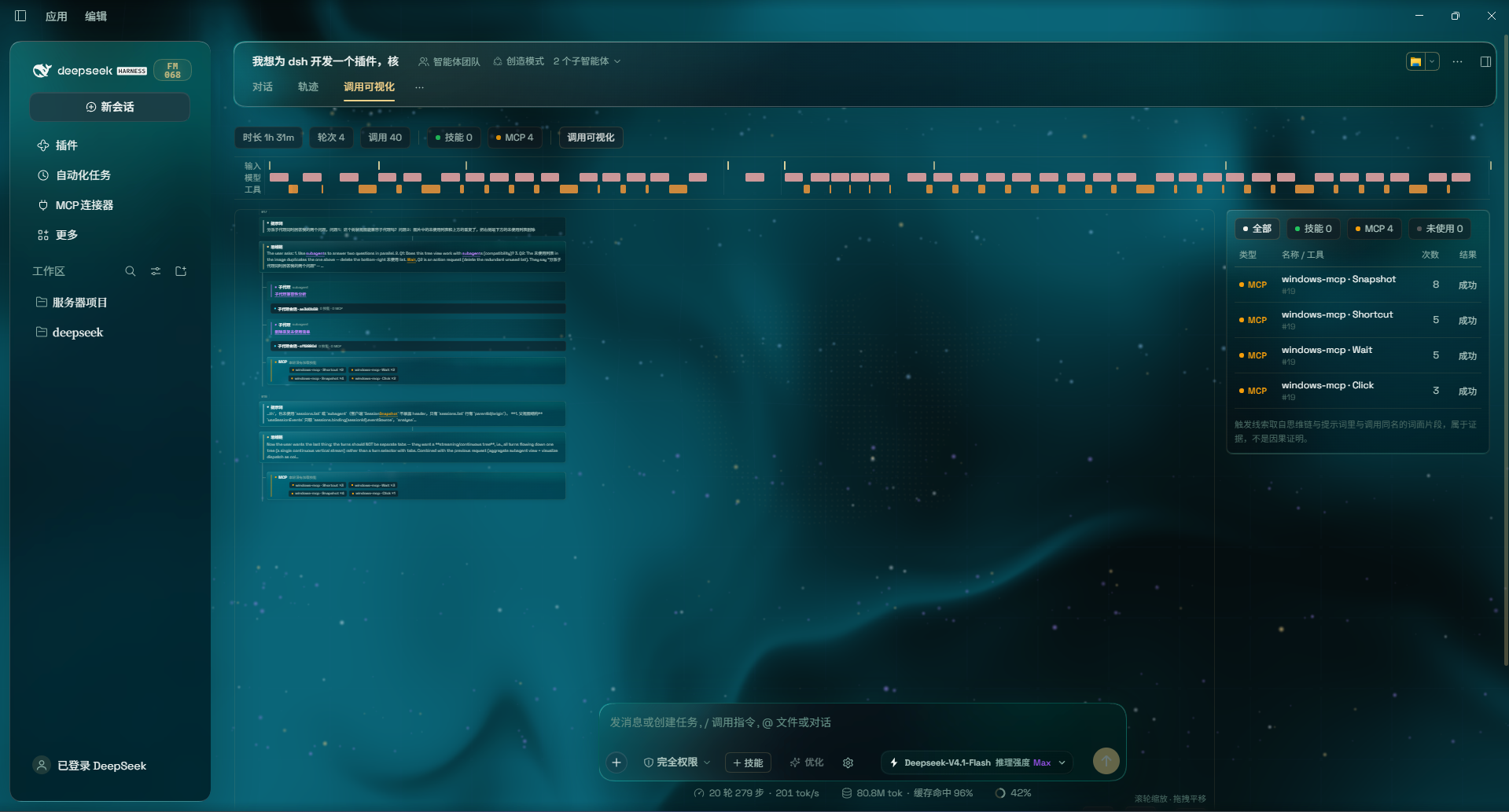
所有轮次按时间顺序连续排在同一张画布上,不再靠标签页切换:
- 滚轮缩放(30%–240%),按住左键拖拽平移,右下角实时显示当前比例;
- 进入这个页签时默认定位到最新一轮,并按画布宽度自适应缩放,一眼看到「现在跑到哪了」;
- 右下角
最新一键定位最后一轮对话,全览把整棵树缩进一屏;
能看到详细的子代理 / 技能调用
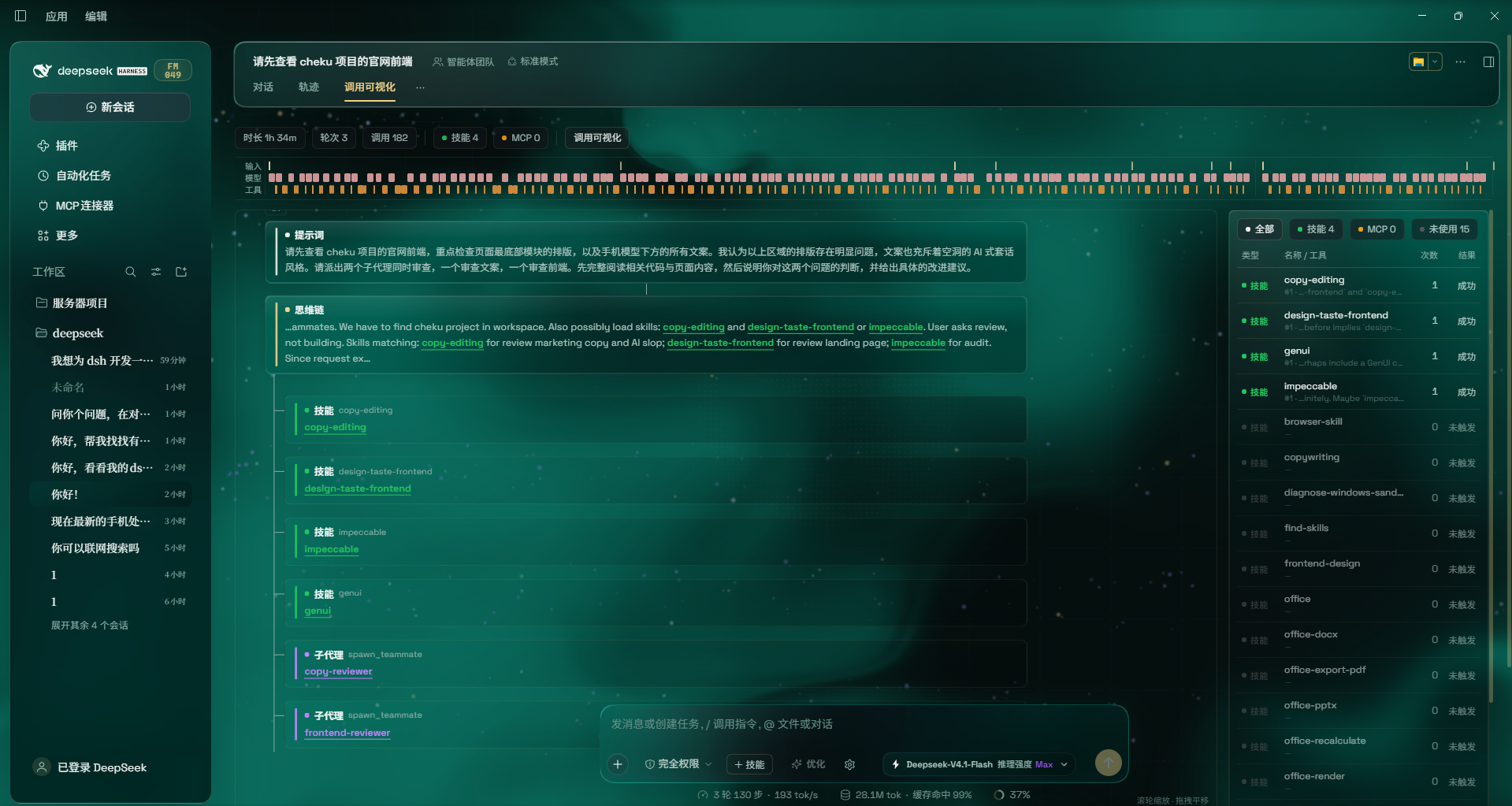
树会一直展开到最细一层,左侧是链路,右侧是同源的调用明细:
- 技能(绿):这一轮加载了哪些技能,各命中几次;
- 派发(紫):
spawn_teammate/subagent/workflow/ralph本身也是节点,节点下面挂子代理卡片——插件会去读那个子代理会话自己的技能 / MCP 调用并折叠进来,点卡片直达该子会话; - MCP(琥珀):某个技能激活期间实际调用的 MCP 工具,带次数(如
windows-mcp · Click ×6); - 提示词 / 思维链(蓝 / 紫蓝):正文里与下层节点同名的词按目标着色,所以「哪个词引出了哪个节点」是肉眼可追的;
- 右侧明细表:类型 / 名称·工具 / 次数 / 轮次 + 触发线索 / 结果,可筛
全部技能MCP未使用,点行打开宿主原生调用详情。
功能
| 能力 | 说明 |
|---|---|
| 一页聚合 | 所有轮次按时间顺序连续排布,不用来回切页 |
| 可缩放画布 | 滚轮缩放(30%–240%)、拖拽平移、最新 / 全览 一键归位;进入默认落在最新一轮 |
| 归因树 | 提示词 → 思维链 → 技能 / MCP / 子代理,命中的词按目标节点上色(技能绿、MCP 琥珀、子代理紫) |
| 子代理聚合 | 派发节点独立成类;能拿到子会话时,把子会话内部的技能/MCP 折叠成筹码挂在下面,点卡片直达该子会话 |
| 调用明细表 | 类型 / 名称 / 次数 / 轮次 / 触发线索 / 结果,可筛「全部 / 技能 / MCP / 未使用」,点行打开宿主原生调用详情 |
| 未使用清单 | 本会话可用但一次没调用的技能与 MCP(未使用 筛选即可看到) |
| 轨道图 | 输入 / 模型 / 工具三泳道时间条,用于快速定位「哪一段在干什么」 |
安装
要求:DSH 已安装并可用(本插件注册的是既有槽位 conversation.view,不改宿主编译产物)。
方式一:DSH 内置插件管理器(推荐)
把本目录作为本地包安装:
plugin_manager install_bundle target = <本目录的绝对路径>
安装后刷新页面,会话头部会多出第三个视图标签 调用可视化。
也可以直接从 GitHub 安装:本仓库已声明 dsh.bundle manifest,可被 dsh plugin add 识别(纯 JS,无构建步骤)。插件已按 awesome-dsh-plugin 的收录规范备好元数据:assets/icon-180.png 为市场卡片图标,screenshots.json 声明商店详情页截图。
方式二:手动挂载
- 把本目录放到任意位置;
- 在 profile 目录执行
pnpm add <本目录绝对路径>(或把它软链进node_modules/call-map); - 在 profile 的
package.json的dsh.profile.bundles数组里加入call-map; - 重启 / 刷新。
卸载:plugin_manager remove_bundle target = call-map。
使用
- 打开任意会话,点头部
调用可视化; - 画布里滚轮缩放、按住左键拖拽平移(单击不会误触发拖动);
- 右下角
最新回到最新一轮,全览缩到整张图; - 右侧表格点行 → 打开该次调用的宿主原生详情;点子代理卡片 → 跳到对应子会话。
数据来源与口径
所有数据来自本地会话事件(user/message、assistant/message、tool/call、tool/result、request/header、turn/start),插件自身不写会话、不联网:
- 技能:
skill工具的调用,技能名取自其arguments.name; - MCP:工具名形如
mcp__<server>__<tool>的调用; - 子代理:
spawn_teammate/subagent/subagent_fork/workflow/ralph的派发调用; - 未使用清单:已注册技能目录(取自系统提示词中的
<available_skills>)与已向本会话暴露工具的 MCP server,减去实际调用的部分; - 触发线索:提示词 / 思维链里与调用同名的词面片段。
已知限制
- 触发线索是词面匹配,不是因果证明。文字里没出现同名词就不标,不臆造归因;需要语义级解释应另加一次模型调用。
- 跨会话(子代理)聚合依赖能拿到子会话 id:
subagent/workflow的结果里带 id,可直接聚合;spawn_teammate只返回队友名,插件用「工作区会话标题 == 队友名」反查,队友会话被改名或尚未进入快照时会退化为「会话未加载」。 - 只读当前会话的事件窗口:极长会话若早期事件未加载,早期轮次的提示词可能显示为「不在已加载的事件窗口里」。
- 本插件的轨道图是自己重绘的,与宿主
轨迹页的原版图表不是同一实现;宿主的轨迹页本身不受影响。 - 宿主
轨迹页的工具栏(时长 / 轮次 / 调用 那一行)没有对外插槽,所以本插件只能作为并列的第三个页签,无法把入口塞进那一行。
隐私
不采集、不发送任何数据。全部计算在本地前端完成,不新增网络请求。
目录结构
call-map/
├─ package.json        # 包清单(dsh.bundle / dsh.client 声明)
├─ cordis.patch.yml    # bundle 补丁:插入一行插件
├─ index.js            # Host 半边(本插件为空实现)
├─ client.js           # 全部逻辑:折叠会话事件 + 视图渲染
├─ locale/en.json      # 插件管理页显示名(英文)
├─ locale/zh.json      # 插件管理页显示名(中文)
├─ docs/*.png          # README 截图
├─ assets/icon-180.png # 市场卡片图标(180×180 PNG)
├─ screenshots.json    # 市场详情页截图声明(1–8 张)
└─ icon.svg            # 插件图标
English
A DeepSeek Harness (DSH) plugin that adds one more page to a session: it draws which skills, which MCP tools, and which subagents were actually used this turn — and which sentence or word in the prompt / reasoning brought them in — as a zoomable branch diagram.
No instrumentation, no uploads: every number comes from the local session log.
What it solves
DSH ships two session views: Chat (the message stream) and Trajectory (a timing overview with input / model / tool lanes). Trajectory answers "when, and for how long". It cannot answer:
- Which skill produced this tool call?
- I configured five MCP servers — which ones did this session actually use, and which were never touched?
- What did the subagent I dispatched actually do inside?
- In that prompt, which word is responsible for this step?
Call map adds exactly that layer: attribution, not chronology.
Zoomable tree: the whole conversation on one page
Every turn is laid out continuously on a single canvas, instead of one tab per turn:
- Wheel to zoom (30%–240%), hold the left button to pan; the live scale sits in the bottom-right corner;
- Opening the tab starts at the latest turn and fits the canvas to the available width, so you immediately see where the work is;
Latestjumps back to the newest turn,Overviewshrinks the whole tree into one screen;- A left click never starts a drag: panning engages only after the pointer travels 4px, so clicking a card is just a click.
Detailed subagent / skill calls
The tree expands all the way down; the chain is on the left, the matching call table on the right:
- Skill (green): which skills this turn loaded, and how often each was hit;
- Dispatch (purple):
spawn_teammate/subagent/workflow/ralphare nodes too, with subagent cards underneath — the plugin reads that child session's own skills / MCP calls and folds them in; click a card to jump to the child session; - MCP (amber): the MCP tools called while a skill was active, with counts (e.g.
windows-mcp · Click ×6); - Prompt / reasoning (blue / indigo): words in the text that match a lower node are coloured by their target, so "which word led to which node" is visible at a glance;
- Right-hand table: type / name·tool / count / turn + trigger trail / result, filterable by
AllSkillsMCPUnused; click a row to open the host's native call inspector.
Features
| Capability | Description |
|---|---|
| One-page aggregation | Every turn laid out chronologically on one canvas; no tab switching |
| Zoomable canvas | Wheel zoom (30%–240%), drag to pan, Latest / Overview shortcuts; opens on the latest turn |
| Attribution tree | Prompt → reasoning → skill / MCP / dispatch, with matched words coloured per target node |
| Subagent aggregation | Dispatch is its own node class; when a child session is reachable its skills / MCP are folded in as chips, and the card opens that session |
| Call table | Type / name / count / turn / trigger trail / result, filter by all / skills / MCP / unused; click a row for the host's native inspector |
| Unused inventory | Skills and MCP servers available in this session but never called (the Unused filter) |
| Lane chart | Input / model / tool time lanes for "what was happening when" |
Install
Requires a working DSH install. The plugin registers into the existing conversation.view slot and does not modify any shipped build output.
Option 1 — DSH plugin manager (recommended)
Install this directory as a local package:
plugin_manager install_bundle target = <absolute path to this directory>
Then reload the page: a third view tab, Call map, appears next to Chat and Trajectory.
You can also install straight from GitHub: the repo declares the dsh.bundle manifest, so dsh plugin add can pick it up (plain JS, no build step). Marketplace metadata follows the awesome-dsh-plugin conventions: assets/icon-180.png is the storefront tile and screenshots.json declares the store screenshots.
Option 2 — manual mount
- Put this directory anywhere;
- In the profile directory run
pnpm add <absolute path>(or symlink it intonode_modules/call-map); - Add
call-mapto thedsh.profile.bundlesarray in the profile'spackage.json; - Restart / reload.
Uninstall: plugin_manager remove_bundle target = call-map.
Usage
- Open any session and click
Call mapin the header; - Wheel to zoom, hold the left button to pan (a click never starts a drag);
Latestreturns to the newest turn,Overviewfits the whole tree;- Click a table row to open the host's native call inspector; click a subagent card to jump to that child session.
Data sources and definitions
Everything comes from local session events (user/message, assistant/message, tool/call, tool/result, request/header, turn/start). The plugin never writes to a session and never touches the network:
- Skill: a
skilltool call, named by itsarguments.name; - MCP: a tool call whose name matches
mcp__<server>__<tool>; - Subagent: a dispatch call to
spawn_teammate/subagent/subagent_fork/workflow/ralph; - Unused inventory: the registered skill catalogue (from the
<available_skills>block in the system prompt) plus MCP servers that exposed tools to this session, minus what was actually called; - Trigger trail: the lexical fragment in the prompt / reasoning that matches the call.
Known limitations
- The trigger trail is lexical matching, not proof of causality. If no matching word appears in the text, nothing is highlighted — the plugin does not invent attribution. Semantic attribution would need an extra model call.
- Cross-session (subagent) aggregation depends on getting a child session id:
subagent/workflowresults carry one;spawn_teammateonly returns a teammate name, so the plugin looks it up by "workspace session title == teammate name" and degrades to "session not loaded" when that fails. - Only the loaded event window is read: in a very long session, early turns may show "the prompt of this turn is outside the loaded event window".
- The lane chart is re-drawn by this plugin and is not the shipped Trajectory implementation; the host's
Trajectorypage is untouched. - The host Trajectory toolbar (the duration / turns / calls row) exposes no slot to plugins, so this plugin can only be a parallel third tab — the entry point cannot live inside that row.
Privacy
No collection, no transmission. All computation happens in the local front-end, with no additional network requests.
Layout
call-map/
├─ package.json        # package manifest (dsh.bundle / dsh.client)
├─ cordis.patch.yml    # bundle patch: inserts one plugin row
├─ index.js            # Host half (empty for this plugin)
├─ client.js           # all logic: session-event folding + view rendering
├─ locale/en.json      # plugin-page display name (English)
├─ locale/zh.json      # plugin-page display name (Chinese)
├─ docs/*.png          # README screenshots
├─ assets/icon-180.png # storefront tile (180x180 PNG)
├─ screenshots.json    # store screenshots (1-8 images)
└─ icon.svg            # plugin icon
License
MIT
No comments yet. Be the first to write one.