dsh-yorha-ui
English | 简体中文


A NieR:Automata / YoRHa-inspired industrial terminal theme for DeepSeek Harness Web.
It reshapes the DSH Web workspace, session list, composer, and overlays with sand-toned paper, charcoal structural lines, and amber status markers while preserving the original interactions and light/dark appearance modes.
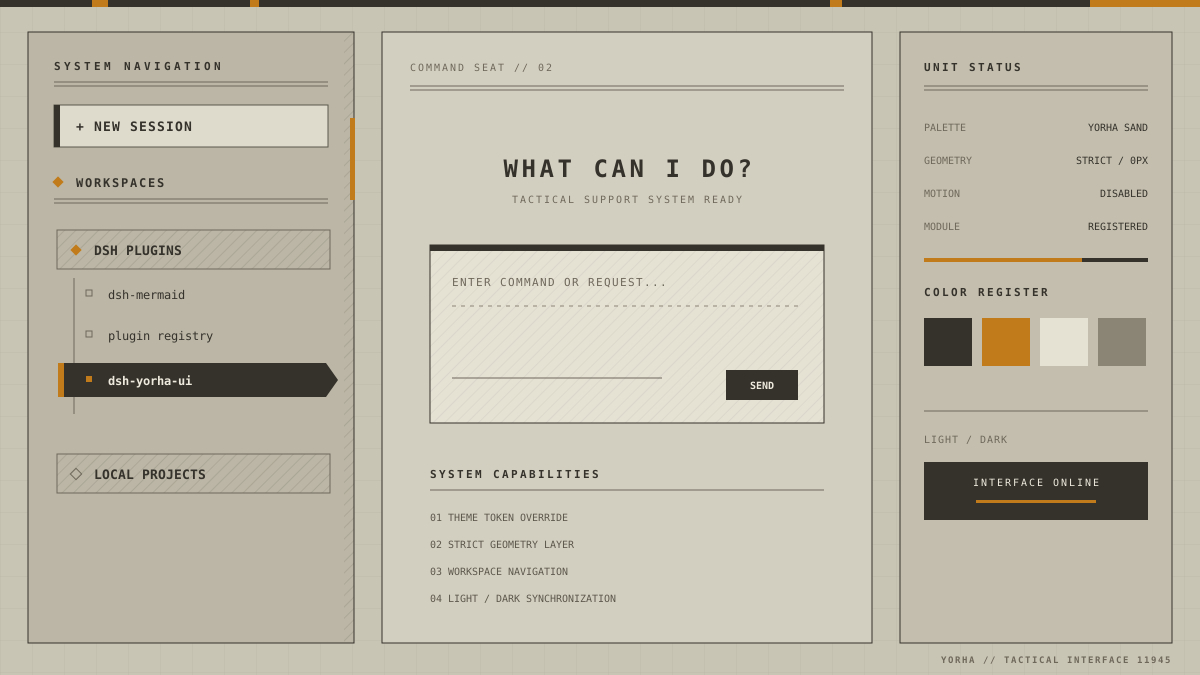
Theme preview: a structured representation of the plugin's actual visual rules. It contains no additional animation or game assets.
Features
- Sand and charcoal palettes that follow the DSH appearance mode
- Square geometry, hard borders, and shadow-free industrial surfaces
- YoRHa-style workspace navigation with project headers, mechanical rails, and a reverse-video active session
- A 32px registration grid, subtle paper texture, and segmented system rail
- Consistent colors for the composer, menus, dialogs, code blocks, and syntax highlighting
- A clickable
YoRHa // TACTICAL INTERFACE 11945repository link in the lower-right corner - No runtime CDN, image dependencies, or page animations
- Theme-token overrides that survive DSH theme repaints
Install
Install from npm (stable release)
Install the current stable release from npm:
dsh plugin --profile web add -w dsh-yorha-ui
Without a globally installed dsh command:
npx.cmd --yes @deepseek-ai/dsh@latest plugin --profile web add -w dsh-yorha-ui
Install from source
git clone https://github.com/MrmoLabs/dsh-yorha-ui.git
cd dsh-yorha-ui
pnpm install
pnpm run build
dsh plugin --profile web add -w .
Restart DSH Web after installation, then refresh http://127.0.0.1:3080.
Update and uninstall
Update the npm release:
dsh plugin --profile web update -w dsh-yorha-ui
Uninstall the plugin:
dsh plugin --profile web remove -w dsh-yorha-ui
If you previously installed a local development link, remove that link before installing dsh-yorha-ui.
Development and verification
Node.js 22 or later is required.
pnpm install
pnpm run check
pnpm test
npm.cmd pack --dry-run
The repository pins pnpm 10 through packageManager; Corepack-enabled environments will select the matching version automatically. pnpm test rebuilds the package before running the regression suite.
Build output is written to dist/:
dist/index.js: DSH host entrydist/client.js: self-registering browser bundle with no relative runtime dependencies
Automated releases
The repository contains two GitHub Actions workflows:
CIinstalls dependencies, type-checks, runs regression tests, rebuilds, and verifies the package on every push tomainand every pull request.Releaseverifies that a pushedv*tag matches thepackage.jsonversion, runs the same checks and regression tests, creates a GitHub Release with the.tgzarchive attached, and publishes the same archive through npm Trusted Publishing.
Project scope
src/client.ts contains the current theme implementation. src/prompt, src/tools, src/templates, src/theme/tokens.css, and src/types.ts are early agent-facing plugin drafts. They are retained as design references and are not included in the current build.
Disclaimer
This is an unofficial community theme. It is not affiliated with Square Enix, PlatinumGames, or the NieR franchise rights holders, and it contains no original game assets.
No comments yet. Be the first to write one.