dsh-plugin-updates


Check the third-party plugins installed in your DSH profile against npm and update them in place — from a right-sidebar page, a Plugins-page tab, and a left-sidebar badge. 中文文档见 下方。
Repository: https://github.com/Moyumole/dsh-plugin-updates · Security: SECURITY.md
English
Features
- Three entry points, one panel
- Right sidebar → "Start / Guide" → "Plugin updates" card (red dot when updates are available)
- Plugins page → "Plugin updates" tab (global, no open Session required)
- Left-sidebar "Plugins" icon badge (clicking it still opens the Plugins page)
- Checks: once on page load; while the page is visible it re-checks every 30 minutes (hidden pages pause the timer and catch up on return), plus manual refresh. Registry answers are cached for 10 minutes. Only third-party bundles are checked (
official !== true,availability === 'profile',installed === true), excluding this plugin itself. - All profiles (read-only): a section lists the third-party plugins of the other DSH profiles on this machine with the same update status logic. It is informational only — those profiles are never changed from here; open that profile's window or use
dsh plugin --profile <name> ...to act on them. - Updates: "Update" for one bundle or "Update all", both through the official plugin manager (
removeBundle→installBundle(name@latest, { enabled })). "Update all" skips large packages (unpacked over 30 MB, e.g.dsh-petat ~71 MB) and reports them; update those one at a time from their row. Installs ask the npmmirror mirror first and retry the official npm registry with the same version when the mirror has not synced it yet (the update check itself always uses the official registry). - DSH version hint: compares the running DSH with the latest
@deepseek-ai/dshon npm and, when a newer version exists, shows "DSH x is available (current y)" with a link to the official release notes. It never installs DSH — the built-in desktop updater does that. - Progress and toasts: phase text (removing / installing / applying / rollback) with a progress bar for single and batch updates; a top-center result toast (success / failure / rollback / batch) that dismisses itself and can be closed.
- Failure handling: the previous version is restored on a best-effort basis; if the rollback also fails, a dismissible error remains and the real on-disk state is reloaded so the UI matches the profile.
- No background process, service or scheduled task: the 30-minute timer only exists while the page is visible; DSH is never restarted automatically.
- Languages: follows the DSH interface language automatically — Chinese when the host locale starts with
zh, English otherwise. Panel copy, card/tab labels, toasts and the "last checked" time format re-localize when the language changes.
Category and compatibility
- Category: UI & Experience (plugin management)
- Verified on: DSH
0.2.1-rc.3(Windows Desktop) - Plugin line:
0.3.x - Profiles:
desktopandweb(examples use--profile web; replace with your profile name). Profiles are data directories: the DSH version comes from the running app/runtime, so all profiles opened by the same installation share one version.
| DSH version | Status |
|---|---|
0.2.1-rc.3 |
✅ Verified on Windows |
other 0.2.x |
⚠️ Expected to work, not individually verified |
| other versions | ❌ Not supported |
⚠️ This plugin uses the host's non-public extension points (right-sidebar tab registry,
plugins.tabslot,sidebar.panellistshadowing,remote.pluginManager). They may change between DSH releases; the UI degrades instead of crashing, but behaviour can change.
Installation
From npm (recommended)
dsh plugin --profile web add "@moyumole/dsh-plugin-updates"
Or enter the package name @moyumole/dsh-plugin-updates in "Settings → Plugins → Add plugin".
From GitHub (pinned)
dsh plugin --profile web add "github:Moyumole/dsh-plugin-updates#v0.3.5"
The repository root is the plugin directory and lib/client.js is committed, so installing it does not require a build.
From a local directory (development)
dsh plugin --profile web add "<path>/dsh-plugin-updates"
The install is recorded as a link: dependency in the profile and added to its bundle list.
Usage
Open the panel from any of: the right sidebar ("Start" → "Plugin updates"), "Settings → Plugins" → "Plugin updates" tab, or the left-sidebar Plugins icon.
| State | What you see |
|---|---|
| Update available | current version → latest version, "Update" button enabled |
| Up to date | "Up to date", no button |
| Incompatible | latest version's engines.dsh / @deepseek-ai/dsh-* peer range rejects the current DSH version; the update button is disabled by default |
| Check failed | only that row is marked failed; a network failure keeps the previous results and can be retried |
| Non-npm source | bundles whose source is not an npm dependency (git, local path, …) are marked "update not supported" |
Update flow: removeBundle(name) → installBundle(name@latest, { enabled }). This really changes the profile's package.json / pnpm-lock.yaml / node_modules, and the plugin is briefly unavailable while it is removed and reinstalled. Updated browser-side code usually takes effect after a refresh or a DSH restart. Confirm the target version before updating — updating is an npm supply-chain action.
Screenshot
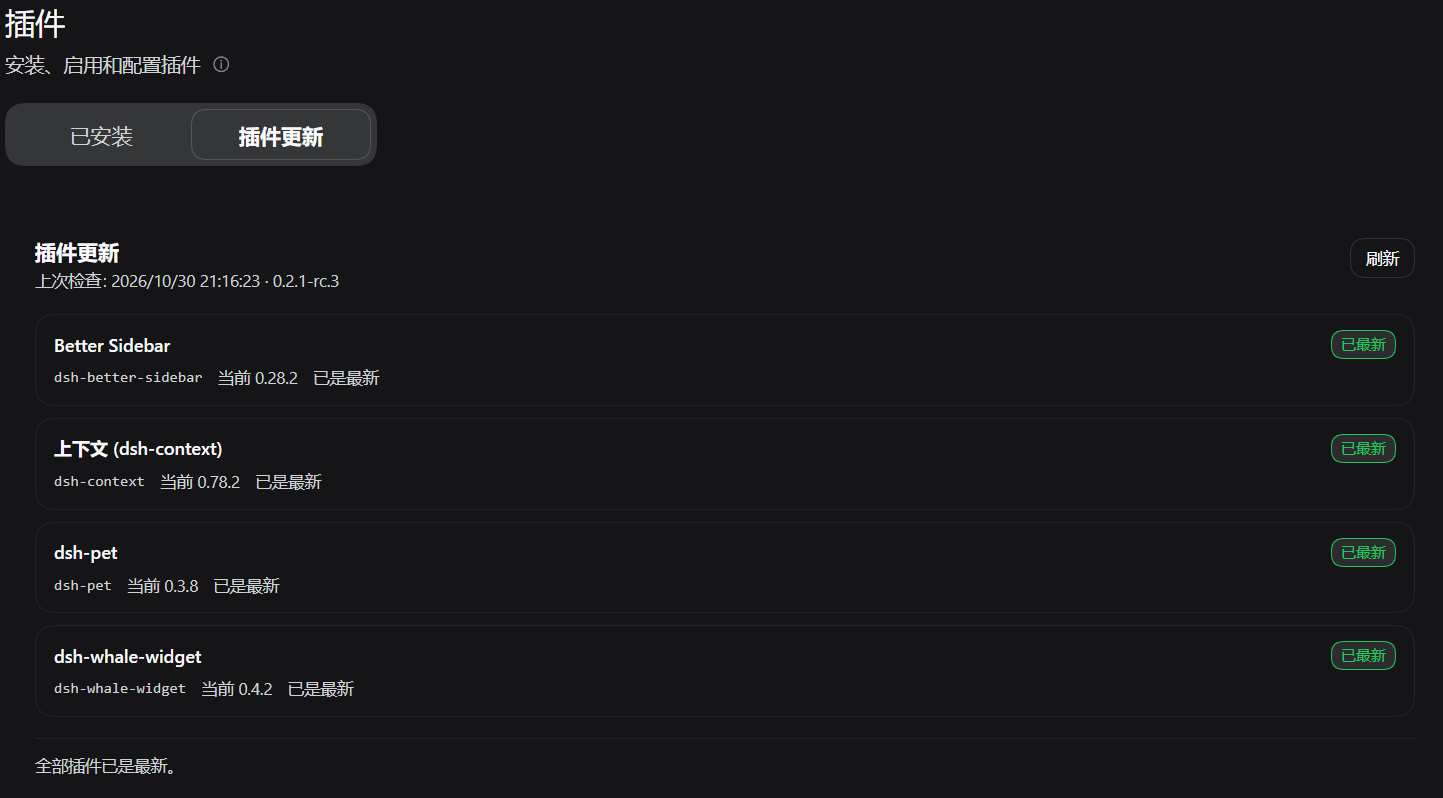
The "Plugin updates" tab on the Plugins page. Every bundle is up to date in this capture; when newer versions exist the badge, the "Update" buttons and "Update all" appear.

The right-sidebar Start/Guide card; an update badge appears on it when updates are available.

The left-sidebar "Plugins" icon keeps the host's own icon and adds a red dot while updates are pending.
Screenshots are taken on a clean test profile and contain no session titles, personal plugin lists or local paths.
Permissions and external services
- Permissions: no DSH permission is requested. The browser half only registers UI. The Host half reads
<DSH_HOME>/profiles/*/package.jsonand the installed versions under each profile'snode_modules, and exposes that inventory as a read-only JSON route (/plugin-updates/profiles) on the local web server. It never writes to a profile, never installs or removes anything, and the payload contains only profile names plus third-party package names/versions (no paths, credentials or session data) - External services: read-only npm registry requests (
registry.npmjs.org, falling back toregistry.npmmirror.com) for<name>/latest; the only data sent is the package name of installed third-party bundles - Local operations: updates are executed by the official DSH plugin manager; this plugin does not run shell commands or write files itself
- Telemetry: none
- Full threat model and residual risks: SECURITY.md
Verification status (honest)
Verified on Windows + DSH 0.2.1-rc.3:
- Automatic check on page load; 30-minute re-check while the page is visible (paused when hidden, catch-up on return); manual refresh; 10-minute cache
- Auto re-check verified on the real UI with the interval temporarily scaled to 15 seconds (production remains 30 minutes; the 30-minute wait itself was not run; the policy has unit tests)
- Correctly detects newer npm versions for third-party bundles (
dsh-better-sidebar,dsh-pet,dsh-context,dsh-whale-widget) - Real updates:
dsh-pet 0.3.7→0.3.8,dsh-better-sidebar 0.28.1→0.28.2,dsh-whale-widget 0.4.1→0.4.2;package.json/node_modules/pnpm-lock.yamlstay consistent and other bundles are untouched - Real "update all":
dsh-context 0.77.0→0.78.1+dsh-whale-widget 0.4.1→0.4.2, batch progress (1/2→2/2) and the batch toast work - Right-sidebar tab, Plugins-page tab, left-sidebar badge, Guide card click, progress bar, success/failure/batch toasts
- No new background process, scheduled task or startup entry (code level)
- Uninstalling leaves no profile or slot registrations behind
- Real "install failure → rollback" path (covered by unit tests; fault injection would be destructive on a real profile)
- Linux / macOS and other DSH versions
Automated checks: node --test test/*.test.mjs (123 tests: SemVer, compatibility, registry fallback/cache/input hardening, row building, large-package protection, install-registry fallback, controller state machine and rollback, host-capability failures, auto-check scheduling policy, cross-profile inventory and route, UI rendering and style constraints, bundle consistency). CI also verifies the committed bundle matches its sources.
Known limitations
- The "All profiles" section is read-only: it reports the other profiles' plugin versions, but updates must be performed in that profile's own window (or with
dsh plugin --profile <name> ...). - The DSH version is tied to the running installation, not to a profile: profiles opened by the same DSH app share one version; profiles opened by a different install (for example the npm CLI) can differ.
- The right sidebar is a per-Session column: with no Session open, use "Settings → Plugins → Plugin updates".
- If the host removes or renames a Remote method (for example
installBundle), the panel shows a localized "plugin manager is not available" banner and updates fail on that row instead of throwing an obscure error. - Large packages (unpacked over 30 MB) are excluded from "Update all"; update them individually. A single large update can take minutes, and a slow download can still exceed the host's install window — use the official Plugins page or the CLI in that case.
- The left-sidebar badge shadows the host's "Plugins" icon cell (
sidebar.panellist,priority: -1); a host redesign may require a visual sync, but functionality is unaffected. - Only the npm ecosystem is supported: checks use the official npm registry, and installs ask npmmirror first with an official-registry retry when a version has not been mirrored yet. Private registries are not supported.
- This plugin does not check or update DSH itself, and does not manage official
@deepseek-ai/*bundles. - This plugin does not list itself (so the panel does not disappear while updating it); update it from the official Plugins page.
- DSH is not restarted automatically; a page refresh re-checks and results are kept in memory only.
- Rollback relies on the official plugin manager restoring
package.json/ lockfile; a failed rollback is unrecoverable and needs a manual reinstall.
Development
cd dsh-plugin-updates
node scripts/build-client.mjs         # generate lib/client.js from lib/src/*.js
node scripts/build-client.mjs --check # verify the bundle is up to date
node --test test/*.test.mjs           # unit / UI / bundle consistency tests
node scripts/preview-rows.mjs 0.2.1-rc.3  # print the rows against the real profile + registry
The browser half is a generated single file because DSH loads exactly one ./client entry per package and cannot import sibling files at runtime. lib/src/*.js is plain testable ESM; the build script only strips imports/exports and concatenates — no bundler and no third-party dependency. lib/client.js is committed so installation never builds. CI and prepublishOnly verify freshness.
| File | Responsibility |
|---|---|
lib/index.js |
Host half: read-only scan of the other profiles, served as GET /plugin-updates/profiles |
lib/src/entry.js |
Slot registration and wiring (right-sidebar tab / Guide card / Plugins tab / left badge / toast / visible-page timer) |
lib/src/schedule.js |
Pure auto-check scheduling policy (30 minutes, skip while busy) |
lib/src/controller.js |
Panel state machine, Remote calls, rollback, progress and toasts |
lib/src/rows.js |
BundleInfo + registry manifest → panel rows |
lib/src/registry.js |
npm registry fetch, validation, 10-minute cache |
lib/src/compatibility.js |
engines.dsh / peer compatibility rules |
lib/src/semver.js |
Version and range comparison (includePrerelease) |
lib/src/i18n.js |
English and Chinese dictionaries |
lib/src/ui.js |
React panel, Guide card, tab title, icon, toast |
lib/client.js |
Generated: all of the above concatenated into one browser bundle |
Releasing (maintainers)
Releasing is two steps: bump the version, push a tag. The tag triggers release.yml, which runs the tests, creates the GitHub Release from the matching CHANGELOG section, and publishes to npm via Trusted Publishing (OIDC) — no long-lived npm secret is stored in the repository.
# bump package.json + CHANGELOG, commit
git commit -am "release: vX.Y.Z"
git push origin main
# tag and push — npm + GitHub Release happen automatically
git tag vX.Y.Z
git push origin vX.Y.Z
- npm uses
npm publish --provenance; the release is skipped when the version already exists. - A manual fallback exists: Actions →
publish→ Run workflow (requires theNPM_TOKENsecret; not needed with Trusted Publishing). - If the npm account uses 2FA for direct publishing, use a granular token with 2FA bypass for local publishes (
.npmrcwith//registry.npmjs.org/:_authToken=${NODE_AUTH_TOKEN}is git-ignored).
Security and privacy
This is a regular DSH bundle (the host's normal plugin trust model, no extra sandbox), with a deliberately narrow surface. The full policy, threat model and residual risks are in SECURITY.md.
Uninstall
Remove @moyumole/dsh-plugin-updates from the official Plugins page (or dsh plugin --profile web remove @moyumole/dsh-plugin-updates). All slot registrations, timers and listeners are released with the plugin; no background process remains.
Third-party code and license
- This project is released under the MIT license, see LICENSE.
- The left-sidebar "Plugins" icon reproduces the DSH pinwheel path from
@deepseek-ai/dsh-client-ui-primitives(MIT, Copyright (c) 2026 DeepSeek); the toast layout follows DSH's own toast. See NOTICE. - No code from
dsh-better-sidebar,dsh-petor other third-party plugins is included; they are only integration-test subjects.
License
MIT
中文
在 DSH(DeepSeek Harness)内检查当前 profile 中第三方插件的 npm 新版本,并在面板里一键更新——右侧栏页面、插件页标签、左侧栏红点三个入口,同一个面板。
功能
- 三处入口,同一个面板
- 右侧栏「开始 / Guide」→「插件更新」卡片(有可用更新时卡片和 tab 标题显示红点)
- 「设置 → 插件」页顶部的「插件更新」标签(全局,无需打开会话)
- 左侧栏「插件」图标右上角红点(点击仍进入「插件」页)
- 检查:页面加载时自动检查一次;页面可见时每 30 分钟自动再检查一次(切到后台暂停,回到前台若已过期立即补一次);也支持手动「刷新」;npm registry 结果缓存 10 分钟;只检查
official !== true、availability === 'profile'、installed === true的第三方 bundle,并排除本插件自身 - 所有 Profile(只读):面板下方列出本机其他 profile 的第三方插件更新状况(复用同一套状态判断)。这里只展示、不修改;要更新请打开对应 profile 的窗口,或用
dsh plugin --profile <name> ...。 - 更新:单个「更新」或「全部更新」;通过 DSH 官方插件管理器执行
removeBundle→installBundle(name@latest, { enabled })。「全部更新」会跳过大型插件(解包超过 30 MB,例如约 71 MB 的dsh-pet)并在结果里提示;这些请在对应行单独更新。安装时先请求 npmmirror 镜像,镜像尚未同步该版本时自动用官方 npm registry 重试同一个版本(检查更新本身始终使用官方源)。 - DSH 版本提示:把当前 DSH 与 npm 上最新的
@deepseek-ai/dsh对比,有更新时显示「DSH 有新版本 x(当前 y)」并附官方 Release notes 链接;插件不负责安装 DSH,升级仍由桌面端自带更新器完成。 - 进度与提示:更新时显示阶段文案(移除旧版 / 安装新版 / 应用 / 回滚)与进度条(单个为不确定进度,全部更新为 done/total);结束时顶部居中弹出结果 toast(成功 / 失败 / 回滚 / 批量汇总,自动消失、可手动关闭)
- 失败处理:安装失败时尽力回滚到旧版本;回滚也失败时保留可关闭的错误提示,并重新读取真实安装状态,保证 UI 与磁盘一致
- 不常驻:无后台进程、无服务、无计划任务;30 分钟定时器只在页面可见时存在(隐藏即清除);不自动重启 DSH
- 多语言:自动跟随 DSH 界面语言——宿主 locale 以
zh开头时显示中文,否则英文;切换语言后界面文案、卡片/标签、toast 以及「上次检查」的时间格式都会即时更新
类别与兼容性
- 类别:UI & Experience(面向插件管理)
- 验证目标:DSH
0.2.1-rc.3(Windows Desktop) - 插件版本:
0.3.x - 支持的 profile:
desktop/web均可(示例命令用--profile web,按你的 profile 名替换)。profile 只是数据目录,DSH 版本来自运行中的应用/运行时,因此同一安装打开的所有 profile 共享同一个 DSH 版本。
| DSH 版本 | 状态 |
|---|---|
0.2.1-rc.3 |
✅ 真机验证(Windows) |
其他 0.2.x |
⚠️ 预期可用,未逐一验证 |
| 其他版本 | ❌ 不保证 |
⚠️ 本插件使用了宿主的非公开扩展点(右侧栏 tab 注册、
plugins.tab槽、sidebar.panellist覆盖、remote.pluginManager)。DSH 升级后这些接口可能变化,UI 做了降级处理但功能可能受影响;使用前请以实际运行验证为准。
安装
从 npm 安装(推荐)
dsh plugin --profile web add "@moyumole/dsh-plugin-updates"
或在「设置 → 插件 → 添加插件」里输入包名 @moyumole/dsh-plugin-updates。
从 GitHub 安装(锁版本)
dsh plugin --profile web add "github:Moyumole/dsh-plugin-updates#v0.3.5"
仓库根目录就是插件目录,lib/client.js 已随仓库提交,安装时不需要构建。
本地目录(开发调试)
dsh plugin --profile web add "<本机路径>/dsh-plugin-updates"
安装会以 link: 依赖写入 profile 并加入 bundle 列表。
使用
- 打开任意会话 → 右侧栏 →「开始」→「插件更新」;或
- 「设置 → 插件」→ 顶部「插件更新」;或
- 点击左侧栏「插件」图标(有更新时带红点)→ 顶部「插件更新」。
| 状态 | 展示 |
|---|---|
| 有更新 | 当前版本 → 最新版本,「更新」按钮可用 |
| 已最新 | 状态「已最新」,无按钮 |
| 不兼容 | 最新版 engines.dsh / @deepseek-ai/dsh-* peer 范围不接受当前 DSH 版本;默认禁用更新按钮 |
| 检查失败 | 只把该行标为失败,其他行不受影响;顶部网络失败可重试并保留上次结果 |
| 非 npm 来源 | source 不是 npm 依赖(git / 本地路径等)时标为「不支持一键更新」 |
更新流程:removeBundle(name) → installBundle(name@latest, { enabled })。更新会真实改动 profile 的 package.json / pnpm-lock.yaml 与 node_modules,且移除再安装期间该插件短暂不可用;被更新插件的浏览器端代码通常在刷新或重启 DSH 后生效。更新前请确认目标版本(更新本质上是 npm 供应链操作)。
截图
「设置 → 插件」页的「插件更新」标签。此截图里全部插件都是最新;有可用更新时会显示红点、「更新」与「全部更新」按钮。
右侧栏「开始 / Guide」里的卡片;有可用更新时卡片上会出现红点。
左侧栏「插件」图标保留宿主原图标,有更新时右上角显示红点。
截图使用干净的测试 profile,不包含会话标题、个人插件列表或本机路径。
权限与外部服务
- 权限:不申请任何 DSH 权限;浏览器半边只注册 UI。Host 半边读取
<DSH_HOME>/profiles/*/package.json及各 profilenode_modules里已安装的版本,并通过本地 Web 服务器暴露只读 JSON 路由(/plugin-updates/profiles);不写 profile、不安装/卸载任何东西,返回内容只有 profile 名 + 第三方包名/版本(不含路径、凭据或会话数据) - 外部服务:仅读取 npm registry(
registry.npmjs.org,失败回退registry.npmmirror.com)的<name>/latest;只发送已安装第三方插件的包名 - 本地操作:更新经由 DSH 官方插件管理器执行;本插件不直接执行 shell、不写文件
- 遥测:无
- 完整威胁模型与残余风险见 SECURITY.md
验收状态(诚实声明)
在 Windows + DSH 0.2.1-rc.3 上已完成真机验证:
- 页面加载后自动检查并显示结果;页面可见时每 30 分钟自动复查(隐藏暂停、回前台补查);手动刷新、10 分钟缓存
- 自动复查真机验证:临时把间隔缩到 15 秒后时间戳自动更新(正式 30 分钟未做长时等待;调度策略由单测覆盖)
- 正确识别第三方插件新版本(
dsh-better-sidebar、dsh-pet、dsh-context、dsh-whale-widget) - 真机更新:
dsh-pet 0.3.7→0.3.8、dsh-better-sidebar 0.28.1→0.28.2、dsh-whale-widget 0.4.1→0.4.2,磁盘package.json/node_modules/pnpm-lock.yaml一致,其他插件未受影响 - 真机「全部更新」批量:
dsh-context 0.77.0→0.78.1+dsh-whale-widget 0.4.1→0.4.2,批量进度(1/2→2/2)与顶部汇总 toast 正常 - 右侧栏 tab、插件页 tab、左侧栏红点、Guide 卡片点击、进度条、成功/失败/批量 toast
- 无新增后台进程、计划任务或开机项(代码层面)
- 卸载后 profile 与槽注册无残留
- 真机「安装失败 → 回滚」路径(当前由单元测试覆盖;故障注入对真实环境有破坏性,暂不做)
- Linux / macOS、其他 DSH 版本
自动化测试:node --test test/*.test.mjs(123 项,覆盖版本比较、兼容性、registry 回退/缓存/输入加固、行构建、大插件保护、安装源回退、controller 状态机与回滚、宿主能力缺失、自动复查调度策略、跨 profile 清点与路由、UI 渲染与样式约束、bundle 一致性);CI 还会校验生成物与源码一致。
已知限制
- 「所有 Profile」区块是只读的:只报告其他 profile 的插件版本,更新必须在对应 profile 的窗口中完成(或使用
dsh plugin --profile <name> ...)。 - DSH 版本取决于运行中的应用/运行时,而不是 profile:同一 DSH 安装打开的 profile 共享一个版本;由不同安装(例如 npm 版 CLI)打开的 profile 可能不同。
- 右侧栏是按会话存在的列:没有打开会话时请用「设置 → 插件 → 插件更新」。
- 若宿主删除或重命名了 Remote 方法(例如
installBundle),面板会显示本地化的「插件管理器不可用」错误横幅,更新会按失败处理,而不是抛出难以理解的异常。 - 大型插件(解包超过 30 MB)不会进入「全部更新」,请逐个更新。单个大插件安装也可能需要数分钟;如果下载过慢、超出宿主的安装窗口,请改用官方插件页或 CLI。
- 左侧栏红点通过遮蔽宿主「插件」图标单元实现(
sidebar.panellist的plugins单元,priority: -1);宿主大改该图标时外观需要同步,功能不受影响。 - 只支持 npm 生态:检查更新使用官方 npm registry;安装先请求 npmmirror,镜像尚未同步该版本时自动用官方 registry 重试。不支持私有 registry。
- 不检查、不更新 DSH 本体;不管理官方随附 bundle(
@deepseek-ai/*)。 - 不列出本插件自身(避免更新过程中面板消失);如需更新本插件请用官方插件页。
- 不自动重启 DSH;刷新页面后检查结果会重新获取(缓存仅保存在内存)。自动复查只在页面可见时进行,后台标签页不消耗资源。
- 更新失败回滚依赖官方插件管理器对
package.json/ lockfile 的恢复语义;回滚失败属于不可恢复场景,需要手动重装。
开发
cd dsh-plugin-updates
node scripts/build-client.mjs         # 由 lib/src/*.js 生成 lib/client.js(浏览器单文件 bundle)
node scripts/build-client.mjs --check # 校验生成物是否最新
node --test test/*.test.mjs           # 单元/UI/bundle 一致性测试
node scripts/preview-rows.mjs 0.2.1-rc.3  # 用真实 profile + registry 打印面板会显示的行
为什么浏览器端是生成物:DSH 的客户端加载器每个包只加载一个 ./client 入口文件,无法在运行时 import 同包的其他文件。lib/src/*.js 是可单测的普通 ESM,构建脚本只做「剥掉 import/export + 拼接」,不引入任何打包器或第三方依赖;生成后的 lib/client.js 直接提交,安装时无需构建。CI 与 prepublishOnly 会校验生成物与源码一致。
源码结构:
| 文件 | 职责 |
|---|---|
lib/index.js |
Host 半边:只读扫描其他 profile,并以 GET /plugin-updates/profiles 提供 JSON |
lib/src/entry.js |
槽注册与接线(右侧栏 tab / Guide 卡片 / 插件页 tab / 左侧栏红点 / toast / 可见页定时器) |
lib/src/schedule.js |
纯自动复查调度策略(30 分钟、忙时跳过) |
lib/src/controller.js |
面板状态机、Remote 调用、回滚、进度与 toast |
lib/src/rows.js |
BundleInfo + registry manifest → 列表行 |
lib/src/registry.js |
npm registry 拉取、校验与 10 分钟缓存 |
lib/src/compatibility.js |
engines.dsh / peer 兼容性判定 |
lib/src/semver.js |
版本与范围比较(includePrerelease) |
lib/src/i18n.js |
中英文字典 |
lib/src/ui.js |
React 面板、Guide 卡片、tab 标题、图标、toast |
lib/client.js |
生成物:上面所有 src 拼成的单文件浏览器 bundle |
发布(维护者)
发版只做两步:改版本号 → 打 tag 并 push。tag 会触发 release.yml:跑测试、用 CHANGELOG 对应版本创建 GitHub Release、通过 Trusted Publishing(OIDC) 发布 npm——仓库里不需要保存任何长期 npm secret。
# 改 package.json 版本和 CHANGELOG,提交
git commit -am "release: vX.Y.Z"
git push origin main
# 打 tag 并推送 —— npm 发布 + GitHub Release 自动完成
git tag vX.Y.Z
git push origin vX.Y.Z
- npm 使用
npm publish --provenance,版本已存在时自动跳过。 - 手动备用:Actions →
publish→ Run workflow(需要NPM_TOKENsecret,用 Trusted Publishing 时不需要)。 - 若 npm 账号对直接发布开启 2FA,本地发布请用带 2FA bypass 的 granular token(
.npmrc里//registry.npmjs.org/:_authToken=${NODE_AUTH_TOKEN},已被 git 忽略)。
安全与隐私
本插件是一个普通的 DSH bundle(宿主的正常插件信任模型,不做额外沙箱),但尽量收窄能力。完整说明见 SECURITY.md。
卸载
在官方插件页移除 @moyumole/dsh-plugin-updates(或 dsh plugin --profile web remove @moyumole/dsh-plugin-updates)。右侧栏 tab 类型、插件页 tab、左侧栏图标覆盖、toast 槽注册、定时器与监听器都随插件卸载释放,无残留进程。
第三方代码与许可
- 本项目代码以 MIT 许可发布,见 LICENSE。
- 左侧栏「插件」图标复刻了 DSH 的 pinwheel 图形路径,来源为
@deepseek-ai/dsh-client-ui-primitives(MIT,Copyright (c) 2026 DeepSeek);toast 的位置/尺寸参考了 DSH 前端自身的样式。详见 NOTICE。 - 未包含
dsh-better-sidebar、dsh-pet等第三方插件的代码;它们仅作为集成验证对象。
License
MIT
No comments yet. Be the first to write one.