Feiyu Desktop — a desktop companion for DeepSeek Harness
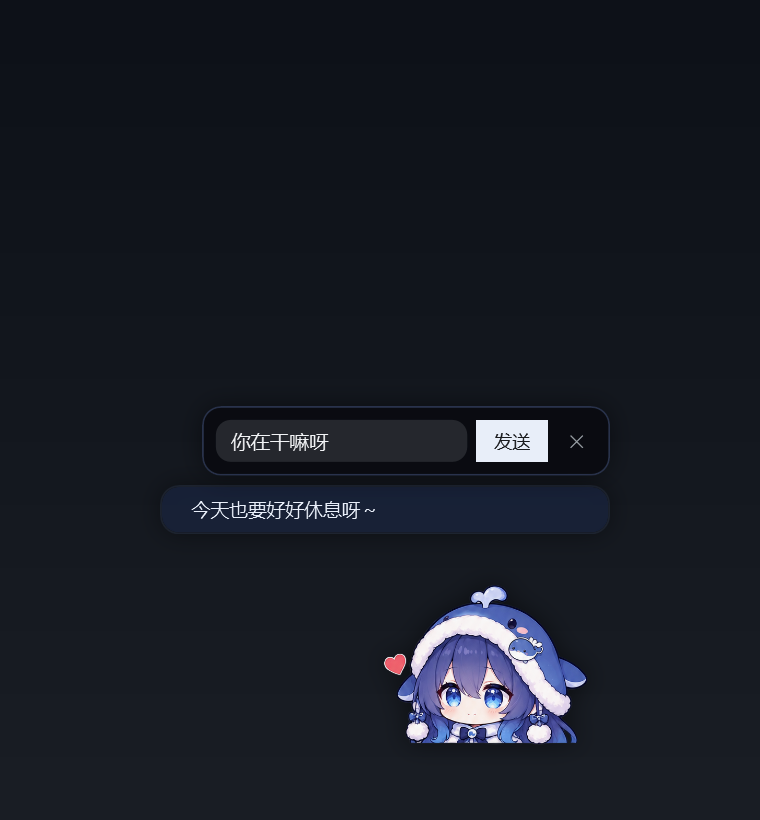
A small, always-on-top whale girl that lives in the corner of your Windows desktop, mirrors the
mood of the dsh-feiyu-mood plugin, and — this is the fun part — talks to you without you opening
the DSH window.
Built with nothing but Windows PowerShell 5.1 + WPF. No installer, no Electron, no background service.






If this project makes your desktop a little less lonely, a ⭐ helps other people find it.
Why a separate program
dsh-feiyu-mood renders the companion inside the DSH web UI. This project lifts the same character
out of the app window: a transparent, per-pixel hit-tested, always-on-top WPF window that reads the
plugin's state file. Chat goes through a tiny Cordis plugin (bridge/) that runs one-shot model
calls inside the DSH Host process — the pet never touches your conversation context.
Features
- Mood mirror — reads
<DSH_HOME>/feiyu-mood/state.jsonevery 1.2 s; five faces, seven emotion bars, last judgement reason, recent history (click the pet to open the panel). - Idle motion — gentle breathing scaled from the feet (no floating), slow gaze drop every few
seconds, a springy hop on click. Blinking is intentionally off: the upstream plugin ships no
closed-eye frame that matches the open-eye sprites (see
CREDITS.md). - Chat without DSH in the foreground — write a line, the bridge runs one model call and streams the answer back into her speech bubble, one character at a time. Closing the input row (click anywhere else) drops the bubble back down onto her head instead of leaving it floating.
- Emotion memory — persistent affection/trust/energy that drift over time, plus a hot layer (last N turns) and a warm layer (model-compressed notes every M turns). No cold diary yet.
- She starts conversations — after a quiet spell (about 25 minutes by default) she says something on her
own, and a few minutes after a chat she follows up on what you said.
She also remembers when you said you were going somewhere: tell her “I am off to a meeting / lunch / class”
and later she asks “how did the meeting go?” instead of a bare “still there?” (same thing at most twice, 90 min apart).
Interval and on/off live in her settings (
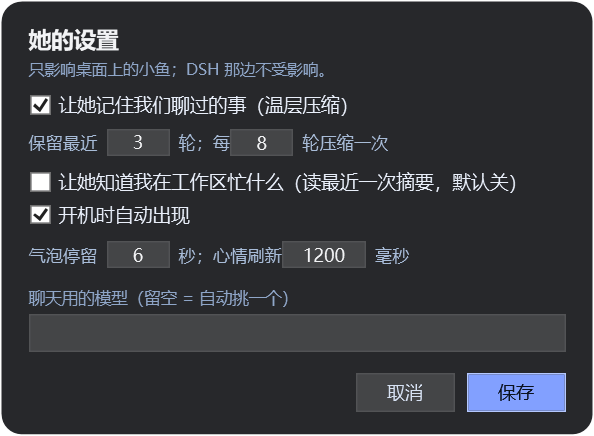
proactive,proactiveMinutes). - Her own settings window (right-click → settings): memory on/off, retain/compress cadence,
“know what I'm busy with”, autostart, bubble seconds, refresh interval, model override.
The footer of that window shows the version and build number of the copy you are running
(
v1.0.0 · build 13 · 2026-10-27), and the tray tooltip carries the same string. Saved towidget/pet-settings.json; both the widget and the bridge read it live. - English interface — her settings window has an “English interface” checkbox that flips every
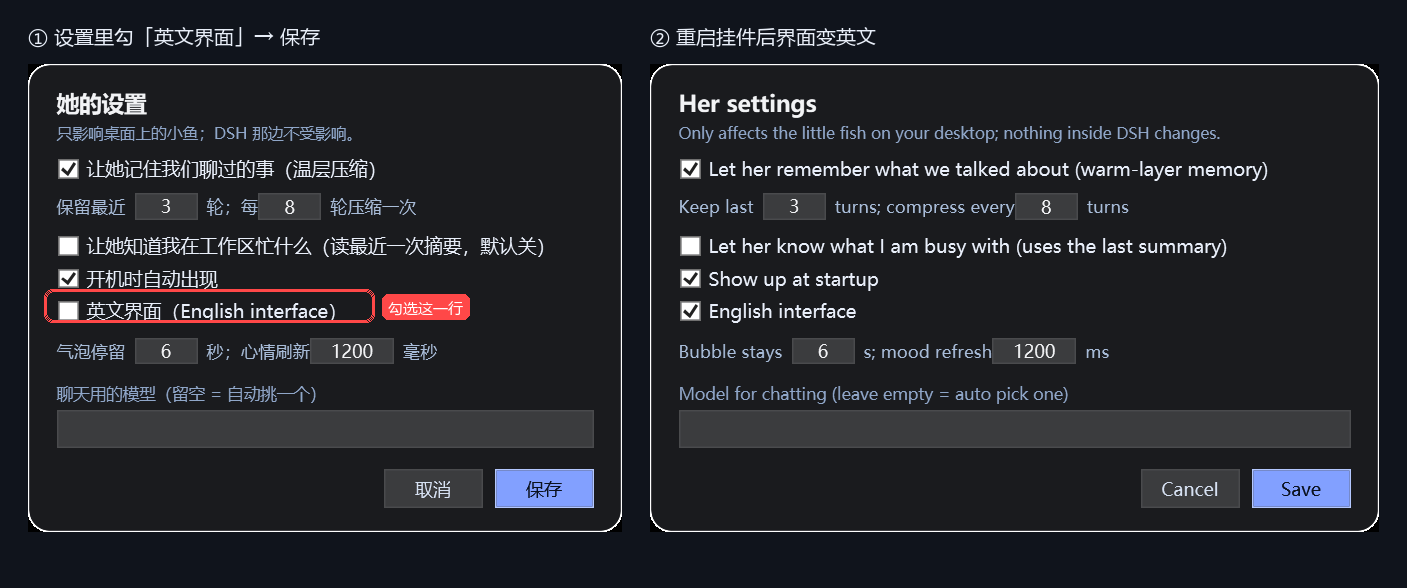
label (panel, menus, tray, balloon, chat bar, idle lines) between 中文 and English. The same switch is
langinwidget/pet-settings.json("auto"/"zh"/"en");autofollows the Windows UI language. Changing the language restarts the widget automatically — the old window stays up until the new one has painted, so it looks seamless.
- Auto-mirroring — she reads which half of the monitor she is on; drag her to the left side and the whole sprite flips horizontally so she always faces into the screen.
- Edge snapping — drop her within 20 px of a screen edge and she glides into place (120 ms ease-out).
- Fullscreen auto-hide — when a real fullscreen window covers the monitor (video, game, borderless app), she hides herself and comes back when it ends.
- Click-through transparency — pixels that are transparent ignore the mouse; only her body reacts to clicks and drags.
- Tray icon — so you can always bring her back or quit cleanly.
Requirements
- Windows 10 / 11
- Windows PowerShell 5.1 (built in)
- DeepSeek Harness desktop app with the
dsh-feiyu-moodplugin installed — that plugin writes the mood state and ships the character art this widget uses - For chat: the
bridge/plugin added to the same DSH profile
Install
Grab the prebuilt bundle from Releases (dsh-feiyu-desktop-v1.0.0.zip), or clone the
repo and follow the steps below (the zip is just this repo's widget/ + bridge/ folders).
Copy
widget/somewhere permanent, for example:Copy-Item -Recurse .\widget D:\Desktop\feiyu-desktopEdit
bridge/cordis.patch.ymlso the three paths point at that folder (see below), then add the bundle to your DSH profile:dsh plugin --profile desktop add file:D:/Desktop/DSH/dsh-feiyu-bridge(Or: DSH → Settings → Plugins → install a local
file:bundle.)Start her:
wscript D:\Desktop\feiyu-desktop\launch.vbsOr right-click the tray icon → “开机自启” to make her start with Windows.
Bridge paths
bridge/cordis.patch.yml is the only file that needs editing:
dir: 'D:/Desktop/feiyu-desktop/bridge'        # where the widget polls for messages
widgetVbs: 'D:/Desktop/feiyu-desktop/launch.vbs'
widgetPid: 'D:/Desktop/feiyu-desktop/widget.pid'
Keep hideInAppWidget: true if you do not want a second copy of the character inside the DSH window.
Usage
| Action | Result |
|---|---|
| Left click | hop + open chat input |
| Double click | she says a random line |
| Right click | menu: panel, settings, say something, autostart, restart, quit |
| Drag | move; snaps to screen edges; position remembered |
| Click the tray icon | bring her back / menu |
Panel shows the mood value and face (≥80 delighted · ≥62 happy · ≥42 okay · ≥25 worried · else sad), the last judgement reason, seven emotion bars and the latest history entries. The bars are scored by the desktop chats themselves (7h half-life, with a small floor that scales with closeness), so they move even if you never open DSH and never sit at zero after a night's sleep.
Settings (widget/pet-settings.json)
| Key | Meaning |
|---|---|
memory.enabled |
read/write bridge/memory.json |
memory.keepTurns |
hot-layer turns kept in the prompt (1–12) |
memory.compressEvery |
compress into warm notes every N turns (2–40) |
memory.maxPoints / warmPoints |
size of the warm layer |
knowWorkspace |
include the latest mood-file reason (“what I'm busy with”) in the prompt |
bubbleSeconds |
default time a speech bubble stays |
refreshMs |
mood state polling interval |
autostart |
toggle the Startup shortcut |
model |
force a model id; empty = auto-pick a chat/flash model |
How chat works
widget -> bridge/inbox/<id>.json -> bridge plugin (ctx.llm.stream) -> bridge/outbox/<id>.json -> widget
The bridge also writes alive.json (heartbeat) and bridge.log, hides the in-app widget via an
injected stylesheet, and can relaunch the desktop widget 4 s after DSH starts (autoStartWidget).
A watchdog in the bridge respawns the widget if its process dies, so quitting DSH no longer leaves you with no way to bring her back.
Logs look after themselves: _boot.log is trimmed to the newest 1200 lines once it passes 256 KB,
and bridge.log keeps its newest 600 lines once it passes 800 KB.
Calendar reminders
She can read your calendar and speak up before an event starts — no DSH window needed.
- Get an
.icslink for your calendar (any calendar app can publish one — see below). - Right-click her → Her settings… → tick Read my calendar and remind me about events, paste the link, choose how many minutes ahead, Save.
- A local
.icsfile path works too, which is handy for testing.
Ask her "what's on my schedule today?" and she answers from the same data; when an event is close she pops a bubble like "还有 7 分钟:组会(测试)(13:31 · Z211)".
More than one calendar? One per line, name|link (the name is just a label):
Apple 日历|https://p01-calendarws.icloud.com/...
理大邮箱|https://outlook.office365.com/owa/calendar/.../calendar.ics
With several sources the bubble and her answers include the source, e.g. "还有 12 分钟:〔Apple 日历〕牙医预约(13:43 · 旺角)"; a single source gets no prefix. The old single-link config still works.
The link can be a secret (it usually grants read access to the calendar), so it is stored in widget/calendar.json, which is git-ignored and never synced into this repository. The parsed agenda is written to bridge/agenda.json for the chat bridge; both files stay on your machine.
How to get the link:
- Outlook / Microsoft 365 (incl. PolyU mail) — Outlook on the web → Calendar → Settings (gear) → Calendar → Shared calendars → Publish a calendar → pick the calendar, permission Can view all details, Publish → copy the ICS link.
- Google Calendar — Settings → click your calendar → Integrate calendar → copy Secret address in iCal format.
- Apple Calendar — right-click the calendar → Share Calendar… → tick Public Calendar, copy the
webcal://link and change it tohttps://.
Recurring events (daily/weekly/…), all-day events and time-zone IDs are handled; very exotic RRULEs may be skipped.
Files
widget/FeiyuMoodDesktop.ps1   main program (PowerShell + WPF, transparent top-most windows)
widget/launch.vbs             console-less launcher
widget/assets/                feiyu.png + five faces
widget/pet-settings.json      her settings (shared with the bridge)
bridge/                       Cordis bundle: file bridge, emotion and memory layers
docs/                         preview images
Privacy
- The widget only reads local files (
state.json,config.json,pet-settings.json) and the bridge directory. - Chat text goes to the model provider configured in your DSH profile; nothing is sent anywhere else.
- Memory is plain JSON on your disk (
bridge/memory.json); delete it to forget everything.
Updating your copy
The widget/ and bridge/ folders here are copies of the ones that actually run on the author's
machine. After editing the live script, sync it into the repo and commit:
powershell -ExecutionPolicy Bypass -File scripts\sync-from-live.ps1
The helper keeps LF in git / CRLF on disk and re-adds the UTF-8 BOM that PowerShell 5.1 needs for the Chinese strings. Then commit in GitHub Desktop and press Push origin.
Where this comes from — and what is ours
This project is a fork-and-extend of someone else's work, and we want that to be obvious before anything else.
Standing on: dsh-feiyu-mood by
Yuuyuko-uu (MIT license). From that project we take:
- the character 「小鱼 / 肥鱼」 and the five expression illustrations in
widget/assets/; - the mood model itself (seven emotions, decay, the state file this widget reads);
- the idea of a small companion living in the corner of the UI.
If you reuse the artwork or the mood system, credit that project too — it is the foundation.
Added here: the standalone WPF desktop widget (widget/), the file-bridge Cordis plugin
(bridge/) that allows chatting without opening DSH, the emotion/relationship layer, the hot-and-warm
memory compression, the settings window, edge snapping, fullscreen auto-hide, tray/watchdog and
system-wide packaging.
Build on it — suggestions are welcome
Please treat this repository as a starting point, not a finished product:
- Fork it, hack it, publish your own version. MIT license, no permission needed — just keep the attribution to the upstream project and the artist.
- Issues and PRs are welcome. Good first ideas we would genuinely like help with:
- a proper set of closed-eye frames for the five expressions (the reason blinking is disabled now);
- macOS / Linux desktop ports;
- a cold-layer diary for long-term memory;
- more idle animations, petting/feeding interactions, sound.
- Be kind to the original author. If our changes are useful upstream, open an issue there too instead of only forking silently.
- If you improve the artwork or the mood model, consider sending it to
dsh-feiyu-moodfirst — that is where the character lives.
Credits & license
Character art, the mood system and the dsh-feiyu-mood plugin are by
Yuuyuko-uu (MIT). Please keep that credit when you
fork. Everything in this repository is released under the MIT license — see LICENSE and
CREDITS.md.
中文说明见 README.zh-CN.md。
No comments yet. Be the first to write one.