commandcode-dash
English | 中文
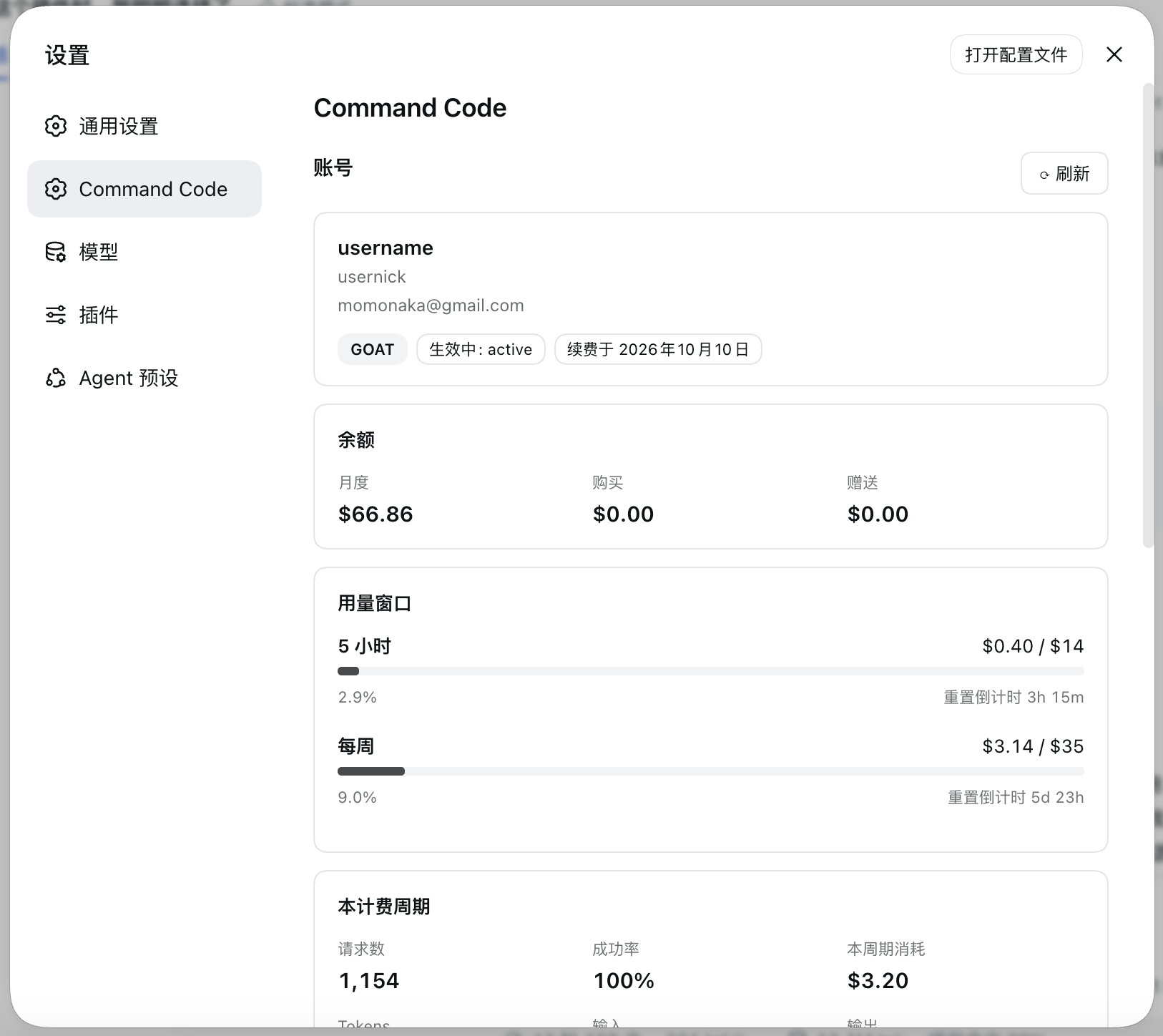
Command Code credits, usage windows, and model catalog — inside the DeepSeek Harness settings panel.
Unofficial community plugin. Not affiliated with DeepSeek or Command Code.




A DeepSeek Harness (DSH) web plugin that adds a Command Code section to the settings panel:
- Plan, credit balance, the 5-hour and weekly usage windows with live reset countdowns, and the current billing period's totals.
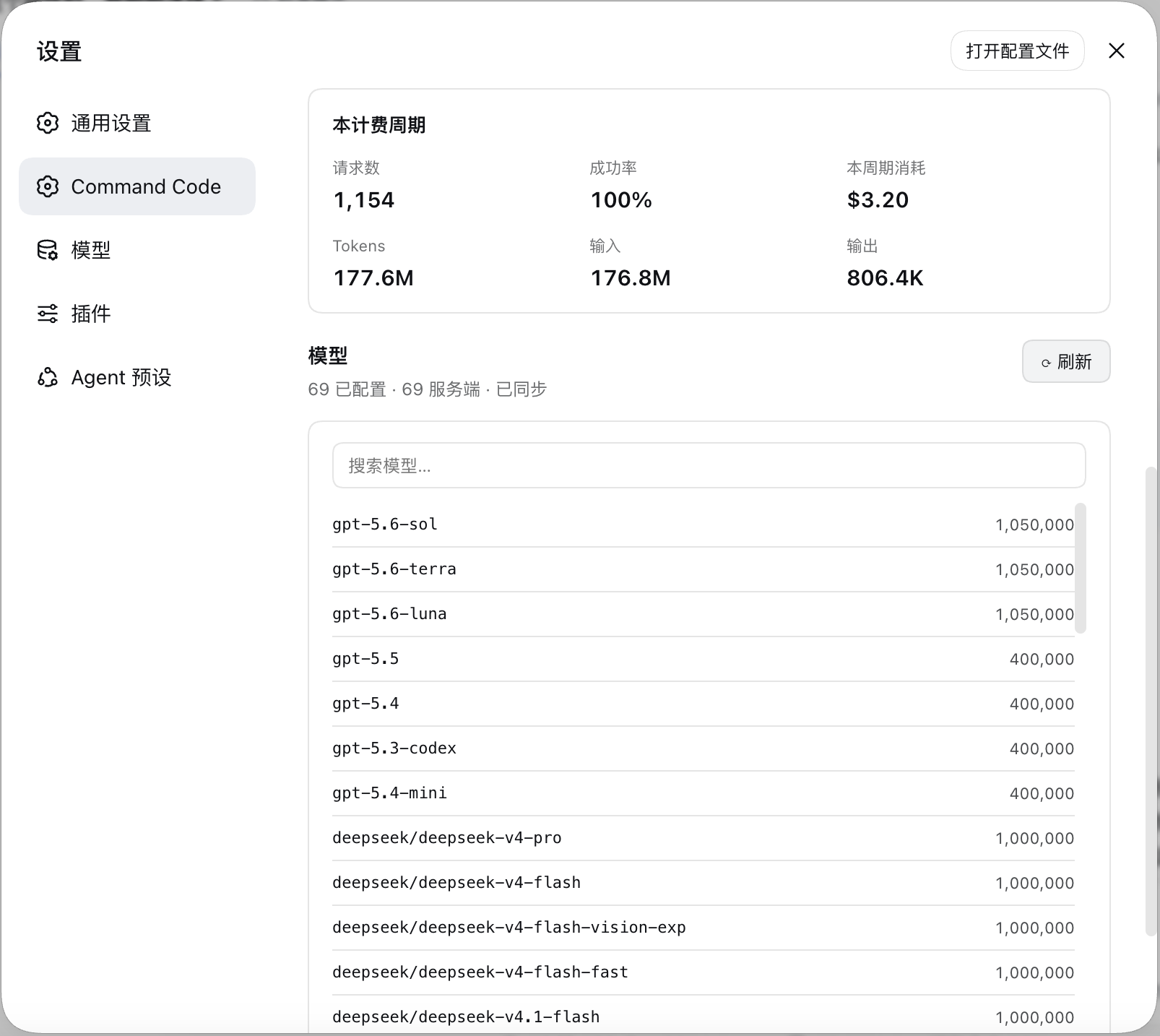
- The configured model catalog, diffed against the live
provider/v1/modelscatalog — with a one-click sync.
Features
| Credits | Monthly, purchased, and free credit balances from the live billing API. |
| Usage windows | 5-hour and weekly windows as used / cap with progress bars and resets in … countdowns that tick without refetching. |
| Billing period | Requests, success rate, credits consumed, and token totals. |
| Model catalog | Every configured model with its context window, searchable. |
| Catalog sync | Diffs the live catalog against your config, then applies additions, context-window fills, and removals — each on your say-so. |
| Setup card | When no key is configured, the section becomes a form that stores one write-only. |
| Sign out | A text button at the bottom of the section opens a confirmation dialog, then forgets the stored key and puts the section back on the setup card. |
| Load once | The section loads on your first visit and renders that same answer on later visits; the account header's ⟳ reloads both routes on demand. |
Preview
Requirements
- A DSH install with the
webprofile available, or the desktop app. - A Command Code plan with Provider API access — every plan except Go.
- Node 20+ on the host (the plugin uses
AbortSignal.any).
Installation
From npm
dsh plugin --profile web add commandcode-dash
Restart dsh web.
On the desktop app
Open Plugins → Add plugin and enter the package name:
commandcode-dash
Restart the desktop app.
Configuration
The API key
The key is read from exactly one place: the harness credential store, under the
reference COMMANDCODE_API_KEY. The section's own setup card writes it there,
or you can add it by hand:
# ${DSH_HOME:-$HOME/.dsh}/.credentials.yaml
refs:
  COMMANDCODE_API_KEY: user_…
It is resolved host-side once per request, so saving one takes effect on the next
refresh — no restart. Sign out at the bottom of the section asks for
confirmation, then forgets the stored key and returns the section to the setup
card; the llm-pi-ai routes it created are left in place, since they are
configuration you also edit by hand.
The model provider
Saving the key is the whole setup. Once it checks out, the section adds the
llm-pi-ai provider routes itself, using the catalog fetched from
provider/v1/models:
| Route | Protocol | Models |
|---|---|---|
commandcode |
openai-completions |
everything except Claude |
commandcode-anthropic |
anthropic-messages |
Claude, which Command Code only serves over /messages |
Disclaimer
This is an unofficial, community-built plugin. It is not affiliated with, endorsed by, or sponsored by DeepSeek or Command Code, and it is not part of either product.
It talks to Command Code's Provider API using your own API key, over the same endpoints the Command Code CLI uses for its own usage screen. Nothing is sent anywhere else.
No comments yet. Be the first to write one.