dsh-visual





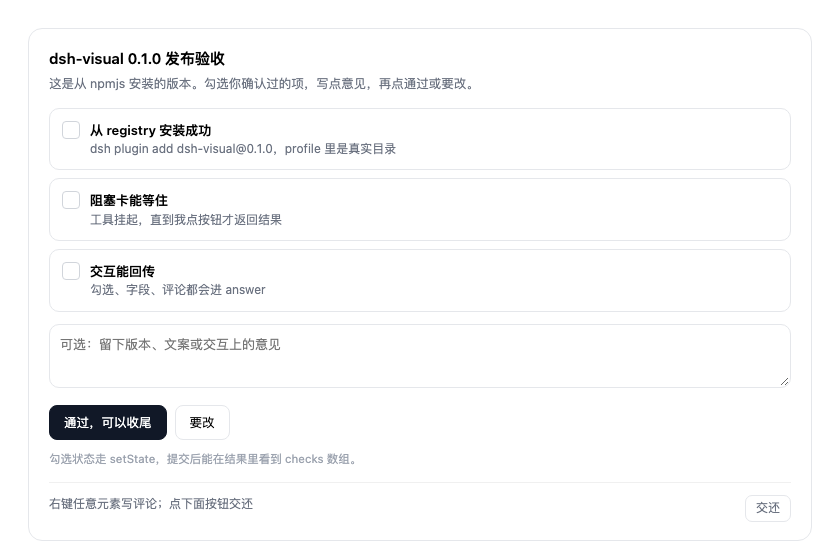
Interactive cards inside a DeepSeek Harness conversation. The model publishes a self-contained HTML card (or a draggable flowchart), the tool blocks until the user submits, and the user's click, comments, form fields and card state come back as the tool result.
No assistant text, no chat message, no artifact preview — a real card in the message stream.
Features
- Blocking, not fire-and-forget.
visualstays pending until the user submits, so the answer arrives as the tool result and the agent continues in the same turn. - Scriptable cards. Inline
<script>runs per card through a small bridge (dshVisual.root,dshVisual.setState), so cards can toggle, validate and prefill themselves. - Structured answers. Buttons (
data-visual-action), inputs (data-visual-field), comments and card state are merged into one JSON answer. - Comments with pins. Right-click any element to leave a comment; the answer carries the element's selector and label so the model knows exactly what each note is about.
- Flow editor. Pass a
flowgraph instead of HTML: drag nodes, double-click to rename, connect, delete, then hand the edited graph back. - Parallel safe. Several cards in one turn each get their own bridge and state; nothing leaks between them.
- Cancellable and time-bounded.
timeoutMsand a stop button turn the card read-only instead of hanging forever.
Requirements
- DeepSeek Harness 0.1.0-rc.1 and newer, below 0.3 (prerelease builds included)
- Node.js 20 or newer
Install
dsh plugin --profile desktop add dsh-visual
Restart DeepSeek Harness once so the host half loads. After that, changes to lib/client.js only need a page refresh (⌘R).
For local development, link the directory instead:
dsh plugin --profile desktop add /path/to/dsh-visual
dsh plugin --profile desktop remove dsh-visual   # uninstall
Quick start
Ask for a card in plain language:
用 visual 发一张发布确认卡,让我选版本并留一句备注
The model calls the tool roughly like this:
{
  "title": "发布确认",
  "height": 360,
  "html": "<h3>发 0.1.1 到 npm?</h3><textarea data-visual-field=\"note\"></textarea><button data-visual-action=\"approve\">发</button><button data-visual-action=\"hold\">先别发</button>",
  "actions": [{ "id": "approve", "label": "发" }, { "id": "hold", "label": "先别发" }],
  "timeoutMs": 600000
}
When the user clicks, the tool returns one answer object:
{
  "action": "approve",
  "payload": { "fields": { "note": "记得打 tag" } },
  "state": { "checks": ["install"] },
  "comments": [{ "selector": "h3", "label": "h3", "text": "标题再短一点" }]
}
Parameters
| Parameter | Type | Description |
|---|---|---|
title |
string | Card header title. |
html |
string | Complete, self-contained HTML document. Styles are scoped; scripts run per card. |
flow |
object | Flow graph {nodes, edges} rendered as an editable canvas instead of HTML. |
data |
object | Initial state exposed as dshVisual.data to the card script. |
height |
number | Initial card height in px (160–900). The card can resize itself. |
actions |
array | Action registry {id, label} for the footer chips and button labels. |
timeoutMs |
number | How long to wait for a submit (default 10 min, max 1 h). |
Every field is optional except one of html or flow.
Card protocol
Buttons and fields
data-visual-action="id"— clicking submits that action together with the fields, state and comments.data-visual-field="name"— read from the card on submit and returned underanswer.payload.fields.- The footer always shows a neutral 交还 button (
answer.action = "done"). It never implies approval: review cards should carry an explicit approve/revise action of their own.
Scripts and state
<script>
(function (dshVisual) {
  var state = Object.assign({ on: false }, dshVisual.data || {})
  dshVisual.root.querySelector('.toggle').addEventListener('click', function () {
    state.on = !state.on
    this.textContent = state.on ? '开' : '关'
    dshVisual.setState(state)   // returned as answer.state
  })
})(dshVisual)
</script>
Each card is compiled as new Function('dshVisual', source)(bridge), so parallel cards cannot see each other's state.
Comments
Right-click any element inside the card, type a note, and it is pinned with a number. The answer carries them in answer.comments as { selector, label, text }.
Timeout and cancel
When timeoutMs elapses the call returns action: "timeout"; stopping the turn returns action: "cancelled". In both cases the card becomes read-only and its footer explains why.
Development
npm run check        # syntax of both entries + docs/code consistency guard
npm pack --dry-run   # inspect the published file list
The client half is a hand-written module-loader bundle, so no build step is required.
Releasing
Publishing is automatic: pushing a v* tag runs the release workflow, which verifies npm run check, publishes to npm with provenance, and opens a GitHub Release.
npm version patch   # or minor / major
git push --follow-tags
The workflow expects an NPM_TOKEN repository secret with publish rights to the dsh-visual package.
License
MIT © MjxUpUp
No comments yet. Be the first to write one.