dsh-personal-assistant
| English | 中文 | MIT License |
|---|
A proactive personal-assistant kernel for DeepSeek Harness (DSH).
It turns the agent into an assistant that works the way a real human assistant for a boss they know and respect would: attentive to the person behind every request, discerning about what matters, and reliable about what it said it would do — including showing up on its own schedule.
Interactive showcase
Open the showcase (Chinese) · View the standalone HTML
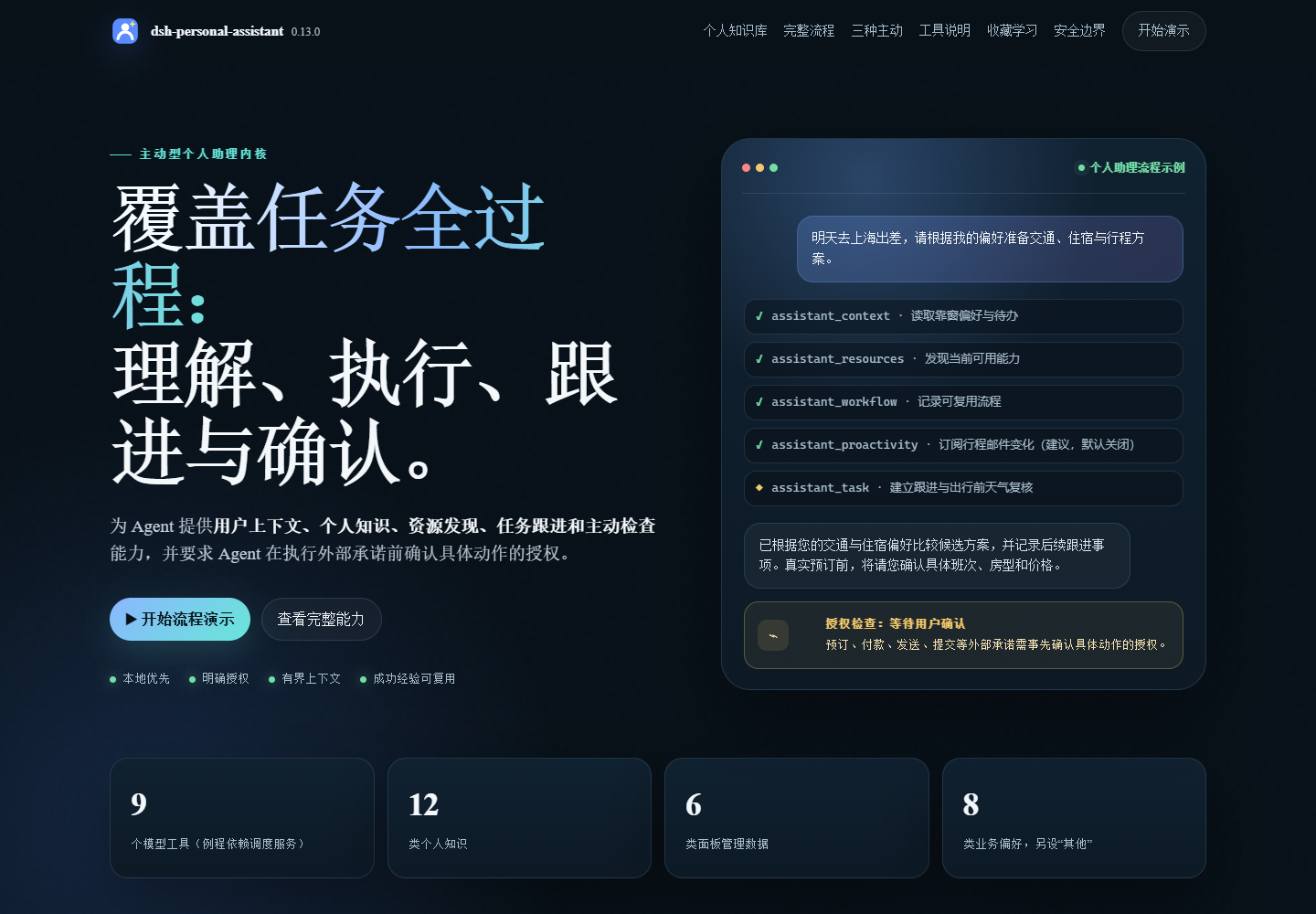
Explore personal knowledge, proactivity, task follow-through, and learning from favorites through interactive examples. The page uses demo data; the actual panel lives in DSH → Settings → Personal Assistant. For offline viewing, extract package/SHOWCASE.zh.html from the release package and open it in a browser.
What it does
Preference memory. Stable habits (
travel.seat) plus situational overrides (dining with clients: no alcohol) in one bounded store. When a needed preference is missing, the assistant asks one concise question instead of guessing; contradictions update the record; a one-off choice is not silently generalized without asking whether it should be remembered. Inferred patterns remain low-confidence hypotheses that can rank reversible options but cannot act as owner instructions. A 16-item survey (ending with a read-back recap) is offered once on demand and never pushed again after a decline.Personal knowledge. Meaningful experiences, people and relationships, places and visits, observations and behavior patterns, current states, goals, decision reasons, commitments, artifact pointers, external rules, and hypotheses become records with time, provenance, confidence, sensitivity, and links. Knowledge stays separate from preferences, tasks, and workflows: one past choice is not a preference, a knowledge commitment does not replace an operational task, and no record authorizes action. Retrieval is query-driven rather than an eager library dump; sensitive records stay out of ordinary lists and
assistant_context. The settings panel presents the twelve attributes (entity, relation, artifact, event, observation, state, goal, decision, commitment, pattern, rule, hypothesis) separately from the eight data types (teaching, guide, resource, review, case, opinion, news, tool): attributes say what a record does in judgement (shared by system management, lifecycle and retrieval), while data types describe its form for manual grouping and search, and both favorites and imported collections write their knowledge with both tags. The knowledge list starts collapsed, supports per-row and expand-all/collapse-all, scrolls internally with sticky row headers, and matches the favorites interaction.Need decomposition. A vague request is worked through end to end before action: the assistant identifies the decisions, dependencies, missing facts, and follow-ups that materially affect the outcome, then keeps the depth proportional to the situation instead of forcing every request through a fixed template.
Three forms of proactivity, with owner control. In-request proactivity identifies dependencies, missing facts, follow-ups, and care items after the owner asks for something. Time-driven proactivity extracts future commitments, reservations, deadlines, travel segments, or anticipatory checks from the current conversation, sources already read, and personal knowledge, deduplicating them against existing tasks and preserving concise source pointers. External-signal proactivity is an extensible subscription list rather than a fixed enum: the owner can add sources directly, and the assistant can suggest new sources as disabled options during later interactions. Each source is enabled independently and resolved through current capability discovery, so mail, calendars, weather, transport, deliveries, bills, account notices, device signals, or future providers need no kernel change. Wakes inspect only enabled, task-relevant sources and stay quiet when nothing actionable changed.
Anticipatory condition checks. With time-driven proactivity enabled, the assistant creates a separate check task when a future event has a condition worth rechecking — for example travel weather or transport, a bill before payment, delivery status, or meeting materials. It chooses a lead time from the event, uses
due_atonly when the source supports a specific time, and otherwise records the next step needed to confirm the time.Follow-through. Deadlines, reservations, approvals, and follow-ups become tracked tasks — and every recorded follow-up is announced in the reply with its timing, so you always know what will happen and when. Long work gets short progress notes along the way instead of long silences.
Proactive check-ins. One recurring routine binding per session. Its schedule is derived from the follow-ups it serves: when timings change (a booked flight, a moved deadline), the schedule rebinds so checks fire before those moments, and a single moment gets a one-shot reminder at the exact time instead. Since v0.9.0, tasks with a due time automatically get a due-time wake in the session that recorded them (on by default) — the wake follows due-time changes and is removed on complete, cancel, or delete. Waking is cheap; restraint is the product: a woken assistant checks context first and stays silent when nothing needs attention.
Care, naturally. Comfort, health, safety, schedule buffer, and spending are weighed against your saved preferences and expressed naturally in replies — not as a fixed checklist.
Resource orchestration. Bounded discovery over every native tool, MCP-mounted tool, and registered skill the agent can see right now — the capability set changes between sessions, so tasks probe what is available today instead of assuming yesterday's environment — with the fallback chain tool → skill → browser → desktop. Nothing is declared impossible before discovery runs. Independent subtasks run concurrently (parallel calls or subagents) to shorten your wait.
Workflow distillation. A verified successful call sequence can be distilled into a runtime skill as a candidate route, not a universal template. The generated skill receives resource identifiers plus a model-supplied, non-sensitive kebab-case label; the original goal, preconditions, tool arguments, results, and other external text are not copied. Applicability is re-evaluated from the current request before every replay.
Conversation favorites. Like a reply style enough to keep it? Click the star below the reply: a picker opens with a 1–5 rating (the rating expresses how important this exchange is to your personal knowledge base and drives both parse order and the knowledge priority), up to two save reasons (instruction followed / wording / output / recurring scene / process & decision / pitfall & correction / preference clue / spark), and an optional note; saved ratings render as the star.svg pentagram cut into five clockwise wedges, with the rating lighting n of them and the rest cleared. Each favorite captures the whole turn — the user question, an execution-process overview built from every assistant step of that turn (thinking joined in step order plus the tool names in call order, never tool arguments, at most 32 names), the final reply, and delivered file names — all read from the conversation snapshot, with capture budgets measured in estimated tokens (question ≤1024, reply ≤2048, process ≤16384, note ≤800 characters). The list starts collapsed and expanding a group also expands its rows; an expanded favorite reads as Input / Process / Output (thinking collapsed into a brain-icon chain, output rendered as Markdown), with parse/retry/re-parse per row and parse-all in the header. Parsing feeds the whole exchange to the LLM and now emits both a personal-knowledge record and a preference record: each save reason carries its own owner intent, its candidate mapping onto knowledge attributes, knowledge tags and preference categories, a content skeleton and an example, so the chosen reasons decide the emphasis (process reasons include the thinking and tool order, result reasons get only the question and final answer) and the knowledge body is segmented by that skeleton and highlighted in the UI. Situational preferences use the same contract as imported collections — omit
situationfor stable preferences, fill it only when a scenario is explicitly stated, and let one key hold a stable record plus situational ones. Save reasons and notes map onto knowledge tags (Chinese reason labels + data type + content tags); the model must return a compressed summary instead of a rewritten reply, and parsing adds an output-limit compaction retry plus a copy-detection guard. The model returns kind/genre/domain/title/content/evidence/tags; the host validates through the same paths asassistant_knowledgeandassistant_preferenceand derives confidence, retention and priority from the stars; failures show the concrete reason. Parsing queues in star-descending order with client polling, pending favorites parse automatically on each host start, and favorites persist in the plugin's own state file, fully separate from feedback telemetry (since v0.11.0).Learning from success. After useful work succeeds, confirmed owner-specific guidance is saved with the situation where it applies, while a verified execution sequence becomes a candidate skill route. Before either is reused, the assistant checks that the new situation fits; one success is evidence, not a universal template. Policy forbids preserving one-off details or secrets.
Safety. Sending, buying, booking, paying, submitting, deleting, or making commitments never happens without your explicit confirmation for that exact action. A reminder or routine is never authorization.
External collection import. Bilibili, Zhihu, QQ Music, Xiaohongshu, and browser bookmarks get side-by-side import cards (the browser card spans the full row) with their own required action and minimal copy; official brand marks and accent colors distinguish the platforms. Paste a Bilibili or QQ Music link to import it, use the Cookie-free Zhihu/Xiaohongshu bookmark, or choose a browser-exported HTML bookmarks file (or paste its HTML). Only basic info (title, description or body excerpt, tags, author, link) is kept — no video download and no full Zhihu article body. Invalid entries are filtered out: Bilibili drops 已失效视频 / attr≠0 / page=0, while Zhihu keeps only answers and articles. One import = one big folder: re-importing the same link replaces that folder in place; "Clear all" removes every folder and the knowledge distilled from them and lets queued parses expire. Parsing merges the whole folder into a single model distillation (never one call per video/answer) and writes two kinds of output. Preferences: 0–4 interest domains (capped at 80 inferred preferences across all imported folders) keyed as
<domain>.<detail>(no interest prefix; provenance comes fromsource), each value summarizing the recurring sub-topics, content shape, and likely use, with confidence capped at 0.35–0.7 and owner-written preferences never overwritten (situational preferences follow the same contract as conversation favorites: omitsituationfor stable ones, fill it only when a scenario is explicitly stated, and let one key hold both); each is classified into the eight core domains (travel / food / schedule / communication / work / health / finance / clothing) first, the four on-demand domains (sports / arts & entertainment / learning / shopping) next, and other for everything else (technology and home are not separate buckets; career development belongs to work). Knowledge: 0–5 records with a two-level taxonomy —genre(教学/攻略/资源库/评测/案例/观点/资讯/工具), free-formdomain(field/subfield), andscene(where the knowledge applies, such as commute / kitchen / training / work review), with finer terms kept as tags. The prompt is tuned per source (Bilibili tutorials/reviews, Zhihu long-form answers, Xiaohongshu lifestyle guides, QQ Music taste-first, browser bookmarks judged only from title/domain/folder path and allowed to yield nothing), and large folders get a full title index before the first N detailed entries so preferences are judged by proportion while knowledge is distilled only from detailed items. Re-parsing is replacement-based. Bilibili (space.bilibili.com/<uid>/favlist?fid=…,medialist/detail/ml…,b23.tvlinks), Zhihu (www.zhihu.com/collection/<id>), QQ Music (i2.y.qq.com/…/playlist.html?id=…,y.qq.com/n/ryqq/playlist/…), Xiaohongshu (www.xiaohongshu.com/board/<id>), and browser bookmarks (Netscape Bookmarks.htmlexported by Edge/Chrome/Firefox, ≤4 MB) are supported. A browser export is split into one folder per top-level category (the subfolders inside the favorites bar; a single-category export becomes one folder), nested folder paths become item tags,ADD_DATEbecomes the saved date, the link domain becomes the site, and items use the “Bookmark” kind; the panel first previews the categories and lets you choose which to import, and re-importing the same category replaces it. The export is attributed to a source browser by file name and by the favorites-bar heading (Edge/Chrome/Firefox/Safari, or a generic “浏览器” when unclear); the source (browser name plus export file name) is stored on the folder and shown in the panel and in the distillation prompt, with the matching Edge/Chrome/Firefox/Safari brand mark on the folder row (a generic bookmark mark when unknown). EmbeddedICONthumbnails (PNG/JPEG/GIF/WebP/ICO data URIs up to 1600 characters) are kept as item covers and shown at their native 16px size; items without an embedded icon do not trigger favicon-service requests, and remote icons and SVG are ignored. Only http/https links are kept:javascript:bookmarklets,edge:///chrome://internal pages, andfile://local paths are skipped (never executed or persisted). QQ Music keeps the playlist title/creator/songs (title, singer, album, release date, duration, cover); Xiaohongshu keeps the board name/author/note title/author/cover/publish date/likes/favorites/comments/topics, with only a short body excerpt. Item tags: Bilibili detail tags, Zhihu topics, and Xiaohongshu tagList/topics are extracted when present; QQ Music has no tag concept and uses album/release date/duration instead. Each folder header shows up to three cover thumbnails and each expanded item shows a cover thumbnail; missing or broken covers take no space. The Xiaohongshu bookmark keeps the board-state desc (up to 1000 chars); cards show the first three lines by default with a Show full body toggle, and Zhihu bodies use the same three-line collapse/expand. If the list state has no body, the bookmark asks whether to open each note detail to fill in body/tags (slower and may trigger risk control); canceling keeps only the list-visible fields; Bilibili public folders need no login, private ones accept a temporary Cookie. Zhihu's items API requires login, so the panel offers a draggable bookmark: click it on a logged-in Zhihu collection page, and the script uses the page session to page through items and puts a JSON payload on the clipboard; come back and click “Import from clipboard” — no manual Cookie hunt (Cookie direct fetch remains as an advanced fallback). Zhihu folder cards use the blue platform icon and accent on authors/excerpts, show a three-line body excerpt, and list reads (when the API provides them), upvotes, comments, and favorites; Xiaohongshu cards use the red accent and list likes, favorites, comments, publish date, and topics. QQ Music's public API only reliably exposes title/singer/album/release date/duration, not per-song like/favorite counts. Cookies are used for that fetch only and never persisted. The plugin contacts only bilibili.com / b23.tv / zhihu.com / y.qq.com and only when you import a link; the Xiaohongshu extractor runs inside your browser and never passes through the plugin server; browser bookmark HTML is parsed locally without any network request and only web links, titles, domains, saved dates, folder paths, and embeddedICONthumbnails are kept (no remote icon requests). Collection cover thumbnails load directly from the platform image CDNs with no-referrer.
Tools
| Tool | Actions | Purpose |
|---|---|---|
assistant_context |
— | Preferences, active tasks, routine status, and optional query-driven personal knowledge |
assistant_preference |
list set delete |
Stable and situational preferences, constraints, and confirmed owner guidance |
assistant_knowledge |
list get search create update archive delete |
Time-, provenance-, confidence-, and sensitivity-aware personal knowledge |
assistant_survey |
— | 16-item preference questionnaire (rendered in your language, with a read-back recap) |
assistant_task |
create update complete cancel delete |
Deadlines, reservations, approvals, follow-ups |
assistant_resources |
— | Search the Tool/Skill registries visible to this agent |
assistant_proactivity |
list create update delete |
Manage the extensible, individually enabled list of read-only external signal sources |
assistant_workflow |
start status complete fail delete |
Track a reusable multi-step flow and publish it as a runtime skill |
assistant_routine |
status enable disable |
The single recurring proactive check-in binding |
assistant_routine registers only when the host provides a Schedule service.
Conversation favorites are not a model tool but a built-in feature of this plugin: the entry point is the star below an assistant reply, management lives in the Settings → Personal Assistant panel, and parse results are written to personal knowledge and preferences through the same validated paths assistant_knowledge and assistant_preference use.
Install
Requires Node.js 22+, an installed DeepSeek Harness, and the Web profile. The package runs directly; no build step is needed.
Install by npm package name (recommended)
dsh plugin --profile web add dsh-personal-assistant
# Pin a version:
dsh plugin --profile web add dsh-personal-assistant@0.13.0
Restart dsh web, check 0.13.0 in Settings → Personal Assistant, then call assistant_context in a new conversation to verify tool registration. npm install dsh-personal-assistant downloads the package for a regular Node.js project; use the DSH command above to enable it in a profile.
Install a prebuilt GitHub Release
Every version includes one npm pack tarball in GitHub Releases. Download dsh-personal-assistant-0.13.0.tgz, then run without extracting it:
dsh plugin --profile web add ./dsh-personal-assistant-0.13.0.tgz
Select the .tgz asset for installation; GitHub's automatic Source code archives are source snapshots.
Install from source, update, and uninstall
git clone https://github.com/Mint-hfut/dsh-personal-assistant.git
dsh plugin --profile web add ./dsh-personal-assistant
# Update a registry installation:
dsh plugin --profile web update dsh-personal-assistant
# Uninstall:
dsh plugin --profile web remove dsh-personal-assistant
A source directory is linked locally; restart the host after editing it.
Usage
There are no commands to memorize. Talk to the assistant.
- Plan a trip: “我下周要去上海出差两天,帮我安排” — before acting, the assistant works through the trip end to end, weighs the material decisions and follow-ups against your saved guidance, and asks only for missing facts that would change the plan. It researches the resulting options, records later actions as tasks, tells you what it will check on and when, and asks before booking anything.
- Tell it a habit: “记住我坐飞机靠窗” — saved as a stable preference; “和客户吃饭时别给我安排酒” — saved as a situational preference that overrides the stable record only in that situation.
- Remember experience and reasoning: “上次去南京选高铁,是因为门到门更快、改签更灵活;不是长期交通偏好” — saved as a sourced, time-aware decision record. The assistant can later explain why while still re-evaluating a new trip instead of inventing a rail preference.
- Separate observation from inference: “三次长会他都提前离开;我猜他不喜欢长会” — the observations and low-confidence hypothesis remain distinct, and the hypothesis is used only for low-cost, reversible suggestions.
- Fill the gaps: “做个偏好问卷” — the survey is rendered as chat questions; answered items are saved, and a declined survey is never offered again.
- Proactive check-in: at the routine schedule, the assistant inspects open tasks, deadlines, and approval needs first, then reports only actionable findings. No news means a quiet session.
- Keep a conversation: click the star below a reply you want to keep, pick 1–5 stars and one or two save reasons (instruction followed / wording / output / recurring scene / process & decision / pitfall & correction / preference clue / spark), and it is captured as a whole turn. In Settings → Personal Assistant the collapsed list shows ratings and actions; parsing distills both a knowledge record and a preference record — the chosen reasons decide the emphasis (process reasons bring in the thinking and tool order, result reasons only the question and final answer), the knowledge body follows that reason's content skeleton, and situational preferences are produced only when the exchange states a scenario. Deleting the parsed knowledge leaves the favorite itself untouched.
A runnable demo script lives in DEMO.zh.md (Chinese).
The v0.10.0 personal-knowledge report lives in TEST-REPORT-v0.10.0.md (Chinese). Run npm run check for the regression suite, including local v6 and colleague v7 state migration, Bilibili import, stale parse results after editing or reloading, reminder recovery after persistence errors, and editing favorites at the 1000-record limit. Network and model calls in these tests use fixtures; live host behavior and knowledge quality still need acceptance testing.
Configuration
All fields are optional and default sensibly. Configuration lives in two layers: the web settings panel (runtime-mutable, effective on save) and the profile's cordis.patch.yml (the baseline layer).
Web settings panel
Under Settings → Personal Assistant in the DSH web GUI the plugin serves its own panel (host-side HTTP routes; works on any host with a webserver, no settings-service dependency):
| Field | Meaning | Effect |
|---|---|---|
| In-request proactivity | Expand a request into material dependencies, missing facts, follow-ups, and care items | Live on save |
| Time-driven proactivity | Extract future agenda items from the conversation, already-read sources, and personal knowledge | Live on save |
| External source subscriptions (dynamic) | Owner- or assistant-added sources, each enabled independently; assistant suggestions start disabled (the model may enable one after the owner agrees in conversation) | Live on change |
| Task due-time wake | Automatically schedule a due-time reminder for tasks with a deadline | Live on save |
| Wake lead minutes | Minutes before the deadline the wake fires (0–1440, 0 = on time) | Live on save |
| Routine cron / time zone / reminder title | Default schedule for assistant_routine when enabled |
Next routine enable |
Panel writes persist to personal-assistant/config.json next to the state file (the UI overlay layer, merged over the cordis.yml baseline); each field can be reset back to the baseline and overridden fields carry a badge. Turning the task wake off clears every recorded wake on the next task operation.
The panel also shows five live inventories; the preference library, conversation favorites, and personal knowledge library share one card language: a stats strip, filter pills, and collapsible rows. The external signal source list grows through interaction: owners can add sources directly, assistants can suggest disabled sources, and every row has its own enable switch and delete action; once the owner agrees in conversation, the model may enable a suggestion on their behalf. The wake inventory lists every due-time wake and the routine the assistant has scheduled, read live from the host scheduler and joined with task bindings: each row shows the kind, the arm status, the next fire time, the last delivery, and the owning session, with an active/all filter. Wakes are added and removed by the task lifecycle itself — completing, cancelling, or deleting a task removes its wake, and rescheduling rebinds it. The preference library renders stable and situational preferences as modular cards: a stats strip for total / categories / situational count / average confidence, category-grouped sections with an SVG icon and fixed accent tone, ordered from the eight core domains (travel / food / schedule / communication / work / health / finance / clothing) through the four on-demand domains (sports / arts & entertainment / learning / shopping) to other, keys as breadcrumb tags, a five-segment confidence meter, and source/time chips — plus all/stable/situational filters, collapsible groups, direct add, in-place edit, and two-step delete, with the add/edit category picker grouped by the same tiers. The conversation favorites card lists saved exchanges collapsed by default — the first line carries the star rating, category (why you saved it), parse status, and the parse / edit / delete actions, the last line carries the session id, turn number, and save time — with per-row disclosure, expand-all / collapse-all, and internal scrolling; expanded rows show the question, the execution-process overview, the reply, and the note. Parsing runs through an LLM in a background queue (star-descending, one call at a time): the status badge and a 2 s poll track "parsing…", failures show their reason inline with a retry action, an analyzed favorite can be re-parsed, and pending favorites parse automatically on each host start (when the llm service is not available yet they simply stay pending — never marked failed — and the panel can parse them once the service is available). The personal knowledge library shows the latest non-sensitive knowledge grouped by attribute (entity / event / pattern …, the 12 kinds) by default, or by content genre (teaching / guide / resource library …), or switched back to recent order; the genre also appears as a clickable standalone tag and facet, alongside kind/text filtering, create, archive, and two-step delete; attributes are labeled in your language (对象 / 事件 / 状态 / 观察 / 方法模式 / 目标 / 决策 / 承诺 / 产出物 / 关系 / 规则 / 假设), while type (教学 / 攻略 / 资源库 …) is a clickable data-type tag and facet; the two are orthogonal, and the favorite reason is neither. Deleting a knowledge record that a favorite produced unlinks it and marks that favorite skipped — it will not be re-parsed automatically on the next host start; re-parse it from the panel when wanted — without changing its content, stars, category, or note. All five edit through the same serialized store path and validation as their conversation tools, so panel changes are visible to later conversations immediately.
cordis.yml layer
Override in the profile's cordis.patch.yml (also the baseline the panel resets to):
- insert:
    - id: dsh-personal-assistant
      name: dsh-personal-assistant
      config:
        dataFile: personal-assistant/state.json
        proactive:
          requestProactivity: true    # expand requests into material dependencies and follow-ups
          timeProactivity: true       # extract future agenda items and maintain anticipatory checks
          cron: '0 9,13,17 * * *'   # default check-in schedule when the agent enables the routine
          timeZone: Asia/Shanghai
          title: '[Personal Assistant] Proactive check'
          taskWake: true             # task due-time wake switch (overridable per field from the settings panel)
          taskWakeLeadMinutes: 0     # lead minutes before the deadline (0–1440; panel-overridable)
        workflow:
          maxTraceSteps: 200        # root-call steps recorded per workflow (10–2000) before the trace is marked truncated
dataFile— state file name under the DSH data directory. State is stored per DSH data directory and shared across all workspaces; generated workflow Skills are projected per workspace.proactive— defaults for in-request proactivity, time-driven agenda extraction, wakes, and the routine binding (requestProactivity,timeProactivity,cron,timeZone,title,taskWake,taskWakeLeadMinutes). They are overridable per field from the settings panel. External-signal proactivity is not a fixed config enum: dynamic source records live in plugin state, owners can add them directly, assistants can suggest disabled sources, and each source is independently enabled. The agent still derives the actual routine schedule from the follow-ups it serves and rebinds as timings change. Task due-time wakes work independently of the routine state — they fire with the routine disabled.workflow—maxTraceStepsbounds how many root calls one workflow records (10–2000, default 200); at the bound the trace is marked truncated and cannot publish a skill. Lowering the value never blocks loading existing longer traces. Read once at plugin load (reload the plugin after changing it).
Task due-time wake behavior
- The wake binds the session that recorded the task: it delivers when that session is live at the deadline; otherwise it waits and delivers when the session comes back (one-shots are never lost and never delivered to another session).
- Due-time changes and deletions retire the host wake before committing: a failed retirement aborts the whole operation (
ok:false) with the old deadline and binding kept for the next task action to retry. A failed cleanup on completion or cancellation keeps the binding on the terminal task (visible in the wake inventory) for the sweep on any later task action to retry. The retirement is gated by a full validation dry-run: invalid arguments (a malformed deadline, a blank title) are rejected before any host wake is touched, so a failed update can never silently drop a wake; if the persistence layer fails after the retirement already committed, the wake is re-armed from the task's unchanged deadline and the result says so. - Moving a task to a terminal status through
updaterecycles its wake exactly likecomplete/cancel; a task created already terminal never arms a wake. - Turning the wake off affects tasks from then on: recorded wakes are cleared on the next task operation, and existing tasks gain their wake on their next update. Due-time changes and deletions issued while the wake is off follow the same retire-first rule: when the sweep cannot delete the target wake the operation aborts with the binding kept, never leaving an orphan wake that no state record points to.
- A wake creation failure never fails the task mutation — the failure is reported in the tool result's
wakefield. - Hosts without a Schedule service degrade gracefully: wakes are skipped (reported in the result). Hosts without a webserver keep everything except the settings panel (headless profiles log one line).
Data & privacy
- All plugin state (preferences, dynamic proactive sources, knowledge, tasks, workflows, conversation favorites, imported folders, and the routine binding) lives in one local JSON file. Importing a Bilibili link fetches its basic metadata; an optional login Cookie is used only for that fetch and never persisted. Favorite and folder parsing send their selected contents to the configured LLM provider. No telemetry is sent. Do not store credentials or complete identity/payment-card numbers; the knowledge writer rejects common secrets.
assistant_contextretrieves knowledge only when the caller suppliesknowledge_query, returning at most eight non-sensitive records. Generic context never dumps the library.assistant_knowledgelist/search exclude sensitive records by default, and exact sensitive reads requireinclude_sensitive=true.- Knowledge distinguishes
stated,observed,inferred, andimportedbases; inferred records cannot have confidence 1. Mark superseded states stale or archive them so default retrieval does not present old and current states together. - Preference views return the newest 50 records with a total count; the panel knowledge view returns at most 50 non-archived, non-sensitive records, and the favorites view at most 100 with a total count. Full state remains on disk while model and UI payloads stay bounded.
- Favorites store bounded excerpts, not full transcripts, and their capture budgets are estimated tokens rather than characters (the same character count differs by nearly 3.3× in real tokens between Chinese and English): question ≤1024, reply ≤2048, execution-and-thinking process ≤16384 estimated tokens (all multiples of 1024), ≤32 tool names (names and order only — tool arguments and command output are deliberately never captured), and a note up to 800 characters; delivered files are recorded by file name (basename) only, never by path or content. The estimator
tokens ≈ 0.829×CJK chars + 0.2514×other charswas regressed from 3090 real model outputs on this machine (R² = 0.98); measured over the 68 session logs on this machine (144 completed turns with a final reply), the question budget covers 99.3% of turns, the reply budget 90.3%, the process budget (16384) 86.8%, and the tool-name cap 100% (for reference: process 12288 covers 79.9%; reply 3072 covers 97.2%). The previous character caps truncated 79.9% of replies and 80.6% of processes, which the token budgets largely remove. The process overview now aggregates every assistant step of the turn (thinking in step order plus the tool sequence) instead of only the closing message. Deleting a favorite removes its record; it never deletes the knowledge parsed from it, and deleting the knowledge never deletes the favorite. An unchanged conversation favorite keeps its parse result when saved again; changing its rating, category, note, or captured contents returns it to pending. Manual re-parsing remains available, and existing knowledge is retained for manual cleanup. Imported-folder re-parsing replaces that folder's previous knowledge only after a new result validates successfully; explicit knowledge references prevent deletion. - Parse queues belong to each plugin state instance. Unloading closes the old state writer and drains writes already in progress; late import or model responses cannot overwrite a reloaded instance. Parse results and errors are applied only to the record version they read. The 1000-favorite count limit applies only to new records; existing favorites can still be edited at capacity. The shared 8 MiB file limit also applies, so long excerpts may reach it before the record limit.
- Writes are atomic (temporary file plus rename), capped at 200 preferences / 100 proactive sources / 500 knowledge records / 500 tasks / 100 workflows (default 200 trace steps, configurable 10–2000) / 1000 conversation favorites / 50 imported folders (300 videos per social folder, 1000 bookmarks per browser folder) / 8 MiB total. The merged state uses version 11: v10 state migrates each favorite's single
categoryinto areasonsarray (idea → spark, method/decision → process, template/result/reference → output, expression → expression, other → unspecified, at most two retained); v9 state drops theinterest.preference-key prefix and deduplicates by key+situation; v8 state narrows the preference taxonomy, moving arts into arts & entertainment (media), career into work, and technology/lifestyle into other while leaving every other field intact; local v6 state gains an empty imported-folder ledger, and colleague v7 state gains an empty proactive-source ledger. Existing records are preserved. Supported earlier versions migrate without guessing content; unsupported or malformed records fail closed without rewriting the source file. After migration, older plugin versions cannot read the version 11 state. - The plugin only shapes model behavior; it never acts externally on its own.
Version history
Current version 0.13.0; the plugin version is not bumped again without explicit confirmation.
| Version | Highlights |
|---|---|
| 0.13.0 | Browser bookmark import. Adds a fifth importer: choose an Edge/Chrome/Firefox .html export, preview and select categories, then import them into multiple collections in one go. Folder paths, saved dates, sites, and embedded favicons are kept; the source browser (Edge/Chrome/Firefox/Safari) is detected and shown with its brand mark. Only http/https links are kept, skipping bookmarklets, internal pages, and local files. Sparse bookmarks are judged by title/domain and may honestly yield nothing. |
| 0.12.0 | Knowledge attributes and data types, favorite-parse mapping, and UI. ① Knowledge classification: the twelve attributes (entity, relation, artifact, event, observation, state, goal, decision, commitment, pattern, rule, hypothesis) describe what a record is for system management and lifecycle, while the data type (teaching, guide, resource, review, case, opinion, news, tool) describes its form for manual grouping and retrieval. Attribute groups show a one-line scope hint, and hovering explains the definition, use, and an example. ② Favorite parsing: save reasons become eight owner-facing options (instruction followed, wording, output, recurring scene, process & decision, pitfall & correction, preference clue, spark; up to two at once); each reason carries its own owner intent, candidate mapping onto knowledge attributes, knowledge tags and preference categories, a content skeleton, and an example. Both external-collection and conversation parsing now emit knowledge records and preference records, sharing one situational-preference contract (omit situation for stable preferences, only fill it when a scenario is explicitly stated, and allow a stable record to coexist with situational ones under the same key). Save reasons and notes map onto knowledge tags (Chinese reason labels + data type + content tags), the skeleton segments are highlighted in the UI, and parsing gained an output-compression retry plus a copy-detection guard so replies are not stored as knowledge. ③ UI: favorite details use Input / Process / Output sections (thinking collapsed into a brain-icon chain, output rendered as Markdown); knowledge rows show the confidence meter and archive/delete beside the title, with basis and status moved into the expanded meta line; favorite edit/delete sit in the bottom-right corner; selects share one rounded frosted popup; every hover explanation uses the same frosted card; and expanding a group expands its rows. State version 11 (favorite category migrates to reasons). |
| 0.11.2 | Xiaohongshu, Zhihu, and QQ Music collection import. Adds three side-by-side importers on top of Bilibili: QQ Music accepts web/short links and keeps playlist title/creator/songs (title, singer, album, release date, duration, cover); Zhihu keeps topics/tags, cover, and reads/upvotes/comments/favorites; the Xiaohongshu bookmark reads the board state and keeps cover, tags, publish date, likes/favorites/comments, with optional per-note detail enrichment for bodies. Items gain cover thumbnails, index-before-cover, a three-line body preview with expand, and publish date beside tags; the imported list gets an "Imported collections" heading and link buttons now say Import instead of Parse. |
| 0.11.1 | Bilibili favorite collections (on top of 0.11 conversation favorites). Adds a "Favorite collections" list beside Conversation favorites: paste a share link and the plugin fetches only basic info (title / description / tags / author / link / cover / duration / plays / likes / favorites / danmaku) — no video download; invalid videos (已失效视频 / attr≠0 / page=0) are filtered; one import becomes one folder group, and re-importing the same link replaces it in place; "Clear all" removes every folder and its distilled knowledge and invalidates queued parses. Parsing is one LLM call per folder: all videos' basic info is merged into one prompt and distilled into 1–4 themed knowledge records (basis: imported, source: collection:<id>); re-parse replaces the old records. Cards follow the Bilibili web style (pink app icon, bold titles, pink bold UP names, indented description, link bottom-left, duration/plays/likes bottom-right). Version plan: 0.11 = conversation favorites; 0.11.1 = Bilibili collection parsing on top; upcoming platforms will follow the same link → basic info → grouped card → folder-level distillation shape: WeChat favorites, official-account follow lists, Xiaohongshu collections, place collections, and music collections. Merged with the local 0.11.0-beta changes, retaining proactivity controls, external sources, and reliability fixes. Local fixes prevent stale writes after reload or re-import, recover reminders when clearing a retired wake binding fails, return collection import statistics to the panel, and raise conversation favorites to 1000 while permitting edits at capacity. |
| 0.11.0-beta | Conversation favorites (beta). Message-level starring below an assistant reply opens a compact picker: a 1–5 rating (how important this exchange is to your personal knowledge base — it sets parse order, knowledge priority, confidence, and retention), a category that records why you saved it (灵感 / 方法 / 模板 / 参考 / 决策 / 执行结果 / 输出表达 / 其他), and an optional note. Saved ratings render as the star.svg pentagram cut into five clockwise wedges. Each favorite captures the whole turn from the conversation snapshot, never by DOM scraping: the user question, an execution-process overview (full reasoning text plus the tool names in call order — tool arguments and outputs are deliberately excluded), the final reply, and the turn number. The settings panel lists favorites collapsed by default (star rating, category, status and action buttons on the first line; session id, turn number and save time on the last line) with per-row disclosure, expand-all/collapse-all, and internal scrolling that hands wheel events back to the page at the edges. Parsing turns a favorite into a knowledge record through an LLM distillation prompt and the same validated write path as assistant_knowledge: the category decides the scope (process-focused categories include the whole turn and ask how the result was reached; result-focused ones get only question and final output and are forbidden to speculate about process), the prompt forbids returning a raw transcript and requires the question's language, and a post-check rejects transcript output. The model returns kind / title / content / evidence / tags; the host derives basis, confidence, retention, 1–5 priority, and a favorite:<id> source. Per-item parse / retry / re-parse and "parse all" (an analyzed favorite can be re-parsed), background queue in star-descending order, 2 s polling for "parsing…", failure reasons shown inline, automatic parse of pending favorites on each host start, and legacy deterministic-parse output detected and requeued. Knowledge kinds are labeled in the UI (对象 / 事件 / 状态 / 观察 / 方法模式 / 目标 / 决策 / 承诺 / 产出物 / 关系 / 规则 / 假设) with an explicit note that the favorite category is not the knowledge kind. Deleting a knowledge record unlinks it from the favorite and marks that favorite skipped — it will not be re-parsed automatically on the next host start; re-parse it from the panel when wanted — without touching its content, stars, or category. Settings-panel text and buttons use a higher-contrast scheme with semantic button colors (deep-blue parse actions by state, red delete, green edit); the wake scheduler and preferences panel are unchanged. LLM route defaults to the first registered provider/model or parseProvider / parseModel. Favorites live in the plugin's own state file, fully separate from feedback telemetry. The favorite-to-knowledge parse pipeline is still under review: its prompt design, field mapping, and resulting knowledge quality are not final, and behavior may change in later revisions. No test report is included for this version — the feature set is still being completed and will be tested once development is finished. Fixes during the beta review: legacy-parse detection no longer misreads tag-less valid output as legacy (fixing a re-parse loop); favorites interrupted mid-analysis are requeued at startup; a half-configured parse route fails the favorite instead of leaving a dangling rejection; panel-triggered parsing uses the panel's configured parse route; process-category favorites with only a process summary are no longer treated as empty; due-time changes and deletions retire the host wake before committing (aborting on failure, retried later), terminal cleanups keep their binding for a later sweep, and routines finish cleanup intents across restarts; assistant_task accepts null to clear due_at, next_action, and context. Second-round review fixes: due-time changes and deletions now run a full validation dry-run before retiring the host wake, so invalid arguments are rejected before any wake is touched (a failed update can no longer silently drop a wake); a persistence failure after a committed retirement re-arms the wake from the unchanged deadline and says so; moving a task to a terminal status through update recycles its wake like complete/cancel and a task created terminal never arms one; in disabled mode a due change or delete whose sweep cannot delete the wake aborts with the binding kept (same-value due resends excepted); a throwing host delete for a wake the list proves gone is treated as success; re-saving a favorite with unchanged content no longer resets its parse result (no re-parse storm on every restart), and deleting its knowledge marks it skipped instead of pending (no automatic re-parse); when the llm service is not available at startup, pending favorites stay pending instead of failing, and the panel resolves the llm service per parse action; a non-array catalog payload degrades as a service error instead of a 500. |
| 0.10.0 | Personal knowledge base: twelve record kinds (events, people and relations, observations, states, decisions, …) with provenance, confidence, sensitivity, temporal validity, and links; preferences / tasks / knowledge as separate authorities; query-driven retrieval in assistant_context; knowledge management in the panel |
| 0.9.1 | Wake lifecycle fixes: updating a completed task no longer arms a wake; due-time changes retire the old wake first; failure-path hygiene (no memory/disk divergence on write failure, injected-callback isolation, stale panel responses cannot overwrite newer state) |
| 0.9.0 | Unified wake and control panel: every proactive wake reads context first, then acts, defers, or stays silent; task deadlines arm one-shot wakes that follow reschedules, clear on completion, and can be switched off; the settings panel gains wake variables, a cross-session wake inventory, and the preference library |
| 0.8.4 | Stability: no state rewrites without an active workflow; routine lock shared across sessions; preference views bounded to the newest 50 records |
| 0.8.3 | Workflow capture: recurring multi-step work starts a trace on begin and publishes a candidate skill once independently verified |
| 0.8.2 | Whole-situation judgment: end-to-end decomposition, ask only what changes the plan, one-off choices never become preferences, low-confidence inferences only rank reversible options |
| 0.8.1 | Environment awareness and speed: dynamic tool/skill discovery, parallel independent subtasks, progress checkpoints, test data never persisted, configurable trace cap |
| 0.8.0 | Initial public release: preference library (stable + situational), task follow-through, single routine binding, resource discovery, workflow distillation |
Development
npm ci
npm run check
Pure ESM. plugin.js is the entire host-side runtime; client.js is the web settings panel (loaded through the host ModuleLoader, with require('react') at runtime). The runtime imports @deepseek-ai/schemastery (resolved by the host; every dsh installation carries it) and the test suite pins it as a devDependency; tests describe behavior, not implementation.
Publishing
Use SemVer. This project currently publishes stable MAJOR.MINOR.PATCH versions. The package version, Git tag, and Release title must match without a v prefix, for example 0.13.0.
- Update the version and docs, refresh the lockfile with
npm install --package-lock-only, then runnpm ci,npm run check, andnpm pack --dry-run. - Commit and push
main, create the matching tag (e.g.git tag 0.13.0), and push it withgit push origin 0.13.0. The Release workflow validates the version, runs tests, and uploads onenpm packtarball to a matching Release. - Download that Release's tarball and run
npm publish ./dsh-personal-assistant-0.13.0.tgz --access public --registry=https://registry.npmjs.org/. Publish the downloaded file so npm and GitHub deliver the same artifact. Sign in withnpm login --registry=https://registry.npmjs.org/and complete any requested verification; credentials stay outside the repository. - Verify
npm view dsh-personal-assistant@0.13.0 version dist.integrity --registry=https://registry.npmjs.org/, then test installation by package name in a separate profile. npm publication is a maintainer step; GitHub Actions creates the Release and showcase site.
No comments yet. Be the first to write one.