DSH PUA
Help your agent try another approach and verify its work before calling it done.
简体中文 · Русский · Features · Screenshots · Installation · Usage · Configuration · Commands · Session events · Changelog






DSH PUA brings PUA to DeepSeek Harness. When an agent repeatedly fails, gives up too early, or claims completion without checking, it encourages a different approach, investigation, and evidence. Community-maintained; not an official DeepSeek AI or PUA product.
Features
- Try another approach: prompt the agent to reconsider its reasoning instead of repeating ineffective attempts.
- Check before claiming completion: encourage verification and evidence for the result.
- Choose a style: 15 company-inspired styles, plus P7, P9, P10, encouragement, motherly, and other persona modes.
- Configure through the UI: save global settings in plugin settings and adjust individual conversations from chat.
- Continue based on verification: start a Loop to keep working until verification passes, the iteration limit is reached, or you cancel.
- Integrity guard: deny reads of hidden benchmark answers, including web searches for them, and remind before edits touch test, scoring, or CI assets.
- Markdown tables: status, progress, and KPI panels use GFM pipe tables that DSH can render, instead of Unicode box drawings.
Results depend on the model and task. The plugin does not guarantee a solution every time.
Screenshots
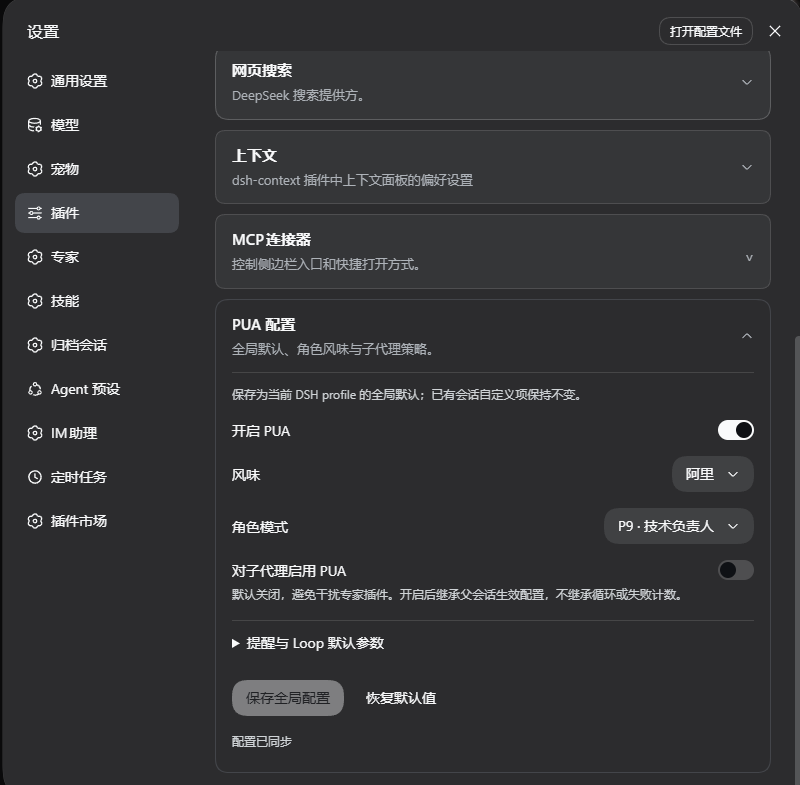
Global settings
Open Plugins in the sidebar, then @michengai/dsh-pua, to set default enablement, style, persona, and subagent behavior. Earlier DSH hosts still use Settings → Plugins → PUA Configuration. Screenshots show the Chinese interface.
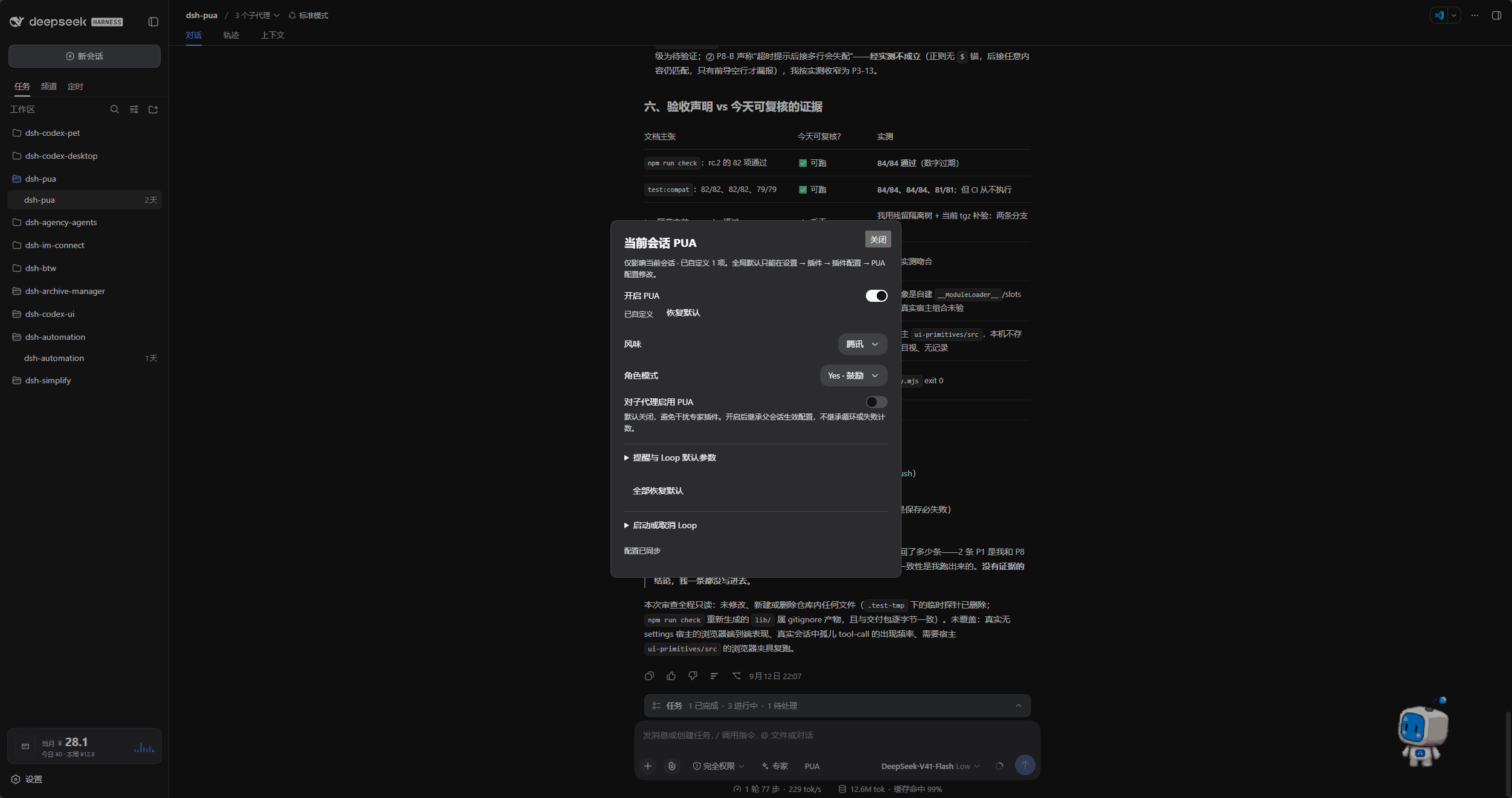
Current conversation
Click PUA to the right of Experts to adjust the current conversation. Restore individual defaults or start and cancel a Loop from the same panel.
DSH product ecosystem
For a desktop workbench, download DSH Codex Desktop. Existing DeepSeek Harness installations can add plugins as needed by following each project's README. Below are 11 first-party plugins; consult the corresponding desktop release notes and bundled catalog for what that version includes.
| Plugin | What you can do |
|---|---|
| Codex UI | Organize projects and conversations, search tasks, and navigate chat turns |
| Agency Agents | Choose and summon specialists for your task |
| Skills Manager | Find, enable, create, and import local skills |
| Archive Manager | Search, restore, or clean up archived conversations |
| IM Connect | Send tasks and receive replies through messaging platforms |
| Automation | Schedule tasks and review each run |
| BTW | Ask side questions without interrupting the main task |
| Simplify | Use /simplify to improve code within your Git changes |
| PUA | Guide the Agent to try new approaches after failures, investigate causes, and verify results before completion |
| Code Review | Use /review to request an independent Agent code review and receive the report in the current conversation |
| Codex Pet | View conversation notifications and respond to tool approvals and questions through a desktop pet |
Installation
Requires Node.js 22.19 or later. Host compatibility: Full DeepSeek Harness 0.2.x line (>=0.2.0-rc.1 <0.3.0-0), verified with 0.2.0-rc.1, 0.2.0-rc.2, 0.2.1-rc.1, 0.2.1-rc.2, and 0.2.1-rc.3, and forwards-compatible with subsequent 0.2.x releases, alphas, and RCs without requiring routine plugin version bumps. Legacy hosts prior to 0.2.0-rc.1 are no longer supported. The version gate cleanly intercepts breaking changes in the 0.3.0 generation. Users on 0.1.x hosts should install plugin 0.3.28. Existing settings and session records are kept. Uses your existing DSH model configuration; no additional API key is needed.
GitHub and npm both include a ready-to-run lib. After changing source, run npm run build before committing.
Examples use the web profile. Replace it with the profile you use.
Ask an agent to install it
Send this to an agent that can run commands on your computer:
Install @michengai/dsh-pua into my local DSH web profile by running dsh plugin --profile web add @michengai/dsh-pua@latest --registry=https://registry.npmjs.org/. Check that the plugin loads, then explain how to open PUA settings.
Install manually
[Console]::OutputEncoding = [System.Text.Encoding]::UTF8
$OutputEncoding = [System.Text.Encoding]::UTF8
dsh plugin --profile web add @michengai/dsh-pua@latest --registry=https://registry.npmjs.org/
After the current task finishes, reload DSH or restart its Web service. Refreshing the browser alone is not enough. Enter /pua help to check that the plugin is available.
Usage
- Open Plugins in the sidebar, open
@michengai/dsh-pua, and use the package page or themichengai-puarow. On earlier DSH hosts, expand PUA Configuration under Settings → Plugins. - Turn on Allow PUA, choose a style and persona, and save. This only shows
/puaand the chat entry. It does not inject by itself. - Return to chat, turn the current conversation on with
/puaor the chat entry, then submit the task.
PUA appears to the right of Experts in the composer. Click it to view or adjust the current conversation. When that conversation is off, the icon is a power symbol and the label is not struck through; disabling it globally hides the entry.
Configuration
The global switch only controls whether /pua and the chat entry are available. Chat controls and commands affect only the current conversation, which starts off.
After upgrading, older conversations that were never explicitly turned on or off also return to off. They do not keep injecting. Conversations changed with /pua on, /pua off, or the chat entry keep their saved switch.
Unchanged options follow global defaults. Editing an option overrides just that option. Choose Restore default to follow the global value again, or restore all options at once.
| Option | What it does |
|---|---|
| Allow PUA | Controls the command and chat entry. Allowed by default; turning it off hides both and blocks this conversation from being turned on. It does not inject by itself |
| Conversation switch | Off by default. /pua or the chat entry turns injection on for this conversation only |
| Style and persona | Select a style automatically or choose a specific style and persona |
| UI language | Follow the host language automatically, or pin Chinese / English |
| Enable for subagents | Off by default; enable when specialists and other subagents should also use PUA |
| Correction reminders | Adjust terminal checks, failure escalation, and quality reminders |
| Integrity guard | Off by default; when on, deny reads of hidden benchmark answers and remind when edits touch test, scoring, or CI assets |
| Feedback reminders | Change reminder frequency or turn reminders off; feedback is not uploaded |
| Loop defaults | Set a verification command, timeout, and iteration limit |
Since 0.3.0, commands no longer change global settings. Subagent enablement also depends on the parent conversation's PUA switch.
Continue until verification passes
In the chat PUA panel, enter a Loop task, verification command, and iteration limit, then start it. For example, ask the agent to fix failing tests, verify with npm test, and stop after at most 10 iterations.
You can also enter:
/pua loop "Fix the failing tests and add regression coverage" --verify "npm test" --max-iterations 10
Enter /pua-cancel-loop or /pua cancel-loop to stop. Disabling PUA for the current conversation also cancels its Loop, but does not undo operations already performed.
Set a verification command and iteration limit when using a Loop. Without a verification command, completion relies on the model's report. An iteration limit of 0 means unlimited iterations.
Common commands
Everyday switches, styles, and personas are available in the UI; memorizing commands is optional.
| Goal | Command |
|---|---|
| Enable or disable PUA for this conversation | /pua on, /pua off |
| Choose a style | /pua flavor huawei |
| Ask for another approach | /pua again |
| Check whether the task is complete | /pua done-check |
| Check delivery evidence | /pua evidence |
| Review current changes without editing | /pua review |
| Restore global defaults for this conversation | /pua reset |
| Cancel a verification Loop | /pua-cancel-loop, /pua cancel-loop |
| View status or full usage | /pua status, /pua help |
Session events
This plugin does not add a custom event type. The host rejects unknown required events on replay, and append has no ignorable flag. Notes written by the plugin are ordinary user/message events with role: "user". Do not count a user turn from type alone.
Tell them apart with data.source:
| Origin | Current hosts (session format 4 or newer) | Older hosts |
|---|---|---|
| Runtime notes and saved observations | kind is plugin:@michengai/dsh-pua/runtime |
kind is plugin and plugin is @michengai/dsh-pua/runtime |
Text submitted with /pua and then queued as a follow-up or steer |
kind is plugin:@michengai/dsh-pua |
kind is plugin and plugin is @michengai/dsh-pua |
A real user message has source.kind === "user".
Each saved runtime observation leaves two user/message events in the raw log. The first carries the PUA_RUNTIME_V1 prefix and JSON so recovery can read it. The second is a surface replace of that same sequence; the model-visible text is only the short note. The second event is not another user turn. The raw JSON stays in the log and is not part of the replaced model surface.
Uninstall
[Console]::OutputEncoding = [System.Text.Encoding]::UTF8
$OutputEncoding = [System.Text.Encoding]::UTF8
dsh plugin --profile web remove @michengai/dsh-pua
Reload DSH for the change to take effect. Project files and conversation history are preserved.
License and attribution
Adapted from tanweai/pua 3.5.1. Persona and collaboration capabilities depend on what DSH supports.
Original project code uses Apache License 2.0. Bundled PUA assets retain their upstream-declared MIT license and attribution; see NOTICE.
No comments yet. Be the first to write one.