dsh-visualrules
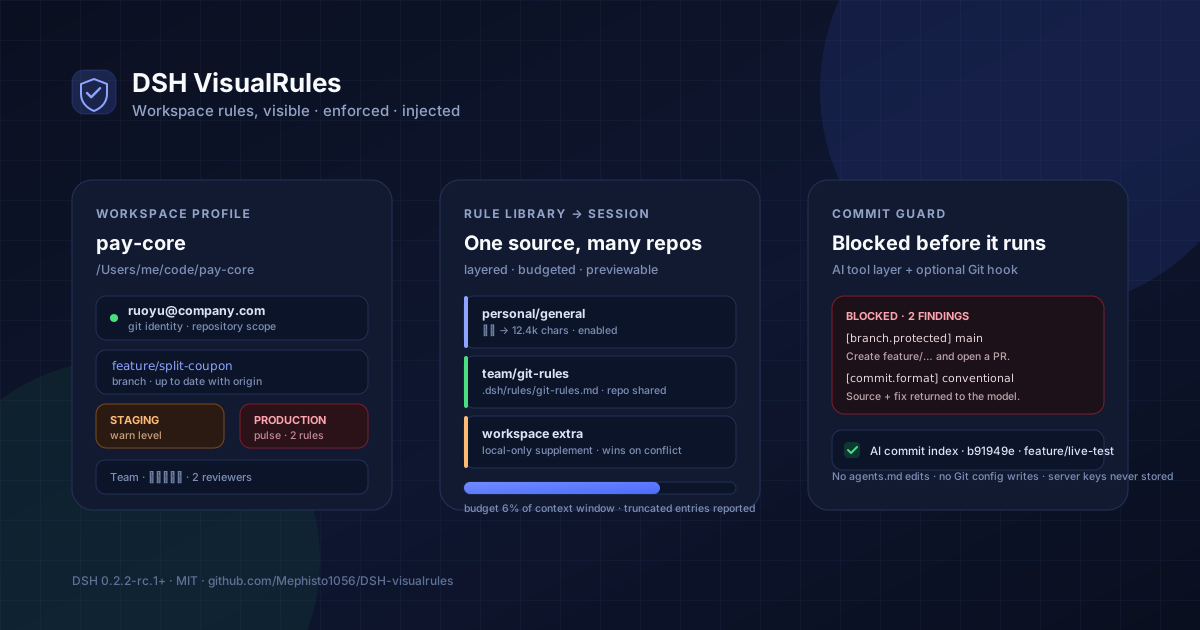
See the rules. Enforce the commit. Teach the model. Leave the repository untouched.



Why this plugin
A DSH session can move between repositories, teams, and environments in a single afternoon. Each place has its own Git identity, branch convention, protected branches, commit format, and review policy. Most of that knowledge lives in CONTRIBUTING.md, a commitlint config, a group chat, or somebody's memory — invisible to the model and easy to violate at 2 a.m.
dsh-visualrules turns those rules into a first-class workspace surface:
- Visible — the session header shows the environment; one click opens identity, branch, remote, environment, and rule summary in the native right sidebar.
- Enforced — AI-issued
git commit/ branch creation passes a rule engine before it runs, and an optional pair of Git hooks covers the terminal, IDE, scripts, and background tasks. - Injected — enabled rule packs are appended to the session's system prompt, scoped to the session directory, budgeted against the model context window, and previewable before you enable them.
- Traceable — every block, warning, one-time bypass, and AI-authored commit hash is indexed locally.
The plugin never edits agents.md, never writes the repository, never changes Git config, and never stores a password, token, or private-key content.
Features
| 🗂️ Workspace profile Git user.name / user.email with their actual scope, environment level with colour semantics, branch / remote / upstream / ahead-behind, protected-branch and naming warnings, team owner and contacts, toolchain and CI expectations.F1.1–F1.8 |
🧾 Team configuration A read-only .dsh/profile.yaml inside the repository. YAML errors report the line and field path; unknown fields are ignored with a notice; personal fields in the team layer are refused, not trusted.F4.1–F4.4 |
| 📚 Rule packs Create, import Markdown, edit, enable globally or per workspace, and reuse one pack across repositories. Team packs can live in the repository ( file:) or inline (content:), and stay read-only in the plugin.F0.1, F0.4, F0.6 |
💉 Session injection Personal → team → workspace supplement, with the later layer winning. A live preview shows the exact text, character count, budget, and truncation before the next model step receives it. F0.2, F0.3, F0.5 |
| 🛡️ Commit validation Identity, protected branch, branch naming, Conventional Commits, allowed types, scope, header length, linked Issue, merge-message mismatch, and --no-verify visibility. Every rule is off / info / warn / block per workspace.F2.1–F2.4, F2.6 |
🤖 Model-facing rejection A blocked tool call returns the violated rule, its source, and a concrete fix. The model reads it in the next step and can retry correctly — no opaque “command failed”. visualrules_check lets it pre-flight a message or branch.F2.8 |
| 🪝 Optional Git hooks Two managed hooks ( pre-commit, commit-msg) cover human commits. An existing hook is backed up and still runs first; uninstall restores it. A core.hooksPath outside the repository is refused.F2.9 |
🔓 User-only bypass A blocked commit can be released for exactly one commit with a written reason and a 5–30 minute TTL. The agent cannot create a bypass; only the UI can. F2.7 |
| 🧭 AI commit index Successful AI-issued commits are recorded by session, repository, branch, author, and full hash — local index only, never written into the commit or Git notes. F3.8 |
🔎 Existing rule sources Read-only discovery of commitlint (JSON / YAML / static JS), .editorconfig, eslint config, CONTRIBUTING.md, and the PR template. Values fill gaps instead of duplicating a second rulebook.F4.7 |
| 🌏 Native UI, light and dark A session-header entry, a right-sidebar quick preview, a full profile page, and a Settings section — theme tokens only, English and Chinese dictionaries. F1.8, F4.6 |
🪶 Optional by default No rule pack is enabled on install. Server information stays off until explicitly enabled. Disabling validation or removing the plugin leaves Git and DSH untouched. |
Installation
From a local checkout (available today)
git clone https://github.com/Mephisto1056/DSH-visualrules.git
cd DSH-visualrules
npm install
Then install the package into your DSH profile. The exact profile name is the one you launch (desktop, web, …):
dsh plugin --profile desktop add /absolute/path/to/DSH-visualrules
Or, inside a DSH session, ask the agent to install the bundle with plugin_manager using the absolute package directory. After installation, hard-refresh the browser (Cmd/Ctrl + Shift + R): the host half activates immediately, but the client bundle is loaded by the page.
From npm (after release)
dsh plugin --profile desktop add dsh-visualrules@latest
See docs/compatibility.md for the supported DSH line. This plugin is built and tested against DSH 0.2.2-rc.1+; the peer floor moves only when a host API changes.
First run
- Open a session in a Git repository.
- Click the shield icon at the left edge of the session-header utility cluster (or the sidebar shield icon for the full page).
- Open Validation and review the effective rules. Nothing is blocked until a team rule or a configured personal expectation applies.
- Add
.dsh/profile.yamlto the repository and commit it — the team shares one rule source. - Optionally enable a rule pack and check Injection preview to see exactly what the model will receive.
Quick start
1. Commit a team profile
# .dsh/profile.yaml — committed, read-only to the plugin
version: 1
team: 支付平台组
environment: staging
environments:
  - { name: dev, host: dev.example.com, level: dev }
  - { name: staging, host: stg.example.com, level: warn }
  - { name: prod, host: prod.example.com, level: danger }
git:
  branch_pattern: "^(feature|fix|hotfix)/[a-z0-9-]+$"
  commit_format: conventional
  allowed_commit_types: [feat, fix, docs, refactor, test, chore]
  header_max_length: 72
  require_issue: true
  merge_strategy: squash
  protected_branches: [main, "release/*"]
  review:
    min_approvals: 2
dev:
  toolchain: { node: "20.x", python: "3.11" }
  lint: eslint
  test: [unit-test]
  ci_required: [lint, unit-test]
docs:
  wiki: https://example.com/wiki
  issues: https://example.com/board
team_info:
  owner: 张三
  contacts: [张三 · 负责人 · zhang@example.com]
  release_window: 每周四 20:00
packs:
  - id: team/git-rules
    title: 团队提交规范
    file: .dsh/rules/git-rules.md
The full annotated example lives in examples/profile.yaml.
2. Try a protected-branch commit
On main, ask the model to commit. The tool call is rejected before Git runs:
Git 提交被 DSH VisualRules 拦截(2 条阻断)。

1. [branch.protected] 受保护分支
   当前分支 main 命中受保护规则 main,团队约定不允许直接提交。
   来源:.dsh/profile.yaml
   修正:创建特性分支(例如 git switch -c feature/<name>)后提交,并通过 PR/MR 合并。
2. [commit.format] 提交信息格式不符合 Conventional Commits
   首行「update」不符合 <type>(<scope>): <subject>。
   来源:.dsh/profile.yaml
   修正:例如:feat(auth): 支持手机号登录。
The next model step sees this text. It can create the branch and retry without guessing.
3. Enable a rule pack
Open Workspace → Rule packs → New, or use Create the default pack from an empty state. Tick a pack on for the current workspace. The right-sidebar preview and the Injection preview update immediately; the next request uses the new text. Changes apply on the next model request, never retroactively.
4. Cover human commits (optional)
On Validation → Git hooks, preview the exact files, then install. The plugin writes .git/hooks/pre-commit and .git/hooks/commit-msg with a managed marker. If either hook already exists, it is moved to *.dsh-visualrules-original and runs first. Uninstall removes only managed files and restores the originals.
Prefer the terminal? The same operations are available headlessly:
node scripts/hooks.mjs status
node scripts/hooks.mjs install
node scripts/hooks.mjs uninstall
Commit validation rules
| Rule id | Default | What it checks |
|---|---|---|
identity.email |
warn | Actual Git email differs from the personal expected email. |
identity.missing |
warn | user.name or user.email is empty. |
branch.protected |
block | Current branch matches a team protected_branches pattern. |
branch.pattern |
warn | Branch name does not match branch_pattern. |
branch.detached |
warn | Committing on a detached HEAD. |
commit.format |
block | Header does not match commit_format (Conventional Commits or a custom regex). |
commit.type |
block | Type is outside allowed_commit_types / commitlint type-enum. |
commit.scope |
warn | Scope is outside commitlint scope-enum. |
commit.headerLength |
warn | Header exceeds header_max_length / commitlint header-max-length. |
commit.issue |
block | require_issue: true and no issue reference is found. |
commit.messageMissing |
warn | The command did not reveal a message (-m / -F / amend). |
commit.mergeMessage |
warn | A Merge … commit under merge_strategy: squash. |
commit.noVerify |
warn | The command uses --no-verify, so repository hooks will be skipped. |
commit.amend |
info | The command rewrites the previous commit. |
Levels are resolved as: built-in default → team rule presence → per-workspace override. The Validation page edits the per-workspace map and shows the effective source.
Two layers, stated honestly
| Path | Covered by | Notes |
|---|---|---|
AI runs git commit through the tool layer |
plugin guard | Model-readable rejection; covers normal agent commits. |
| Terminal, IDE, scripts, background jobs | optional Git hooks | Enabled per repository; existing hooks are chained. |
git commit --no-verify |
not coverable locally | The hook cannot run; the tool guard still sees the command string. Server-side protection and CI remain authoritative. |
One-time bypass
A blocked commit can be released once from Validation → One-time bypass. The reason (≥ 3 characters) and a 5–30 minute expiry are stored locally; the next matching commit consumes the record and shows the reason in the warning. This is deliberately a user-only operation: the agent has no tool to create or extend a bypass.
Configuration
Team layer — .dsh/profile.yaml (in the repository, read-only)
| Field | Type | Meaning |
|---|---|---|
version |
integer | Config version; unknown future fields are ignored with a notice. |
team |
string | Display name of the team. |
environment |
string | Current environment; environments[].level controls the colour and prod emphasis. |
environments[] |
array | { name, host, port, level, jump, note }; only name / level are required for display. |
git.branch_pattern |
regex | Branch naming rule. |
git.commit_format |
conventional or regex |
Commit header format. |
git.allowed_commit_types |
string[] | Allowed Conventional Commits types. |
git.header_max_length |
integer | Maximum header length (10–500). |
git.require_issue |
boolean | Require an issue reference. |
git.issue_pattern |
regex | Issue format; default matches #123 and PROJ-42. |
git.merge_strategy |
string | squash, merge, …; squash warns on Merge … messages. |
git.protected_branches |
glob[] | Supports * and ?; used for display and blocking. |
git.review.min_approvals |
integer | Displayed review requirement. |
git.tag_pattern |
regex | Displayed tag rule. |
dev |
object | toolchain, lint, formatter, test, ci_required, dirs. |
docs |
object | wiki, issues, contributing, pr_template. |
team_info |
object | owner, contacts, release_window, timezone. |
packs[] |
array | Team rule packs: { id, title, description, file, content }; file must stay inside the repository. |
identity, servers, exclusive, and personal are personal fields. If they appear in the team file, the plugin warns and refuses to use them.
Personal / workspace layer — DSH local storage (never in the repository)
| Field | Meaning |
|---|---|
gitName, gitEmail |
Expected identity used by warnings and the hook snapshot. |
environment |
Personal override; a warning appears if it hides a team environment. |
showServerInfo |
Explicit consent required before host / user / key reference leave the Host. |
servers[name] |
{ user, keyRef } — a login name and a reference name, never a secret. |
enabledPacks / disabledPacks |
Per-workspace pack references; a disabled pack wins over a global default. |
injectRules |
Inject the structured team Git rules directly. |
extraRules |
Workspace-only Markdown supplement (last layer). |
validation.enabled |
Master switch for commit validation. |
validation.levels |
Per-rule override map. |
validation.confirmDanger |
Ask before destructive commands in a prod workspace. |
validation.trackCommits |
Record successful AI commits locally. |
Rule sources discovered from the repository
When present, the plugin reads — never executes — these files and uses them to fill gaps in the effective rules:
- commitlint:
commitlint.config.{js,cjs,mjs,ts},.commitlintrc(.json|.yaml|.yml|.js|.cjs), orpackage.json#commitlint .editorconfig(indent_style,indent_size,max_line_length)- eslint config (presence and path)
CONTRIBUTING.mdand the GitHub PR template (path and title)
JavaScript commitlint configs are parsed statically; anything opaque produces an explicit notice instead of a guessed rule.
How injection works
session directory
      │
      ├── personal packs (global default or explicitly enabled)
      ├── team packs     (enabled, from .dsh/profile.yaml)
      ├── structured Git rules (injectRules)
      └── workspace supplement (last, wins on conflict)
      │
      ▼
compose → header (cwd / branch / environment) → budget check
      │
      ▼
systemPrompt.section(), per Agent, per request
- Registered as a session-scoped section, so no session id ever appears in the text and nothing global leaks across agents.
- Recomposed on every request from the session's current directory; changing a workspace directory invalidates the next assembly.
- Budget defaults to about 6% of the model context window (fallback 24k characters), with more specific layers retained first. Truncated and omitted entries are reported in the preview.
- Disabling a pack, changing levels, or removing a profile applies on the next request. No restart, no
agents.mdedit. - The commit-feedback section is separate and short; it only appears after a guard rejection or warning and is cleared naturally as the session moves on.
UI surfaces
| DSH slot | Content |
|---|---|
conversation.session.header.utilities |
Header shield + environment dot + warning badge, order: -20. |
sidebarRightTabs + sidebar.right.pane.tab |
Native right-sidebar quick preview. |
shell.overlay |
Fallback when the right sidebar is unavailable. |
sidebar.panellist + main |
Full workspace profile page: Overview, Validation, Packs, Personal, Team, Injection preview. |
settings.section |
Rule packs, validation, personal configuration, injection preview. |
Host API
All routes are mounted on the shared /api fetch handler behind DSH's normal connection trust fence. They are intentionally private to the plugin's Client half; there is no cross-origin surface.
| Route | Purpose |
|---|---|
POST /api/visualrules/profile |
Assembled workspace profile. |
POST /api/visualrules/preview |
Exact injection text, budget and truncation. |
POST /api/visualrules/library |
Personal packs, team packs, workspaces, template. |
POST /api/visualrules/packs/save · /packs/delete |
Personal pack CRUD; team packs stay read-only. |
POST /api/visualrules/workspace/save · /workspace/toggle |
Personal / workspace settings and pack enablement. |
POST /api/visualrules/validation/status · /save · /check |
Rule levels, hook status, recent events, pre-flight check. |
POST /api/visualrules/bypass/create · /revoke |
User-only one-time bypass. |
POST /api/visualrules/hook/status · /preview · /install · /uninstall |
Managed Git hooks. |
POST /api/visualrules/commits/list · /delete · /clear |
Local AI commit index. |
POST /api/visualrules/refresh |
Force-refresh profile caches. |
Model-facing tools: visualrules_check (pre-flight) and visualrules_status (read-only summary).
Safety boundaries
- Team configuration is read-only. The plugin never writes
.dsh/profile.yaml; the template is copy-only. - The only repository writes are the optional Git hooks, with an explicit preview and a reversible install.
- The plugin never changes Git config, never commits, never pushes, and never runs a destructive Git operation on its own.
- Server information is off by default; enabling it asks for confirmation. Only login names and key reference names are stored.
- Secrets, tokens, and private keys are never requested, read, or persisted.
- A broken configuration, a non-Git directory, an unavailable storage domain, or a failed rule evaluation degrades to display-only; it never blocks DSH or Git.
- Local validation is an assistant, not a gatekeeper.
--no-verify, another machine, and server-side settings are outside its reach.
Compatibility
- DSH 0.2.2-rc.1+ (verified on the desktop profile).
- Node.js 20+ for the standalone hook runner (
nodemust be onPATHfor Git hooks). - macOS, Linux, and Windows Git Bash are supported by the hook scripts; the UI follows the host theme.
- No native dependencies; the only runtime dependencies are
yamlandzod.
Development
npm install
npm run check     # syntax + manifest + export surface
npm test          # 77 tests: rules, command parsing, sources, hooks, guard, API, profile, injection
npm run verify    # check + test
Repository layout:
lib/
  index.js              Host entry: storage, API, prompt sections
  client.js             Client entry: header, sidebar, page, settings
  host/
    rules.js            Pure commit/branch rule engine
    command.js          Shell/Git command parser
    guard.js            tools/pre-execute, tools/result, model tools
    hooks.js            Managed Git hooks
    sources.js          commitlint / editorconfig / eslint / docs discovery
    store.js            storageDomain tables and validation
    team-config.js      .dsh/profile.yaml loader and line-aware errors
    profile.js          Profile assembly
    injection.js        Layered prompt composition and budget
    git.js              Read-only Git probes
  hook/check.mjs        Standalone hook runner
test/                   Node test runner suites
docs/                   Configuration, validation, architecture, release
Useful local commands:
node scripts/hooks.mjs status
node scripts/hooks.mjs install
node scripts/hooks.mjs uninstall
Roadmap
- 0.1 — workspace profile, rule packs, injection, sidebar preview, settings (shipped).
- 0.2 — commit validation, tool guard, Git hooks, one-time bypass, AI commit index, existing rule sources (this release).
- Next — multi-document packs, Git graph as a separate product evaluation, SVN adapter, external linter config linkage, optional CI status markers.
- Out of scope — pushing, committing on the user's behalf, or replacing server-side branch protection and CI.
FAQ
Nothing is blocked. Why?Commit validation only acts when a rule exists: a team git rule, an expected personal email, or a per-workspace override. A fresh install with no .dsh/profile.yaml has nothing to enforce. Check Validation → Rules for the effective values.
The entry is rendered only while a session is open; the blank Hero has no header utilities. The full page remains reachable from the sidebar shield icon, and Settings always has the Validation section.
I changed a rule pack but the model did not change.Injection is assembled per request. Start a new step/turn; opening a new session is not required. The preview shows exactly what the next request will carry.
Why did a commit pass even though the message looks wrong?Check the rule level. warn and info never block; only block does. Also check whether the message came from a file (-F), a heredoc, or an --amend; the guard reads those forms, and an unparsable message is reported as commit.messageMissing.
Hooks are deliberately independent of the plugin process: they must keep working while DSH is closed. Uninstall them from Validation → Git hooks or node scripts/hooks.mjs uninstall before removing the plugin. The managed hook itself degrades to a warning and exits 0 if the checker path disappears, so a missing plugin never bricks a commit.
Rule packs, personal settings, bypass records, validation events, and the AI commit index live in the DSH storage domain dsh_visualrules (~/.dsh/storages/dsh_visualrules.json on macOS). The team profile stays in the repository; the plugin only reads it.
Contributing
Issues and pull requests are welcome. Please read CONTRIBUTING.md and the repository rules in AGENTS.md. Before opening a PR:
npm run verify
For a behavior change, add a test that fails without the change. For a UI change, describe the workspace state and the surface you checked.
License
MIT © 2026 dsh-visualrules contributors.
No comments yet. Be the first to write one.