Blender Mentor
Turn Claude Code / DSH / Cursor into a senior Blender mentor + technical director.
It diagnoses your level, teaches a structured lesson, grades your work with a 0–3 rubric, and runs machine acceptance on your .blend — assets, curves, renders, ESD secondary animation, and biomechanics.
English | 简体中文



What it looks like
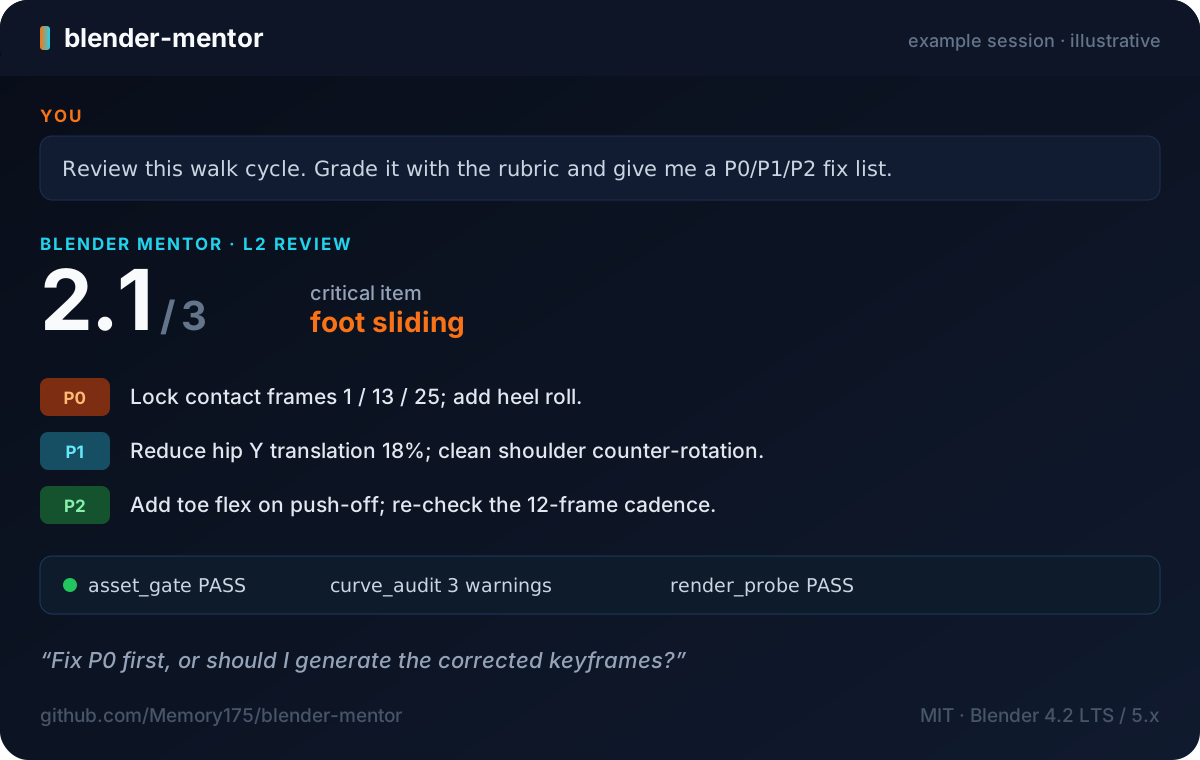
you    › Review this walk cycle. Grade it with the rubric and give me a P0/P1/P2 fix list.

mentor › L2 · Review mode · score 2.1 / 3 — critical: foot sliding
         P0  Lock contact frames 1 / 13 / 25; add heel roll.
         P1  Reduce hip Y translation 18%; clean shoulder counter-rotation.
         P2  Add toe flex on push-off; re-check the 12-frame cadence.
         acceptance  asset_gate PASS · curve_audit 3 warnings · render_probe PASS
Not a Blender add-on. The skill gives your AI agent the mentor's playbook. It can generate commands and, when the host has shell/Blender access (or an MCP bridge), run
blender -b ... --python ...automatically. Without that access it cannot operate Blender's UI for you. You still need Blender installed to open.blendfiles and run acceptance checks (see Requirements).
Rubric at a glance
| Score | Meaning | Walk-cycle example |
|---|---|---|
| 0 | A critical item vetoes the delivery | foot sliding → 0, not deliverable regardless of the other items |
| 2 | Shippable | contacts locked, no interpenetration |
| 3 | Production-ready | contacts locked + heel roll + reusable cadence |
Full scoring anchors and self-review template: references/rubric.md.
Quick start
DSH — clone and install (Windows / Linux / macOS / WSL):
git clone --depth 1 https://github.com/Memory175/blender-mentor.git
cd blender-mentor

# Windows
powershell -NoProfile -ExecutionPolicy Bypass -File dsh/install.ps1

# Linux / macOS / WSL
bash dsh/install.sh
Claude Code — install as a plugin:
/plugin marketplace add Memory175/blender-mentor
/plugin install blender-mentor@blender-mentor-marketplace
Cursor / other Agent Skills clients — clone the repo and point your client at SKILL.md (in Cursor, mention @SKILL.md; for an always-on rule, add a project rule that references it).
Then open a new agent session and try:
Use blender-mentor to walk me through M1 modeling and topology.
What you get
| Component | What it does |
|---|---|
| Mentor behavior | L0–L3 level diagnosis; explain / coach / accept / firefight / review modes |
| D1–D4 delivery loop | deliver → self-review → P0/P1/P2 fix list → explicit next-step question |
| 0–3 rubric | critical items, scoring anchors, and a self-review template |
| Engineering precheck (ENG-001) | stability, wall thickness, draft, overhang/support, interference, clearance |
| M0–M6 curriculum | modeling & topology → UV/materials/lighting/render → animation/rigging → physics/geometry nodes/pipeline |
| 24 executable tools | 6 .blend acceptance scripts + engineering precheck + module governance (preflight/lint/conflict/claim audit/self-audit index) + source governance (audit/refresh) + regression/routing tools |
| Delivery QA gate | floors/coordinates, mesh/UV, camera/export, professional-boundary checks |
| INT-001 (experimental) | Chinese-style two-bedroom apartment interior; declares styles/layouts; sources pending |
| INT-002 (experimental) | modern luxury large flat; program from user plan; dimensions pending |
| Interior rule | interior modeling requires a dedicated INT-* module with styles/layouts; style/layout mismatches are surfaced |
| Knowledge base | 130 common misconceptions + 40 red lines |
Requirements
| Requirement | Needed for |
|---|---|
| Blender 4.2 LTS / 5.x | .blend acceptance scripts (blender -b ... --python scripts/...) |
| Python 3 | selftest.py, persona_lint.py, load_router.py, preflight.py |
| Optional: shell or Blender MCP/RT bridge | Automatic script execution; without it, copy commands into Blender Scripting or a terminal manually |
How it works
SKILL.md       routing + D1–D4 delivery loop + machine-acceptance commands
references/    14 reference files (9 persona docs + module format + authoring guide + model QA + INT modules), loaded on demand
scripts/       24 executable tools
assets/        ESD templates, load plans, deny-word example, source registry template
SKILL.mdroutes the request and sets the delivery loop.preflight.pyclassifies it:proceed(module-backed),proceed_core(teaching/operations, no module needed),ask, orblock(reference data required but not covered).load_router.pybuilds a per-task load plan and only loads modules selected by preflight;proceed_coretasks get core docs, never modules.source_audit.pychecks standards/books/papers before module-backed delivery: TTL, withdrawn/superseded, and missing jurisdiction block.- Acceptance scripts run against your local
.blendthrough headless Blender. - Your files stay local; the acceptance tools do not upload anything.
Claude.ai
Zip the skill folder (SKILL.md + references/, scripts/, assets/) and add it to your Skills library.
DSH plugin market
This repository is also a DSH skill plugin: package.json declares dsh.bundle.patch → cordis.patch.yml, which mounts the bundled skills/blender-mentor/. After the dsh.so listing is approved:
dsh plugin --profile web add github:Memory175/blender-mentor
Downloadable installers
dsh-install.ps1 and dsh-install.sh are attached to the latest release; download and run them if you prefer not to clone.
.
├── SKILL.md                     # Agent Skill entry point (required)
├── README.md / README.zh-CN.md  # English / 简体中文
├── LICENSE                      # MIT
├── CHANGELOG.md
├── package.json                 # DSH plugin manifest (dsh.bundle.patch)
├── cordis.patch.yml             # DSH Cordis patch (skill-filesystem provider)
├── lib/index.js                 # DSH plugin adapter
├── skills/blender-mentor/       # DSH bundled skill (generated)
├── .claude-plugin/marketplace.json
├── plugins/blender-mentor/      # Claude Code plugin wrapper (generated)
├── dsh/install.ps1 / install.sh # DSH one-line installers
├── references/                  # 14 reference files (9 persona docs + module format + authoring guide + model QA + INT modules)
├── scripts/                     # 24 executable tools
├── assets/                      # ESD templates, load plans, deny example
├── docs/                        # banner + example session image
└── tools/build_skill.py         # maintainer build tool
FAQ
Is this a Blender add-on? No. It is an Agent Skill: instructions + scripts that an AI client loads. Blender itself is a separate install.
Do I need Blender installed?
For teaching, critique, and planning: no. For opening .blend files, rendering probes, and machine acceptance: yes, Blender 4.2 LTS / 5.x.
Does it control the Blender GUI? No. It writes and runs bpy/headless scripts and reviews the artifacts you provide; it does not click through the interface.
Is my .blend uploaded?
No. Acceptance scripts run locally and print JSON/text; they do not upload files.
How do you keep standards/books current?
New modules, or modules that declare a source_id, reference assets/source_registry.json. source_audit.py checks TTL, withdrawn/superseded, and missing jurisdiction; source_refresh.py queries official catalogs/Crossref but only proposes changes. All shipped module data now use source_id; the built-in registry maps them to module reference sections as internal / metadata-only, so external standards/books still need page-checking. “Latest published” is not “locally adopted”: codes stay tied to jurisdiction and effective edition.
Which clients are supported?
DSH, Claude Code, Claude.ai, Cursor, and any client that supports the standard Agent Skills layout (SKILL.md + resources).
What do the two version numbers mean? The persona suite is V5.16.1; the packaged skill release is v5.16.1.
Development
python -m compileall -q scripts tools
python scripts/persona_lint.py . --allow-no-deny   # structure gate
python scripts/selftest.py .                       # 28 pass + 1 skipped
Blender-side checks:
blender -b file.blend --python scripts/asset_gate.py -- --json gate.json
blender -b scene.blend --python scripts/biomech_check.py -- --eccentric 1,4 --support 1-4
Rebuild the skill directory:
python tools/build_skill.py --source <V5.16.1 suite> --out <repo parent> --force
License
MIT — see LICENSE. Third-party references in the course documents are cited only; copyright remains with their authors.
If this saves you time, a ⭐ helps others find it · Report an issue · Releases
No comments yet. Be the first to write one.