dsh-ask
中文 | English
dsh-ask is a small DeepSeek Harness bundle for terminal questions: it runs one turn in the current directory, streams the visible answer, and exits. It does not start the TUI.
Behavior
dsh --profile ask "what does this function do?"
The default conversation is scoped to the absolute current directory and the current parent shell. Consecutive asks from one terminal and directory resume its durable session. A new terminal receives a new default session, even in the same directory. Use the Web session surface to browse or recover earlier sessions. --new creates a separate persisted session for one run; --session <id> selects a specific persisted session.
At the end of every turn the runner calls sessions.flush(). DSH therefore persists the canonical event log before the process exits. With DSH's default JSONL backend, the log is stored under $DSH_HOME/sessions/<encoded-cwd>/<session-id>/session.jsonl.zstd (normally ~/.dsh/sessions/...). The log contains user messages, assembled assistant messages, tool calls/results, and turn boundaries; dsh-ask does not create a competing history file.
Terminal output
While a terminal is waiting, dsh-ask renders a spinner on stderr with lifecycle labels such as preparing session, thinking, and calling a tool. When the first visible assistant text-delta arrives, the spinner stops and the answer streams directly to stdout. Only visible text deltas are rendered: the runner never prints reasoning-delta chunks or claims to expose private model chain-of-thought. If a provider supplies no visible chunks, dsh-ask falls back to printing the completed assistant message after the turn ends.
Commands
# Continue this terminal's conversation in the current directory.
dsh --profile ask "continue the implementation"

# Start a separate persisted thread for this one invocation.
dsh --profile ask --new "investigate an unrelated issue"

# Resume or create a named persisted session.
dsh --profile ask --session refactor-auth "continue the refactor"
DSH_ASK_SESSION is an optional environment override for wrappers that need a stable, isolated default session id.
Shell integrations
The bundle does not edit shell configuration when it is installed. Shell integrations are explicit, separate init commands so Bash, Zsh, PowerShell, and other shells can follow the same pattern.
Each integration is a plain template under src/templates/. pnpm run build copies those files to lib/templates/, allowing the installed binary to read its package-provided template at runtime instead of embedding shell syntax in JavaScript.
Fish
After adding the bundle to the ask profile, install Fish support with:
dsh plugin --profile ask exec dsh-ask init fish
source ~/.config/fish/conf.d/zz-dsh-ask.fish
New Fish shells load the generated conf.d/zz-dsh-ask.fish file automatically. It intercepts unknown interactive commands, joins them into a question, and runs:
command dsh --profile $DSH_ASK_PROFILE -- $text
The screenshots below show an unknown Fish command being answered, followed by a question that resumes the same terminal-scoped conversation.
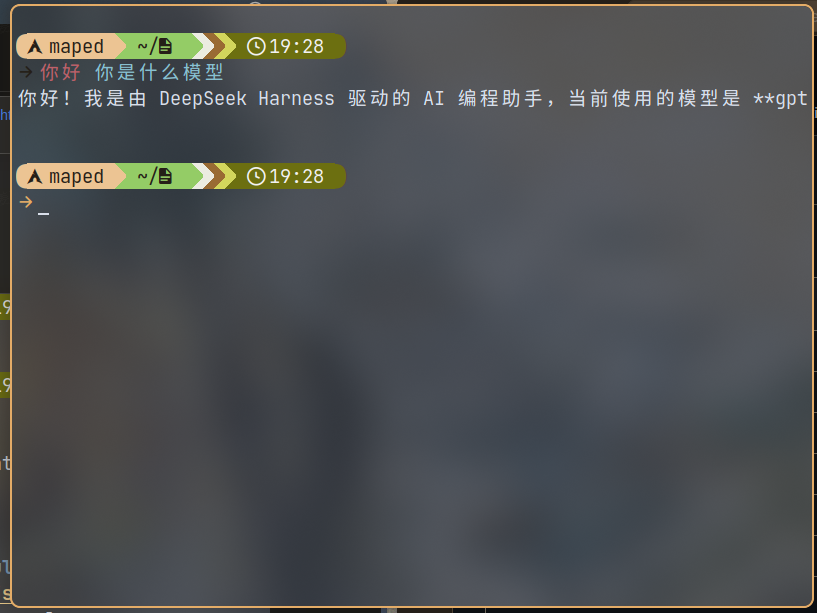
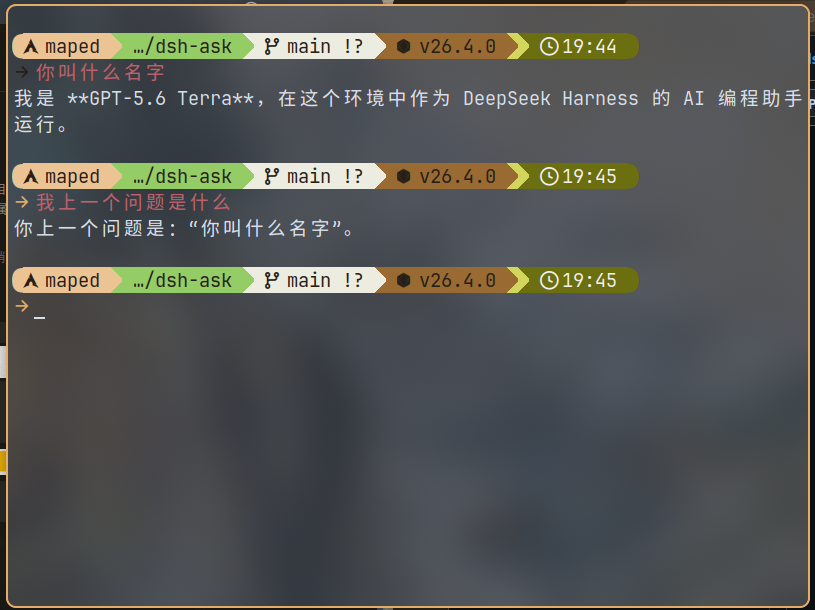
DSH_ASK_PROFILE defaults to ask; set it before starting Fish to use another profile name. The generated wrapper preserves a pre-existing fish_command_not_found handler as a fallback when dsh is unavailable. The installer refuses to overwrite a same-named file that it did not generate.
Bash
Install the Bash snippet, then source it in the current interactive shell:
dsh plugin --profile ask exec dsh-ask init bash
source "${XDG_CONFIG_HOME:-$HOME/.config}/dsh-ask/bash-command-not-found.bash"
The installer never edits ~/.bashrc. To load it in future shells, add that same source line to ~/.bashrc after any distribution-provided command-not-found setup. The template preserves an existing command_not_found_handle as a fallback, rejects newline-containing input, and sets DSH_SHELL=1 only for the child dsh invocation.
Zsh
Install and source the Zsh snippet after your framework or plugins have initialized:
dsh plugin --profile ask exec dsh-ask init zsh
source "${XDG_CONFIG_HOME:-$HOME/.config}/dsh-ask/zsh-command-not-found.zsh"
The installer never edits ~/.zshrc. To make it persistent, add the same line to ~/.zshrc after Oh My Zsh, Prezto, or another plugin that defines command_not_found_handler. The template keeps the previous handler as a fallback and invokes dsh --profile ${DSH_ASK_PROFILE:-ask} for eligible unknown interactive commands.
PowerShell (experimental)
Install and dot-source the PowerShell snippet in a supported interactive host:
dsh plugin --profile ask exec dsh-ask init powershell
. "$HOME/.config/dsh-ask/powershell-command-not-found.ps1"
Use the exact installation path printed by the command when XDG_CONFIG_HOME is set or on a platform with a different home directory convention. The installer never edits $PROFILE; add the same dot-source command to $PROFILE manually if you choose to persist it.
This integration uses $ExecutionContext.InvokeCommand.CommandNotFoundAction, preserves the existing delegate as a fallback, and is intentionally marked experimental. PowerShell command lookup and interactivity differ across Windows PowerShell, PowerShell 7, terminal hosts, and remote runspaces; test it in every host you use before persisting it.
Customizing or adding a shell
To customize an integration while developing the bundle, edit its file under src/templates/ (for example, fish.fish, bash.bash, zsh.zsh, or powershell.ps1) and run pnpm run build before testing or packing. To add another shell, add its template and a matching entry to SHELL_INTEGRATIONS in src/bin/dsh-ask.ts. The entry defines the template file, generated-file marker, installation path, and activation command; the shared installer handles reading, overwrite protection, and writing the file.
TypeScript development
The maintained source is TypeScript under src/; lib/ contains generated ESM JavaScript, declarations, and source maps. Do not edit lib/ by hand. Build before using a changed linked package or packing it for distribution:
pnpm install
pnpm run typecheck
pnpm run build
The package keeps Cordis and DSH packages as peer dependencies so a profile supplies the same service instances used by the bundle. The TypeScript maintenance notes document the source/artifact layout and supported validation commands.
Development and publication
The checked-out package is locally named @dsh-local/dsh-ask and marked private to avoid accidentally publishing under a scope that is not owned. Before publishing it, set name to a scope you control and set private to false. Runtime DSH packages are peer dependencies so the bundle shares the profile's Cordis and DSH service instances rather than loading duplicates.
The local profile used for development links this checkout. A published bundle can be added in the same way as other DSH bundles, for example:
dsh plugin --profile ask add <your-package-spec>
dsh plugin --profile ask exec dsh-ask init fish
No comments yet. Be the first to write one.