dsh-node-appearance
本插件属于 @max-null/* 插件系列——这一系列共同构成 SSID(思灵 · Seek Soul in Darkness) 桌面体验。SSID 是整合它们的盒:dsh-capture · dsh-chat-rail · dsh-chinese-thinking · dsh-draft-polish · dsh-guardian · dsh-habit · dsh-header-unify · dsh-memory · dsh-node-appearance · dsh-plugin-center · dsh-skill-mcp-center · dsh-ssid-panels · dsh-ssid-zh-ui。
This plugin belongs to the @max-null/* family — a set of plugins that together form the SSID (思灵 · Seek Soul in Darkness) desktop experience.
会话节点外观插件:按节点类型 / 工具名给 DeepSeek Harness Web GUI 的会话面板节点着色(可配置配色),并提供"显示思考过程"开关。纯前端渲染增强,不改 DSH 源码,cordis.yml 一行挂载。
功能
- 节点着色:工具调用、联网搜索、智能体调用、代码 / 指令执行、文件操作、任务 / 目标、指令节点(
/command)、思考行(Think)——每种类别一个可配置颜色,左侧 3px 色条 + 淡色底,深 / 浅主题均可读。 - 工具级颜色覆盖:任意工具名(如
web_search、subagent、run_code)可单独指定颜色,优先级高于类别色。 - 思考过程显示开关:关闭后 Think 思考行前端隐藏(
display: none),配置项与配色在同一张设置卡片里。 - 即时生效:设置改动立即重绘会话,并持久化到 DSH 用户设置文档(
$DSH_HOME/settings.yaml)。
截图
| 会话节点着色 | 设置卡片 |
|---|---|
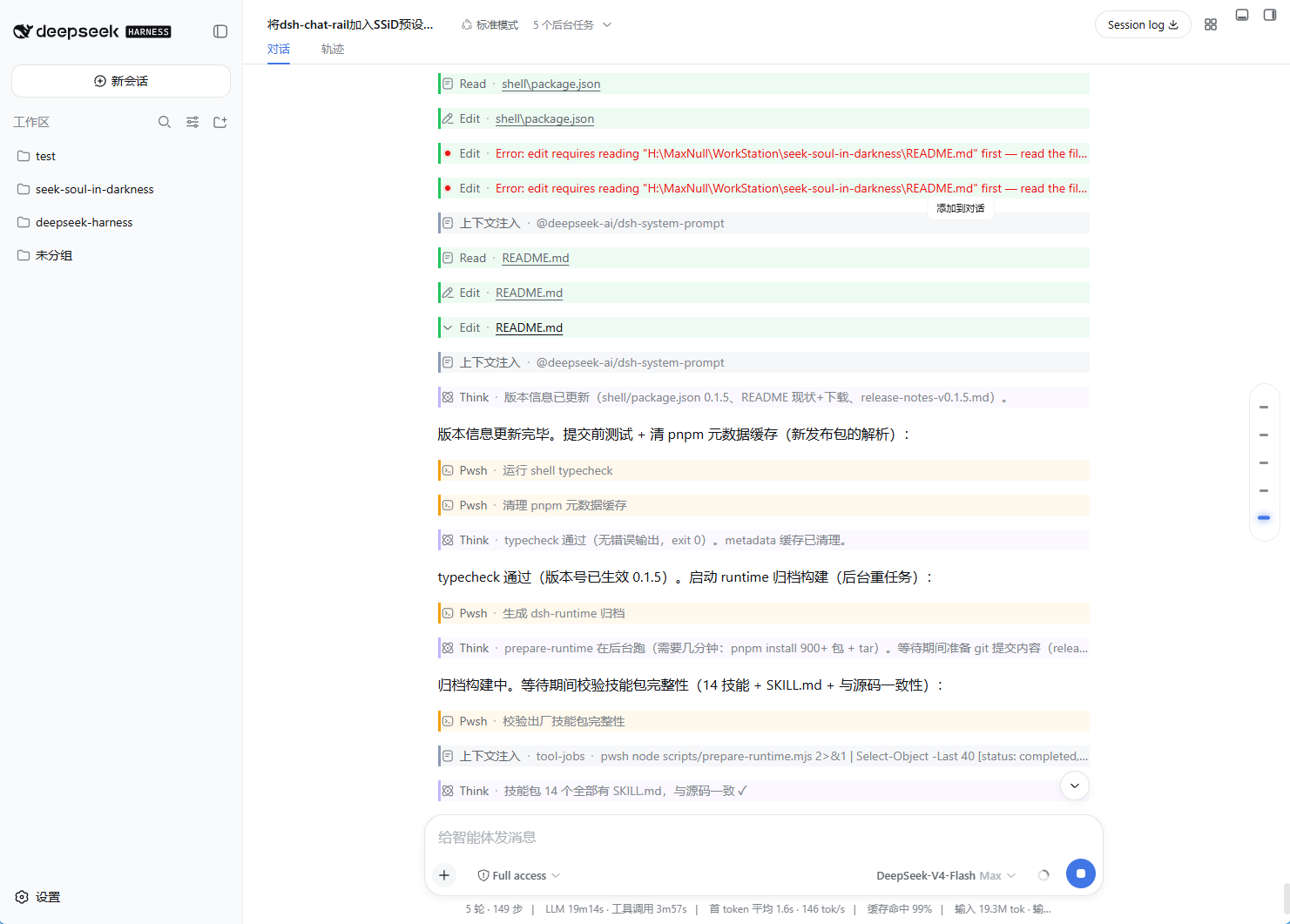 |
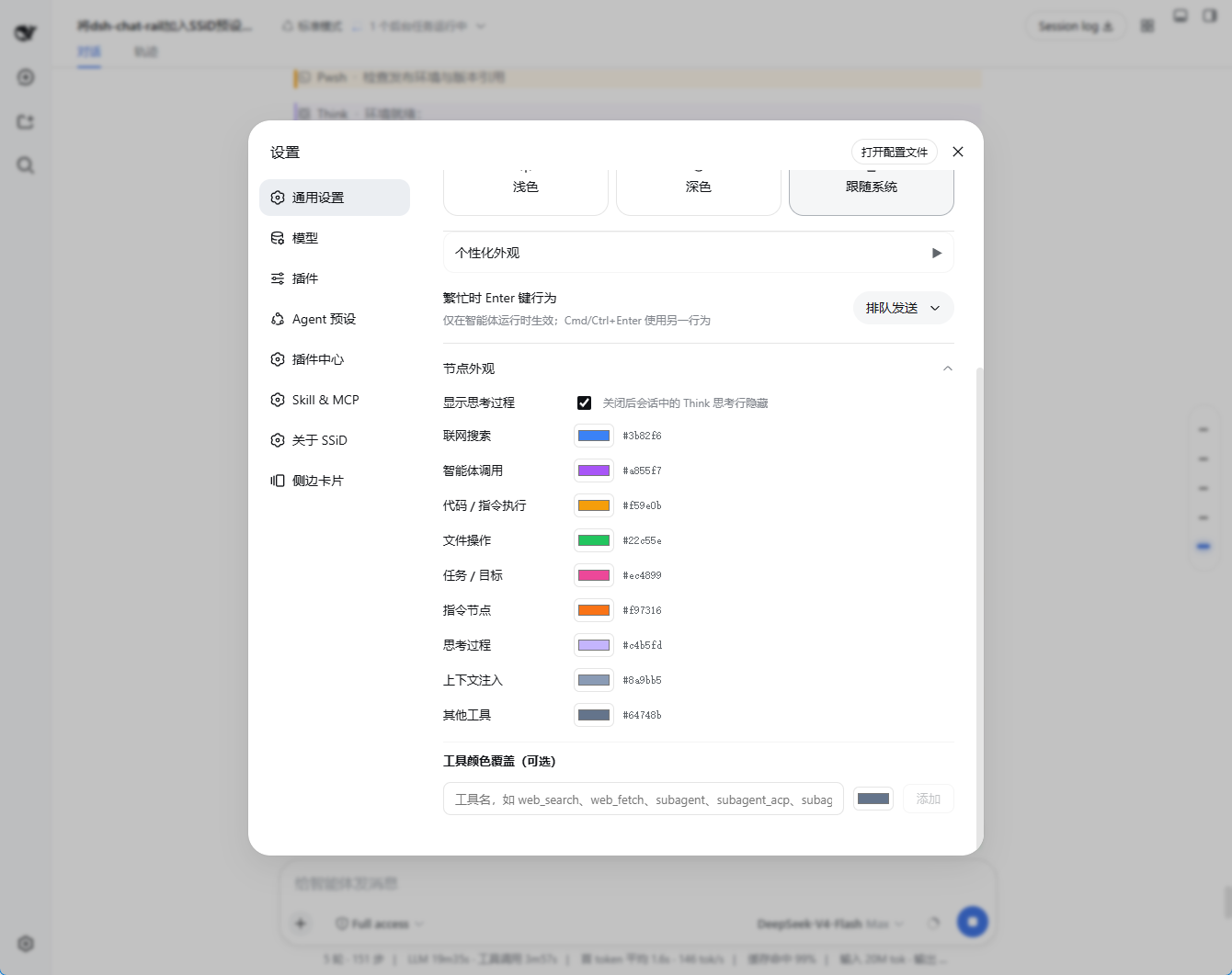 |
安装
# 在 dsh profile 目录(如 ~/.dsh/profiles/web)
pnpm add @max-null/dsh-node-appearance
在 profile 的 package.json(dsh.profile.bundles)加入 @max-null/dsh-node-appearance,或在 profile 的 cordis.patch.yml 插入:
- insert:
    - id: node-appearance
      name: '@max-null/dsh-node-appearance'
重启 dsh web 后生效。设置入口:设置 → 插件配置 → 节点外观。
配置
cordis.yml / settings 文档均可覆盖(以下为初始化配色):
node-appearance:
  showThinking: true
  colors:
    search: '#3b82f6'    # 联网搜索
    agent: '#a855f7'     # 智能体调用
    execute: '#f59e0b'   # 代码 / 指令执行
    file: '#22c55e'      # 文件操作
    task: '#ec4899'      # 任务 / 目标
    command: '#f97316'   # 指令节点
    thinking: '#c4b5fd'  # 思考过程
    context: '#8a9bb5'   # 上下文注入
    other: '#64748b'     # 其他工具
  toolColors: {}         # 工具名 → 颜色覆盖
工作方式
双面插件(Host + browser half,dsh.client bundle 由 DSH client 模块系统自动加载):
- Host half 通过
installSettingsSection注册node-appearancesettings namespace,插件配置作为 base 层。 - Browser half 绑定
ctx.settingsScope,把快照交给纯函数buildCss()生成 CSS,注入一个<style data-plugin-css="node-appearance/rules">标签;快照变化即重绘。 - 着色目标全部使用 DSH 会话 DOM 的稳定 data 属性(
data-chat-flow-kind/data-tool/data-variant),不依赖任何 CSS Modules 哈希类名。
已知限制
- v0.1 不做运行态动画与节点折叠。
- 命令节点只有类别色(
command),暂无命令名级配色。 toolColors按工具名精确匹配;DSH 工具名变更时旧条目静默失效(可在设置面板删除)。
开发
npm install
npm run typecheck   # tsc
npm test            # vitest(CSS 规则生成 + Config schema)
npm run build       # tsc 类型 + tsdown(lib/index.js + lib/client.js)
No comments yet. Be the first to write one.