dsh-plugin-opencode-local
Why this exists
I wanted to use OpenCode's models in DeepSeek Harness through the OpenCode CLI installed on my own machine, the way T3 Code does. I couldn't find a DeepSeek Harness plugin that did that, so I built this one.
What it does
A DeepSeek Harness (DSH) plugin that adds an OpenCode (local) model provider. Every request is served by your own installed OpenCode, the same way T3 Code does it: one opencode serve on 127.0.0.1, started from your install with your own login and config, driven only through OpenCode's official clients.
- Your models: every model of every provider you are signed in to in OpenCode, plus OpenCode's own free models, with OpenCode's
provider/modelids. - Your login: the plugin never reads, copies or forwards
auth.jsonor any credential. OpenCode uses its own. - Your machine: all model traffic goes through your
opencodeprocess. The plugin makes no calls toopencode.aior any other host, uses no proxies, and sets no custom headers or user agent.
Compatibility
| DeepSeek Harness | 0.2.x (tested on 0.2.1-rc.5) |
| DSH profiles | Desktop app and CLI/headless profiles |
| OpenCode | 1.14.19 or newer, including 2.x |
| Platforms | Windows (tested end to end), Linux (CI); macOS should work but is untested |
| Node | 22.19 or newer (DSH ships its own) |
Restricted OpenCode tools (shell, file edits, web fetch) go through DSH's approval prompt; see Permission policy.
Install
Install OpenCode and check it runs:
npm i -g opencode-ai     # or see https://opencode.ai/docs/#install
opencode --version
opencode auth login      # only for paid providers; the free models need no login
Add the plugin to DSH.
DSH desktop app: open the plugin manager and add
dsh-plugin-opencode-local.DSH CLI:
dsh plugin --profile web add dsh-plugin-opencode-localUse the name of your own profile in place of
web, for exampledesktoporheadless.
To try an unreleased version, build it (
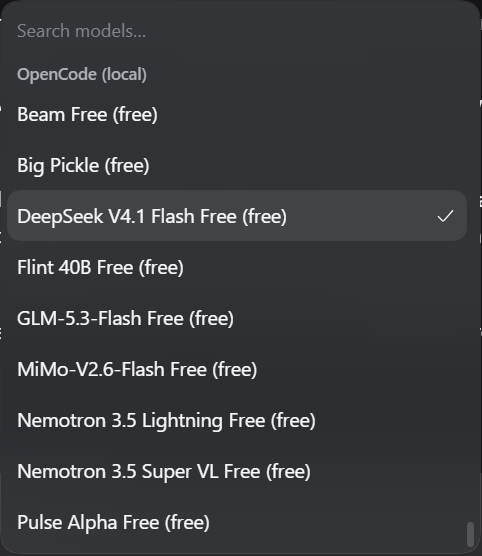
npm ci && npm pack) and add the.tgzfile instead.Restart DSH, open the model picker, and choose a model under OpenCode (local).
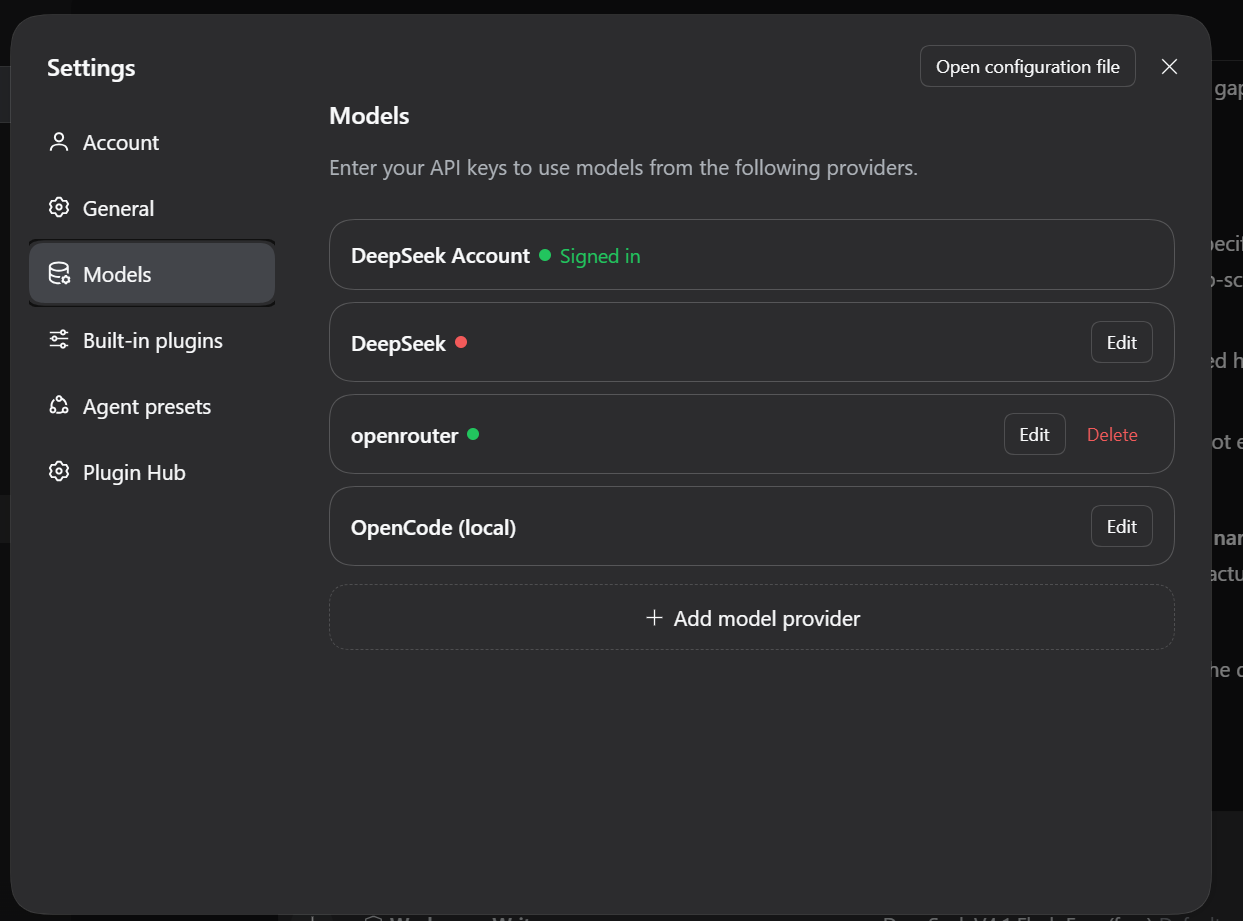
The provider also shows up in Settings → Models, where Edit opens its settings:
The plugin has no install scripts and downloads nothing. If opencode can't be found, the first request tells you how to install it or where to point binaryPath.
Settings
In DSH under Settings → Models → OpenCode (local), or in your profile's cordis.patch.yml under dsh-plugin-opencode-local.
| Setting | Default | What it does |
|---|---|---|
binaryPath |
opencode |
Path or PATH name of your opencode executable. |
serverUrl |
empty | Attach to an opencode serve you already run (e.g. http://127.0.0.1:4096) instead of starting one. |
serverPassword |
empty | That server's password (OPENCODE_SERVER_PASSWORD for 1.x, OPENCODE_PASSWORD for 2.x). |
cwd |
empty | Working directory for OpenCode sessions. Empty uses the DSH conversation's working directory. |
allowRestrictedTools |
false |
Allow the restricted tools (below) without asking. |
askForApproval |
true |
Ask in DSH's approval prompt before a restricted tool runs. When off, they're rejected. |
requestTimeoutMs |
1800000 |
Upper bound for one turn, in ms. 0 means no limit. |
modelRefreshSeconds |
300 |
How often the model list is re-read from OpenCode. |
showToolActivity |
true |
Show OpenCode's tool calls as short lines in the reply. |
localSessionTitles |
true |
Make DSH session titles locally instead of spending a model request on them. |
How it works
- One shared server. On the first request the plugin runs
opencode --version, thenopencode serve --hostname=127.0.0.1 --port=<free port>with your full environment and a new random password. It waits for the "listening" line and checks/global/health(1.x) or/api/info(2.x). If the server crashes it is restarted with backoff. When DSH stops or the plugin is disabled, the whole process group (or process tree on Windows) is killed. - Sessions. Each DSH conversation gets its own OpenCode session in the conversation's working directory. Only the new message is sent each turn. If the DSH history no longer matches what OpenCode has seen (DSH restarted, a message was edited, the conversation was compacted, or a turn failed), a new session is created and seeded with the DSH transcript.
- Streaming. Text, reasoning, tool activity and token usage stream into DSH. Stopping a reply in DSH aborts the OpenCode run.
- Images. png, jpeg, gif and webp up to 20 MB are sent to models that accept images.
Permission policy
The same policy as T3 Code's default (non full-access) mode:
- Always allowed:
question,read,glob,grep,lsp,todowrite,task,skill. Reading.envfiles still asks;.env.exampledoesn't. - Restricted:
bash(shellin 2.x),edit,webfetch,websearch,codesearch,external_directory,doom_loop, and anything not listed.
Restricted tools are configured as ask, never deny. (A deny rule makes OpenCode's free tier refuse requests with FreeTierError.) When OpenCode asks:
- if
allowRestrictedToolsis on, it's allowed once; - otherwise, if DSH's approval prompt is available and
askForApprovalis on, you decide; - otherwise it's rejected, and the model gets a message saying the tool was not granted and not to retry.
For 1.x the policy is passed in OPENCODE_CONFIG_CONTENT (your own OPENCODE_CONFIG_CONTENT, if set, is kept and only its permission key replaced). For 2.x it's set as session permission rules. The plugin never uses --auto or allow-all.
OpenCode questions (the question tool) can't be shown in DSH, so they're declined and the model continues without an answer.
Errors
OpenCode's error message is shown as is.
| OpenCode | DSH failure |
|---|---|
HTTP 429, FreeUsageLimitError |
RATE_LIMIT. The plugin doesn't retry it; wait and try again. |
HTTP 401/403, FreeTierError, ProviderAuthError |
AUTH |
| network errors, timeouts, lost connection to the local server | TRANSPORT (retried once by DSH) |
| HTTP 5xx | SERVER |
<none> (OpenCode couldn't read the provider's reply) |
a readable message with the HTTP status, as in T3 Code |
Troubleshooting
- "OpenCode was not found". Install it (above), or set
binaryPathto the full path. On Windows that's usuallyC:\Users\<you>\AppData\Roaming\npm\opencode.cmd. - "OpenCode vX is too old". Run
opencode upgradeornpm i -g opencode-ai@latest. - No models in the picker. Run
opencode modelsin a terminal. If that's empty too, sign in withopencode auth login. The list refreshes everymodelRefreshSeconds. - "database is locked". Another OpenCode process is busy with the same data directory. Try again, or attach to your running server with
serverUrl. - A tool keeps getting rejected. That's the policy. Approve it in DSH's prompt, or turn on
allowRestrictedToolsif you trust the model with your shell and files. - Rate limits on free models. These come from OpenCode's free tier. The message is OpenCode's own; wait, or sign in to a provider with your own key.
The plugin never logs prompts, credentials or the server password. Server output shown in startup errors has the password removed.
Development
npm ci
npm run check   # typecheck, build to lib/, unit tests
The tests run against a fake opencode (test/fixtures/fake-opencode.mjs) that speaks both the 1.x and 2.x APIs.
Credits
- T3 Code inspired this plugin. The way it runs OpenCode follows T3 Code's OpenCode provider: starting your own
opencode serveon 127.0.0.1, the permission policy, the OpenCode 1.x/2.x handling and the error messages. Parts are adapted from its code (MIT, © 2026 T3 Tools Inc.). - @quonaro/dsh-plugin-opencode showed the DSH plugin shape and local session titles (MIT).
Details are in NOTICE.md.
License
MIT. See LICENSE.
No comments yet. Be the first to write one.