dsh-task-center
English | 简体中文






Turn interrupted AI sessions into work that resumes itself
dsh-task-center is a local-first task command center for DeepSeek Harness (dsh). It finds unfinished work in old sessions, preserves the context outside any one chat, and lets a fresh agent continue from the next concrete step.
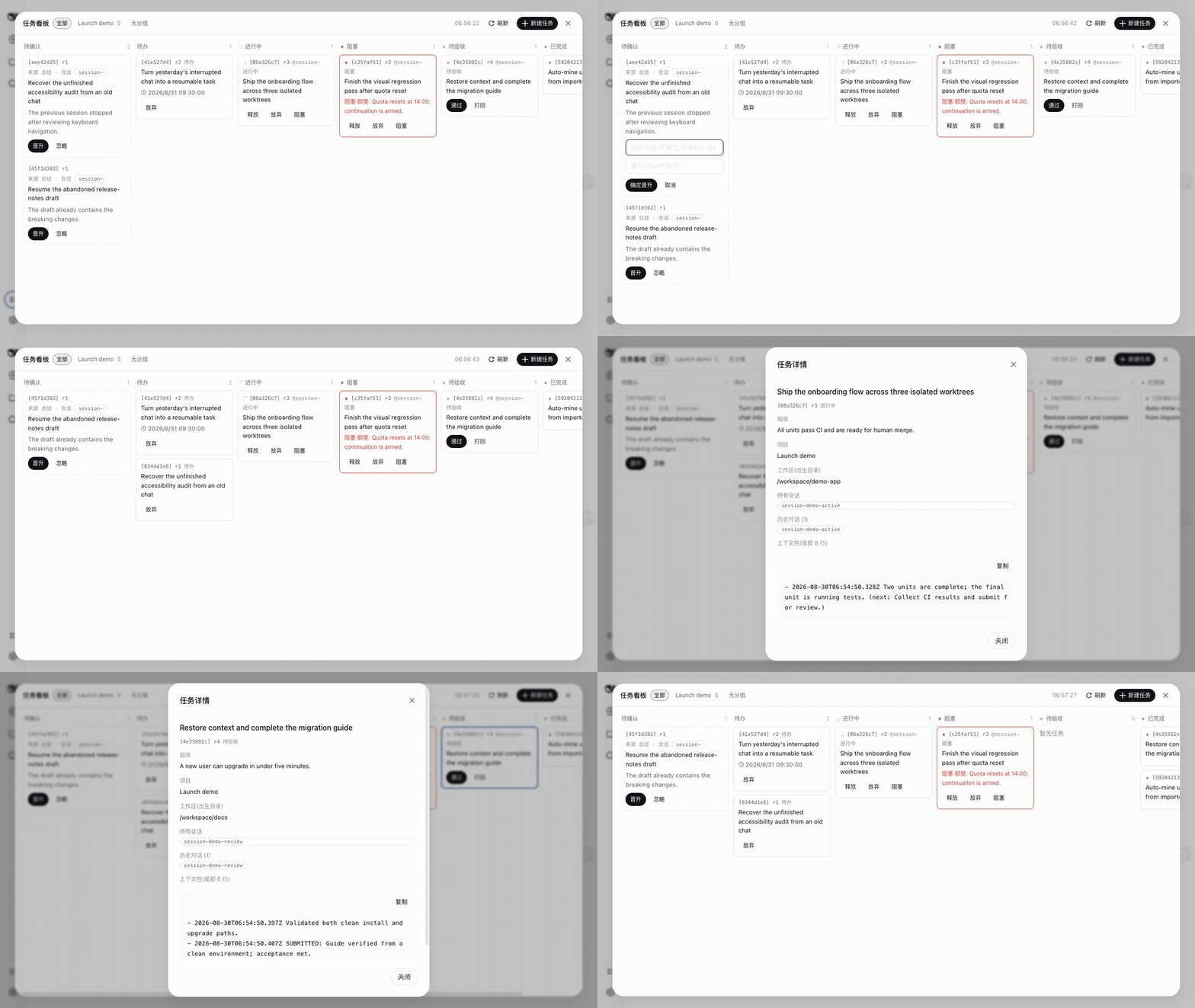
Watch the 60-second demo · View the full board · Install

- Recover context across sessions — a new agent receives the prior sessions, progress notes, acceptance criteria, and the next step automatically.
- Keep work alive — schedules, quota resets, and crash recovery can wake or release work without losing its history.
- Keep humans in control — agents can work and submit; only you approve, reject, or abandon the result.
Install the complete suite with one command:
dsh plugin --profile web add dsh-task-center
Then run dsh web and open Task Board from the sidebar. If this saves you
from losing an agent task, consider starring the repository.
The loop
- An idle or imported chat leaves real unfinished work behind.
- The extractor turns it into a candidate; you promote only the useful ones.
- A fresh session claims the task and receives the context pack automatically.
- The task can wake on schedule, survive quota resets, and recover from a dead holder.
- Completed work waits for your acceptance verdict.
The problem it solves
Agent tools such as dsh, Claude Code, and Codex work in sessions — when a session ends, the initiative dies. Real work breaks across four seams:
- Across time — a parked task has no follow-up. Weeks later you can't even reconstruct where it stood.
- Across projects — one feature touches three repos; three sessions know nothing about each other.
- Across windows / machines — you can carry the log files, but not "work in progress".
- Across executors — you and your sub-agents each do a piece, and nobody sees the whole.
dsh-task-center turns the task into the durable unit, hosted outside the harness as a family of plugins. One shared task ledger serves two audiences: you (board for the full picture, acceptance verdicts) and the model (claim tasks, restore context, push forward, report back).
In one line: the board makes work visible, the tools make progress, the alarm clock keeps tasks alive.
It is implemented independently of the harness repo and depends only on its published npm packages (@deepseek-ai/cordis, @deepseek-ai/dsh-*). Full design notes live in docs/design/ (Chinese).
Features
- Full task lifecycle — five-state machine (todo / in-progress / blocked / awaiting-review / done), append-only event ledger, every change CAS-versioned, everything restored after a restart.
- Cross-session handover — a new session that claims a task gets the context pack and a
PRIOR SESSIONSlist injected automatically; you never re-explain the background. Every session id on the board is clickable through to the conversation. - Subtask delegation — one task parents many subtasks; different sessions hold and advance them in parallel while the parent aggregates progress.
- Parallel fleet — a held task whose plan splits into non-overlapping units fans out via
task_fanout: each unit gets its own git worktree of the birth repo and a session working exactly that slice. The board and/task fleetshow each branch's ahead/behind and conflict preview; merging a unit (/task merge, or the board's merge button) is the human's verdict — conflicts are listed, never auto-resolved. - Projects and workspaces — human-managed projects plus a workspace directory stamped at task birth; the board filters four ways (all / project / workspace / ungrouped).
- Scheduled work — a task can carry wake rules (one-shot / at-time / recurring); when the time comes, a fresh session is spawned, claims the task, and continues. A daily patrol session refreshes the state of every open task. Wake rules and their next fire time render on cards and in the detail dialog.
- Scheduled sends — from the session page or the board detail, schedule a message (default
cont) to be delivered into an existing session at a set time, with quick presets — a task parked mid-flight picks itself up. - Quota awareness — when API quota runs out, tasks suspend and release their holders; at the quota reset point they resume automatically. The kanban head dialog (自动续做) flips this at runtime and picks which session continues — a fresh wake session (default), the session that hit the wall, or any named session (the latter two ride the scheduled-send channel); each session page's ⏰ scheduling dialog also carries a one-tap switch that targets the reset-point continuation into that session. Choices survive restarts, and
resumeOnResetin config is only the default. Blocked cards label the reason category (quota / human / …). - Crash recovery — when a session holding a task dies (crash or kill), the hold is released automatically and the task becomes claimable again.
- Automatic extraction — goals, approved plans, and todo tables left in idle sessions birth task candidates for you to confirm and promote; a goal completed with no human response goes straight to awaiting-review; a rejection pushes the reason back into the original conversation and re-claims it for rework.
- Two frontends — a full-screen web kanban (five columns, filters, blocked pinned on top, detail dialog, creation) and a
/taskcommand panel, both reading the same ledger. The board's language follows the dsh system setting (Settings → General → Language, Chinese/English).
Killer flow: mine tasks out of your old chats
Pair it with dsh-chat-import: import your Claude Code / Codex history as resumable dsh sessions, and task-center's extractor will summarize each idle conversation, judge whether it left unfinished work behind (a nameable result, a checkable acceptance, a real intent to continue), and birth the survivors as candidates on the board — no manual triage.
Architecture
Task data uses a double ledger: the authoritative append-only event stream (~/.dsh/storages/task.json) plus session-log receipts (task/change, task/context-injected events) — the ledger survives restarts and keeps sessions consistent; the receipts keep every model input reconstructable from the logs.
| Package | Role | What it does |
|---|---|---|
task |
Core (Service) | ctx.tasks: state machine, projects, subtasks, contextPack, events; stamps workspacePath at birth |
task-local |
Storage Provider | Opens the storage domain; backend routes to json/sqlite |
tool-task |
Model face (Consumer) | Seven model tools + prompt section |
command-task |
Human face (Consumer) | /task command: panel, projects, candidate triage |
task-web |
Human face (Consumer) | Web board: Typert service + browser bundle |
task-wake |
Time face (Provider) | Spawns working sessions on schedule + daily patrol |
task-sched |
Time face (Provider) | Scheduled sends: injects a user message into an existing session at the set time (default cont) |
task-fleet |
Execution face (Provider) | task_fanout: splits a held task into parallel units, each in an isolated git worktree; the same plugin serves ctx.fleet — live branch verdicts plus the human-triggered merge (conflicts reported, never resolved) |
task-quota |
Quota (Provider) | Suspends and releases on QUOTA failures, resumes at reset |
task-reaper |
Liveness (Provider) | Releases dead holds, crash recovery |
task-source |
Extraction (Provider) | Scans idle sessions for candidates; end-of-turn diffs flow back; acceptance births and rejection push-backs |
shell |
Standalone REPL | One-command interactive launcher assembling every plugin |
docs/design/   Design archive (product definition, data model, seam specs, plan, extraction layer — Chinese)
packages/      dsh-task-center-* plugin packages (pnpm workspace)
Install
Requires dsh ≥ 0.1.2-rc.1. Prerequisite: the dsh CLI installed globally (npm i -g @deepseek-ai/dsh), with pnpm reachable by dsh plugin (corepack users: corepack enable; if the node directory is not writable, corepack enable --install-directory <dir> and put that dir on PATH).
If a future dsh upgrade breaks this package's built code, each affected plugin disables itself with one warning instead of taking dsh web down with it — the boot keeps going, and the warning names the plugin to upgrade (dsh-task-center or dsh itself).
One package from npm — it bundles every plugin and its default rows, no clone, no build:
dsh plugin --profile web add dsh-task-center
The web profile (created by dsh web on first run) already carries the storage rows this set rides, at the shared ~/.dsh/storages root — the package never inserts them, so a duplicate storage stack cannot happen. A fresh, non-web profile adds the three storage rows itself first (snippet); without them the boot fails loudly, never silently. Every plugin row lands with a deployment default; override any row by id in the profile's own cordis.patch.yml (a later layer replaces the whole config).
The 0.1.0 multi-package family (dsh-task-center-task etc.) is deprecated; one dsh-task-center package replaces all of it.
Then set DEEPSEEK_API_KEY (or save it through the web UI's Models page) and go:
dsh web                          # browser UI; the board entry appears in the sidebar footer
dsh --profile web "some task"    # one-shot: create agent, work, print, exit
Clone, build, and add the bundle package directly (the same artifact the npm package ships):
git clone https://github.com/Mason-1011/dsh-task-center && cd dsh-task-center
corepack pnpm install && corepack pnpm run build   # produces packages/*/dist + packages/bundle/dist
dsh plugin --profile web add "file:$(pwd)/packages/bundle"
Validate the composition tree without booting:
dsh --profile <name> --dump-config
Usage
export DEEPSEEK_API_KEY=...   # or save it on the web Models page
dsh --profile web "some task" # one-shot: build an agent, work, print, exit
dsh web                       # browser UI: task tools for the model, /task command for you
Model tools (tool-task)
| Tool | Effect |
|---|---|
task_create |
Create a task (objective, optional acceptance — the human verdict at review is the gate, not this field), optionally under a parent or in a project; the birth workspace is stamped from the session directory |
task_claim |
Claim and receive the full context pack; injects the prior-sessions list |
task_update |
Record progress (note / next); clears blocked state |
task_report |
Report: blocked (with reason) or review (with a self-check against the acceptance criteria) |
task_patrol |
Record a patrol observation: claims nothing, changes no state, does not refresh the idle clock |
task_query |
Filter by status / workspace_path / project_id; list live subtasks of a parent |
task_projects |
List human-managed projects (creation order, with archive flag) |
task_fanout (task-fleet) |
Fan a held task out into parallel units: each gets its own git worktree of the birth repo and a fresh session working exactly that unit; single-effect — any failure rolls back everything. Merging the branches back is the human's verdict moment |
Human actions
Acceptance verdicts (approve / reject), release, archive, block, project CRUD, candidate promotion — all human-only; the model tool face does not register these verbs. The web board and the /task command panel share the same human action face; a conflict refreshes rather than overwrites. On a rejected acceptance, the reason is pushed back into the original conversation as a user message and the task is re-claimed for rework. Unit-branch merging is likewise a human verdict on both faces: /task merge and the board's fleet section run the git-derived checks (branch alive, mainline clean, merge-tree conflict preview) and then merge --no-ff; conflicts come back as a file list with nothing changed, and model actors are refused on principle. Abandon is not deletion: the task drops into the board's collapsible trash bin at the bottom, listed by /task trash and brought back by /task restore <id-prefix> or the per-card restore button (active/blocked normalize to todo).
Web board (task-web)
Open the full-screen five-column board (todo / in-progress / blocked / awaiting-review / done) from the sidebar footer, with the pending-candidates inbox and a collapsible trash bin at the bottom (abandoned tasks, restorable per card). The head row carries the quota auto-resume dialog (自动续做: on/off plus the resume-target session picker, task-quota's runtime knobs); the session page's ⏰ scheduling dialog carries the second entry — a quota-aware resume switch that targets that session. Filters: all / project / workspace (birth directory) / ungrouped. The detail dialog shows acceptance criteria, past conversations (clickable through to the session page), subtasks, the context-pack tail, wake rules, scheduled sends, and — for parallel units — the fleet section: per-unit branch verdicts (ahead/behind, conflict preview, merged/gone) with the human merge button. Unit cards carry their branch chip (⑂); a parent card aggregates its fleet (done/units plus awaiting-review count). Blocked cards and details label the reason category (quota / human / …). A ⚠ banner names the open task left untouched longest within staleDays (idle computed over the subtree, freshest wins; delegation in progress does not count as idle).
Configuration
| Field | Plugin | Default | Meaning |
|---|---|---|---|
contextPackByteLimit |
task | — | Context-pack byte limit |
listDefaultLimit |
task | — | Default list/query cap |
pollSeconds |
task-source / task-wake / task-sched | 30 | Scan / wake / send poll interval |
idleHours |
task-source | 3 | Session idle window |
summariesPerTick |
task-source | 2 | Max summary sessions per tick (install-storm guard) |
transcriptEvents |
task-source | 40 | Recent messages carried into the summary prompt |
staleDays |
command-task / task-web | 3 | Stale-warning threshold in days |
patrol.at |
task-wake | — | Daily patrol time (e.g. '09:30'; a missed slot is skipped) |
agent |
task-source / task-wake / task-sched / task-fleet | — | Route (provider + model) for wake / summary / scheduled-send / fleet-unit sessions |
maxUnits |
task-fleet | 3 | Per-call ceiling on task_fanout units |
resumeOnReset |
task-quota | true | Default for the auto-resume knob; the board head dialog flips it — and picks the resume-target session — at runtime (persisted in task-quota's own storage domain) |
Development
pnpm install
pnpm run build       # full build (includes the web client bundle)
pnpm run test        # build + vitest; real-model e2e self-skips without DEEPSEEK_API_KEY
pnpm run typecheck
Standalone REPL shell (no dsh profile; default ledger ~/.dsh-task-center):
corepack pnpm start # or --root <dir> for a custom working root
Gotchas
- Changed plugin source: after
corepack pnpm run build,removethenaddfile:./packages/bundle— pnpm cachesfile:copies and--forcedoes not refresh them. - Changed web client code: the client bundle's verdict and version are cached per process; after a build you must restart
dsh web.dist/client.jsmust exist before the composition row (a declared client package missing its bundle fails the whole web start), so always build before add. - Rows inserted by patch must carry an explicit
config({}when empty): the patch path does not normalize a missing config, and a plugin reading config without a default in apply crashes on the spot. - Ledger location: dsh profiles share
~/.dsh/storages; the standalone REPL shell defaults to~/.dsh-task-center. The two never meet. - Install into exactly one profile at a time: the scheduled-send poller runs per boot; two profiles both carrying the package share the storage root and would each deliver the same row. The standalone REPL shell never installs it.
Roadmap
Implementation status and phases: docs/design/04-plan.md (Chinese). P0/P1, the extraction layer (6a–6f, including acceptance births and rejection push-backs), the three progress-flowback layers, and board history/workspace fusion have all landed. Current milestone: one week of real daily use, iterating on actual pain.
No comments yet. Be the first to write one.