Intelligence UI for DeepSeek Harness
Chat replies that render as interfaces, not walls of Markdown.
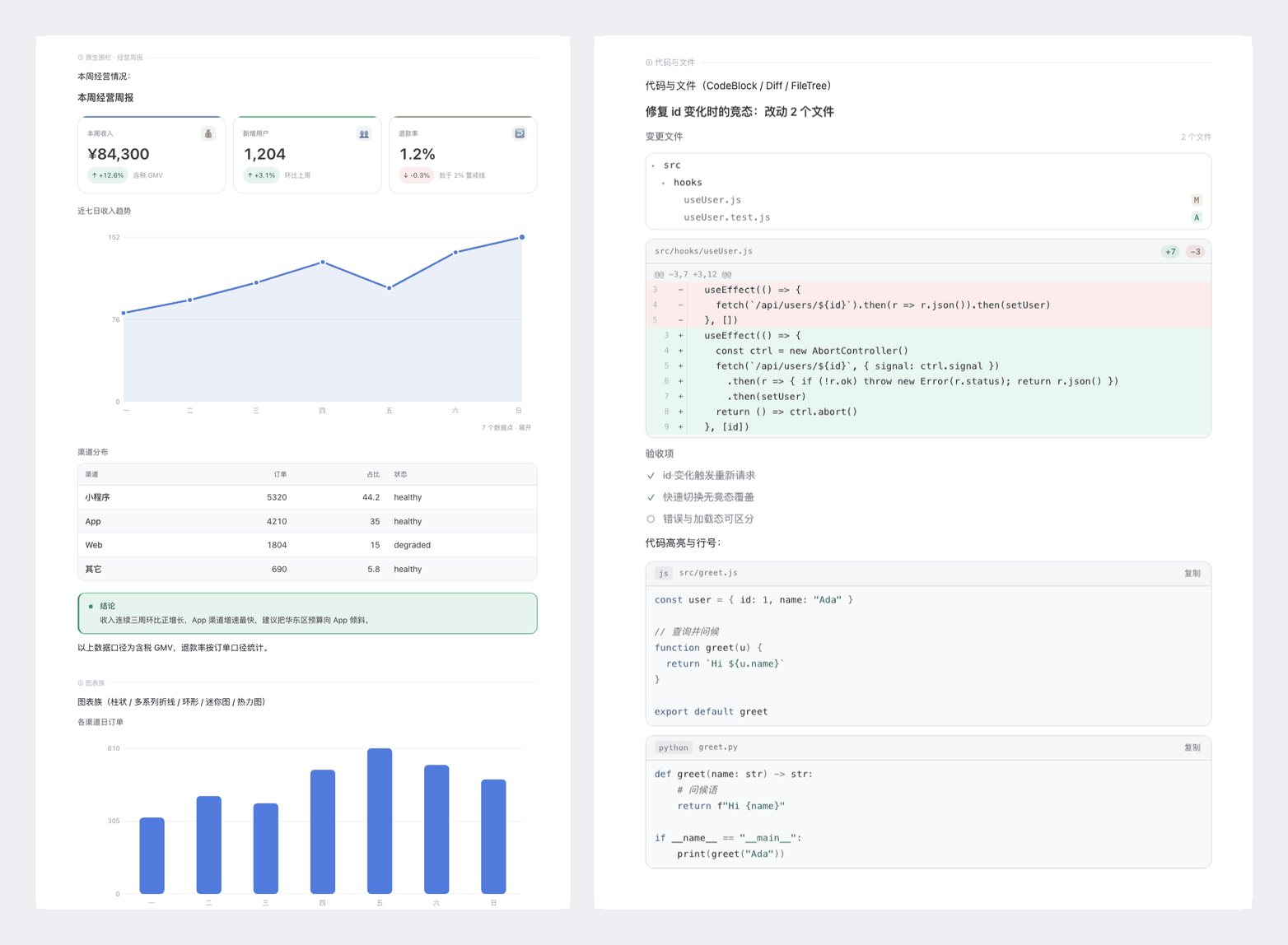
A plugin for DeepSeek Harness (DSH) that upgrades the assistant-message renderer: model-authored OpenUI Lang fences render as cards, tables, charts and diagrams in place, while structured Markdown is automatically compiled into the same visual language. Plain text stays plain text.



中文说明 · Docs index · Component reference · Design system · Architecture · Gallery (GitHub Pages) · Light / dark / mobile


Status: v1.1.0 · 44 components · MIT · light/dark themes · 390/920px · macOS tested locally, Linux covered by CI.
The gallery page is served by GitHub Pages once enabled in the repository settings (see RELEASING.md); the PNG links work immediately.
Why not plain Markdown?
Markdown is excellent for prose but poor at structure: KPI comparisons turn into walls of text, tables lose hierarchy on mobile, and trends are invisible. Intelligence UI keeps Markdown for the parts that are prose and upgrades the rest:
- Structure where it matters — metrics, comparisons, timelines, steps, trees, charts and code changes render in their natural form instead of ASCII tables.
- Fast to read — compact previews, aligned numbers, semantic status colours, one accent per screen.
- Safe by construction — a bad program never breaks the message; invalid input degrades to a local notice or plain text.
- No new app, no build — it ships as one directory bundle inside the chat you already use.
What it does
An assistant reply can mix prose and interface blocks. The plugin intercepts the
assistant-step renderer (priority −20) and runs a three-mode pipeline:
| Reply shape | Trigger | Rendering |
|---|---|---|
| Native fence | a ```openui program in the reply |
parse → evaluate → render components in place (highest fidelity) |
| Auto-compiled | no fence, but Markdown tables / KPI lists / ordered steps | the client compiler turns them into cards, charts and search tables |
| Plain text | everything else | the host Markdown renderer, unchanged |
Text outside a fence stays Markdown, so one reply can be: explanation → chart → caveat. Rendering is insertion-based: nothing is merged, rewritten or stripped.
root = Stack([kpis, chart, note], "column", 16)
kpis = Grid([a, b], 2, 12, 150)
a = StatCard("Revenue", "¥84,300", "+12.6%", "up", null, "gross, tax included", "brand")
b = StatCard("Refund rate", "1.2%", "-0.3%", "down", null, "below the 2% guardrail", "warning")
chart = Chart("Last 7 days", "area", [{name: "Revenue", values: [82, 94, 110, 129, 105, 138, 152]}], [], ["Mon", "Tue", "Wed", "Thu", "Fri", "Sat", "Sun"], 220)
note = Callout("Takeaway", "Revenue grew three weeks in a row; shift budget toward the fastest channel.", "success")
Features
- 44 components — primitives, layout, containers, text, data (metrics/tables/timeline/steps), charts (bar/line/area, donut, sparkline, heatmap), a schematic world map, code/diff/file panels, tree and graph views with playback, and interactive controls.
- Theme-native design system — every colour, radius and type step is a host theme token; light/dark follow automatically, with zero hard-coded colours (enforced by tests). Data uses the host business-blue accent; status text keeps accessible contrast in both themes.
- Reply compiler — a zero-dependency, deterministic Markdown → OpenUI compiler; pathological input safely falls back to plain Markdown.
- Built for real model output — positional/named/colon arguments, bare child elements, Python/JS literals, enum synonyms and programs written as plain code blocks are recovered; invalid props degrade to a local notice instead of breaking the message.
- Streaming-safe — unfinished fences render while the model is still writing; the final frame keeps the same component instances.
- Compact by default — charts, maps, tables and long code render compact with an in-place expand control.
- Prompt architecture — the host injects an adaptive presentation policy plus a capability reference, so the model knows when and how to use the UI.
Requirements
| Host | DeepSeek Harness (DSH) desktop app (source), with a build that exposes plugin bundles (engines.dsh >= 0.2.1-rc.0). This repository is the plugin, not a standalone app. |
| Node.js | >= 20 — only needed to build and run tests (the repository ships a prebuilt lib/client.js). |
| pnpm | 12 — pinned through packageManager (Corepack picks it up automatically). |
| Chrome | Any recent Chrome/Chromium for the browser-based tests (CHROME=/path/to/chrome if auto-detection fails). |
| Platform | macOS (14+) and Linux tested; Windows is expected to work but untested for the Chrome-based suites. |
engines.dshrefers to the host's plugin-bundle API version; check the DSH build notes for the exact minimum.
The plugin renders against the host's --dsw-* theme tokens and platform modules
(@deepseek-ai/dsh-client-*). Those are supplied by the host; nothing needs to be installed
globally.
Quickstart
Five minutes from zero to a rendered reply:
- Install DeepSeek Harness — download the desktop app from deepseek.com/harness. AI features need a configured model in DSH.
- Get the plugin —
git clone https://github.com/MarkYangKp/dsh-intelligence-ui.git(no build step:lib/client.jsis committed). - Install the directory as a bundle — open DSH's plugin manager and install this repository as a plugin bundle (choose the install-from-directory / bundle option and point it at the repository root). Menu labels vary slightly between DSH versions.
- Restart DSH and open a chat. The browser console should show
[dsh-intelligence-ui/1.1.0]. - Paste the example below into a message (as-is, no extra prompt needed) and send it.
If step 3 is unavailable in your DSH build, that build does not expose plugin bundles and cannot load this plugin; upgrade DSH or use a build with bundle support.
Build from source (optional)
pnpm install
pnpm build          # writes lib/client.js
# then install this directory as a bundle, as in step 3
To update: git pull && pnpm install && pnpm build, then reload the chat page (⌘R / Ctrl-R).
To remove: uninstall the bundle in the plugin manager and restart DSH.
Maintainers iterating on the host machine can use
node scripts/deploy.mjs --to <plugin-directory>to rebuild, back up the target and rsync the repository into the directory the host loads.
Usage
Write normal Markdown; insert a fence where the interface belongs:
Ops review:

```openui
root = Stack([hd, tl, ok], "column", 16)
hd = Heading("Incident review", 2)
tl = Timeline([{"title": "14:02 alert", "description": "error rate > 15%", "time": "14:02", "variant": "error"}, {"title": "14:26 rollback complete", "description": "error rate back to 0.4%", "time": "14:26", "variant": "success"}])
ok = Callout("Next", "Add a connection-pool limit to the index job.", "info")
```
No fence? Structured Markdown is upgraded automatically. Both paths share one
parse → evaluate → render pipeline.
- Component signatures and program syntax: docs/COMPONENTS.md.
- Ten runnable examples (with an overview):
examples/. - Emergency switch to disable Markdown auto-compilation (browser console):
localStorage['dsh-intelligence-ui:disable-auto']='1'.
Components
44 components across ten groups; full signatures live in docs/COMPONENTS.md.
| Group | Components |
|---|---|
| Primitives | Box Row Col Text Icon Image Link |
| Layout | Stack Grid Divider Spacer |
| Containers | Card CardHeader Section Callout Quote |
| Text | Heading TextContent BulletList KeyValue CodeBlock Badge BadgeGroup |
| Data | StatCard Table SearchTable ProgressBar ComparisonBar Timeline Steps Checklist |
| Charts | Chart PieChart Sparkline Heatmap |
| Geography | Map |
| Code & files | Diff FileTree |
| Process | TreeView Diagram |
| Interactive | Button Tabs Accordion SegmentedControl |
Design system
The visual language is "Precision Editorial": host ink typography, a single business-blue accent
for data, hairline structure and layered surfaces. All tokens live in
src/ui/theme.js; rationale, type scale and per-component guidance are in
docs/design.md.
A headless-Chrome design gate measures computed styles (no gradients, no static shadows, no uppercase labels, no horizontal overflow, bounded type scale, WCAG AA text contrast — 4.5:1 for normal text, 3:1 for large text, bounded accent hues) across light/dark × 920/390.
Accessibility
- Design gates enforce WCAG AA contrast in both themes, keyboard focus for interactive controls,
prefers-reduced-motion, and no horizontal overflow at 390px. - Components use semantic HTML (headings, tables, lists, buttons) and
aria-*labels where needed; charts carry text labels for series, axes and values. - Known gaps: SVG charts are not yet exposed as an accessible data table, and the schematic map is not keyboard-navigable. Contributions welcome.
How it works
assistant-step text block
  ├─ ```openui fence ─► parse → evaluate → render components (text outside stays Markdown)
  ├─ no fence, settled ─► Markdown compiler → OpenUI program → render
  └─ otherwise ─► host Markdown renderer
The repository contains both halves of the plugin: a host half that injects prompt modules
(index.js) and a browser half that registers the renderer (src/ → lib/client.js). Component
implementations are split into focused modules under src/ui/; the tolerant binding layer and
render pipeline live in src/openui-runtime.jsx. Isolation boundaries, resource budgets, streaming
identity and clipboard/timer cleanup are described in docs/ARCHITECTURE.md.
Development
pnpm install
pnpm build            # → lib/client.js (committed; CI checks it is up to date)
pnpm test             # build + unit/browser suites (310 checks; browser suites skip without Chrome)
pnpm test:unit        # the same suites without browser tests (no Chrome needed)
pnpm test:design      # computed-style design gates in headless Chrome (36 checks)
pnpm test:interact    # chart/map interaction regressions in headless Chrome (10 checks)
pnpm test:docs        # relative Markdown links must exist and be tracked
pnpm format           # Prettier
pnpm format:check     # verify formatting (CI gate)
pnpm shot             # regenerate docs/gallery{,-dark,-mobile}.png + gallery.html
pnpm preview -- --name me --only "图表" --theme both
Test suites cover a synthetic 56-program corpus, 63 adversarial inputs, the Markdown compiler, theme-token fidelity, prompt modules, bundle budget/schema fingerprint, chart SSR, and real-browser lifecycle/heap checks. See CONTRIBUTING.md for prerequisites and PR expectations.
The gallery and design gate prefer a local snapshot of the host theme. Generate one with
node scripts/extract-theme.mjs (optional; it falls back to an original approximation in
test/fixtures/theme-fallback.css).
Generated artefacts in this repository: lib/client.js (the shipped bundle) and
docs/gallery* / docs/hero.png (rendered by pnpm shot). Do not edit them by hand; CI verifies
the bundle is in sync with src/.
Privacy & telemetry
The plugin itself has no analytics, no telemetry and makes no network requests. Installing the
development dependencies does not send telemetry either: the upstream @openuidev/lang-core
install hook is explicitly denied in this repository's pnpm-workspace.yaml (see
SECURITY.md). Remote images
that a user or model references through the Image component are loaded by the host, like any other
chat image. The bundled upstream @openuidev/lang-core telemetry path is disabled unless the host
explicitly sets OPENUI_RUNTIME_TELEMETRY_ENABLED; the browser runtime never enables it (the
inert upstream code is documented in SECURITY.md). Clipboard access happens only
through user-initiated copy buttons.
Language support
The component library and host API are locale-neutral. The injected prompt modules, example programs and gallery content are currently written in Chinese, the primary language of the first release; an English prompt set is on the roadmap. UI chrome rendered by the plugin itself is minimal and language-neutral; number and date formatting comes from the content.
Limitations
- The map is schematic: an equirectangular projection with a simplified world outline — suitable for distributions and routes, not for navigation.
- On 390px screens, tree/diagram figures scale to fit (labels get small) instead of scrolling.
- Expand state is per message, not persisted across replies.
- Auto-compilation only recognises clear structures; prose numbers are not turned into charts.
- The tolerance layer fixes syntax, not semantics: swapped values cannot be detected.
- Rendering depends on host internals (renderer slot, theme tokens, platform module table); a host upgrade may require plugin changes.
Documentation
| Doc | Contents |
|---|---|
| docs/COMPONENTS.md | All 44 components, signatures, program syntax rules |
| docs/ARCHITECTURE.md | Reply pipeline, module map, robustness, prompt architecture, test matrix |
| docs/design.md | Design-system v3 tokens, type scale, per-component visual guidance |
| docs/README.md | Documentation index |
| Gallery page | Full rendered gallery (generated; served by GitHub Pages) |
Contributing
Issues and pull requests are welcome — see CONTRIBUTING.md, CODE_OF_CONDUCT.md and SECURITY.md. Visual changes should include light/dark and 920/390 screenshots. Release steps live in RELEASING.md; changes are tracked in CHANGELOG.md.
Acknowledgements
- OpenUI Lang by Thesys (
@openuidev/lang-core, MIT) — parser, evaluator and type system for the language. - Natural Earth (public domain) and
world-atlas(ISC) for the world outline data. - DeepSeek Harness — the host platform and theme system this plugin renders against.
- Design principles borrowed from the "design taste" school of restrained editorial interfaces.
Third-party license texts: THIRD_PARTY_NOTICES.md.
License
MIT © 2026 MarkYangKp
No comments yet. Be the first to write one.