AI Session Title
A DeepSeek Harness (DSH) bundle that adds an AI generate control inside the session rename dialog. It asks the session's current model for a title derived from the actual conversation (and from whatever draft you already typed), then drops the result into the name field — you review it and press 重命名, or keep your own text.
Requires dsh ≥ 0.2.1-rc.3 and Node ≥ 20.
What it looks like
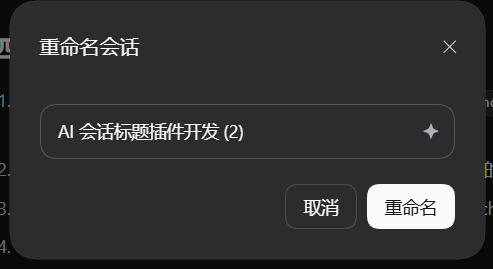
- Open the built-in rename dialog of any session (
···→ 重命名会话). - A small sparkle button sits at the trailing edge inside the name field, on the same border, in the shipped dialog itself.
- Clicking it reads the transcript plus the current field text as a reference draft, then replaces the field's content with the generated title. The native 取消 / 重命名 footer still does the actual rename.
How it works
Two halves in one package:
| Half | File | Role |
|---|---|---|
| Host | index.js |
Registers the global /ai-title command. It reads the session's event log, picks the route the next request would use (session.requestHeader().config, else the newest assistant message), streams one completion through ctx.llm with purpose: 'session-title', and returns a cleaned title. Text after the command name is treated as the user's draft title. |
| Client | client.js |
Watches for the shipped dialog's name field and decorates it in place, then calls ctx.remote.commands.execute(sessionId, '/ai-title <draft>', []) and writes the returned text into that field through a native input event. |
The shipped dialog keeps its target session in component state and renders
through shell.overlay, so it exposes no slot for a plugin to fill. The client
half therefore decorates the field rather than replacing the dialog; the session
id is recovered from the field's seeded title through the Workspace Service's
session list.
The plugin calls the host through a command, because the client→host RPC
surface is generated at build time and cannot be extended by third-party
bundles. A side effect is that each generation leaves a small
command/run + command/done pair in the session flow — that is also the
only visible feedback while it runs.
Applying a title only fills the field; nothing is written until you press 重命名, so the session's own title semantics (including pinning) stay whatever the shipped dialog does.
Install
From npm (recommended)
dsh plugin --profile <profile> add dsh-ai-session-title
Restart dsh web, then reload the page. Desktop builds that ship their own
dsh should use the app's Settings → Plugins instead, because the CLI does
not touch the app-owned profile while the app is running.
From this checkout
plugin_manager install_bundle target = <absolute path to this directory>
or let an agent do it with the plugin_manager tool. Then reload the Web UI.
From the plugin market
The market reads its catalog from the awesome-dsh-plugin registry, not from this repository. Once an entry exists there, the plugin is installable from Plugins → Discover like any other catalog entry.
Compatibility
engines.dsh is ^0.2.1-rc.3. DSH decides compatibility from engines.dsh
alone (falling back to lockstep @deepseek-ai/dsh-* peer ranges when it is
absent), and the market shows that requirement on the plugin card.
The plugin imports nothing from the @deepseek-ai/* packages at runtime: the
host half uses only ctx.commands / ctx.llm, the client half only
ctx.remote and DOM APIs. That keeps it loadable from any profile without a
dependency install, but it also means a harness that renames those services or
changes the rename dialog's markup needs a matching plugin release.
Configuration (optional)
The row accepts:
| Key | Meaning |
|---|---|
provider, model |
Force a route. Both or neither; defaults to the route the next request would use, then the newest assistant message. |
timeoutMs |
Generation deadline, default 60000. |
maxTitleChars |
Hard character cap on the returned title, default 30. |
maxOutputTokens |
Output budget for the one call, default 1024. Raise it when a reasoning model answers with an empty title (max-tokens). |
Layout
cordis.patch.yml   inserts row id `ai-session-title` -> this package
index.js           host half (command + generation)
client.js          client half (in-place decoration + remote calls)
test/host.smoke.mjs  host-half smoke test (npm test)
locale/*.json      bundle display metadata (title / description)
icon.svg           bundle icon
Development
npm test # host-half smoke test, no harness or model needed
The client half has no build step: client.js is served as written and loaded
by the harness module loader. To try a change, edit the file and reload the Web
UI (the profile installs this package as a link:, so no reinstall is needed).
License
MIT — see LICENSE.
No comments yet. Be the first to write one.