dsh-synthv-studio
A DSH plugin that finds a local Synthesizer V Studio 2 Pro, drives it through its own Lua scripting API, and gives the agent five tools for discovery, a persistent bridge, vocal composition, note editing and DAW integration.
中文 | English





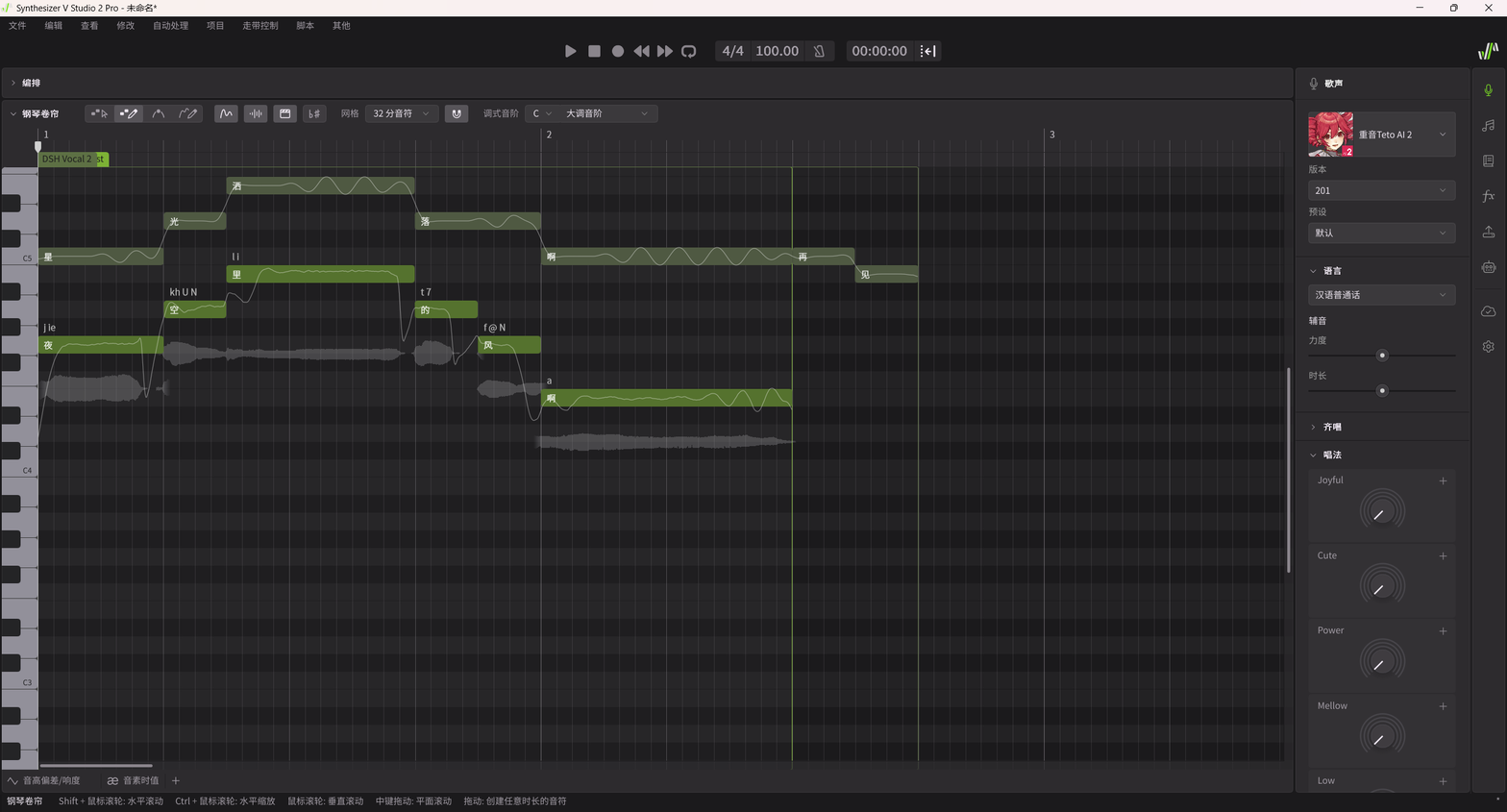
Synthesizer V Studio 2 Pro has no external API: it exposes in-app Lua
scripts and a VST3/ARA plug-in. This plugin turns the script API into
agent-callable tools by combining a persistent Lua executor, file-based IPC and a
bundled local MCP server. It never parses or rewrites .svp project files, never
opens a network port and never calls an online service — Synthesizer V remains
the only authority for project state.
Requirements
- Windows 10/11 (developed and verified on Windows 11; discovery and DAW probing are Windows-specific).
- Synthesizer V Studio 2 Pro 2.1.2 or newer, installed normally, with a project open. Verified with 2.2.1.
- DeepSeek Harness with
dsh≥ 0.2.0-rc.1 (verified on the 0.2.0-rc.2 runtime shipped with DSH Desktop Next 2.0.17-next). - Node.js 20+ available to the DSH Host (the bundled bridge server is a plain Node script).
- Optionally any VST3 host (REAPER, Zrythm, Cubase, Studio One, …) for DAW work.
Install
Install the bundle into a DSH profile:
dsh plugin --profile desktop add github:Making-acid/dsh-synthv-studio
(or --profile web for the web profile). Restart DSH once after installing so
the Host plugin loads; the bundle is then listed under Settings → Plugins and the
five tools appear in new sessions.
An npm package is planned. The
dshinstall command will becomedsh plugin add dsh-synthv-studioonce it is published; the GitHub install above works today.
First connection (once per SynthV launch)
- In DSH, call
synthv_bridgewith{ "action": "ensure" }. On first use the plugin writes the bridge scripts into%APPDATA%\Dreamtonics\Synthesizer V Studio 2\scripts\SynthV Agent Bridge\. - In Synthesizer V, choose Scripts → Rescan once, then Scripts → SynthV Agent Bridge → Start SynthV Agent Bridge and leave it running.
- Call
synthv_bridgewith{ "action": "ensure", "waitSeconds": 30 }again. A healthy bridge reportsconnected, a fresh heartbeat, andcoherence.state = "matched".
The bridge is a SynthV script, so it stops with SynthV and must be started again
after the next launch. If a previously installed bridge was built from an older
template, ensure hot-reloads it instead of asking you to restart.
Tools
| Tool | What it does |
|---|---|
synthv_detect |
Read-only scan: install directory and version, license session, voice database, VST3 + ARA bundles, installed DAWs, bridge heartbeat and IPC directory. |
synthv_bridge |
status / install / ensure / launch / stop / reload / uninstall: installs the bundled Lua scripts, repairs a stale running bridge by hot reload, checks build coherence, starts Synthesizer V. |
synthv_compose |
Writes a vocal phrase: tempo, track name, notes with lyrics, dedicated or reused note group, then an independent read-back check. dryRun plans without writing. |
synthv_do |
Calls the bridge's own MCP tools: sv_status, sv_describe, sv_query, sv_command, sv_ui, sv_review. The bridge exposes 17 read actions, 38 write actions and 9 UI actions over notes, lyrics, phonemes, pitch controls, automation, voices/vocal modes, mixer and playback. |
synthv_daw |
detect / verify / export_midi / write_guide: DAW detection, VST3/ARA verification, DAW plugin-cache evidence, Standard MIDI File export and a generated integration guide. |
Notes for synthv_compose: onset and duration are in quarter-note beats,
pitch is a MIDI note number, lyric is one syllable.
{
  "tempoBpm": 104,
  "trackName": "Lead Vocal",
  "groupName": "Lead Vocal",
  "notes": [
    { "onset": 0,   "duration": 1,   "pitch": 72, "lyric": "星" },
    { "onset": 1,   "duration": 0.5, "pitch": 74, "lyric": "光" },
    { "onset": 1.5, "duration": 1.5, "pitch": 76, "lyric": "洒" },
    { "onset": 3,   "duration": 1,   "pitch": 74, "lyric": "落" },
    { "onset": 4,   "duration": 2,   "pitch": 72, "lyric": "啊" }
  ]
}
For advanced editing, call synthv_do with sv_describe first to read the exact
action schema, then sv_query with contextMode: "writeIntent" to obtain a
contextId, then sv_command. Every write is verified against SynthV's current
state by the bridge.
How it works
DSH agent
   │  five synthv_* tools
   ▼
dsh-synthv-studio (Host plugin, lib/)
   │  MCP over stdio (child process)
   ▼
server/server.bundle.mjs  (SynthV Agent Bridge server, bundled)
   │  JSON file IPC in %TEMP%
   ▼
SynthV Agent Bridge (in-app Lua executor, SV:setTimeout polling)
   │  Synthesizer V's official Lua script API
   ▼
Synthesizer V Studio 2 Pro  ──▶  VST3 / ARA plug-ins  ──▶  DAW
The Lua executor and the Node server share a content-derived build id
(sv3-lua-<version>-<sha256(template)>). The plugin injects it at install time
and writes the install manifest the executor uses to locate itself for hot
reload, so the two halves can never disagree silently.
DAW integration
Synthesizer V Studio 2 Pro ships a VST3 instrument plug-in and a VST3 ARA plug-in. Typical workflow:
- Insert
Synthesizer V Studio 2 Pluginon an instrument track in your DAW. - Export a melody with
synthv_daw { "action": "export_midi", "bpm": 104, "notes": [...] }and drag the.midonto that track, or draw MIDI in the DAW. - Write lyrics and tuning in the plug-in (or compose in the desktop app with
synthv_composeand save the project). - Render/export from the DAW; the vocal follows the arrangement.
- Need a finished audio file? Render from the Synthesizer V desktop app and import the WAV.
synthv_daw { "action": "write_guide" } writes a machine-specific Markdown guide
with the detected plug-in paths and DAW steps.
Limitations
- Voice selection is manual. The scripting API can neither read the current singer nor enumerate installed singers, so you must pick one for the note group in Synthesizer V's Voice panel before listening.
- Save and render stay in the GUI. The official API cannot save the project
or render audio;
.svpfiles are never touched by this plugin. - The bridge lives inside SynthV. It stops when SynthV closes and has to be started from the Scripts menu after the next launch.
- Windows only. macOS/Linux paths, process checks and DAW discovery are not implemented.
- One
synthv_composecall targets one track. For multi-track work, create tracks withsynthv_do(sv_command, actionadd_track) and address them viatrackIndex.
Tests
node test/selftest.mjs          # offline: plugin surface, schemas, pure logic
node test/mcp-handshake.mjs     # offline: bundled server MCP handshake
node test/e2e-synthv.mjs        # needs SynthV + bridge; dry run by default
node test/e2e-synthv.mjs --write
Real-machine results are recorded in docs/verification.md.
License and credits
Apache-2.0. The bundled bridge server (server/server.bundle.mjs) and the
in-app Lua scripts (synthv/*.lua) are vendored from
SynthVCopilot/synthv-agent-bridge
(Apache-2.0) — see NOTICE for provenance and the build-id injection this
plugin performs. “Synthesizer V” is a product of Dreamtonics Co., Ltd.; this
project is not affiliated with Dreamtonics.
No comments yet. Be the first to write one.