DeepSeek Harness SSH Toolkit
Run DeepSeek Harness sessions on a remote machine over SSH. Pick any folder on that machine as a workspace, and every shell / file / search tool call executes there instead of on your laptop.
An independent, DSH 0.2-native continuation of dsh-ssh/dsh-ssh — see CREDITS. Not a mirror of upstream commits.
Why this one
- Works on current DSH (0.2.x). Hosts live in a real storage domain, the client uses the 0.2 Typert + primitives contracts, and the settings page is built from the current component set.
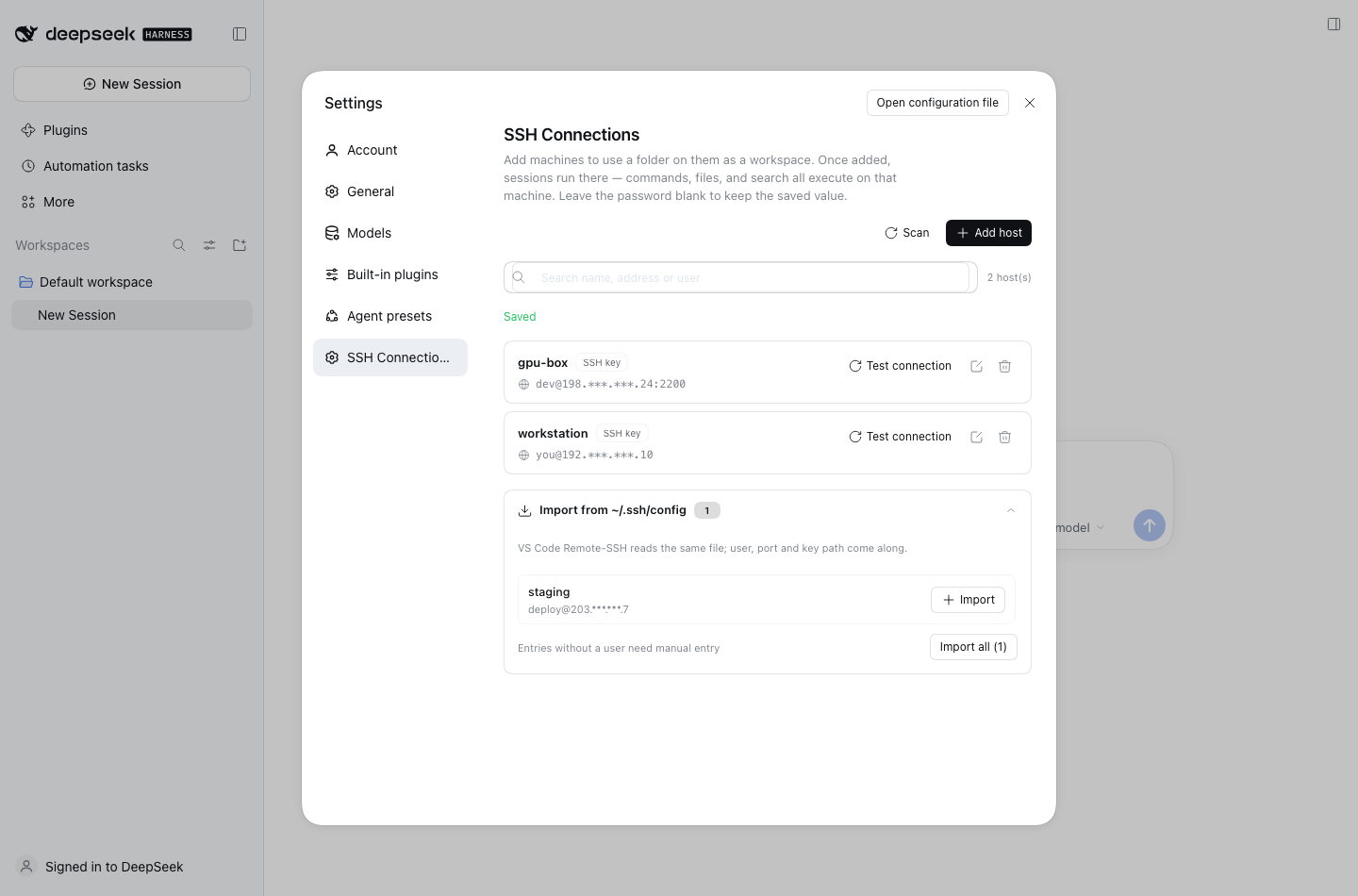
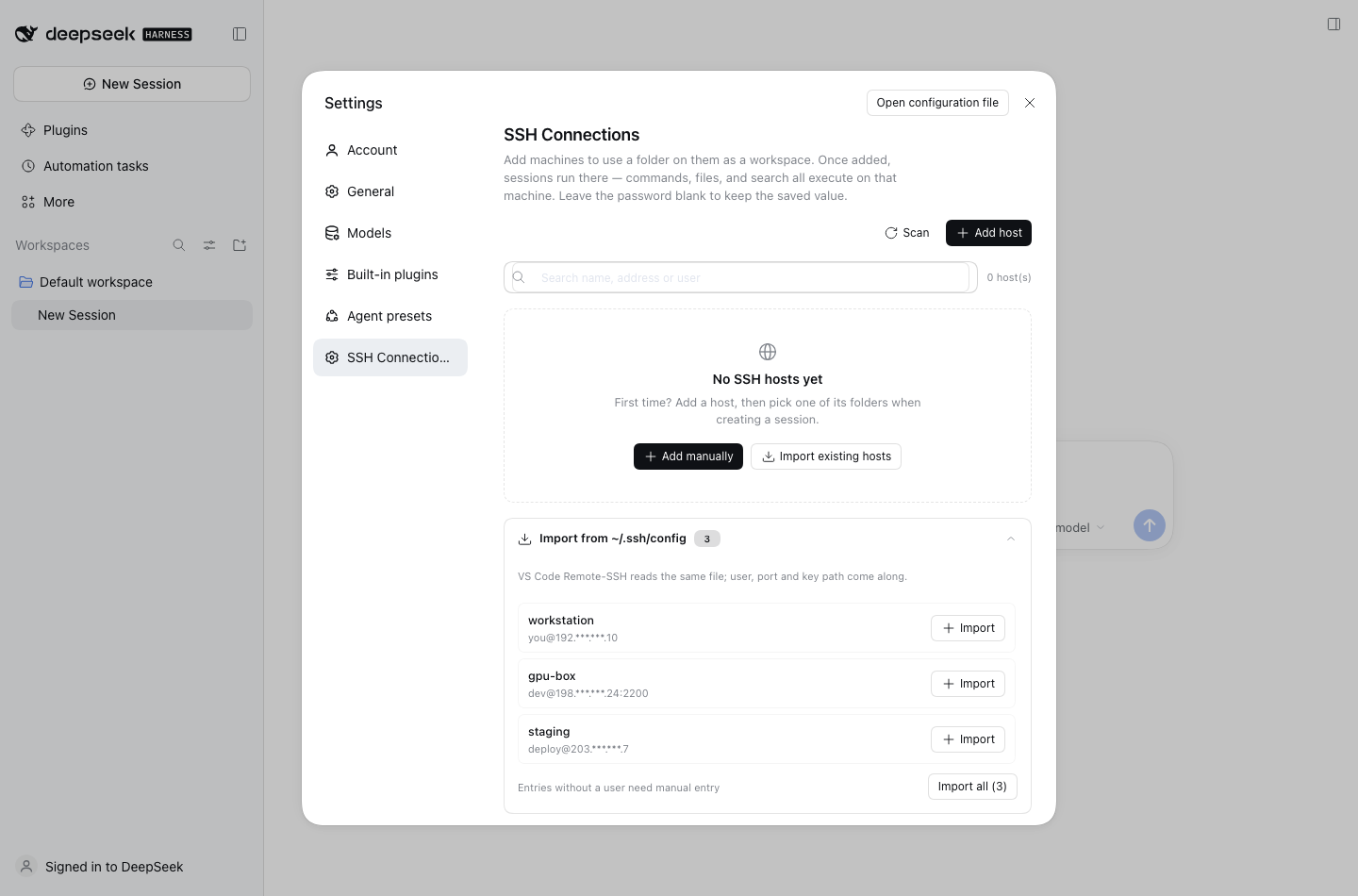
- Import the hosts you already have. The scanner reads
~/.ssh/config,~/.ssh/config.d/*andIncludechains — the same file VS Code Remote-SSH uses — and imports user, port and key path in one click. - One package, no monorepo. Host code, client bundle, tests and docs in a small, navigable tree.
- Same-name tools, zero prompt surgery.
bash,read,write,edit,read_image,globandgrepkeep their official names and arguments; routing depends only on the session's cwd.
Features
| Host manager | Add, edit, test, remove hosts from Settings → SSH Connections. Password is write-only in the UI. |
| Config import | Scans ~/.ssh/config (+ config.d, Include) and imports in bulk; entries without a User are flagged instead of silently broken. |
| Seven routed tools | bash, read, write, edit, read_image, glob, grep — same schemas, executed over SSH. |
| Remote workspaces | Browse a remote directory, pick it, get a local placeholder workspace; deleting the workspace cleans the placeholder up. |
| Background jobs | run_in_background plus job_list / job_output / job_kill run on the remote host. |
| Sandbox parity | The three sandbox modes fence remote tool calls the same way they fence local ones. |
| Trust on first use | Unknown host keys show a fingerprint dialog; later connections verify known_hosts. |
| Resilient transport | Connection pool with reconnect, atomic remote writes, SFTP → exec+base64 fallback. |
Requirements
| DSH | 0.2.1-rc.5 (desktop and web profiles) |
| Node | ≥ 22 |
| Remote OS | Linux or macOS (sshd only, no agent to install) |
| Auth | key (path or ssh-agent) or password |
| Topology | single hop (no ProxyJump) |
Install
From a checkout:
git clone https://github.com/MaiwulanjiangMaiming/Deepseek-harness-SSH-toolkit.git
dsh plugin --profile desktop add ./Deepseek-harness-SSH-toolkit
or straight from GitHub:
dsh plugin --profile desktop add github:MaiwulanjiangMaiming/Deepseek-harness-SSH-toolkit
Use --profile web for a headless web setup. If pnpm reports
ERR_PNPM_ADDING_TO_ROOT, append -w. Then fully restart DSH and open
Settings → SSH Connections.
The plugin is additive: local workspaces behave exactly as before, and removing
it (dsh plugin --profile desktop remove dsh-ssh-toolkit) leaves DSH untouched.
Quick start
- Settings → SSH Connections → Import from ~/.ssh/config (or Add host).
- Test the connection once; confirm the host key fingerprint on first use.
- New session → pick the host → browse to a folder → it becomes the workspace.
- Everything the agent runs now happens on that machine.
How it works
index.js              host entry: sshPool service, hosts domain, routing hook
client.js             Settings page (settings.section slot, Typert client)
cordis.patch.yml      profile bundle row
src/hosts/            domain.js (schema + storage), model.js (merge/redact),
                      config-scan.js (~/.ssh/config importer)
src/ssh/              pool.js (ssh2 pool, TOFU, reconnect), exec-fs.js
src/tools/            tool registration + bash/fs/search implementations
src/remote/           Typert contract + host service (settings-page RPC)
src/workspace/        router.js (placeholder paths), placeholder.js
src/jobs.js           remote background jobs
src/policy.js         sandbox fence
test/                 295 unit tests (node:test)
Hosts are stored as records in the dsh_ssh_hosts storage domain
(~/.dsh/storages/dsh_ssh_hosts.json). The settings page talks to the host over
a small Typert remote (ssh/listHosts, saveHost, deleteHost,
testConnection, scanSshConfig, plus the remote-workspace calls), so no
settings namespace is exposed to the wire.
Notes and limits
- Passwords are stored in plaintext in
dsh_ssh_hosts.json(same trade-off as upstream). Prefer keys; the private key itself is never copied. ProxyJump/ multi-hop is not supported; such entries are listed but not imported.- Remote
grepuses GNU grep, so ignore rules differ slightly fromrg. - Windows remotes are not supported.
Development
pnpm install
pnpm test          # node --test test/*.test.js
pnpm selfcheck     # validates the client bundle + Typert descriptors
pnpm pack          # produces the publishable tarball
The client bundle is hand-authored (client.js) and mirrors the Typert
contract in src/remote/contract.js; pnpm selfcheck fails if the two drift.
License
MIT — see LICENSE. Original work Copyright (c) 2026 dsh-ssh; this continuation Copyright (c) 2026 Maiwulanjiang Maiming.
No comments yet. Be the first to write one.