dsh-archive-manager-plus
Delete DeepSeek Harness sessions from the session menu, or manage archived sessions in Settings. Deletion removes the session log and related records; archiving alone only hides the session.
English | 中文



Compatibility
Plugin 0.1.10 targets DeepSeek Harness v0.2.2-rc.1. It uses the new native context-menu service and handles the updated session publication states. The legacy v0.2.1-rc.5 menu fallback remains, but the full runtime checks for this release target v0.2.2-rc.1.
The unchanged runtime code passed 20 tests in 0.1.8, including three integration tests using pinned official Harness components. They cover native menu registration, stopping an active Agent turn, workspace synchronization, plain and zstd log deletion, projection-cache cleanup, and recreating the host from persisted data. Other sessions and historical cost records are preserved.
Desktop version manually verified: on November 6, 2026, desktop session deletion was verified with 0.1.8 and confirmed to work normally. Version 0.1.10 updates documentation and package metadata only; runtime code is unchanged. Session teardown uses version-specific host internals, so compatibility with other Harness versions is not assumed. See the compatibility report for the exact scope and reproduction steps.
Features
- Delete session in the session row's
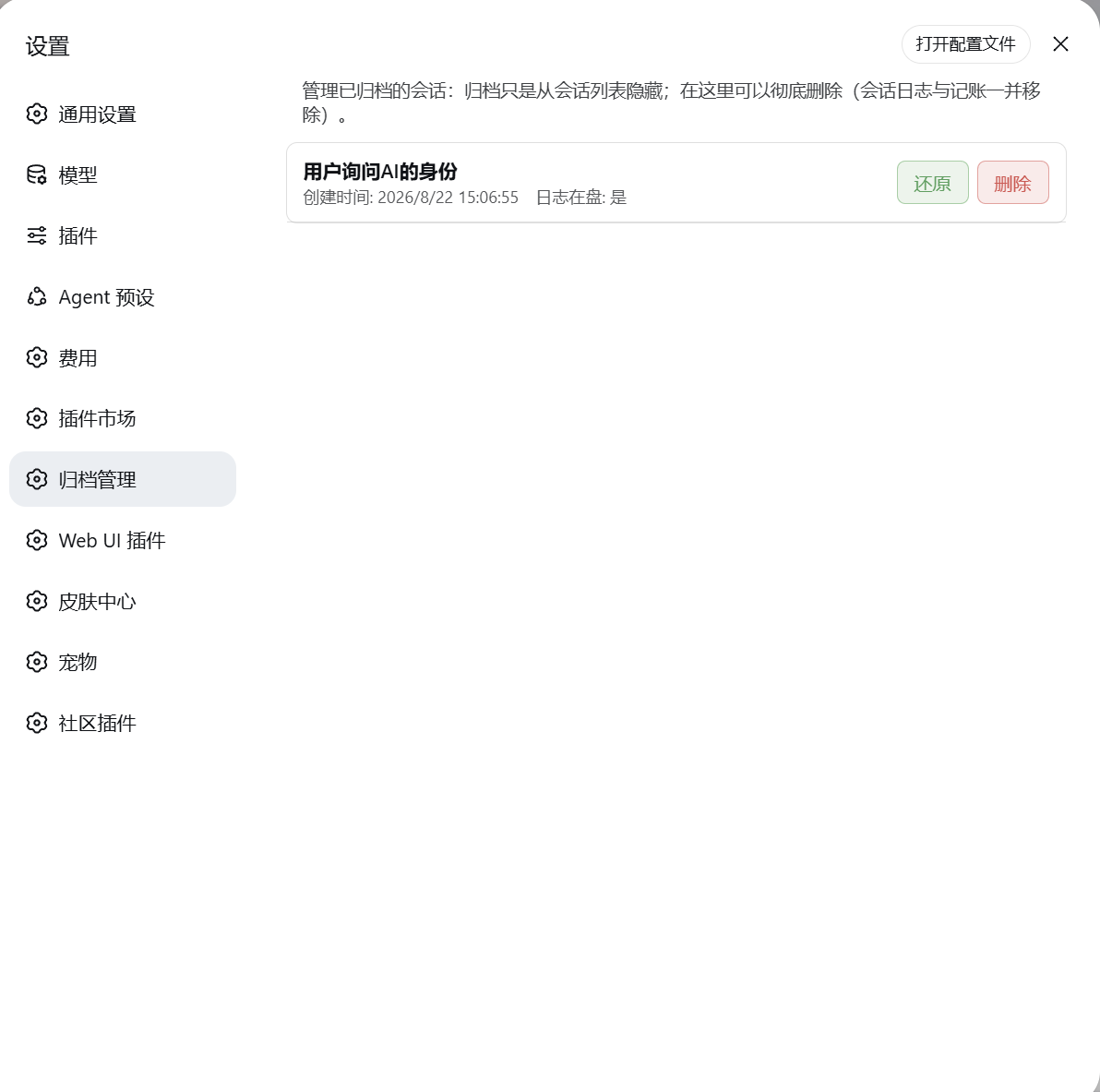
⋯menu, with confirmation before any change. - Settings → Archive Manager: list archived sessions with their title, creation time, and log availability; restore or permanently delete them.
- Stop running work and release the session's writer and in-memory state before deleting its log.
- Remove workspace membership and notify the native sidebar session feed.
- Keep persistent deletion receipts and clean up stale archive records or late cache writes that would otherwise bring deleted entries back.
- Require same-origin POST requests and validate session IDs before filesystem operations.
Installation
Add Plugin — recommended
Open DeepSeek Harness → Settings → Plugins → Add Plugin. Depending on the UI locale, plugin management may also be available from the sidebar.
Enter the npm package spec:
dsh-archive-manager-plus@0.1.10Complete installation, then fully quit Harness, including its tray process, and reopen it once to load both plugin halves.
To install the newest npm release later, enter dsh-archive-manager-plus or use the host's plugin update action. For a local build, enter the absolute path to dsh-archive-manager-plus-0.1.10.tgz, without surrounding quotes in the input field.
Install from source on Windows
Clone or download this repository, then run the script from its root:
powershell -NoProfile -ExecutionPolicy Bypass -File .\install.ps1 -DryRun
powershell -NoProfile -ExecutionPolicy Bypass -File .\install.ps1
For a custom Harness home:
.\install.ps1 -DSHHome "D:\path\to\dsh-home" -DryRun
.\install.ps1 -DSHHome "D:\path\to\dsh-home"
| Parameter | Behavior |
|---|---|
-ProfileDir <path> |
Explicit profile directory; takes priority over home detection. |
-DSHHome <path> |
Explicit home, then DSH_HOME, then ~/.dsh. |
-ProfileName <name> |
Select a profile; otherwise detect desktop first, then web. |
-DryRun |
Preview without changing files. |
-SkipCopy |
Update only the profile manifest; the plugin files must already be installed. |
The script copies the plugin files, registers its dependency and bundle, and verifies the profile manifest with Node. Manifest writes use UTF-8 without BOM. It keeps a manifest backup and restores that backup if final manifest verification fails; this does not provide rollback for deleted sessions.
Manual profile setup
If the host's plugin manager is unavailable, install into the intended profile directory:
cd "<profile-directory>"
npm install dsh-archive-manager-plus@0.1.10
Ensure that profile's package.json contains the dependency and bundle entry below. Merge them into the existing manifest; do not replace other dependencies or bundles.
{
  "dependencies": {
    "dsh-archive-manager-plus": "0.1.10"
  },
  "dsh": {
    "profile": {
      "bundles": ["dsh-archive-manager-plus"]
    }
  }
}
Save without a UTF-8 BOM, then fully quit and reopen Harness. Installing into an unrelated project directory does not activate a Harness plugin.
Usage
Direct deletion: session row → ⋯ → Delete session → confirm. Confirmation archives the target, stops its running work, releases it, and deletes its log and related records. Canceling the dialog makes no changes.
Archive management: open Settings → Archive Manager. Use Restore to unarchive a session without deleting its log, or Delete to remove it permanently after confirmation.
Deletion is irreversible. If loading, publication, or saving is still in progress, the plugin may refuse deletion and show an error. If a later step fails, the session may remain archived; retry or inspect it in Archive Manager. Existing deletion receipts apply to sessions deleted by versions that recorded them; a leftover entry from an older version may need to be deleted once more.
Data affected
Deletion releases the loaded Agent and session, closes the log writer, and removes:
- The session directory under
<DSH_HOME>/sessions/<encoded-workspace>/<session-id>/. - Its archive/pin markers and workspace membership through the live registry.
- Its current per-session projection-cache record and any legacy cache entry.
- Its cached host index entries, followed by a native sidebar removal notification.
The plugin records deleted IDs in <DSH_HOME>/storages/archive-manager-deleted.json to repair stale state or late projection-cache writes. It does not scan for and automatically delete unrelated session logs. Historical cost ledgers are not removed.
Do not include credentials, usernames, machine-specific paths, or private conversation content in public issues.
Development and verification
Requires a Node version compatible with the target Harness. Runtime verification for 0.1.8 used Node 24 and official v0.2.2-rc.1 packages.
npm run setup:integration
npm test
npm run test:integration
The setup command installs locked test dependencies into .compat-runtime inside this repository. Tests use temporary data directories and an offline model adapter; they do not touch the user's Harness home or call paid models. Without these dependencies, the three official-component integration tests are explicitly skipped; a run with skipped tests is not the full release validation.
client/client.js is a handwritten browser module bundle; lib/ contains the host ESM modules. No build step is required. Restart the host after host-side changes.
Before publishing, run the complete tests and npm publish --dry-run. Publish the same version from package.json to npm and create the matching GitHub tag/release.
No comments yet. Be the first to write one.