⚡ dsh-agent-conductor
Your AI fleet, ready when you are.
Delegate tasks from DeepSeek Harness to 11 external agent CLIs, follow their progress in the Big Fat Fish Commander, and bring results back to your conversation.
大肥鱼指挥官 · Big Fat Fish Commander
A small fleet for big tasks.





English · 简体中文
🚀 Install the Commander in DSH
Open Plugins in the left sidebar, then select Installed.
Click Add plugin and enter the package name:
dsh-agent-conductorClick Install, then follow DSH's prompts. Restart DSH if it asks you to.
Open Commander in the left sidebar. Install and sign in to the CLI you want to use separately.
If the Commander panel is missing after installation, check that npm has updated to 0.4.0. You can also install the current source from
https://github.com/MJorgin/dsh-agent-conductor.
🐟 Meet your command room
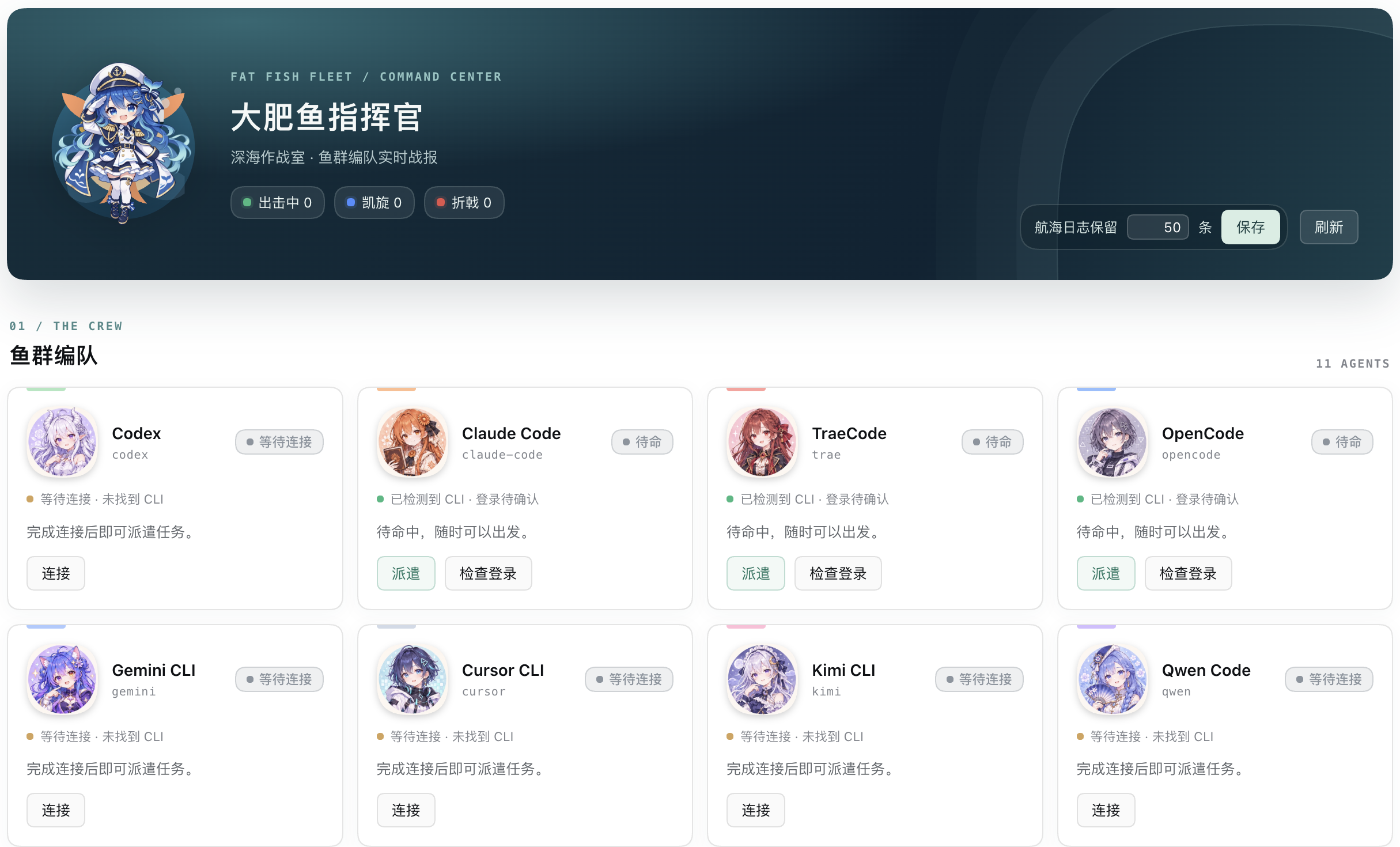
From the 指挥官 entry in the DSH sidebar, see your crew, check whether each CLI is available, and follow dispatches as they happen. Select Connect for an installation or sign-in guidance draft, or Dispatch to start with an editable task example. The draft is never sent automatically.
Meet the crew

The captain and crew are AI-generated interpretations made for this project; they are not official characters of the CLI vendors. Artwork is shown here as a visual collection; the panel assigns each portrait to its agent.
Availability is not authentication. Finding a CLI executable does not confirm that it is signed in or ready to run. The panel labels sign-in as unverified.
DeepSeek Harness is a great reasoning engine — but sometimes the job is better done by another coding agent: a Codex translation, a Claude Code investigation, a Cursor refactor. This plugin lets your DSH agent recognize when to delegate (by skill-description matching), dispatch a self-contained task to one of 11 external agent CLIs in headless mode, and bring the stdout result back as the answer — while the 大肥鱼指挥官 panel shows the fleet's live status.
Inspired by Multica — the "agent squad" idea as a zero-install DSH skill.
🎯 When to use Conductor
- Independent second opinion: ask Codex, Claude Code, or Gemini to review the same design and compare their reasoning.
- Legacy-code investigation: have one agent trace a call chain while another checks risks, regressions, and migration options.
- Cross-model implementation: use an agent whose toolchain or model fits the job, then bring its result back to DSH.
✨ What you get
| Capability | What it does | Cost |
|---|---|---|
| 🧠 Auto-triggered dispatch | Say "have Codex translate this README" — the model matches the skill, runs the dispatch script, and answers from the result | Free (uses the target CLI's quota) |
🔧 conductor_dispatch tool (optional bundle) |
The same registry as a first-class DSH tool, installed into a profile with one command | Free |
| 🐟 大肥鱼指挥官 panel (bundle) | Sidebar tab just above 更多: 11 chibi crew cards with live status, elapsed time and output tail, a ship log, per-run detail and a 终止 button, and adjustable history retention | Free |
🩺 doctor self-check |
python3 dispatch.py doctor probes which CLIs are installed (resolves PATH + tries --version) before you dispatch |
Free |
| 👀 Dry-run preview | Preview the target, working directory, argv, and shell-equivalent command without starting an external agent | Free |
| 👥 11 agent CLIs | Codex, Claude Code, TraeCode, OpenCode, Gemini, Cursor, Kimi, Qwen, Copilot, WorkBuddy, Grok | Their login quotas |
| 🔒 Privacy | Task text goes only to the CLI's own provider; keys stay local | — |
🧭 Why a Skill (and not just a plugin)
| profile plugin / bundle | dynamic plugin | Skill (this repo) | |
|---|---|---|---|
| Install | write profile + restart | define in-session | copy a folder |
| Trigger | manual | model calls a tool | description matching, model auto-recognizes |
| Risk | touches the host | session-scoped, gone on restart | read-only script, host-agnostic |
| Result | tool result | tool result | stdout directly becomes the answer |
One SKILL.md + a zero-dependency dispatch.py (Python stdlib only).
⚡ Quick start (Skill)
Copy skills/conductor/ to any skill root (project-level .dsh/skills/ or global ~/.dsh/skills/):
mkdir -p .dsh/skills/conductor
cp -R skills/conductor/. .dsh/skills/conductor/
No restart needed — from the next message on, just say:
- "派 codex 把这份 README 翻译成繁体中文" (have Codex translate this README)
- "让 Claude Code 查一下这个报错的成因" (ask Claude Code to investigate this error)
- "用 Codex 独立实现一个 XXX" (have Codex implement XXX independently)
The agent auto-recognizes the need (SKILL.md description matching) → runs dispatch.py → returns the result.
Before an unfamiliar or potentially write-producing dispatch, preview it without consuming the target agent's quota:
python3 skills/conductor/scripts/dispatch.py --dry-run claude-code "Read src/auth.ts and explain the token refresh flow. Do not edit files."
🧭 Agent capability matrix
| Task | First choices | Why |
|---|---|---|
| Architecture review / second opinion | Codex, Claude Code, Gemini | Different reasoning styles are useful for catching design blind spots |
| Legacy-code call-chain investigation | Claude Code, Codex, Copilot | Good for tracing repository-local dependencies and attaching evidence |
| GitHub-centric issue or Actions analysis | Copilot, Codex | Natural fit for repositories, pull requests, and CI diagnostics |
| Editor-coupled refactor | Cursor, Codex | Useful when the workflow is tightly connected to an existing project tree |
| Chinese localization / Chinese docs | TraeCode, Qwen, Kimi, Codex | Strong Chinese-language options; keep terminology consistent in the task |
| Fast alternative implementation | OpenCode, Qwen, Kimi | Useful for bounded spikes where a separate login/toolchain is available |
The matrix is a routing starting point, not a hard rule. Prefer an installed, logged-in CLI that has access to the correct workspace.
📋 Copy-ready dispatch recipes
- Safe diagnosis:
You are investigating a bug in the current repository. Do not edit files.
Reproduce the issue from this description: <paste error and steps>.
Read only the minimum relevant files. Return:
1) root cause, 2) evidence with file:line, 3) three ranked fix options,
4) tests that should be added or updated.
- Independent architecture review:
Review this design as an outside staff engineer. Do not assume hidden context.
Design summary: <paste PRD/technical plan>.
Challenge scalability, failure modes, security boundaries, and migration risk.
Return disagreements first; for each, include impact, evidence, and a fallback.
- Test-backed implementation:
Implement this change in the current repository: <scope and acceptance criteria>.
Work in small steps. Add or update tests first where practical.
Before finishing, run the relevant test command and report:
files changed, tests run, remaining risks, and follow-up work.
🛠️ Prereqs: install the CLIs you want to dispatch to
# Codex / Claude Code / OpenCode / Gemini / Qwen
npm i -g @openai/codex
npm i -g @anthropic-ai/claude-code
npm i -g opencode-ai
npm i -g @google/gemini-cli
npm i -g @qwen-code/qwen-code
# Kimi / Grok / Copilot (headless flags verified against each CLI's own --help)
npm i -g @moonshot-ai/kimi-code
npm i -g @xai-official/grok
npm i -g @github/copilot
# TraeCode CLI: https://docs.trae.cn/cli_command-line-parameters
# (already have codex-cli? symlink instead: ln -s ~/.codex/plugins/.plugin-appserver/codex ~/.local/bin/codex)
Headless note: Copilot non-interactive mode must auto-approve tools, so the registry runs
copilot -p "<task>" --allow-all-tools. The other CLIs run their standard print/headless flag.
Then check what's actually dispatchable on this machine:
python3 skills/conductor/scripts/dispatch.py doctor
# ✅ Codex  …/codex — codex-cli 0.151.0 …
# ❌ Gemini … 未找到 `gemini`  →  安装:npm i -g @google/gemini-cli
Working directory is auto-detected. The bundle tool runs each CLI in the current session's workspace (
exec.agent.session.header.cwd), thenCONDUCTOR_CWD, then the harness cwd — no hardcoded paths. Codex still requires a trusted git repo: pointCONDUCTOR_CWD=/path/to/git/repo(env or~/.dsh/secrets/media-tools.env) at one if the auto-detected folder isn't trusted. The skill script honorsCONDUCTOR_CWDand falls back to the current directory. Codex model override. Codex reads its model from the shared~/.codex/config.toml; if that model isn't available to the current account, setCONDUCTOR_CODEX_MODEL=<model>(env or~/.dsh/secrets/media-tools.env) and the bundle/dynamic tool and the skill script insert-m <model>automatically. Windows. The skill script resolves npm.CMDshims throughPATHEXTand decodes CLI output as UTF-8 (errors="replace"), so dispatch works even on non-UTF-8 ANSI codepages. The bundle tool goes through the hostsubprocessservice, which never shell-interprets argv — on Windows it therefore needs native.exeentry points; use the skill script for npm-shim-only CLIs. To let the dispatched agent write files: addsandbox_mode = "workspace-write"to Codex's~/.codex/config.toml. Dispatching consumes the target CLI's login quota.
✅ Verified vs ⏳ pending
| CLI | Headless command | Status |
|---|---|---|
| Codex | codex exec "{task}" |
✅ field-tested (translation task delivered) |
| Claude Code | claude -p "{task}" --output-format text |
✅ installed; per official docs |
| TraeCode | traecli exec "{task}" |
✅ per official docs |
| OpenCode | opencode run "{task}" |
✅ per official docs |
| Gemini CLI | gemini -p "{task}" |
✅ per official docs |
| Qwen Code | qwen --prompt "{task}" |
✅ per official docs (Gemini-CLI fork) |
| Kimi CLI | kimi --prompt "{task}" |
✅ flag confirmed from the CLI's own help (-p, --prompt = non-interactive) |
| Copilot CLI | copilot -p "{task}" --allow-all-tools |
✅ flag confirmed from copilot --help (bin is copilot, not github-copilot; --allow-all-tools is required headless) |
| Grok CLI | grok -p "{task}" |
✅ per official README (grok -p "..." = run one task) |
| Cursor CLI | cursor-agent -p "{task}" |
⏳ command shape pending field test (install via cursor.com; the npm cursor-agent package is unrelated) |
| WorkBuddy | workbuddy -p "{task}" |
⏳ command shape pending field test |
Install packages were verified against the npm registry: Kimi is
@moonshot-ai/kimi-code(binkimi), Grok is@xai-official/grok(bingrok), Copilot is@github/copilot(bincopilot), Codex is@openai/codex. Thekimi-clinpm package is an unrelated placeholder with no binary — do not use it.
🐟 The 大肥鱼指挥官 panel (0.4.0+)
The bundle now ships a browser half too: a 指挥官 row in the left sidebar, placed immediately above the built-in 更多 menu — the panel's Chinese display name is 大肥鱼指挥官 (Big Fat Fish Commander). It turns dispatches into a small "deep-sea war room":
- Fleet — a blue-haired whale captain and 11 AI-generated portraits inspired by the supplied character references. Cards show CLI availability and the latest dispatch; active cards animate subtly, respecting reduced-motion preferences;
- Connect and dispatch — the panel checks whether each CLI executable can be resolved. Choose Connect for a guided sign-in/install draft, or Dispatch for an editable task example. Opening a draft never sends it or runs a CLI; review the selected workspace before sending;
- Ship log — the last N runs (default 50, adjustable in the header). Completed-run summaries and the retention setting are saved locally in
~/.dsh/conductor-crew.jsonand restored after a restart; click a row for details; - Detail & terminate — while the host is running, inspect argv, working directory, duration, exit code, stdout/stderr tails and errors; the 终止 button stops a running process tree. An open report refreshes automatically;
- The page polls the same-origin
/conductor/stateroute, and only while it is visible; nothing leaves the machine.
Notes:
- A detected executable does not prove login, entitlement, or successful execution. The panel labels authentication as unverified; installation and login still require the user’s action.
- Only dispatches that go through the bundle's
conductor_dispatchtool appear in the panel. The skill'sdispatch.pyruns as a plain subprocess and registers nothing — by design. - The portraits are AI-generated interpretations informed by supplied reference images, not official vendor characters. They are bundled locally; the earlier SVG avatars remain as fallbacks. The character direction was inspired by dsh-pet; no artwork from that project is bundled.
- For privacy and bounded storage, restored history contains summaries only: command arguments and output tails are kept in memory and do not survive a restart. Task previews, working directories and error summaries are written locally and may contain sensitive text.
- Headless/CLI profiles without a web server still get the tool: the route is registered lazily and simply never used.
📦 Optional: install the bundle (tool + panel)
This repo is also a dsh bundle — a host half (dsh.bundle) plus a browser half (dsh.client.platform = "web"). One command installs both into a profile:
dsh plugin --profile desktop add github:MJorgin/dsh-agent-conductor
Use your own profile name if it isn't desktop. Follow DSH's restart prompt if one is shown; a replaced package may need a restart before its new client module is served. See Install the Commander in DSH for the graphical route.
- The tool, the panel and the skill share the same CLI registry (
index.js⇄conductor-dynamic.js⇄dispatch.py— keep the three in sync when adding CLIs); - The browser half is a hand-written client module (
client.js): it registers the sidebar row and themainpage throughctx.slots, and talks only to the same-origin/conductorroute; - Hardened host execution: supports dry-run previews, explicitly declares the
subprocessdependency, enforces a real 10-minute timeout that terminates the whole process tree (also on cancel — no orphaned CLIs), and clips over-long output (head + tail, ~20k chars) so a chatty agent can't blow up the context; stderr diagnostics are bounded the same way (head + rolling tail) so the real trailing error survives; - The panel page replaces the conversation area while open; switch back to a session from the sidebar. It uses only
--dsw-alias-*theme tokens, so it follows light/dark automatically; - Task-board recycling beyond this panel is still on the roadmap (see below).
📂 Repo layout
index.js                      # bundle host half: conductor_dispatch tool + /conductor routes
conductor-store.js            # run registry behind the panel (pure, unit-tested)
client.js                     # browser half: 指挥官 sidebar row + 大肥鱼指挥官 page
cordis.patch.yml              # bundle layer (one host row)
skills/conductor/SKILL.md      # skill definition: trigger description + dispatch rules + privacy
skills/conductor/scripts/dispatch.py  # dispatch engine (Python stdlib, zero deps)
conductor-dynamic.js           # alternative: dynamic-plugin edition (tool only — no panel)
tests/                         # clip, store, route, client-module and CLI-glue tests
🗺️ Roadmap
-
doctorhealth check and dry-run preview - 大肥鱼指挥官 panel — live fleet status, ship log, per-run detail + 终止 (0.4.0)
- AI-generated crew portraits and whale captain, with SVG fallbacks
- Routing by capability, speed, and cost
- Task-board recycling: dispatch results written back to dsh-task-board cards
- Squad orchestration: one task fanned out to several agents and merged (Multica squads shape)
🔑 Keys & privacy
- Keys are never stored in this repo. The skill script reads env vars, then
~/.dsh/secrets/media-tools.env(same convention as dsh-media-skills). - The panel is local-only: completed-run summaries and retention settings are saved in
~/.dsh/conductor-crew.json; command arguments and output tails remain in memory. Nothing is uploaded. - Task text is sent to the target CLI's provider — never put secrets or internal data into a task.
- Results belong to the target CLI's terms of service; mark deliverables as "done by ".
License
Related
- 🎨 dsh-media-skills — free vision & image generation for DSH (GLM-4V-Flash + Qwen3-VL + Gemini failover)
- 📬 Community listing PR: awesome-dsh-plugin#664
- 📋 awesome-dsh-plugin · ecosystem index: dsh-plugin topic
- 🎯 Benchmarks: Multica (multi-agent workbench) · dsh-web-ui (task board)
No comments yet. Be the first to write one.