dsh-limitup-widget — A 股涨停直播浮窗(DeepSeek Harness 插件)



A frame-wide floating A-share limit-up card for DeepSeek Harness (
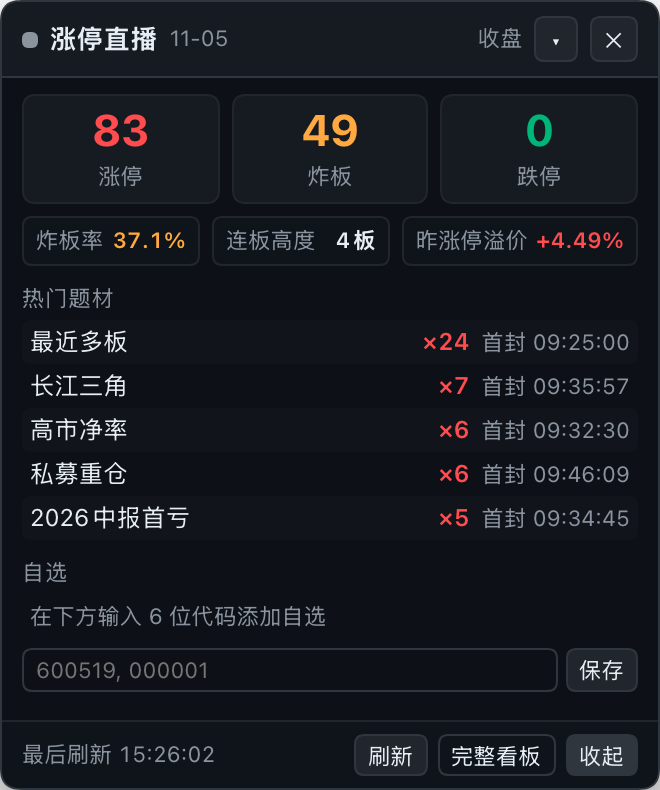
dsh). 在 DSH 桌面 / Web UI 的 frame 级浮动层(shell.overlay)里常驻一张深色小卡片:实时显示 A 股涨停 / 炸板 / 跌停家数、炸板率、连板高度、昨日涨停溢价、热门题材与自选股;Host 侧提供同源代理,并可探活 / 自动拉起 随仓库附带的 Python 看板后端。可拖动、可收起、可关闭(关闭后浮层无任何残留,可从左侧边栏底部恢复)。
1. 它是什么
本插件由 两半 组成,安装一个 npm 包即同时生效:
| 半 | 文件 | 职责 |
|---|---|---|
| Client | lib/client.js |
浏览器端手写模块(无构建步骤,React 由宿主提供),在 shell.overlay 注册 limitup-widget 卡片,轮询数据并渲染 |
| Host | lib/index.js |
ESM cordis 插件:在 DSH webServer 上挂 /limitup-widget 同源前缀路由,反代本地 Python 后端;启动时探活,可选自动拉起后端 |
| 后端 | dashboard/(仓库内,单独维护) |
Python + Flask + akshare 的 A 股涨停直播看板;默认 http://127.0.0.1:8000,不随 npm 包分发 |
插件本体不采集、不上传任何用户数据:浏览器只请求同源 /limitup-widget/api/*,Host 只访问
backendUrl(默认本机 127.0.0.1:8000)与本机 Python 进程。
2. 功能
2.1 浮动卡片内容
- 状态:状态点 + 文案(盘中 / 午休 / 收盘 / 盘前 / 休市 / 过期 / 未连接 / 连接中),数据日
MM-DD(非当前交易日时显示「回退」标签,悬停可看回退说明); - 三大数字:涨停 / 炸板 / 跌停 家数;
- 次级指标:炸板率(
炸板 ÷ (涨停 + 炸板),后端给出)、连板高度(最高连板数)、昨日涨停均溢价; - 热门题材 Top5:题材名 × 涨停家数、最早首封时间;概念映射未建完时后端按「所属行业」兜底并标注「行业」;
- 自选股:名称 / 代码 / 最新价 / 涨跌幅,涨停显示红色「涨停」徽章,单只获取失败显示「失败」;
- 页脚:最后刷新时间、刷新、完整看板、收起。
2.2 交互
| 操作 | 行为 | 持久化(localStorage) |
|---|---|---|
| 拖动 | 按住头部拖动(4px 位移阈值区分点击与拖动;按钮/输入框上不触发) | limitup.widget.pos |
| 收起 | ▾ 收起为小胶囊(「涨停 N · 炸板 N」),整颗胶囊可点击展开 | limitup.widget.collapsed |
| 关闭 | 头部 ✕ 关闭整卡:浮层内不渲染任何内容(无小挂件残留);左侧边栏底部出现「涨停」恢复按钮,点击恢复整卡;关闭期间轮询继续。关闭状态只在本次页面生命周期内有效,刷新/重启 DSH 后看板自动重新出现(不会永久关没) | 会话内状态 |
| 刷新 | 页脚「刷新」→ GET /api/refresh 强制后端刷新一次(可能耗时约 30s) |
— |
| 完整看板 | 用绝对 http 地址在系统浏览器打开后端看板(桌面端 dsh-app:// 下相对地址会被静默拒绝;弹窗被拦时自动复制地址并提示) |
— |
| 自选 | 输入逗号 / 空格分隔的 6 位代码,保存后立即刷新 | limitup.watchlist(与看板页面同一 key) |
2.3 轮询与容错
- 轮询间隔由 Host 的
/limitup-widget/api/config下发,默认 交易时段 60s / 其余 300s; 页面隐藏时暂停,visibilitychange回到前台立即补拉一次; - 数据过期:红色横幅「数据已过期:自 HH:MM 起未更新」(悬停看原因);
- 后端未连接:错误条 + 「重试」;
- 从未成功采集:显示「加载中…」/「暂无数据」;
- 所有服务端字符串渲染前经
esc()转义(React 本身也会转义),无dangerouslySetInnerHTML; 定时器、visibilitychange监听、样式标签在卸载时全部清理。
2.4 Host 侧同源代理
浏览器只认 /limitup-widget 前缀,避免 CORS / 混合内容问题:
| 路由(GET/HEAD) | 行为 |
|---|---|
/limitup-widget/ |
302 到 backendUrl/(完整看板) |
/limitup-widget/api/config |
返回 backendUrl、backendPageUrl、pollTradingMs、pollIdleMs、autostart |
/limitup-widget/api/snapshot |
反代后端 /api/snapshot(12s 超时) |
/limitup-widget/api/refresh |
反代后端 /api/refresh(45s 超时) |
/limitup-widget/api/health |
反代后端 /api/health(6s 超时) |
| 其它路径 / 非 GET·HEAD | 404 / 405 |
| 后端不可达 | 502 {"ok":false,"error":"backend_unreachable",...},并限频尝试补拉后端 |
后端自动拉起(可选):插件加载时探活 backendUrl/api/health。若健康检查失败、autostart 为 true 且
script 非空,则用 pythonBin script 拉起后端(环境对齐 HOST=127.0.0.1、PORT=backendUrl 端口、
TZ=Asia/Shanghai),最多等待 startupTimeoutMs;只会在自己拉起过进程时于卸载时终止它,
已在运行的后端永远不会被插件杀掉。
3. 安装
3.1 环境要求
- DeepSeek Harness
>=0.2.0-rc.2 <0.3.0(桌面版或 Web profile),Node.js ≥ 20; - 后端需要 Python ≥ 3.9(推荐 3.10+)与可访问东方财富数据源的网络(akshare 免费接口,无需 API key)。
3.2 安装插件
方式 A:插件市场 / Settings → Plugins(上架后推荐)
在 DSH 的 设置 → 插件(市场 / Discover)里搜索 dsh-limitup-widget 一键安装。
桌面版 profile 由 Electron 应用管理,请通过设置界面安装,不要手动改桌面 profile。
方式 B:CLI / npm(已发布 【0.2.1】)
# 安装到当前 profile(不用全局安装)
dsh plugin add dsh-limitup-widget
dsh plugin --profile web add dsh-limitup-widget         # 或显式指定 profile

# 从 GitHub 源码(等价,npm 不可用时)
dsh plugin --profile web add github:LusJourney/dsh-limitup-widget

# 从本地 tarball / Release 附件
dsh plugin --profile web add /absolute/path/to/dsh-limitup-widget-0.2.1.tgz
npm 包页面:https://www.npmjs.com/package/dsh-limitup-widget
安装后重启 DSH 应用(新 bundle 才会进入正在运行的 roster),右下角应出现「涨停直播」卡片。
市场索引:DSH
0.2.1+的 插件 → Discover → Index sources 可添加https://cdn.jsdelivr.net/npm/dsh-plugin-catalog/index.json,之后即可搜索到本插件。
3.3 准备后端(二选一)
A. 手动运行(推荐先跑通)
git clone https://github.com/LusJourney/dsh-limitup-widget.git
cd dsh-limitup-widget/dashboard
python3 -m venv .venv
source .venv/bin/activate            # Windows: .venv\Scripts\activate
pip install -r requirements.txt
python app.py                        # → http://127.0.0.1:8000
首次启动约 10–20 秒出第一版快照(概念映射在后台慢慢建,期间题材按行业兜底);依赖与接口说明见
dashboard/README.md。
B. 交给插件自动拉起
在 profile 的 cordis.patch.yml 里写同 id 配置(完整示例见下一节),把 pythonBin 指向
后端 venv 的 python 绝对路径、script 指向 dashboard/app.py 绝对路径。插件启动时若后端没起会自动拉起;
反之 script: '' 时只探活、不拉起(本包默认配置即如此)。
3.4 验证
curl -s http://127.0.0.1:8000/api/health
# 期望:{"ok":true,...}
重启 DSH 后,右下角出现卡片即安装成功;Host 日志里可见 [limitup-widget] host plugin loaded。
4. 配置
默认值在包内 cordis.patch.yml 的 insert.config 中(Host 行 id: limitup-widget)。
用户覆盖方式:在 profile 的 cordis.patch.yml 追加同 id 的 patch 条目。
⚠️ 覆盖会替换整个 config 对象,请写全量字段:
- id: limitup-widget
  name: dsh-limitup-widget
  config:
    backendUrl: http://127.0.0.1:8000
    autostart: true
    pythonBin: /absolute/path/to/dashboard/.venv/bin/python
    script: /absolute/path/to/dashboard/app.py
    startupTimeoutMs: 45000
    pollTradingMs: 60000
    pollIdleMs: 300000
| 字段 | 默认 | 允许范围 | 说明 |
|---|---|---|---|
backendUrl |
http://127.0.0.1:8000 |
任意 http(s) URL |
后端根地址;端口同时用于自动拉起子进程的 PORT |
autostart |
true |
布尔 | 探活失败且 script 非空时是否拉起后端 |
pythonBin |
python3 |
非空字符串 | 拉起后端用的 Python(建议后端 venv 内解释器的绝对路径) |
script |
''(空) |
字符串 | app.py 绝对路径;为空则只探活、不拉起 |
startupTimeoutMs |
45000 |
1000–300000 | 拉起后等待健康的超时 |
pollTradingMs |
60000 |
15000–600000 | 交易时段客户端轮询间隔 |
pollIdleMs |
300000 |
30000–3600000 | 非交易时段客户端轮询间隔 |
5. 目录结构
dsh-limitup-widget/
├── package.json          # dsh.bundle.patch + dsh.client(platform: web) 清单
├── cordis.patch.yml      # bundle patch:insert Host 行 limitup-widget + 默认 config
├── lib/
│   ├── index.js          # Host:/limitup-widget 路由 + 后端探活/自动拉起
│   └── client.js         # Client:shell.overlay 浮动卡片(拖动/收起/关闭/轮询)
├── tests/
│   ├── test-loader.mjs   # 假 window.__ModuleLoader__ / React:加载、注册、渲染、转义
│   └── test-node-plugin.mjs  # 假 ctx/webServer:路由映射、autostart 决策矩阵
├── assets/
│   ├── icon-180.png      # 市场图标(180×180)
│   └── screenshot-card.png
├── dashboard/            # Python 看板后端(GitHub 仓库内,不在 npm tarball 中)
├── screenshots.json      # 市场店铺截图声明
├── README.md
└── LICENSE
npm pack 生成的 tarball 只包含插件本体(lib/、cordis.patch.yml、README.md、LICENSE、assets/、
screenshots.json);需要后端源码请从 GitHub 仓库获取 dashboard/。
6. 开发与验证(不启动 DSH 也能跑)
node --check lib/index.js
node --check lib/client.js
node tests/test-loader.mjs      # 假 ModuleLoader/React:加载、注册 shell.overlay、渲染、XSS 转义
node tests/test-node-plugin.mjs # 假 ctx/webServer:路由映射、autostart 决策
npm test                        # 上面两个测试
7. 故障排查
- 卡片不出现:确认插件已装进当前 profile 并重启 DSH;Host 日志有
[limitup-widget] host plugin loaded说明 Host 半已加载。浏览器 console 若报slot entry crashed in 'shell.overlay',用node --check lib/client.js检查语法。 - 卡片显示「后端未连接」:
curl http://127.0.0.1:8000/api/health应返回{"ok":true,...}。 未启动且未配置自动拉起时,手动python app.py;检查pythonBin/script是否为绝对路径且可执行。 - 关闭后找不到卡片:看左侧边栏底部(Settings 旁边)的「涨停」小按钮,点一下恢复;刷新窗口(Cmd+R)或重启 DSH 也会让看板重新出现;
清除 localStorage 的
limitup.widget.hidden与limitup.widget.pos后刷新页面。 - 8000 端口被占用:改
backendUrl(自动拉起的PORT会取自 URL 端口),或让已有后端先运行。 - 健康检查一直超时:首次启动 akshare 拉数据可能较慢,可调大
startupTimeoutMs。 插件只在自己拉起进程后才会在卸载时终止它,已在运行的后端不会被杀。 - 数据过期红色横幅:后端数据源异常 / 被限流,保留上一份好数据并标 stale; 打开完整看板看后端日志与数据源状态。
- 完整看板点了没反应:桌面端会用系统默认浏览器打开
backendUrl;普通浏览器弹窗被拦时插件会复制 看板地址到剪贴板并提示。 - Python 环境:不要用 DSH 内置 runtime 的 python 建后端 venv(hardened runtime 签名会拒绝 pip 安装的 C 扩展,numpy 报 different Team IDs)。请用系统 / Homebrew / python.org 的 Python 3.9+。
8. 数据、隐私与免责声明
- 插件只读取 DSH 前端数据并请求同源
/limitup-widget/*;Host 只访问配置的backendUrl与本机 Python; 无遥测、无第三方请求、不读取任何凭据; - 持久化仅使用 localStorage 的 4 个 key:
limitup.widget.pos、limitup.widget.collapsed、limitup.widget.hidden、limitup.watchlist; - 数据来自后端通过 akshare 免费公开接口抓取的东方财富数据,可能存在延迟、缺失或错误;
- 本插件只做数据展示与提醒,不构成任何投资建议,据此交易的风险由使用者自行承担。
9. License
MIT © 2026 Luka Zhao (LusJourney)
English summary
dsh-limitup-widget is a DeepSeek Harness plugin that mounts a floating A-share limit-up card in the
frame-level overlay (shell.overlay). It shows limit-up / broken-board / limit-down counts, break rate,
consecutive-board height, previous-day limit-up premium, the top 5 themes and a localStorage-backed watchlist.
The card can be dragged (position persisted), collapsed into a pill, or closed entirely (no floating remnant; while closed a small 涨停 restore button appears at the sidebar footer, and a refresh brings the card back)
button; all three states persist across reloads. Polling runs every 60 s during A-share trading hours and
every 300 s otherwise, pauses when the page is hidden and catches up on visibilitychange. The Host half
exposes a same-origin proxy under /limitup-widget/api/*, health-checks the backend and can optionally spawn
python app.py (only the child it spawned is ever stopped). The Python dashboard backend lives in the
GitHub repository under dashboard/ and is not bundled in the npm tarball. MIT licensed.
No comments yet. Be the first to write one.