DeepSeek Web (DSH plugin)
简体中文 · English
Two controls, one purpose: keep DeepSeek's web chat and your DSH Session in the same window.
- Sidebar launcher — beside Settings at the sidebar foot. Opens
https://chat.deepseek.com/in the shipped right-Sidebar Browser tab, next to the current Session. Clicking again focuses the tab it already has. - Composer bridge — a small "pull" control in the composer tool row (before Send). One click reads the newest answer out of the DeepSeek panel and inserts it into the current draft as one undoable edit, so you can hand what the page produced straight to your agent.
The bridge prefers a live text selection inside the DeepSeek page; with nothing selected it takes the last rendered answer block.
- Review tool — the host half also registers
web_review, so the agent can send a prompt into that same page and get the answer back as structured findings. See Review bridge.
Install
This is a DSH Desktop bundle, not an npm package. Distribution is the folder itself.
- Clone or download this repository somewhere permanent, e.g.
C:\plugins\deepseek-web-panel. - Ask your DSH agent to install that directory as a bundle
(
plugin_manager→install_bundlewith the absolute path). The agent adds the dependency as alink:and the bundle row to your profile, so edits to the folder stay live. - Restart DSH. The launcher appears at the sidebar foot, beside Settings.
Manual alternative: add "@local/dsh-plugin-deepseek-web": "link:C:/path/to/deepseek-web-panel"
to your profile's package.json, list the package under dsh.profile.bundles,
and install; cordis.patch.yml is the row this bundle inserts.
Through a plugin market
This repository also publishes a market index (market.json, format 1). Add
one of these URLs under Settings → Plugins → Discover:
https://fastly.jsdelivr.net/gh/LuoZIren/dsh-deepseek-web@main/market.json
https://gcore.jsdelivr.net/gh/LuoZIren/dsh-deepseek-web@main/market.json
https://raw.githubusercontent.com/LuoZIren/dsh-deepseek-web/main/market.json
The jsDelivr mirrors are listed first because raw.githubusercontent.com is
unreachable from some networks; the Host fetches the index itself, so pick one it
can reach.
The entry installs this repository as a commit-pinned Git package
(git+https://github.com/LuoZIren/dsh-deepseek-web.git#<commit>), so an update
means a new commit and a new version in the index — and the installing machine
must be able to clone github.com. A market index is just a JSON file a reader
is configured with; there is no central registry to submit to.
Requirements: DSH Desktop (Electron) on Windows, macOS or Linux. The sign-in
patch targets the desktop app.asar; a DSH upgrade replaces that file, which the
status dot then reports.
What it writes to your machine
- The status dot's repair path performs a 50-byte, equal-length rewrite of a
single statement inside the desktop
app.asar, after savingapp.asar.orig-bak. It refuses to write when the archive's shape changed. That rewrite is what keeps the DeepSeek sign-in across restarts; without it every launch asks you to sign in again. - Nothing else is written outside your DSH profile. The review bridge types into the DeepSeek page you already have open and reads its answer back.
The status dot
A 6 px dot rides to the right of the launcher and reports whether the partition patch is in place:
| Dot | Meaning |
|---|---|
| green | the archive carries the persistent statement |
| red | the statement is gone (an upgrade replaced it) — click the dot to rewrite it |
| gray | not known yet: open the DeepSeek panel once, or restart DSH |
Clicking a red dot asks the Host half to re-apply the patch; the tooltip then says a restart is needed, because the running process keeps the partition it was started with. A dot that stays red with "the archive no longer matches this patch" means a DSH build changed the statement itself — the plugin refuses to write rather than risk the archive, and the patch text has to be re-derived.
The dot reads two sources, in order: the Host half's GET /deepseek-web/patch
(the archive itself), and the live guest's partition attribute (what the
running process actually uses). The second one is what makes the dot correct
before the Host half has been reloaded by a restart.
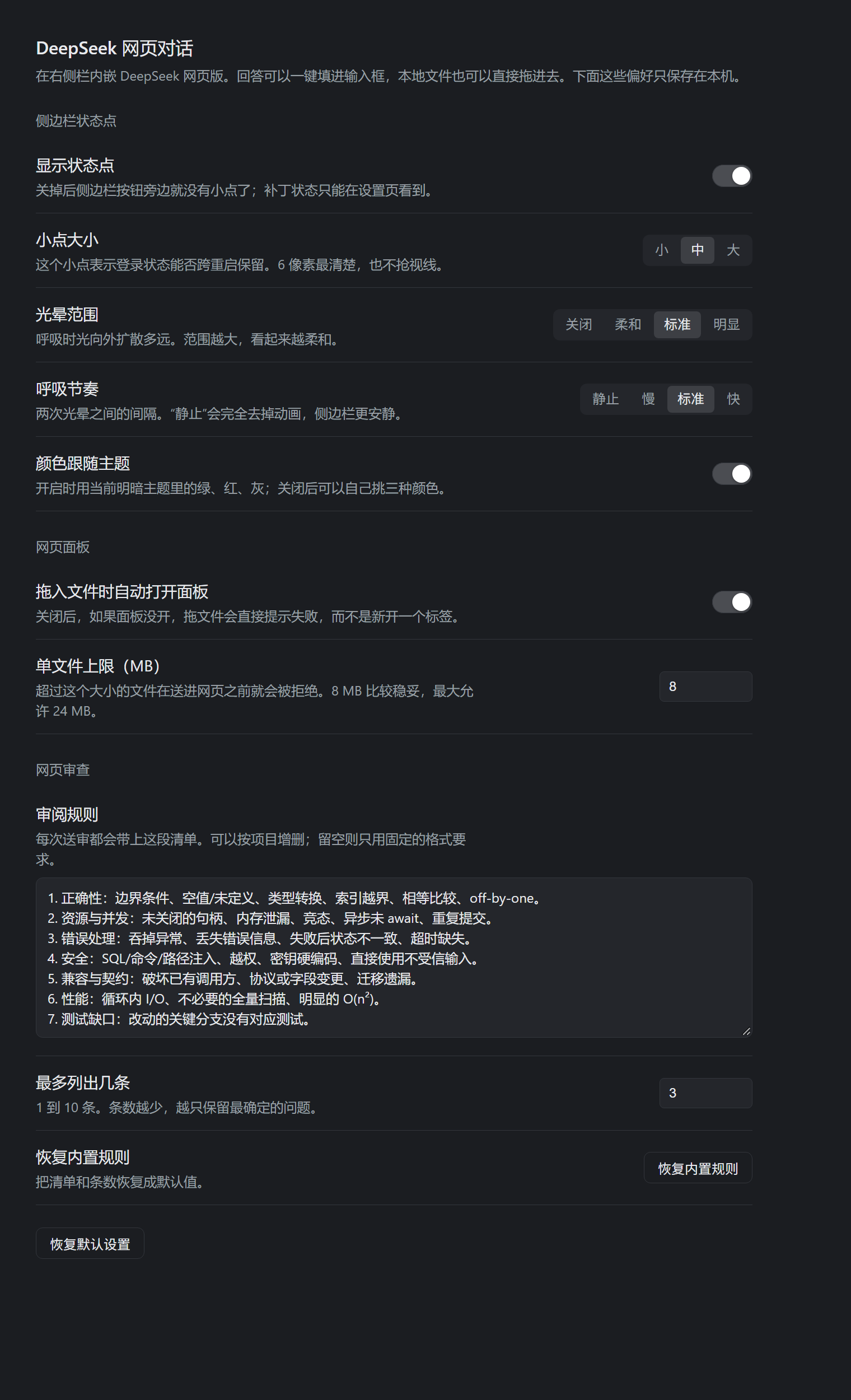
Settings
Settings → DeepSeek web chat holds this plugin's preferences. They are
stored per browser profile (dsh.deepseek-web.settings.v1) and apply live — the
dot on the sidebar updates as you change them, without a reload.
| Group | Preference | What it does |
|---|---|---|
| Status dot | Show the dot | Hides the dot entirely; the launcher stays. |
| Dot size | 4, 6, or 8 px. | |
| Halo spread | Off / soft / normal / wide — how far the breathing glow reaches. | |
| Breathing rhythm | Still / slow / normal / fast. "Still" removes the animation. | |
| Colours follow the theme | On: green, red and grey come from the active theme. Off: pick three colours. | |
| Web panel | Open on drop | Off: a drop with no panel open reports an error instead of opening a tab. |
| Largest file (MB) | 1–24; files above it are refused before they cross into the page. | |
| Web review | Output format | Plain list, JSON with severity, or strict JSON with evidence and confidence. |
| Review checklist | Sent with every web_review request; edit it per project, empty it to keep only the fixed format rules. |
|
| Findings at most | 1–10. Fewer findings keeps only the most certain ones. | |
| Built-in checklist | Restores the default checklist and count. |
"Restore defaults" resets every value above. Every preference is written to local storage, so a fresh install starts from the defaults and a broken stored value falls back to them.
The default checklist follows the design of Alibaba's open-source Open Code Review: fixed check areas (correctness, resources and concurrency, error handling, security, compatibility, performance, tests) and precision before recall — a finding must be provable from the shown code, so the model is told to mark uncertainty instead of guessing. The wording is this plugin's own.
Drag and drop into the web chat
A bar appears at the top of the frame as soon as a drag can become a file. Nothing is sent until the drag is released on that bar — moving, pressing, or starting a native drag only announces the candidate, so an accidental 8-pixel drag can never hand a file to the page. Sources, in the order the bridge tries them:
| Source | What the bridge reads |
|---|---|
| File manager / desktop | the File objects of the drag itself |
| Conversation file or delivery card | its accessible description, title, data-*, href, or src; a card is an interactive button, so the bridge drags by pointer instead of native drag. A card header names no file, so the bridge gathers the distinct paths listed under it — one file for a single-file card, every file for a multi-file card (the bar shows the count before you release) |
| Inline file mention or image | the link address: dsh-resource://file/…, file:///…, or a relative href |
A reference that only shows a name (client.js, 简历.pdf) |
the Host half searches the current session directory by basename (depth 5, skipping node_modules, .git, dist…); a unique match wins, several matches is reported rather than guessed |
The session directory comes from the one visible session. A side-by-side multi-session layout keeps the last session that published it; a reference that fails to resolve that way still falls back to the by-name search, so the failure mode is a refusal rather than a wrong file.
Paths are normalized first: file:/// URLs, dsh-resource://file/… addresses,
:24 / :24-30 line anchors, and relative references resolved against the
session directory with that platform's separator. POSIX and Windows forms are
both understood, and a POSIX-shaped string on a Windows session is treated as a
site route rather than a file. A relative reference must look like a path (no
spaces, an extension), and a rooted one is never joined onto the session.
When nothing resolves, the bar says so and copies the pressed element's shape
(tag, class, and its title/href/aria-*) to the clipboard, which is the
fastest way to report a surface the bridge does not recognize yet.
Limits: 8 MB per file (one base64 string crosses into the guest in a single
executeJavaScript call, so the payload is capped well below IPC discomfort),
directories are refused, and the page must expose an input[type=file] or an
editable drop zone; without either the bar reports the failure instead of
pretending to send.
Review bridge
The Host half registers a web_review Tool: the agent sends a review prompt
(code, a diff, the answer format it wants), and the answer comes back as the
tool result. The page is driven the same way a person would drive it — the
prompt is typed into the composer and Enter is pressed — so no reverse-engineered
API, PoW solver or token refresh is involved.
Flow:
- the tool queues one request (single flight: a second call while one runs is rejected) and awaits the answer;
- the Client polls
GET /deepseek-web/review/taskevery 1.2 s; - on a new request it opens a dedicated DeepSeek tab (never the conversation the user is having), waits for the composer, types, and sends;
- it polls the page until the answer stops growing (message count or body length stops changing, no stop control visible), then extracts the text;
- it posts the answer to
POST /deepseek-web/review/result, which resolves the waiting tool call.
The message the page receives is composed on the Client: a fixed block (chosen by the Output format preference) followed by the checklist from Settings, the previous round when one is supplied, and the request the tool sent. The fixed block is not editable; everything after it is.
Structured answers, dedupe, re-review
The default format asks for one JSON block:
{"findings":[{"severity":"high|medium|low","problem":"…","reason":"…","fix":"…"}]}
The Host parses it (fenced block or bare object/array, English or Chinese keys,
severity words normalized), and the tool returns findings[] alongside the raw
report; parsed: false means the answer was prose and only report is usable.
Two behaviours ride on that shape:
- Dedupe — the same prompt with the same previous findings returns the cached
answer (
cached: true, no page round-trip).force: truere-asks anyway. - Re-review — pass
previousFindings: string[]and the page is asked to confirm each one (fixed / still there / changed) before adding new ones.
The conversation card
A web_review call renders through tool.call.toolview (keyed by tool name) as
a card instead of a plain text block: one row per finding with its severity, the
reason and the fix, plus a checkbox to tick a finding off once it is handled.
Ticks are stored per call id in local storage, so they survive a reload and stay
with the call they belong to. A run still in flight shows "reviewing…"; a run
whose answer was prose shows the answer text instead of rows.
Invoking it
The bridge is a Tool, and only an agent can call a Tool — so a review is asked
for in conversation ("use the web chat to review this diff"), not clicked. The
agent may call it more than once in a turn, passing previousFindings on the
second call. Nothing starts a review on its own.
Limits: 200 000 characters per prompt, 90 s default wait (300 s maximum), one review at a time, and the panel must be open and signed in. The prompt leaves this machine and is visible in that DeepSeek chat — treat it as a second opinion, not a gate.
Two details the Host half has to get right:
- The archive must be opened through
original-fs. Desktop runs the Host under Electron's node, whosefstreats every path containing.asaras a path inside an archive.open('…/app.asar')therefore becomes "open the empty path inside app.asar" and fails withENOENT, not found in …app.asar.original-fsis the same module without that layer (verified against this build underELECTRON_RUN_AS_NODE), withprocess.noAsaras the fallback for a plain-node run. - A write needs a token.
GETreturns a per-processrandomUUID, and aPOSTmust carry it in the query (or thex-dsh-deepseek-web: patchheader), so a page from another origin — which cannot read the GET body and does not survive a preflight — cannot trigger a rewrite.
Persistent sign-in: the partition patch
Desktop creates the sidebar browser's storage partition in exactly one place
(DesktopBrowserGuests.acquire in the shell's main process):
let partition = this.partitions.get(workspace);
if (partition === void 0) {
  partition = `dsh-sidebar-browser-${randomUUID()}`;
  this.configureSession(session.fromPartition(partition));
  this.partitions.set(workspace, partition);
}
A partition name without the persist: prefix is an in-memory Electron session,
so cookies and localStorage die with the process: every launch is a brand-new
device, which is both the repeat sign-in and the reason DeepSeek's risk engine
treats the login as new. A plugin cannot change that — will-attach-webview
rejects any guest whose partition differs from the lease the main process
issued, and the lease always carries this exact string.
So the fix lives outside the plugin. tools/apply-persist-patch.mjs rewrites
that one statement in place, with a replacement of exactly the same 50 bytes
so no asar header, offset, or file table changes:
- partition = `dsh-sidebar-browser-${randomUUID()}`;
+ partition="persist:"+workspace.replace(/\W/g, "");
node tools/apply-persist-patch.mjs --check     # report only
node tools/apply-persist-patch.mjs --apply     # needs the app closed
node tools/apply-persist-patch.mjs --restore   # back to stock
--apply refuses while DeepSeek Harness runs, keeps one app.asar.orig-bak
beside the archive, and reads the bytes back to verify. The app must be closed
because it maps app.asar; the script parses the patched method before it
writes, and was dry-run against a copy of the archive first.
A DSH upgrade replaces app.asar, so the patch has to be re-applied after
every upgrade. The status dot is the reminder: it turns red, and one click on
it runs the same rewrite from the Host process (no terminal, no closed app — the
archive is writable while the app runs; the new bytes take effect on the next
launch).
The rewrite itself is a fixed procedure, not a per-build judgement call: one byte-for-byte substitution of a known 50-byte statement. Only if a DSH build changes that statement does the patch need re-deriving, and every path refuses to write in that case — the script exits non-zero, the dot reports "the archive no longer matches this patch", and the app is left untouched.
Effects to know about:
- The partition becomes
persist:<workspace without punctuation>, so the cookie jar is written under the app'sPartitionsdirectory — sign in once, and the session survives restarts. The sign-in is a stable device from then on. - This is the whole sidebar browser, not just DeepSeek: every site opened in that panel now keeps its cookies on disk.
- The name is sanitized with
\W, so a workspace path made only of punctuation collapses, and two very long paths that differ only after 200+ characters could share a jar. - A revoked or expired DeepSeek session still asks for one sign-in.
Why DeepSeek said "abnormal usage environment"
DeepSeek's own client ships a hard-coded check:
navigator.userAgent.toLowerCase().includes('electron')
  || ('process' in window && window.process.type === 'renderer')
Either hit renders the usageEnvUnsafeTitle / usageEnvUnsafeWarn dialog
("使用环境异常 … 建议您使用我们的官方产品"). In this guest process is not
exposed (sandbox, contextIsolation, no node), so the user agent is the only
trigger. The plugin calls webview.setUserAgent() once per tab with the same
string minus the Electron/x.y.z and application tokens — platform and Chromium
version untouched — and reloads, so the check no longer fires and the sign-in
request no longer advertises an embedded browser.
The dialog is dismissible and its "closed" flag is persisted storage, so once the partition survives restarts, a dismissed dialog stays dismissed too.
Why it reuses the Browser tab
chat.deepseek.com answers with content-security-policy: frame-ancestors 'none', so a plain <iframe> page inside DSH cannot load it. The shipped
Browser tab type is the supported way around that: on Desktop it embeds a real
Electron guest view (not a frame), which a site cannot refuse. The bridge then
reads that guest through webview.executeJavaScript(); the guest keeps
sandbox, contextIsolation, and nodeIntegration: false, so nothing is
injected into the page and no Node access is granted.
In the browser build of DSH the same tab type falls back to an iframe and no guest exists, so both controls report that embedded browsing is unavailable instead of failing silently.
Extension points
| Piece | Where |
|---|---|
| Launcher | Client slot sidebar.footer.action, cell id deepseek-web |
| Navigation | ctx.sidebarRight.openTab('browser', { params: { url } }) |
| Bridge | Client slot conversation.input.right, cell id deepseek-web-pull |
| Insertion | inputActions.captureInsertion() + inputActions.insertText(text, span) |
| Styling | One style[data-plugin-css] tag using --dsw-* tokens; focus ring on :focus-visible only |
| Host half | empty apply(); the capability is entirely browser-side |
Known limits
- Sign-in persistence needs the main-process partition patch described above; the plugin alone cannot keep cookies across restarts.
- Without a Session on screen the right Sidebar has no surface, so the launcher reports that instead of opening an empty panel.
- The guest's user agent is normalized to a plain Chrome string (see above). A server that cross-checks User-Agent against client hints could notice the mismatch; DeepSeek's shipped client reads only the agent string.
- The bridge reads the guest's rendered text by shape (
[class*="markdown"]), not by a DeepSeek API. If the site reworks its markup, the shape fallback chain degrades to the last message-like block; a manual selection always works and is checked first. - The client half hot-reloads in this Desktop build: saving
client.jsre-applies the module and replaces its slot registrations in place. - Requires the
ui-sidebar-browserrow, which the Desktop profile enables by default.
No comments yet. Be the first to write one.