dsh-memory-vault











Persistent OKF memory for DeepSeek Harness (DSH):
a Python MCP server (SQLite FTS5 + Markdown), two Cordis plugins (memory-mcp, memory-auto)
and a vault starter with templates and a type registry.
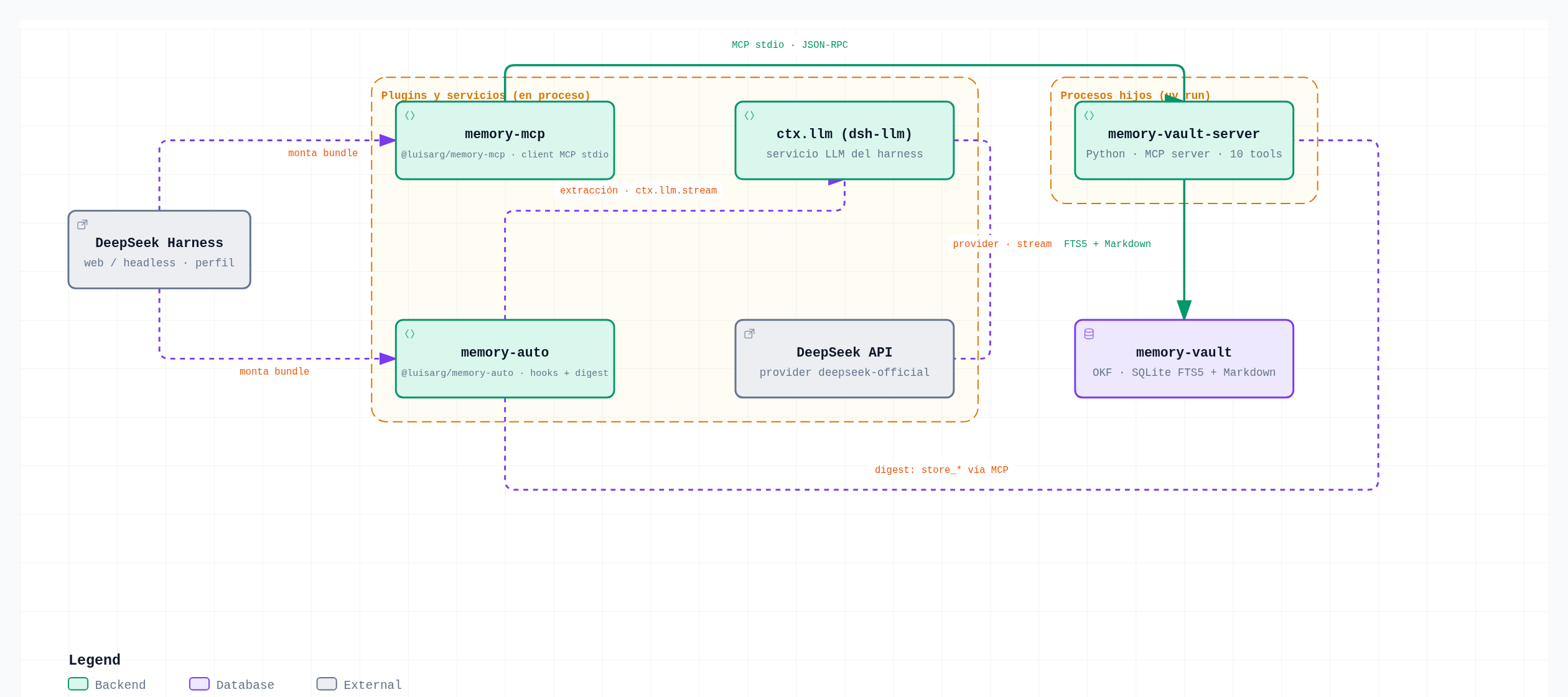
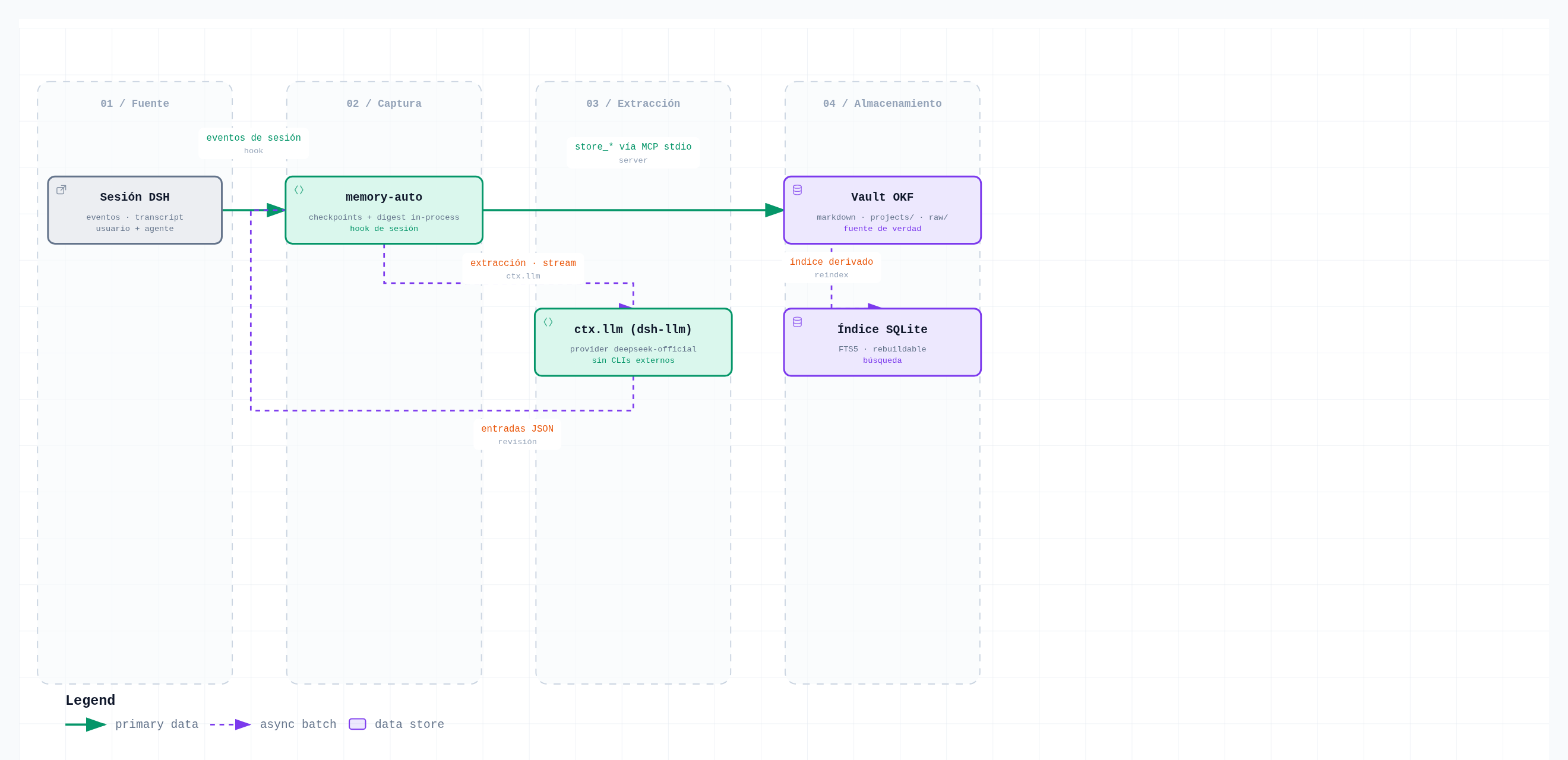
Components
| Component | What it does | Bundle |
|---|---|---|
memory-mcp |
MCP stdio wrapper: connects DSH to the memory vault server | @luisarg/memory-mcp |
memory-auto |
Auto memory capture: session digest with commit/compaction checkpoints | @luisarg/memory-auto |
memory-vault-server/ |
Python MCP server: SQLite FTS5 + Markdown OKF | — |
memory-vault/ |
Vault starter: templates + type registry + tag vocabulary | — |
scripts/digest_session.py |
Optional standalone post-session digest (CLI, not used by the plugins) | — |
Quickstart
pnpm install
pnpm -r build

# local dev with an overlay (paths relative to the repo cwd)
dsh web --patch ./examples/dev-memory.cordis.yml
Install
# 1. install both plugins (npm, prebuilt — no build approvals, no repo clone)
dsh plugin --profile web add @luisarg/memory-mcp@0.1.2 @luisarg/memory-auto@0.1.2

# 2. launch — first boot installs the vault server + starter under $DSH_HOME
#    (~/.dsh/memory-vault-server and ~/.dsh/memory-vault) automatically
dsh web

# verify
dsh --profile web --dump-config | grep -A8 memory
uvon PATH is recommended but no longer required: the bundledlauncher.mjsruns the server withuv runwhen uv is present and falls back to a pip-managed venv (python3 -m venv+pip install -r requirements.txt, first boot needs network) when it is not. The packages are self-contained: they ship the Python vault server and the OKF vault starter, and copy them into place on first boot (existing files are never overwritten; upgrades copy only the missinglauncher.mjsandrequirements.txt). The version is pinned because pnpm's defaultminimumReleaseAge(3 days) would otherwise resolve an older release. Paths resolve as: env (DSH_MEMORY_PATH,DSH_MEMORY_SERVER_DIR) →$DSH_HOME/memory-vault(-server)→ profile patch (see Path resolution). Launch from any directory.
Developers (local checkout instead of npm):
dsh plugin --profile demo add ./packages/memory-mcp ./packages/memory-auto
Offline: pnpm --filter @luisarg/memory-mcp pack and add the .tgz files.
Installing the repo root from GitHub is not supported (root has no
dsh.bundle; pnpm lacks git subdirectory specs) — use npm or the tarball.
Usage & interaction commands
Once installed, the agent can read and write the vault through the
mcp__memory__* tools — just ask it in the chat:
| You say | Tool the agent uses |
|---|---|
"search your memory for <topic>" |
mcp__memory__search_memory |
"remember this: <fact/decision>" |
mcp__memory__store_decision / store_fact / … |
"export everything you know about <project>" |
mcp__memory__export_memories |
| "summarize my profile" | mcp__memory__get_profile |
Automatic capture (memory-auto): git commits, compactions and session
ends trigger digests; idle checkpoints capture when there is activity. Digests
log as [memory-auto] … lines in the harness console, and writes land under
<vault>/projects/<project>/<type>/ (Markdown) + the SQLite FTS5 index.
Verify the installation and the stored memory:
# composed config shows both bundles with the resolved paths
dsh --profile web --dump-config | grep -A8 memory

# what the vault holds (default vault: ~/.dsh/memory-vault)
ls ~/.dsh/memory-vault/projects/               # per-project OKF entries
grep -i "digest" ~/.dsh/memory-vault/log.md    # digest markers

# talk to the vault MCP server directly (standalone smoke test)
printf '%s\n' \
  '{"jsonrpc":"2.0","id":1,"method":"initialize","params":{"protocolVersion":"2025-06-18","capabilities":{},"clientInfo":{"name":"cli","version":"0"}}}' \
  '{"jsonrpc":"2.0","method":"notifications/initialized"}' \
  '{"jsonrpc":"2.0","id":2,"method":"tools/call","params":{"name":"ping","arguments":{}}}' \
  | MEMORY_PATH=$HOME/.dsh/memory-vault uv run --directory memory-vault-server python server.py
Run a second harness instance on another port (for testing without touching your main session):
pnpm dsh web --port 3090
Memory stack
The plugins work on an OKF vault (memory-vault/ in this repo, or your own).
Runtime: uv on PATH, or Python ≥3.11 with a network on first boot — both
launch paths go through the bundled launcher.mjs, which uses uv run and
falls back to a pip-managed .venv (requirements.txt) when uv is missing.
The post-session digest runs in-process through the harness's own LLM
service (ctx.llm, provider deepseek-official by default — configurable with
provider/model), so the plugins need no external CLI and store no
credentials: they use the same key DSH is configured with.
Path resolution (cwd-independent)
DSH does not chdir — the launch directory is irrelevant. Paths resolve in this order:
- Env vars (override everything):
DSH_MEMORY_PATH,DSH_MEMORY_SERVER_DIR. - Defaults under the harness home:
$DSH_HOME/memory-vaultand$DSH_HOME/memory-vault-server(~/.dshwhen$DSH_HOMEis unset). - Profile patch (
cordis.patch.yml) or--patchoverlay with explicit values.
| Env var | Used for | Default |
|---|---|---|
DSH_MEMORY_PATH |
vault directory | $DSH_HOME/memory-vault |
DSH_MEMORY_SERVER_DIR |
directory with server.py (MCP server) |
$DSH_HOME/memory-vault-server |
# run the MCP server standalone:
MEMORY_PATH=./memory-vault uv run --directory ./memory-vault-server python server.py
Vault
memory-vault/ is an OKF bundle: templates/ (per-type templates),
type-registry.yaml (source of truth for types), tag-vocabulary.json
(tag normalization). Runtime data (projects/, raw/, logs/, memory.db)
is created by the server on first use and excluded from git (.gitignore).
Architecture & diagrams
Interactive versions of the diagrams (standalone HTML, open in any browser):
- stack.html — architecture
- session-digest.html — dataflow
- mcp-tool-call.html — sequence
- capture-lifecycle.html — lifecycle
Editable specs live in docs/diagrams/*.json (generated with
archify). Full write-up:
docs/architecture.md; index: docs/README.md.
Repository layout
packages/memory-mcp/          # cordis bundle: MCP stdio client to the vault
packages/memory-auto/         # cordis bundle: automatic session digest
memory-vault-server/          # Python MCP server (SQLite + Markdown OKF)
memory-vault/                 # vault starter (templates + type registry)
scripts/digest_session.py     # optional standalone digest CLI (not used by the plugins)
examples/dev-memory.cordis.yml      # memory-mcp
examples/dev-memory-auto.cordis.yml # memory-mcp + memory-auto
Layer order
dsh.profile.bundles(base + every installed bundle)$DSH_HOME/profiles/<name>/cordis.patch.yml$DSH_HOME/cordis.patch.yml--patchoverlays
Patch replaces config wholesale — it does not merge.
Troubleshooting pnpm
unable to open database file→ the pnpm store is not writable in a sandboxed environment. Use--store-dir ./.pnpm-storeon everypnpm installand ondsh plugin --profile X --store-dir ./.pnpm-store add ....dsh: pnpm failedwhen installing from GitHub → only applies to packages with apreparescript; copy the printed key into the profile'spnpm-workspace.yaml(allowBuilds). Note: the subpackages of this monorepo cannot be installed withgithub:...(pnpm has no git-subdirectory support) — use npm or a tarball.
Docs
docs/— public documentation (architecture + diagrams)- Your first plugin
- Build a tool
- Plugin configuration
- Package and install
No comments yet. Be the first to write one.