DSH API Revise
Snapshot your APIs. Rerun after the agent edits. Accept each difference — don't guess.
Pre-release v0.1.0. Verified with DSH Web 0.2.0-rc.2 on Windows, Node 24. UI and reports are Chinese. The real-model closed loop passed on 2026-10-01: baseline → real DeepSeek V4-Flash edited the backend → rerun → structured diffs → per-item acceptance → report. Model steps were never mocked; see docs/real-model-validation.md.
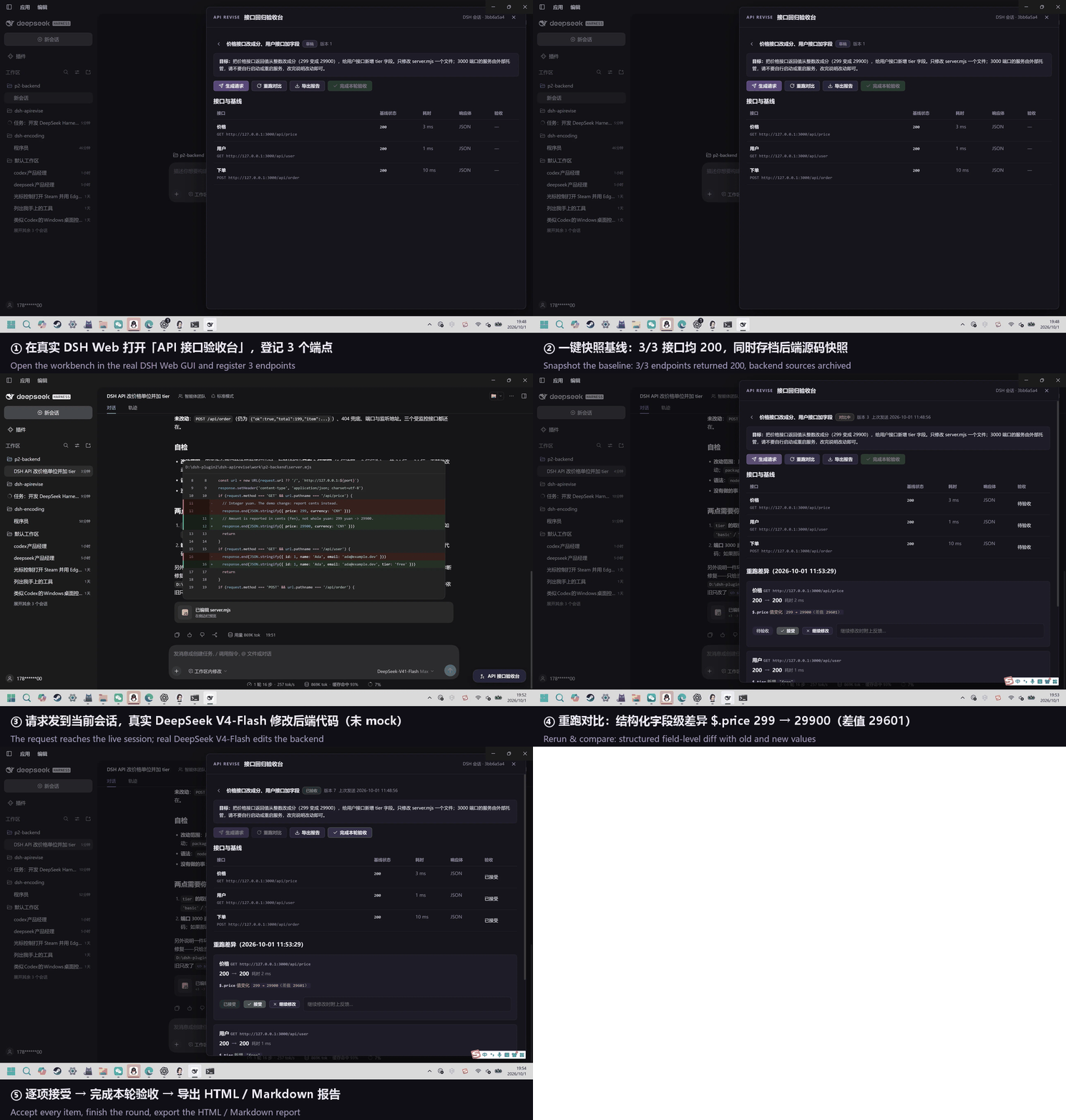
This 64-second walkthrough uses stills from the actual run on 2026-10-01 (DSH Web 0.2.0-rc.2 + real DeepSeek V4-Flash). It is not a continuous recording. Details: docs/real-model-validation.md.
Why: your DSH agent changes backend code, and you no longer know whether endpoint behavior changed. DSH API Revise records response baselines before the edit and shows structured, field-level differences after it — status codes, fields, and numeric values with old → new values — side by side with a source-code diff. You accept every difference item by item, and export a report.
What you get
- Register endpoints: method + URL + optional headers/body, all typed by hand in the DSH Web panel (no traffic capture — that is v2).
- Baseline snapshot: each endpoint is requested once and its response (status / headers / JSON or text body) is stored in the project's
.dsh-apirevise/directory, together with a bounded snapshot of backend source files. - Current-session handoff: the change goal plus the monitored endpoint list is sent to the current DSH session through DSH's normal prompt queue.
- Rerun & compare: after the model edits, one click re-requests every endpoint and produces a structured diff — JSON field-level differences (added / removed / type / value, numeric delta), status-code changes highlighted, text patch for plain-text bodies.
- Per-item acceptance: accept each endpoint, or mark it “needs work” with feedback that travels back into the next request. Comparisons go stale when the source changed after the rerun: you must rerun before accepting. Only when every endpoint is accepted against the current rerun can the round be completed.
- Portable reports: Markdown plus a single-file HTML report with embedded diffs, XSS-escaped and served with a strict CSP. Facts only — diffs never claim “the API is fine”; acceptance is the human's decision.
Install
Use Node 22.19+ (22.x) or Node 24. Install and configure DSH according to its official documentation. DSH handles your model credentials; API Revise has no separate API key.
From npm
dsh plugin --profile web add dsh-apirevise
Published as dsh-apirevise@0.1.0. A pre-release tarball is also attached to v0.1.0.
Source checkout
git clone https://github.com/Lostforest7/dsh-apirevise.git
cd dsh-apirevise
npm ci
npm run build
Stop DSH, then register the checkout in its Web profile and restart:
dsh plugin --profile web add /absolute/path/to/dsh-apirevise
dsh web
The repository includes built lib/ files so DSH can load the plugin without running a package build script.
Use it
- Start your backend locally (e.g.
node server.mjsfrom examples/api-server, port 3000). - Open a DSH project session whose directory is the backend project. Click API 接口验收台 at the bottom right.
- Create a round: title (what to change), goal (sent to the session), and the endpoints to monitor. Creating the round snapshots the baseline immediately.
- Click 生成请求, review it, and 发送到当前会话. The model edits the backend code.
- After the model finishes, click 重跑对比. Review the structured diffs and the source-code diff; accept each endpoint or attach feedback and send the session back to work.
- When every endpoint is accepted, click 完成本轮验收, then 导出报告.
Add .dsh-apirevise/ to your project's .gitignore.
What it is not
- Not a traffic-capture proxy (v2 direction); not a frontend tool (that is dsh-revise); not a test-framework runner (that is dsh-test-workbench territory).
- It never claims “the API is definitely fine.” Diffs present facts — status / fields / numeric old-and-new values — and acceptance remains a human decision.
- The model step is never mocked in validation; see docs/real-model-validation.md.
Development
npm ci
npm run check        # typecheck + unit tests + build
npm run dev          # standalone workbench preview (examples/api-server) on http://127.0.0.1:4320
Unit tests are fixture-based and run offline (loopback HTTP only), no DSH and no network required: tests/unit.
License
MIT
No comments yet. Be the first to write one.