dsh-ai-import
Import the conversation history of other AI coding assistants into DeepSeek Harness (DSH) as resumable sessions — named after what was actually asked, and filed into one workspace per source.
Supported sources: Claude Code, Codex CLI, WorkBuddy, Cursor, and optionally Trae (prompt-only). Two packages live in this repository:
| Package | Path | What it is |
|---|---|---|
dsh-ai-import |
root | the converter: scanning, naming, session writing, grouping, the /import-ai command and two agent tools |
dsh-ai-import-ui |
packages/ui |
the Web panel: a floating “AI 导入” button, a right-hand drawer, and a three-column pick-and-file wizard |
The panel drives the same scanAll() / runImport() code and the same ledger as the command, so the
two can be used interchangeably.
Install
From this repository (works today — the packages are not on npm yet):
dsh plugin add github:LoneLeave/aiplug                     # the converter: command-line + agent tools
dsh plugin add "github:LoneLeave/aiplug&path:/packages/ui" # adds the Web panel on top of it
Once published to npm the same two lines become dsh plugin add dsh-ai-import and
dsh plugin add dsh-ai-import-ui.
Install both if you want the panel: dsh-ai-import-ui imports dsh-ai-import/lib/* directly and
does nothing useful without it. After installing, reload the DSH Web UI page.
Nothing in this plugin runs at install time — there is no build step, no postinstall, and no
dependency to compile. The packages ship plain ESM.
Usage from an agent session
/import-ai                    scan and report how many conversations are importable
/import-ai full               list every entry (source, project, title, turns)
/import-ai run 5 --dry-run    convert 5 entries without writing anything
/import-ai run                import everything
/import-ai run cursor         import one source only
/import-ai run --force        re-import what the ledger already knows (new sessions, nothing overwritten)
/import-ai status             where the ledger lives, how much has been imported
The same capability is exposed as two tools:
ai_import_scan({ detail: "summary" | "full" })ai_import_run({ sources?, dryRun?, force?, limit? })
The Web panel
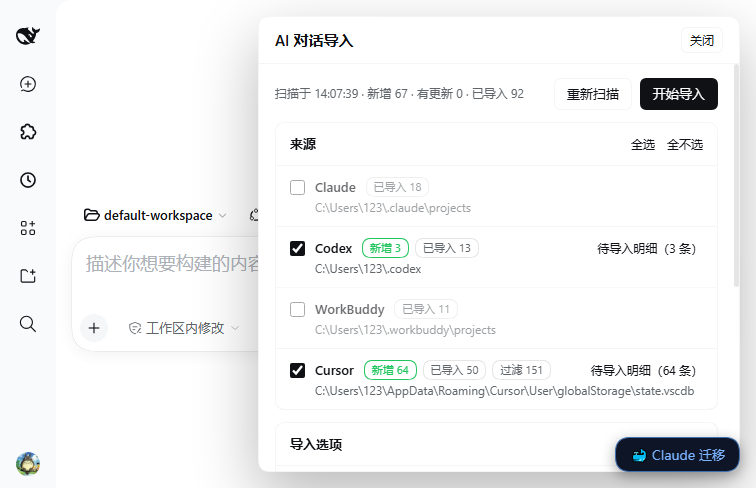
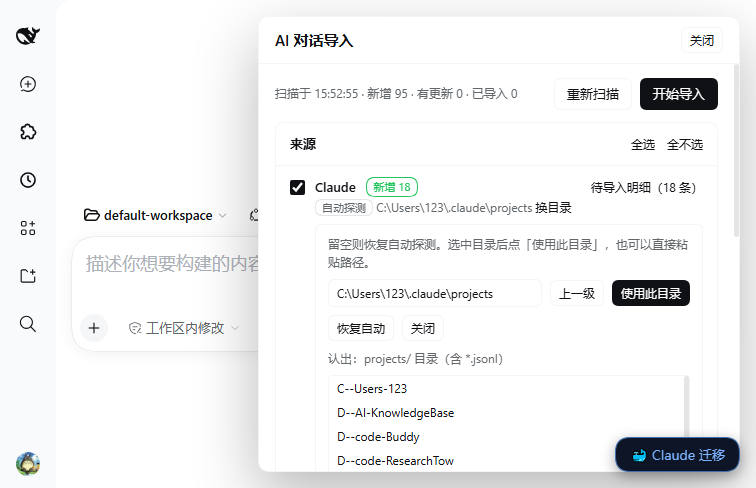
Click AI 导入 in the bottom-right corner (it sits above the “🐳 Claude 迁移” button), or open Settings → AI 对话导入. The drawer has two modes.
Simple mode — five source cards, each showing its resolved path (手动指定 / 自动探测 /
未找到) and a one-line tally 新增 N · 已导入 M · 过滤 K. Tick the sources you want, optionally
tick dry run / force, press 开始导入, and watch a per-source progress bar and a result table.
Pick mode (wizard) — “上排三栏 + 下排整条预览”:
| Where | What | What you can do |
|---|---|---|
| top left | every source with new or changed conversations (Codex(3)) |
click one; the middle column lists its candidates |
| top middle | that source's candidates with checkboxes; for a folder, archived sessions (grey, not checkable) followed by each source's unimported candidates | tick what to import; click a row to preview it below |
| top right | every folder under <DSH_HOME>/ai-import/groups plus an input + 建立 / 归档到 / 取消归档指定 |
create a folder, or point the current selection at an existing one |
| bottom, full width | the message stream of the selected conversation (question / answer / thinking / tool call) | decide whether this one is worth importing |
So “import three of these into an existing folder” is: click the folder, tick the conversations in the middle column, press 归档到, then 导入勾选的 N 条.
Naming
Titles come from, in order:
- a title the source itself recorded — Claude's
custom-title/ai-title, Codex'ssession_index.jsonlthread_name, a Cursor composername; - the first line of the first human question, with injected noise stripped (
<system-reminder>,<user_info>,# AGENTS.md instructions,@skill:"…", Codex review templates), cut at the first sentence-final punctuation, at most 56 characters; <source> <date time>;<source> conversation N.
Two traps that are handled explicitly: Codex's thread_name contains repeated automation titles
(Guardian review, Weekly review, hi) — only names that appear exactly once in the whole index
are trusted; and an unnamed Cursor composer stores a UUID in name, which is treated as no name.
Grouping
One workspace per source, not per project:
| Source | Directory | Workspace title |
|---|---|---|
| Claude Code | <DSH_HOME>/ai-import/groups/claude |
Claude 对话 |
| Codex | <DSH_HOME>/ai-import/groups/codex |
Codex 对话 |
| WorkBuddy | <DSH_HOME>/ai-import/groups/workbuddy |
WorkBuddy 对话 |
| Cursor | <DSH_HOME>/ai-import/groups/cursor |
Cursor 对话 |
| Trae | <DSH_HOME>/ai-import/groups/trae |
Trae 对话 |
A session's own cwd still points at the real project directory, so opening it in DSH carries the
right project context; the group directory is used only when the original project is gone. The
wizard can also file individual conversations into any subdirectory of groups/, and the folder
name becomes the workspace title.
Finding the sources on another machine
Every source resolves its root in this order: plugin config → the path remembered in the panel
(<DSH_HOME>/ai-import/roots.json) → environment variable → platform default. Windows, macOS and
Linux defaults are all covered, and the panel's 换目录 browser writes the remembered path, so a
machine with a non-standard install location works without editing any configuration file.
Trae is off by default (prompt-only data): enable it with includePromptOnlySources: true, or by
importing it from the pick-mode wizard where it appears when it has entries.
What it writes
- Sessions go through DSH's own
sessionPersistenceservice, in the same on-disk format DSH uses for its own sessions, after passingvalidateSessionEvents, so they can be resumed normally. - Every session also gets a projection-cache record (
titleandsessionListMetadata), because DSH's session list reads cold sessions from that cache — without the record an imported session shows up as “未命名” (untitled) until it is opened once. - The ledger is
<DSH_HOME>/ai-import/imports.json: source key → session id, fingerprint, turns. Re-running only picks up new or changed files; a source file that grew appends to its session instead of creating a second one. - Imported session ids look like
import-claude-<uuid>, namespaced by source so they cannot collide with sessions imported by other tools.
Source files are only ever read. Nothing in the original assistant's directories is moved, renamed or deleted.
Requirements
- DSH
0.2.x(theengines.dshrange inpackage.json). - Node.js
^22.19.0 || >=24.9.0. - Official
@deepseek-ai/*packages are declared aspeerDependencies, not bundled.
License
Apache-2.0. See LICENSE. 中文说明见 README.zh.md.
No comments yet. Be the first to write one.