dsh-jump

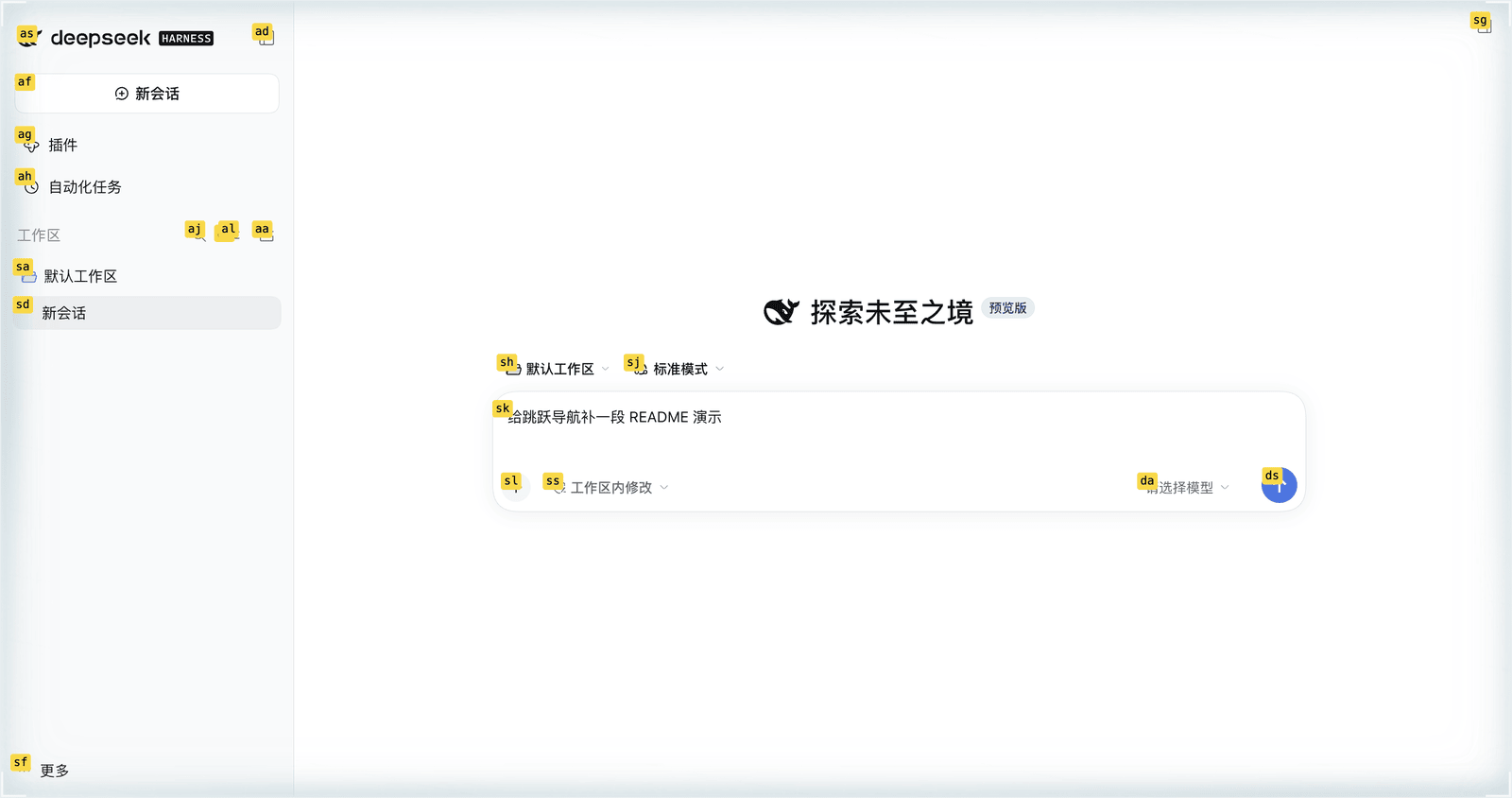
Keyboard jump navigation for the DeepSeek Harness Web GUI: press a chord, type a letter label, and the labelled element is clicked or focused.
中文 · Install · What gets labelled · v1 boundaries · Layout
Install
From npm
dsh plugin --profile web add dsh-jump
The package on npm is dsh-jump. Restart the profile afterwards; the bundle
patch registers its Loader row, so no manual cordis.patch.yml edit is needed.
From a checkout
To track this repository instead of the published version:
{
  "dependencies": {
    "dsh-jump": "link:../dsh-jump"
  },
  "dsh": {
    "profile": {
      "bundles": ["...", "dsh-jump"]
    }
  }
}
Then dsh plugin --profile web install and restart DSH. The path in link:
resolves relative to ~/.dsh/profiles/web, so adjust it to wherever the
checkout lives on your machine. Pointing at a git URL works too:
dsh plugin --profile web add github:Lionad-Morotar/dsh-jump.
Manual patch
Append to the profile's cordis.patch.yml:
- insert:
    - id: jump
      name: 'dsh-jump'
The top level of that file must always stay a YAML array ([] when empty).
中文
给 DeepSeek Harness Web GUI 的键盘跳跃导航:按下一个组合键,视口里的可交互元素 会被打上字母标签,再敲标签即可点击或聚焦到它。
Cmd+H进入点击模式,Cmd+U进入聚焦模式;非 Mac 上默认是Ctrl+H/Ctrl+U。Esc(或任意 meta 组合键、或再按一次激活键)退出。- 两个组合键都可以改:设置 → 「跳跃导航」,点一下快捷键再按新的即可立即生效,
无需刷新。两个模式各有自己的恢复按钮。绑定存在浏览器的
localStorage(dsh-jump:bindings:v1),不写进包配置。 Insert、F1、Home这类不产生字符的键可以不配修饰键。它们在输入框里 仍然归输入框:焦点在可编辑区域时裸键不触发,带修饰键的组合键照旧生效。- 这一页在设置导航里排第 25 位。位置由注册时声明的
order决定;宿主占用 -10 / 0 / 10 / 15 / 20,已装第三方从 30 起。改这个值时先重新扫一遍, 两个插件取同一个order时谁在前取决于注册先后,不受控。 - 标签前九个是
a s d f g h j k l;超过九个时整轮改用等长的双键标签(as、ad……),避免短标签抢走长标签的首击;超过 81 个则整轮升到三键。 - 命中的元素决定动的含义:文本输入面(textarea、带光标的 input、
contenteditable)聚焦并把光标落到草稿末尾,其余元素在点击模式下走完整的 合成指针/鼠标/点击序列,聚焦模式下只调focus()。
Compatibility
engines.dsh is >=0.2.0-rc.2 <0.3.0-0. An own engines.dsh range decides
alone: the host ignores peerDependencies once it is present, and prereleases
participate in the range, so 0.2 release candidates are admitted while 0.3 is
not.
Display metadata
The plugin manager reads locale/en.json and locale/zh.json for the title and
one-line description without evaluating the plugin, and resolves the icon
through exports["./icon"] as an SVG served as a data: URL.
assets/icon-180.png is the same artwork rendered at 180px for GitHub-hosted
catalog entries, which reject SVG.
What gets labelled
Three families, each added because a real element was unreachable:
- Native controls —
a[href],button,input,select,textarea,summary— plus anything carrying atabindex. - ARIA widget roles the Harness actually renders:
button,link,tab,treeitem(the sidebar's project and session rows),option, themenuitem*family,checkbox,radio,switch,slider,spinbutton. Structural roles (row,columnheader,gridcell) are deliberately absent: a row is a container and a header is a label, so labelling them hands dead labels to every presentational table; an interactive grid gives its cells atabindex, which the branch above already catches. - Editable hosts (
[contenteditable]:not([contenteditable=false])) and the text-entry rolestextbox/searchbox/combobox. This is what makes the composer reachable: it is a Lexical-manageddiv[contenteditable=true][role=textbox]with no tag and notabindex, so no native selector matches it.contenteditable=falseis excluded on purpose — Lexical marks chips and command tokens inside the composer with it, and the deepest-candidate rule would otherwise let a chip steal the label from the composer that owns it.
Click versus focus is decided by the target
Both activation keys jump to the same set, and the matched element decides what "jumping" means:
- Text entry surfaces (textarea, caret-bearing inputs, contenteditable hosts) are focused, and the caret is collapsed to the end of the draft so the next keystroke continues writing. A field that already owns the caret keeps its offset.
- Everything else gets the full synthetic pointer/mouse/click sequence in
click mode, and a plain
focus()in focus mode.
The split is not stylistic. Synthetic pointer and mouse events are untrusted,
so the browser performs no focusing default action for them: dispatching the
whole sequence at a button, an input and a contenteditable element left
activeElement unchanged in all three cases. Conversely a button does
nothing when focused. Mode therefore only picks the fallback; the target picks
the action.
Labels are rendered as an overlay by the client entry; while jump mode is active all keydown events are consumed by the state machine, so typing inside a focused input never leaks through.
v1 boundaries
- Hints are snapshotted at the moment of activation: elements that appear or move after activation do not get labels until you re-activate.
- The activation chords are stored per browser profile in
localStorage(dsh-jump:bindings:v1), not in package config. The host's own shortcut registry cannot hold them: a bare home-row label stroke is rejected as modifier-less, and the shippedCmd+H/Cmd+Udefaults collide with reserved primary chords. The listener is therefore plugin-owned, and the settings page writes to the same plugin-owned document. - A chord that prints a character must carry ⌘, ⌃ or ⌥: a bare letter would type into whatever field has focus, and Shift alone is refused for the same reason. A key that prints nothing (Insert, F1, Home, PageUp) may be bound bare; the runtime then steps aside while a text surface has focus, so the editor keeps its own meaning of that key. Keys the interface owns (Tab, Enter, Space, the arrow keys, Escape) are refused at any modifier count, as is the chord the other mode already holds.
- The settings section waits for the host's slot service through
ctx.injectrather than sampling it once. Services start one at a time, so a singlectx.get("slots")duringapplycan legitimately return undefined; the section would then never register, andctx.getreports nothing. With neither the slot service nor a React seed, navigation still works; only the ability to remap is missing. - Web and desktop both load this plugin, but the label overlay targets the Web GUI's DOM. The chords and the settings section are not Web-specific.
Layout
src/index.tshost half (emptyapply; the Loader requires it to resolve)src/client/entry.tsloader adapter: takes the factory'srequire, resolves React, then hands the real context toruntime.tssrc/client/runtime.tscomposition: one bindings store shared by the listener and the settings rowsrc/client/hints.tshint collection and label streamsrc/client/target.tswhich action a matched target needs (click vs focus)src/client/keys.tskey state machinesrc/client/bindings.tschord model, platform defaults, validation, formattingsrc/client/store.tsthe persisted pair, total on read, normalized on writesrc/client/recorder.tsone keydown into a candidate chordsrc/client/settings-controller.tsthe recording mode's rules, renderer-freesrc/client/settings-page.tsthe settings page: one row per modesrc/client/react.tsthe narrowed React slice and the recording listenersrc/client/copy.tsthe page's Chinese and English copysrc/client/config.tsselectors and the label key maplib/committed build products (pnpm run build)
Development
pnpm install
pnpm test        # vitest, 12 files
pnpm typecheck   # tsc --noEmit
pnpm run build   # esbuild src -> lib, committed
lib/ is committed on purpose: an installed profile loads lib/ straight from
the package and never runs a build step, so the built files have to be in the
tarball and in the repository.
The build produces a two-entry package: lib/index.js is the host half (an
empty apply the Loader still requires to resolve) and lib/client.js is the
browser half inlined with its React imports resolved at load time.
Releasing
npm version <patch|minor|major>   # or edit package.json
pnpm run release                  # test, build, then publish to registry.npmjs.org
git push --follow-tags
release runs the tests and the build before publishing, so a failing suite
stops the release. Publishing goes to registry.npmjs.org explicitly because a
global registry setting elsewhere (a mirror, for instance) would otherwise
send the tarball to the wrong place while reads still succeed.
No comments yet. Be the first to write one.