dsh-model-group-collapse
English | 简体中文
A DeepSeek Harness (DSH) Web UI plugin that makes the provider groups in the composer's model menu collapsible.

What it does
The stock model picker in the composer's tool row lists every provider group (DeepSeek Account, official endpoints, custom providers…) fully expanded. When you have many providers, the menu becomes a long wall of models.
This plugin adds a collapsible layer to that menu:
- Every provider heading becomes a toggle with a triangle caret (
▸collapsed /▾expanded). - All groups start collapsed by default.
- The provider of the currently selected model starts expanded.
- Click a heading to toggle that group; the caret flips and the group's models appear or disappear.
- While a search query is active, matched groups render expanded so results stay visible; clearing the query restores the collapse state.
- Everything else keeps working unchanged: the two-level "Model / Effort" menu, search, keyboard navigation, the pending spinner, and the official model-label badge (e.g. “1017”).
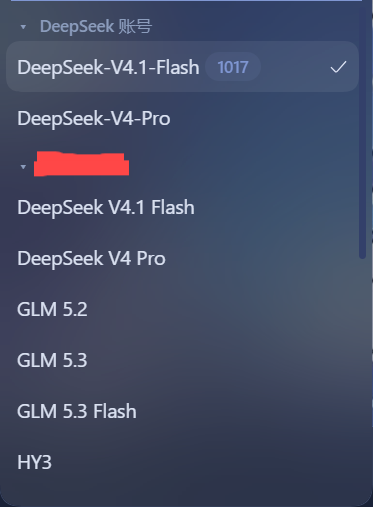
Disable the plugin in the plugin manager and the menu returns to its stock appearance immediately.
Install
From a local checkout (development)
- Put this folder somewhere stable.
- In DSH, open the plugin manager and install the bundle from the local
directory, or use the CLI equivalent:
dsh plugin install /path/to/dsh-model-group-collapse - Reload the Web UI and open a conversation.
From npm (after publishing)
dsh plugin install dsh-model-group-collapse
From GitHub
dsh plugin install github:LinJohn8/dsh-model-group-collapse
Compatibility
- DeepSeek Harness
>=0.2.1-rc.2(client plugin APIdsh.client). - Works on top of the shipped model picker: no component is replaced, so it follows the host's own state (streaming lock, pending selection, search filtering) instead of duplicating it.
How it works
The shipped model menu renders its provider groups as
section[data-menu-group] elements, each with a
[data-menu-group-heading] label and button[role="menuitemradio"] rows.
The client half watches the document for that menu while it is open and
decorates each group:
- the heading gets a triangle caret and becomes a
role="button"toggle; - a collapsed group hides its model rows with
display:noneand reportsaria-expanded="false"; - collapse state is per group and resets on every menu open, using the
current model's
aria-checkedrow to pick the initially expanded group.
All styling is inline-scoped (mgc- prefix, --dsw-alias-* tokens), and every
DOM write is guarded by an equality check so the menu's own MutationObserver
never re-enters.
No comments yet. Be the first to write one.