dsh-harness-audit
English | 中文
Audits an agent harness for the failure modes that break agent loops — and refuses any finding whose evidence isn't actually in the code.
Fifteen checks, one throwaway subagent each, and a summary written by code rather than by a model. The plugin is self-contained: installing it installs the criteria too.
The fifteen checks
Each check is one failure mode of an agent loop, and states what to look at.
State stays self-consistent
| Check | What it examines | |
|---|---|---|
C1 ★ |
Tool-call pairing completeness | Whether every way tool execution can end — error, timeout, cancellation included — still records a result, and whether one failure in a parallel batch discards the rest. |
C2 |
History is append-only | Whether anything edits a message after it was added, rather than only appending new ones. |
C3 |
Crash and checkpoint semantics | What a reader sees if the process dies between the two halves of a multi-part write, and whether that half-written state is detectable on restart. |
Untrusted input is treated as untrusted
| Check | What it examines | |
|---|---|---|
C4 ★ |
Model output parsing | How model output is parsed: whether malformed arguments, a truncated stream, or a repeated call id are handled rather than trusted. |
C5 |
Path and sandbox boundaries | Whether a model-supplied path is resolved and checked against the workspace root — after symlink resolution, not before. |
C6 |
Secrets and ambient environment | What environment a model-generated command inherits, and whether secrets are in it. |
Failure is a first-class outcome
| Check | What it examines | |
|---|---|---|
C7 |
Error taxonomy and retryability | Whether failures carry a closed set of error codes classified as retryable, not retryable, or fatal — or arrive as unclassified text. |
C8 |
Partial success | Whether independent outcomes collapse into a single status, so one failure hides or discards the successes beside it. |
C9 ★ |
Idempotency and side-effect safety | What sits inside the retry wrapper: if the retried region performs a write, a command, or an outbound message, a retry repeats it. |
Boundaries can be closed
| Check | What it examines | |
|---|---|---|
C10 ★ |
Cancellation propagation | Whether the cancellation signal actually reaches outbound requests and spawned subprocesses, or stops at the loop. |
C11 |
Timeout layering | The timeout layers on one tool call and their relative sizes — the tool budget must expire before the resource underneath it. |
C12 ★ |
Loop and budget limits | Whether hard ceilings exist on turns, tool calls, wall-clock time, tokens, and delegation depth. |
Finite resources are accounted for
| Check | What it examines | |
|---|---|---|
C13 ★ |
Context management and truncation boundaries | Whether context is managed at all as a session grows, and where truncation cuts — a cut through a call/result pair breaks the history. |
C14 ★ |
Prompt prefix determinism | Whether everything before the newest message — system prompt, tool definitions, prior messages — is byte-identical between runs, which is what the cache needs. |
The run is observable
| Check | What it examines | |
|---|---|---|
C15 |
Trace completeness and replay | Whether the run leaves an event record covering turns, tool calls and results, retries, truncation, and approvals, complete enough to reconstruct it. |
★ marks the seven critical checks — /harness-audit p1 runs exactly these.
Use
/harness-audit          # asks which dimensions, with a plain-language menu
/harness-audit C1       # one dimension
/harness-audit C1,C9    # several
/harness-audit p1       # the seven critical ones
/harness-audit all      # all fifteen
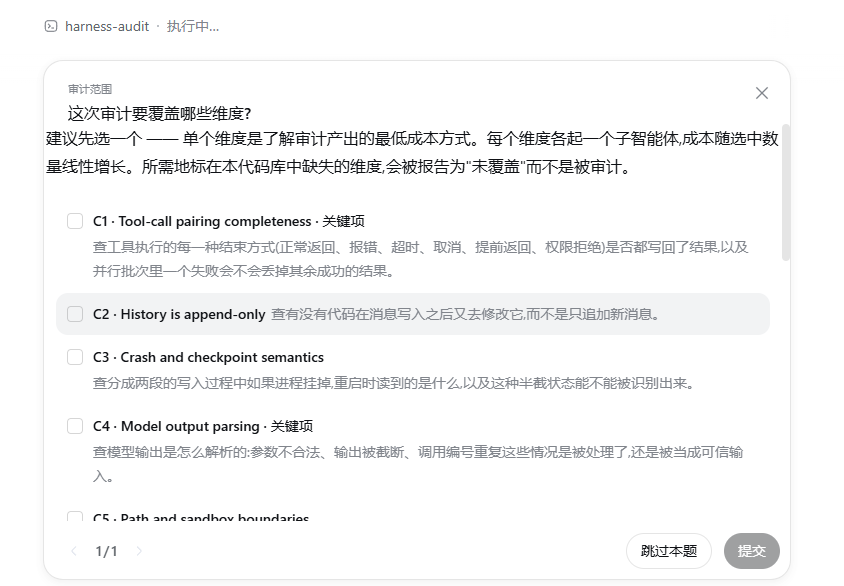
The command returns immediately and the audit runs as a background job, so it
does not block the session. When it finishes, the agent is woken and reports.
Ask for progress at any time with job_output <id>.
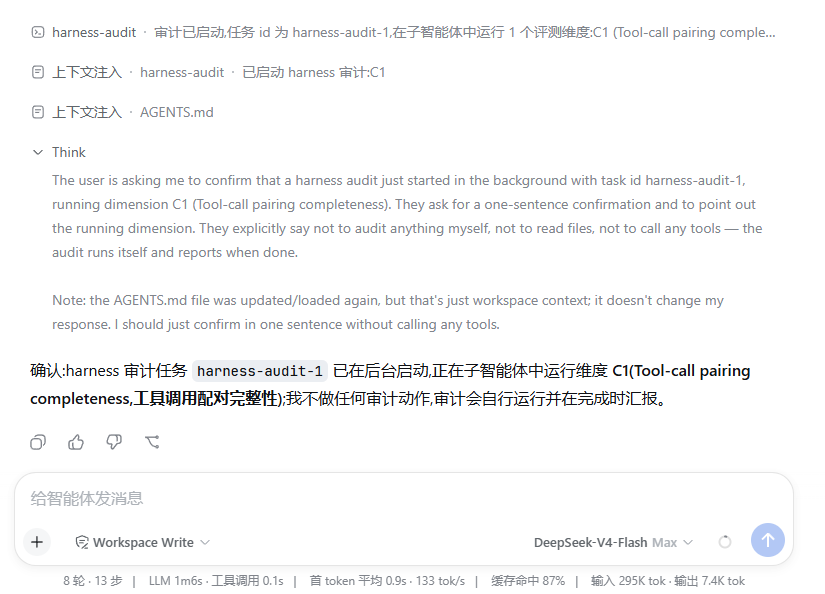
Two files land in outputDir (default .harness-audit/), named by local time
and the dimensions covered:
report-2026-08-17_095736-C1.md
report-2026-08-17_095736-C1.json
Input that cannot be parsed is refused, never silently reinterpreted — an
earlier version accepted only --checks, so --check c2 fell through to a
configured default and audited a different dimension without saying so.
Does it work?
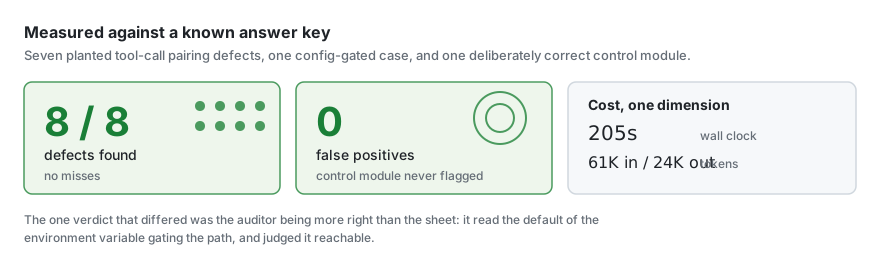
Measured against a fixture with known defects — seven deliberate C1 bugs, one config-gated case, and one deliberately correct module as a false-positive probe:
| Defects found | 8 of 8 |
| False positives | 0 — the correct module was never flagged |
| Evidence rejections | 2 of 10 submissions, both corrected on resubmission |
| Cost | 205s, 61K in / 24K out for one dimension |
The one verdict that differed from the fixture's answer key was the auditor being more right than the sheet: it read the default of the environment variable gating the path and judged it reachable.
npm test --prefix dsh-harness-audit
191 tests. The load-bearing ones assert that every check carries criteria a subagent can judge by, that a check prompt carries only its own criteria, and that no prompt has drifted back to asking for a document that is not installed.
How a run works
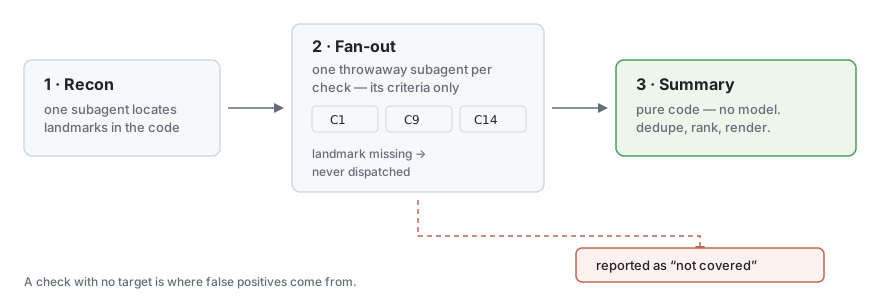
- Recon — one subagent locates landmarks (agent loop, request assembly,
tool execution, …) and reports them through
report_landmark. - Fan-out — one throwaway subagent per check, each given exactly one check's criteria and only the landmarks that check depends on. A check whose required landmark was not found is not dispatched; it is recorded as not covered. Running a check with no target is a leading source of false positives.
- Summary — pure code. No model writes it: that is how
suspectedturns intoconfirmedand how unevidenced claims get in.
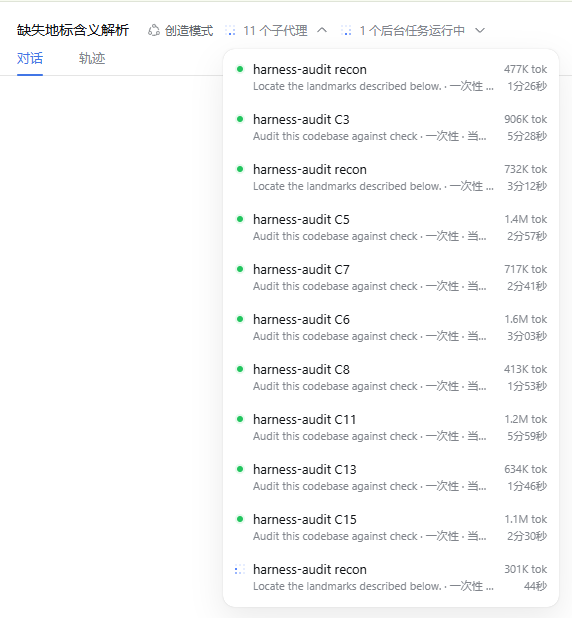
One entry per check, each with its own cost. That separation is what makes the per-check figures in the report real rather than estimated.
Evidence validation
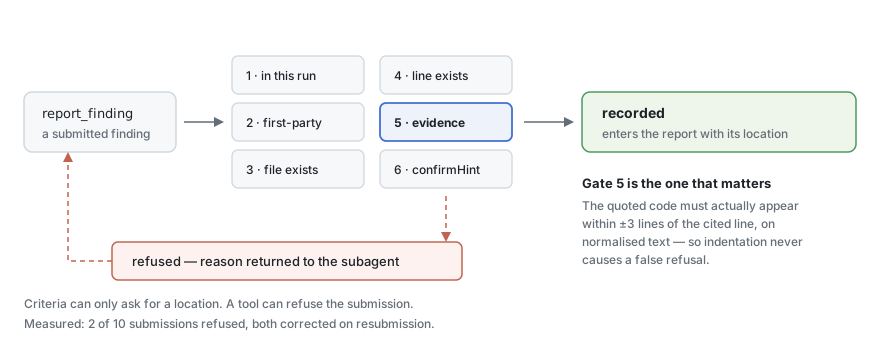
report_finding refuses a submission unless:
- the check belongs to this run,
- the path is first-party code — not
.venv,site-packages,node_modules, …, - the file exists inside the workspace (also the path-traversal gate),
- the line exists in that file,
- the quoted evidence actually appears within ±3 lines of the cited line, and
- a
suspectedverdict carries aconfirmHint.
Rule 5 compares normalised text — trimmed, internal whitespace collapsed — not bytes, so indentation differences don't cause spurious refusals. A refusal is returned to the subagent with the reason, and in practice it re-reads the file and resubmits correctly.
The rejection rate is the metric to watch. Every report states it. A high rate means the subagents are fabricating and the prompts need work. It is never a reason to relax validation.
Scope enforcement exists for the same reason. A first run against a Python
project located all 23 landmarks inside .venv/site-packages/, auditing the
vendored framework rather than the project. Asking was not enough; the tools
now refuse those paths, and the same run costs 147s instead of 698s.
Install
First, get DeepSeek Harness
This is a plugin — it needs a dsh install to mount into. With Node.js
present:
npx @deepseek-ai/dsh web
That starts the Web UI at http://127.0.0.1:3080. Or from a source checkout:
git clone https://github.com/deepseek-ai/deepseek-harness.git
cd deepseek-harness
pnpm install
pnpm run build
pnpm dsh web
Two things worth knowing before you build on it:
- DeepSeek Harness is a developer preview and there will be
compatibility-breaking changes. This plugin pins its peer dependencies to
^0.1.0-rc.5for that reason. dsh pluginshells out to pnpm, so pnpm must be on your PATH for the install step below.
Then install this plugin
dsh plugin --profile web add dsh-harness-audit
npm i dsh-harness-audit downloads the package but does not activate it —
dsh plugin add installs it into the profile, and the dsh.bundle declaration
in package.json is what gets its configuration layer mounted. Check it landed:
dsh --profile web --dump-config
A # == dsh-harness-audit layer should appear. To remove it later, use the
package name:
dsh plugin --profile web remove dsh-harness-audit
Distribution is via npm or pnpm pack. A GitHub install works too, but pulls
source rather than build output: pnpm must run this package's prepare script,
which the user has to authorise in their profile's pnpm-workspace.yaml. That
authorisation lets this package's code run on their machine outside any agent
sandbox, so pin the commit:
dsh plugin --profile web add github:you/repo#<commit-sha>
Without the sha the install resolves to whatever the default branch points at at install time, so two people running the same command on different days get different code. The prebuilt paths avoid the question entirely.
Development
pnpm dsh --profile web --patch ./dsh-harness-audit/cordis.yml
Four things that cost time when they are wrong:
webis an alias for--profile weband rejects--patchalongside it. Use--profile web.- The
nameincordis.ymlmust be an installed package name or an absolutefile://URL. Node's ESM loader accepts onlyfile:,data:andnode:schemes — a bareF:/…fails withReceived protocol 'f:', and a git URL cannot work here at all. Git URLs belong indsh plugin add, not in a patch row. - Running
dshfrom a source checkout requires that checkout to be built (npm run build:lib:hostat minimum), or the boot fails intypert-loaderbefore any plugin loads. A built install — what real users have — is fine. pnpm installhere needs--ignore-workspacewhen the package sits inside another pnpm workspace's tree; without it pnpm installs the outer workspace and ignores this package entirely.
Configuration
| Field | Default | Meaning |
|---|---|---|
checks |
[] |
Check ids to run. Empty means "ask", never "audit everything". |
priorityFloor |
2 |
Run checks at or below this priority (1 = P1 only). An explicitly named check runs regardless. |
concurrency |
3 |
Checks in flight at once. 1 is supported and is the cheapest way to debug. |
subagentProvider |
spawn |
Subagent provider name. |
maxTokensPerCheck |
120000 |
Advisory. See the limitations below. |
outputDir |
.harness-audit |
Workspace-relative report directory. |
announceOnStart |
true |
Post a one-line notice when a run starts, so a fresh session has something to attach the job UI to. |
background |
true |
Run as a job. false blocks the command until the audit finishes. |
useLsp |
true |
Try LSP navigation, degrading to text search. |
crossCheckAnalysis |
false |
Reserved; not yet emitted. |
language |
auto |
Output language. auto follows the harness locale, then the host locale, then English. |
excludePaths |
dependency dirs | Directory names refused as out of scope. [] audits a vendored framework deliberately. |
Known limitations
maxTokensPerCheckis advisory. The subagent seam has no whole-run token cap —AgentOptions.maxTokensbounds a single response, not a run — so the budget is stated to the subagent and recorded, and the report gives the observed cost. It is not enforced.crossCheckAnalysisis not implemented. When built, its output must be a separate section marked as model inference that did not pass validation.- LSP availability is per-extension. The seam exposes no capability query,
so availability is observed by running a query and routing on the thrown
LspError. The probe runs after recon, using the detected primary language, and speaks only for that language. - Token attribution needs a local subagent provider. Cost is folded from the child's session events; a remote provider publishes no local child session, so its usage reads as zero.
- A run in a brand-new session shows nothing until the first turn. Command
dispatch produces no turn, and the conversation's UI slots are session-scoped,
so the job indicator has nowhere to attach until something else starts one.
announceOnStartexists to start one.
Design notes
The criteria live in src/criteria.ts, not in a skill. An earlier version
shipped a bundled harness-evaluation skill that subagents loaded at run time.
That indirection is gone so that installing the plugin installs everything.
The trade is recorded in that file's header: changing a criterion is now a code
change and a release, and a project can no longer override the criteria by
shipping its own skill of the same name.
Each check's criteria are handed to its subagent verbatim, and only its own.
The plugin's name, group and picker glosses are navigation copy; no subagent
is shown them, and they must never stand in for the criteria.
Audit children are not tool-scoped. An earlier version passed
toolFilter: { allow: [...] }, built from names resolved in the plugin's own
scope. Model-facing tools live on the agent plane, so the list collapsed to one
entry and tools.restrict() removed everything else — recon came back with
unknown tool "read". There is no supported way to enumerate a child's scope
before it exists, and guessing is worse than not scoping.
还没有评论,来写第一条。