dsh-model-quota — 模型余额与额度面板
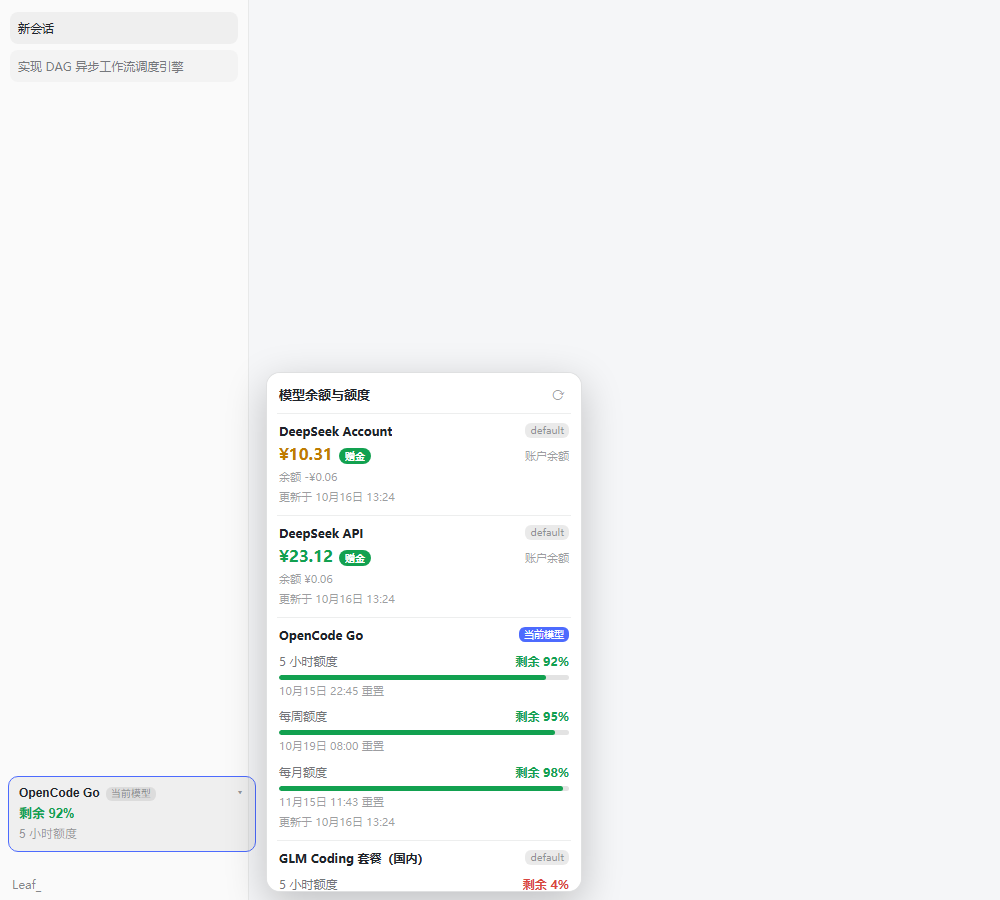
给 DeepSeek Harness Web 界面加一个「模型余额与额度」面板:侧栏底部常驻一张额度卡片,
点一下在右侧展开面板,逐行列出各供应商的账户余额或套餐窗口(5 小时 / 每周 / 每月)
剩余百分比 + 重置时间。默认只显示 DeepSeek Account,其余供应商一旦检测到已配置的凭据
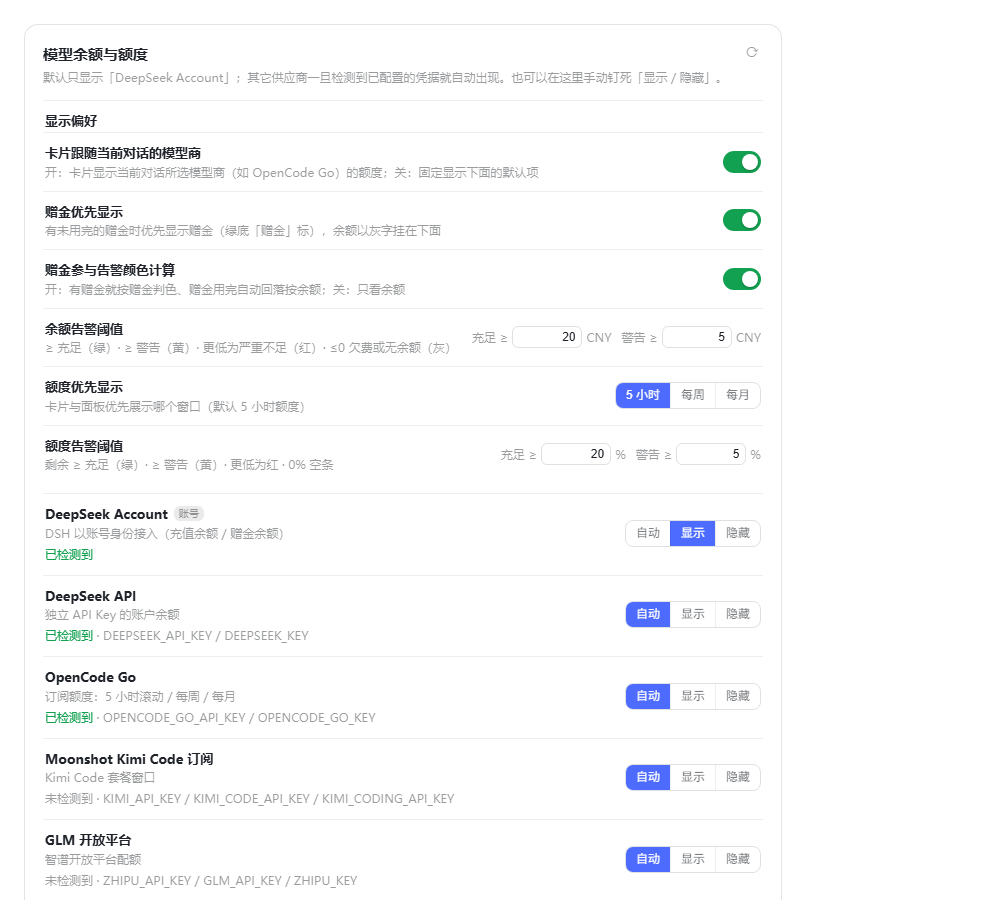
就自动出现;设置 → 额度面板 里可以逐个开关。密钥只在宿主进程内使用,不下发浏览器。
安装
方式一:GitHub Release(推荐,不需要 npm)
# 直接装这个 tag 的源码包(本机已实测可用)
dsh plugin --profile <你的 profile 名> add https://codeload.github.com/Leafmy/dsh-model-quota/tar.gz/refs/tags/v1.0.0
或者从 Releases 下载 dsh-model-quota-1.0.0.tgz 再装:
dsh plugin --profile <你的 profile 名> add ./dsh-model-quota-1.0.0.tgz
装完完全退出并重开 DSH Desktop(客户端半在启动时组装,刷新页面不够)。
升级:把 URL 里的 tag 换成新版本即可;先把旧版本移除更干净
(dsh plugin --profile <profile> remove dsh-model-quota 再 add)。
方式二:本地源码 / 手动安装
dsh plugin --profile desktop add file:/绝对路径/dsh-model-quota
手动(不使用插件管理器):
把包放进 profile 的
node_modules/(复制或 junction 都行):New-Item -ItemType Junction ` -Path "$env:USERPROFILE\.dsh\profiles\desktop\node_modules\dsh-model-quota" ` -Target "C:\path\to\dsh-model-quota"在
~/.dsh/profiles/<profile>/package.json的dsh.profile.bundles里加一行"dsh-model-quota"。重启 DSH Desktop。
包自带的
cordis.patch.yml已经insert了id: dsh-model-quota。不要在用户层再 insert 同一个 id(重复 id 会让加载器起不来);要改配置就在 profile 的cordis.patch.yml里写一条 同 id 的覆盖行(见下面「配置」)。
兼容性
| 项 | 值 |
|---|---|
| 目标版本 | DSH 0.2.1-rc.1 |
| 已实测兼容 | 0.2.1-rc.1(宿主路由 + DeepSeek Account + 侧栏卡片实测,2026-10-17)、0.2.0-rc.2(1.0.0 的验证基线) |
| 未做兼容承诺 | 其它版本未实测;升级 DSH 后建议照下面「依赖的缝」复核一遍 |
0.2.1-rc.1 上的实测证据:
- 宿主路由:
/dsh-model-quota/api/summary、/settings、/providers均 200;probe.seam = "inject"、lastResolveError / lastDescribeError / lastAccountError全为null。 - DeepSeek Account:
ctx.deepseekAccount.getState()/getBalance()取到真实余额 (充值 + 赠金钱包),与独立 API Key 的行互不影响。 - 客户端:侧栏底部额度卡片正常渲染,并跟随当前会话的模型商
(卡片显示的 provider 与当前会话
modelSelection.lastUsed.provider一致)。 - 设置页:「额度面板」section 的槽位声明与注册形状按官方用法逐条静态核对;未做视觉确认 (无 CDP/token,无法在运行实例里打开设置页截图)。
依赖的缝(都只走 DSH 公开面,不 import 内部包):
- 宿主:
ctx.credentials.resolve/describe、ctx.deepseekAccount、webServer.register({ kind: 'prefix', … })。 - 客户端:
window.__ModuleLoader__.load、require('react'/'react-dom')、slots的sidebar.footer.action与settings.section槽、sessions.list快照里的retainedBy.mainView、sessions.binding(id).session.projections.faceOf('modelSelection')、ctx.modelDirectories(兜底路径)。
这些缝任何一个在将来消失,插件是降级而不是崩溃:卡片退回配置的 primary 供应商,
单个供应商行显示明确的错误原因(错误码词表见下)。
它解决什么
同一个 DSH 里往往配了好几个供应商:DeepSeek 按量计费看余额,OpenCode Go / GLM Coding / Kimi Code 是套餐制看滚动窗口。以前要分别登录各家控制台才能知道「还能不能接着干」。 本插件把这些读数聚合到侧栏一个卡片上,一眼可见。
余额怎么显示(赠金优先 + 颜色)
DeepSeek Account / DeepSeek API 这类带「赠金 / 赠送余额」的供应商:
- 有未用完的赠金且开了「赠金优先显示」→ 大号数字显示赠金,右侧一个 绿底白字的「赠金」圆角标;赠金下方以灰色小字显示正常余额(非赠金部分)。
- 没有赠金(或关掉「赠金优先显示」)→ 直接显示正常余额。
颜色(数字与「赠金」标同色):
| 颜色 | 条件(默认阈值) |
|---|---|
| 绿 | 充足:≥ 20 CNY |
| 黄 | 警告:≥ 5 CNY |
| 红 | 严重不足:< 5 CNY |
| 灰 | 没有余额或已欠费(≤ 0) |
「赠金参与告警颜色计算」开关决定用哪个数判色:开(默认)→ 有赠金就按赠金判色, 赠金用完自动回落按余额;关 → 只看余额。阈值本身可在设置页改(默认 20 / 5 CNY)。
额度怎么显示(进度条 + 颜色)
套餐型供应商(OpenCode Go / GLM Coding / Kimi Code / MiniMax 等):
- 优先显示哪个窗口可在设置页选:5 小时(默认)/ 每周 / 每月;卡片与面板都按它排序。
- 颜色(默认阈值):剩余 ≥ 20% 绿 · ≥ 5% 黄 · < 5% 红 · 0% 空条(不画填充)。 阈值可在设置页改(默认 20 / 5 %)。
供应商目录
| id | 显示名 | 凭据引用 | 接口 | 语义 |
|---|---|---|---|---|
deepseek-account |
DeepSeek Account | (账号登录记录) | 宿主 ctx.deepseekAccount |
充值 + 赠金余额,默认常驻 |
deepseek |
DeepSeek API | DEEPSEEK_API_KEY |
api.deepseek.com/user/balance |
账户余额(含充值/赠送明细) |
moonshot |
Moonshot 开放平台 | MOONSHOT_API_KEY |
api.moonshot.cn/v1/users/me/balance |
账户余额 |
kimi-coding |
Moonshot Kimi Code 订阅 | KIMI_API_KEY |
api.kimi.com/coding/v1/usages |
5 小时 / 每周窗口 |
glm |
GLM 开放平台 | ZHIPU_API_KEY、GLM_API_KEY |
open.bigmodel.cn/api/monitor/usage/quota/limit |
配额剩余(无公开余额接口) |
glm-coding-cn |
GLM Coding 套餐(国内) | GLM_CODING_API_KEY、ZAI_CODING_CN_API_KEY |
同上 | 5 小时 / 每周 / 每月 |
zai-coding |
Z.AI GLM Coding(国际) | ZAI_API_KEY |
api.z.ai/api/monitor/usage/quota/limit |
5 小时 / 每周 / 每月 |
opencode-go |
OpenCode Go | OPENCODE_GO_API_KEY |
opencode.ai/zen/go/v1/usage |
5 小时滚动 / 每周 / 每月 |
openrouter |
OpenRouter | OPENROUTER_API_KEY |
openrouter.ai/api/v1/credits |
已购 − 已用 |
siliconflow-cn |
SiliconFlow(国内) | SILICONFLOW_CN_API_KEY |
api.siliconflow.cn/v1/user/info |
账户余额 |
minimax / minimax-cn |
MiniMax Coding | MINIMAX_API_KEY / MINIMAX_CN_API_KEY |
/v1/token_plan/remains |
5 小时 / 每周 |
stepfun |
StepFun 阶跃星辰 | STEPFUN_API_KEY |
api.stepfun.com/v1/accounts |
账户余额 |
xai |
xAI | XAI_API_KEY |
api.x.ai/v1/billing/credits |
剩余额度 |
卸载
- 删掉 profile
package.json里 bundles 的"dsh-model-quota"一行; - 删掉
cordis.patch.yml末尾那条- id: dsh-model-quota覆盖行; - 删掉
node_modules\dsh-model-quota这个 junction(如果是dsh plugin add装的,改用dsh plugin --profile desktop remove dsh-model-quota); - 重启 DSH。
配置
写在 profile 的 cordis.patch.yml(- id: dsh-model-quota 那一行):
| 键 | 默认 | 说明 |
|---|---|---|
enabled |
true |
关掉就完全不挂载 |
refreshMs |
300000 |
后台刷新周期(毫秒),下限 60000;面板页脚文案跟着它变 |
timeoutMs |
15000 |
单个供应商请求超时 |
showUnconfigured |
false |
false=只显示 Account + 检测到的(推荐);true=全部列出(未配置的灰显) |
primary |
deepseek-account |
卡片优先展示哪个供应商 |
accountClientVersion |
环境变量/0.2.1-rc.1 |
DeepSeek 账号余额请求带的客户端版本号(x-client-version) |
statePath |
$DSH_HOME/dsh-model-quota/state.json |
显示开关与偏好的持久化路径 |
hide |
[] |
从面板与设置页隐藏的供应商 id |
providers |
{} |
按 id 覆盖目录条目,或新增自定义供应商 |
覆盖/新增的例子:
- id: dsh-model-quota
  config:
    primary: opencode-go
    hide: [xai, stepfun]
    providers:
      deepseek:
        label: DeepSeek 官方
      my-gateway:                       # 目录外的自建网关
        label: 自建网关
        refs: [MY_GATEWAY_KEY]
        endpoint: https://gw.example.com/v1/credits
        format: openrouter-credits      # 复用已有解析器
        currency: $
新增供应商时 endpoint / format / refs 三者必填,format 必须是已注册的解析器
(deepseek-balance、moonshot-balance、openrouter-credits、siliconflow-balance、
stepfun-accounts、xai-credits、zhipu-quota、zai-coding-quota、kimi-coding-usage、
minimax-remains、opencode-usage)。要接一个全新形状的接口,在 CATALOG 旁边加一个
解析函数并登记到 PARSERS 即可,约 10 行。
与天枢(Tianshu-harness)的关系
参考了 huiliyi37/Tianshu-harness(Apache-2.0),复用两样东西:
- 供应商预设表(
src/config/provider-presets.ts)——各家官方 key 页、apiKeyEnv命名、baseUrl。 - 数据契约(
src/server/protocol.ts的ProviderUsageAccount/ProviderUsageSnapshot与ProviderUsageStatus/ProviderUsageError/ProviderQuotaPeriod词表)——本插件的行 字段与错误码词表按它对齐,kind: 'subscription'、period: '5h'|'7d'|'monthly'、remainingPercent、errorCode: 'auth'|'rate-limit'|…都取自这里。
License
MIT © 2026 Leafmy
No comments yet. Be the first to write one.