dsh-skill-prompt-injector
English | 中文
Search, pin, combine and inject skills & prompts into the current conversation — from the DSH right sidebar.
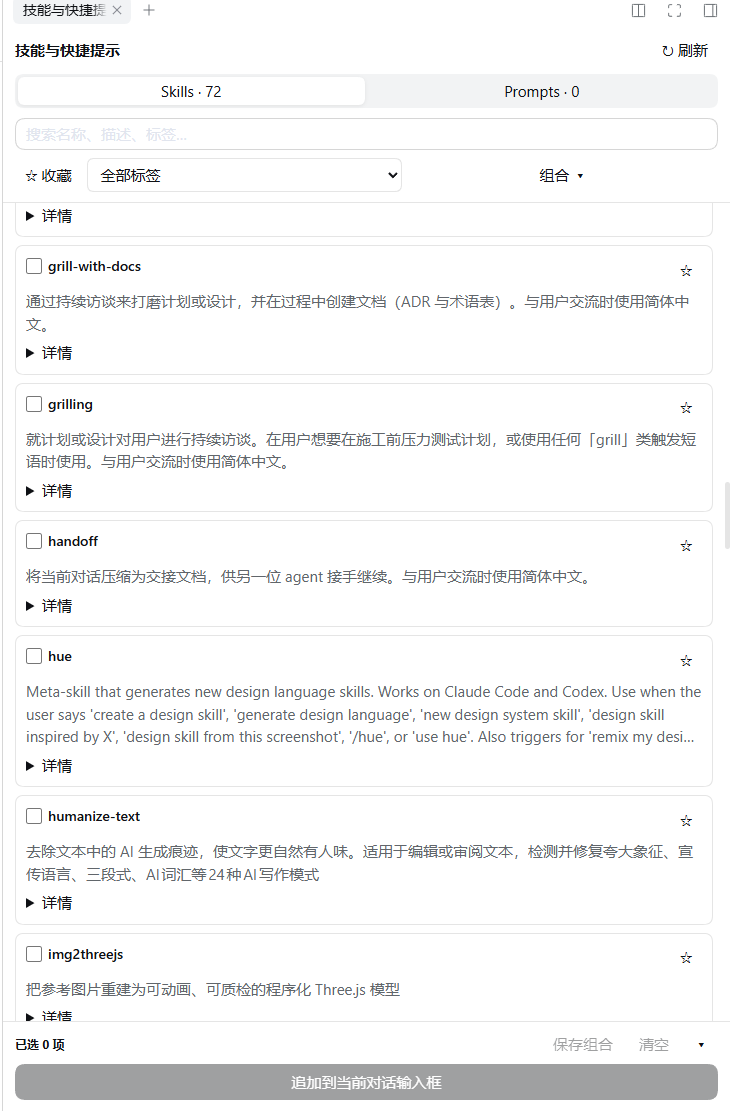
Features
- Skills catalog — mirrors the live DSH skill registry of the current session (workspace and agent-preset aware), with search across name, description, body and tags.
- Prompts — create, edit and delete your own reusable snippets.
- Tags & favorites — both entry kinds can be favorited and tagged locally.
- Combinations — save a named set of skills + prompts, load it later, rename it, or update it in place. Combinations always reference the latest prompt body.
- One-click inject — appends the selection to the current composer as plain text, keeping your draft, references and attachments;
Ctrl+Zundoes the insertion in one step. - Never sends for you — injection only fills the draft; you review and send.
- Kept mounted — lives in the right sidebar beside the shipped tabs, so switching sessions does not tear it down.
Requirements
- DeepSeek Harness
>=0.2.1-rc.3 <0.2.2(declared asengines.dsh) - A DSH build that provides the right sidebar slot
sidebar.right.pane.tab
Install
From the npm registry — recommended, the package ships prebuilt lib/, so there is nothing to clone or build:
dsh plugin --profile <profile> add dsh-skill-prompt-injector
Or from source:
git clone https://github.com/Larliers/dsh-skill-prompt-injector.git
dsh plugin --profile <profile> add link:<absolute-path-to-clone>
Either way, restart DSH afterwards so both the Host and the Client side load the new artifacts.
Usage
- Open the right sidebar and pick Skills & prompts (技能与快捷提示).
- Toggle entries in the Skills tab; switch to Prompts to manage snippets.
- Use Combinations to save or load a named set.
- Press Append to composer (追加到当前对话输入框), review the draft, then send.
Skills resolve from the session's workspace and agent preset; the body itself is loaded by DSH's native /skill-name mechanism after you send. Dragging only changes injection order — it does not build a serial workflow.
Data
Favorites, tags, combinations and prompts live outside the package, under $DSH_HOME/skill-prompt-injector/ (default ~/.dsh/skill-prompt-injector/):
prompts.json— titles, bodies, tags and favorites of your snippetslibrary.json— skill tags/favorites, and combination references and order
Both files carry schemaVersion: 1 plus a Host-maintained revision; edit them through the UI. Writes are version-checked, serialized and atomic, and .bak keeps the previous valid file. The plugin never rewrites your SKILL.md files.
Point dataDirectory in the plugin Config elsewhere if you prefer another location.
Development
npm ci
npm run typecheck
npm test
npm run build
Output: lib/index.js (Host) and lib/client.js (Client). The two halves talk over the native Typert Remote channel — no extra server or MCP.
License
MIT © 2026 Larliers
No comments yet. Be the first to write one.