dsh-workspace-create-dialog
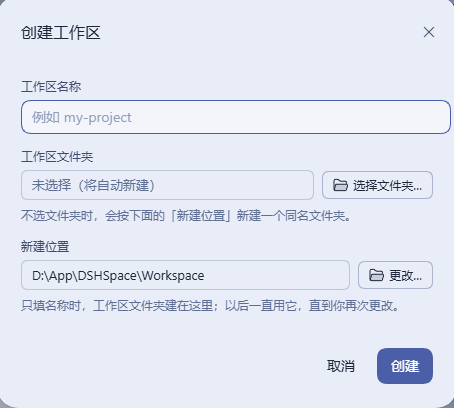
A Create Workspace dialog for DeepSeek Harness: type a name and go, or pick a folder with a chooser that finally remembers where you were.
What it does
Clicking Add workspace… in DSH today opens the OS folder dialog immediately. This plugin replaces that with a small dialog that asks two independent questions: what is the workspace called, and where does it live. Answer the first only and it creates the folder for you; answer the second and the folder you picked is the workspace.
| You do | You get |
|---|---|
| Type a name, press Create | A new folder with that name is created under New workspace location, registered as a workspace, and a session opens in it |
| Click Choose folder… | The native Windows folder dialog, starting where you left off, not at some default |
| Choose a folder, leave the name empty | The name fills itself in from the folder's own name |
| Choose a folder, having typed a name | Your name wins — the workspace is registered, then renamed to it |
| Click Change… on New workspace location | Pick where name-only workspaces go from now on; the choice is saved and survives restarts |
| Cancel / Esc / click the backdrop | Nothing happens — no folder, no registration |
The effect, before and after
| Before | After | |
|---|---|---|
Creating my-project |
Create the folder in Explorer first, then hunt for it in the picker | Type my-project. Done |
| The folder picker's starting point | The OS default, every single time | The directory you last chose |
| Where new workspaces land | Wherever you navigate to | A location you set once, visible in the dialog, changeable any time |
| Naming a workspace after its folder | Retype the folder name | Auto-filled |
Install
From the DSH UI (simplest)
Sidebar → Plugins → Add plugin, paste this address, click Install, then Enable now:
https://github.com/LanFeng97/dsh-workspace-create-dialog
That box takes a package name, a Git address, a tarball or a local absolute path. A repository URL works because this package ships a dsh.bundle patch — DSH checks exactly that before it installs. Restart DeepSeek Harness if the plugin does not come up.
Two things worth knowing: it downloads straight from GitHub, so GitHub has to be reachable (the China-mirror option only covers registry packages, not repository downloads); and DSH does not auto-update third-party plugins yet — upgrading means uninstall + install again.
Already installed with
tools/install.mjsbelow? Runnode tools/install.mjs --uninstallfirst, so the profile does not end up with two loader rows for the same id.
One-line prompt for your agent
If you would rather not click through it:
Install the DSH plugin at https://github.com/LanFeng97/dsh-workspace-create-dialog into my DSH and tell me when to restart.
From the plugin market (once listed)
Search for dsh-workspace-create-dialog in dshmarket and install it in one click. The listing is pending a PR to awesome-dsh-plugin (their CI requires the repository to be at least one day old); until it lands, use the routes above and below.
Manual install from this repository
git clone https://github.com/LanFeng97/dsh-workspace-create-dialog
cd dsh-workspace-create-dialog
node tools/install.mjs
That copies the package into your DSH profile's node_modules and appends one loader line to the profile's cordis.patch.yml. It resolves your DSH home the same way the harness does — explicit config, then $DSH_HOME, then ~/.dsh.
Then restart DeepSeek Harness (the host half is a Node module, so a config reload alone will not import it). After that, changing lib/client.js only needs a page refresh; changing lib/index.js still needs a restart.
node tools/install.mjs --dry-run prints what it would do without writing anything; --uninstall removes the package and its loader row again.
Publishing to npm is not required: the market installs from GitHub exactly the same way, and listing is unaffected either way.
How it works
It uses the official extension point, not a patch
@deepseek-ai/dsh-client-ui-workspace declares a single slot where the "pick a directory" step is handed to whichever plugin fills it:
sidebar.workspaces.directoryFlow              ← the sidebar's "Add workspace…"
conversation.hero.workspace.directoryFlow     ← the empty-state entry
The owner hands the occupant the whole interaction contract:
interface DirectoryFlowOwnerProps {
  open: boolean                     // a pick is requested
  busy: boolean                     // the owner is adopting the picked path
  onPicked: (path: string) => void  // report the directory; the owner registers it and opens a session
  onCancel: () => void
  onError: (message: string) => void
}
This plugin registers its own occupant into both slots at priority -100. A single slot renders the lowest-priority entry, the shipped native driver sits at 0, so this dialog wins (two entries at the same priority throw, which is the official protection against ambiguity). Removing the loader line from your profile patch restores the stock behaviour exactly.
Why the folder dialog is built here instead of reused
The desktop app opens its folder dialog from the Electron main process without a starting directory:
// D:\App\DSH\resources\app.asar → lib/main.js
dialog.showOpenDialog(window, { properties: ['openDirectory', 'createDirectory'] })
There is no defaultPath, which is exactly why the chooser always starts in the same place. A plugin cannot reach that call: the DSH host is a child process of Electron. So lib/pick-folder.js opens its own IFileDialog — a small C# COM interop compiled and run by the Windows PowerShell 5.1 that ships with Windows:
- no dependencies: no koffi, no PowerShell 7, no native module to publish;
- compilation happens in memory (~120 ms per call), so there is no DLL cache to corrupt or lock;
- the one line that matters is
IFileDialog::SetFolder— the remembered directory as the starting point; - the dialog runs in a child process, so a native fault cannot take the host down.
The C# method declaration order must match the COM vtable (Show=3, SetOptions=9, SetFolder=12, SetTitle=17, GetResult=20). Getting it wrong does not error — it just silently does the wrong thing — so a self-test asserts the order.
Where name-only workspaces are created
The New workspace location is resolved in this order (lib/base-dir.js, a pure function):
- What you set in the dialog — highest priority; once you change it, it is yours;
config.baseDirfrom your profile patch — the value used at install time;- The root of your default workspace — the parent of the workspace whose directory is named
default-workspace(a name the harness fixes, independent of UI language). New workspaces land next to it. This is the default for a fresh install; - Fallback —
<Documents>/deepseek-harness, or<home>/deepseek-harnesswhen there is no Documents folder.
The resolved value is written to the state file, so "what it was on first run" is decided once and only you change it afterwards. config.baseDir is a seed, not an order.
HTTP routes
All four are loopback-guarded (loopback socket + loopback Host + same-origin marker; x-forwarded-for is never trusted) — they create directories and open windows on the host machine, so nothing off-machine may reach them.
| Route | Method | Purpose |
|---|---|---|
/api/dsh-workspace-create/config |
GET | Current location + last directory |
/api/dsh-workspace-create/base-dir |
POST | {"path":"…"} → validate absolute, create, persist |
/api/dsh-workspace-create/create-folder |
POST | {"name":"…"} → create the folder, return its absolute path |
/api/dsh-workspace-create/pick-folder |
POST | {"title":"…"} → open the native chooser, return the path (null on cancel) |
The dialog title is supplied by the browser half in the current UI language (<html lang>, maintained by the official client-locale service); the host only sanitizes and truncates it.
Configuration
Optional, in your profile's cordis.patch.yml:
- insert:
    - id: ui-workspace-create-dialog
      name: 'dsh-workspace-create-dialog'
      config:
        baseDir: 'D:\Work\Workspaces'                 # seed for New workspace location
        stateFile: '<writable path>/state.json'       # defaults to $DSH_HOME/storages/dsh-workspace-create-dialog/state.json
The state file holds two fields: baseDir (the location) and lastDir (where the chooser last was).
Development
node tools/selftest.mjs           # 40 checks, no DSH runtime needed
node tools/pick-probe.mjs         # native picker: compiles the C#, exercises the COM chain, no window
node tools/pick-probe.mjs --real  # same, but actually opens the dialog so you can look at it
node tools/install.mjs --dry-run  # what the installer would do
tools/selftest.mjs covers name validation rules, the location precedence order, the COM vtable order, the slot registration (it runs apply against a fake client context and asserts priority and both slots), the route behaviour (a real mkdir round trip, guard rejections), and the dialog's behaviour itself — it renders the component through a minimal React hook harness and drives it: name-only creation, auto-fill from a picked folder, "your name wins", cancel, and the location change.
| File | Role |
|---|---|
lib/index.js |
Host half: location resolution, folder creation, native chooser, routes |
lib/base-dir.js |
Location precedence + absolute-path validation (pure) |
lib/name.js |
Workspace-name validation and path joining (pure) |
lib/state.js |
Atomic state persistence with corrupt-file fallback |
lib/guard.js |
Loopback trust fence for the routes |
lib/pick-folder.js |
The native picker: embedded C#, PowerShell script, child process |
lib/client.js |
Browser half: the dialog, registered into both flow slots |
Known limitations
- The native chooser is Windows-only. On other platforms "Choose folder…" reports the failure; the name-only path is platform-independent and keeps working.
- It runs
powershell.exewith a runtimeAdd-Type. That pair (-EncodedCommand+Add-Type) is exactly what endpoint protection watches for, so a small number of machines may block it. The alternative is shipping a native dependency (koffi); this plugin chose zero dependencies. - An open native chooser cannot be cancelled from the browser. There is no per-request abort on this wire; closing the window is the cancel.
- "Your name wins" needs the client workspace service. When the name differs from the folder name the plugin registers first and renames after; if the rename fails the workspace still exists, just titled after its folder (with a console warning).
- It depends on the 0.2.0-rc.2
directoryFlowcontract. If a future harness renames or changes it, the plugin goes silently inert —ctx.slots.injectwaits for a declaration that never comes, and nothing errors.dsh.engines.dshstates the version requirement; it cannot remove the risk.
License
MIT © 2026 LanFeng97
No comments yet. Be the first to write one.